
 Jo Galvez

Copay requests go out before check-in, and balance links go out the day they post.
Paid status updates on one dashboard. Receipts send automatically, and each payment is logged for posting to CharmHealth billing. Staff learn the system in under 10 minutes.
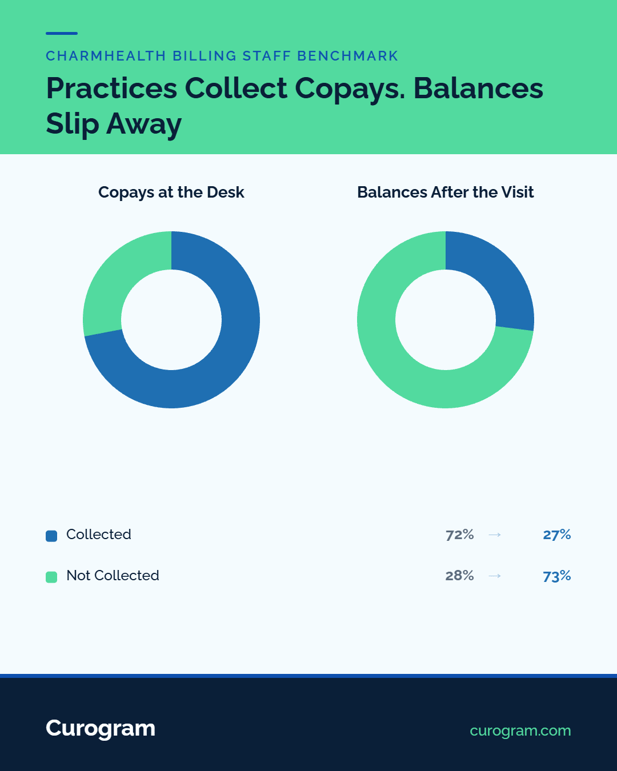
In 2024, practices collected about 72% of copays at the time of service. For other patient-due balances, MGMA data puts that rate at about 27%. That gap is where billing staff spend their month.
The front desk handles copays while the patient stands there. Balances are harder. They post weeks later, after the claim clears, when the patient is long gone. The patient is rarely thinking about the bill by then.
In CharmHealth, those balances post to the Patient Portal. Few patients log in to see them, so the statement cycle starts. Staff print and mail a batch, wait 30 days, mail again, and then pick up the phone.
Meanwhile, the phone keeps ringing with "how much do I owe?" calls. Each one pulls the same person away from the batch they were working. Nothing in the process shows who opened an envelope and who tossed it.
There's no module to buy that fixes this. CharmHealth's Two-Way Text add-on can message patients, but it can't send a payment request. So the mail run stays, month after month, for nearly every balance.
The cost goes beyond postage. Every statement batch takes hours of printing, folding, and stamping. Every chase call takes a staff member off something else. And every week a balance sits, it gets harder to collect.
This guide walks the full staff workflow with text-to-pay. It covers copay texts before check-in and balance links the day they post. It ends with month-end reconciliation that needs no mail run at all.
Why the Statement Cycle Eats Billing Staff Time
Strong Charge Capture, Weak Patient Collection
CharmHealth centralizes charge capture, claims, and Bluefin processing well for the price. Collecting the patient's share is a different story. It still runs on portal logins that don't happen and envelopes that don't come back.
MGMA's 2026 data shows how wide that gap is. Practices collected about 72% of copays at the time of service in 2024. They collected only about 27% of other patient balances. The second number is the one the statement cycle is supposed to fix.
The rest turns into aging A/R, and staff chase it by mail and phone.
One Month of the Statement Cycle
For a small billing team, a typical month looks like this:
- Balances post after claims clear, often weeks after the visit.
- Staff print, stuff, and mail the statement batch.
- Thirty days pass, and a second notice goes out.
- The call list starts, and patients screen the calls.
- Inbound "how much do I owe?" calls interrupt the batch all month.
The worst part is the blind spot. Staff can't tell who opened a statement, so every account gets the same slow, costly treatment.
How One Dashboard Handles Every Copay and Balance
Copays Before Check-In, Balances the Day They Post
Curogram gives billing staff a simple payment texting workflow. Templated copay requests go out before the visit, so copay collection at check-in starts on the patient's phone. Balance links go out the day a balance posts, with no statement run.
Each request shows as sent, opened, or paid on one dashboard. Patient balance follow-up texts go out on their own when a link sits unpaid.
The same inbox runs your automated appointment reminders and confirmations with CharmHealth. Patient replies land in 2-way patient texting for CharmHealth practices.
Posting, Bluefin, and Setup
CharmHealth stays the system of record. Each Curogram payment is logged with patient, amount, and time, and staff post it to CharmHealth billing. Bluefin keeps processing in-office payments as it does now. Nothing about claims or charge capture changes.
Curogram's team handles CharmHealth's gated API program end to end. Full integration takes 1 to 2 weeks, and staff training takes under 10 minutes.
The CharmHealth integration page covers the full connection. For the bigger picture, see our pillar on text-to-pay billing for CharmHealth practices.
Curogram Highlight: Text-to-Pay for Billing Teams
Curogram's Text-to-Pay gives billing staff one place to send, track, and log every patient payment. Copay requests and balance links go out by secure SMS. Patients pay on any phone with no login, and receipts and overdue reminders send themselves.
Payment requests tie to patient records, and every send and payment is logged. That audit trail is cleaner than notes from a phone collection.
Curogram is HIPAA-compliant, SOC 2 Type II certified, and signs a Business Associate Agreement. See the text-to-pay page for CharmHealth users for details.
A Billing Day With Text-to-Pay, Step by Step
Step 1: Morning, Send Tomorrow's Copay Requests
Take a two-person billing team at a small behavioral health practice. Each morning, staff send templated copay texts for the next day's visits. Many patients pay from their phones that night. Those who don't get a short reminder before the visit.
By check-in, the front desk sees those copays marked paid. No one has to quote a copay at the window while a line forms.
It's the same text channel behind our post on reducing no-shows with CharmHealth automated SMS reminders.
Step 2: Midday, Text New Balances as They Post
After lunch, a batch of claims clears in CharmHealth, and 14 patient balances post. Staff send a balance link to each one in a few clicks.
There is nothing to print, stuff, or stamp. That alone saves an afternoon of folding.
Several patients pay within the hour, and receipts go out by text on their own. Anyone with a question replies in the thread.
Billing answers there in writing, which keeps the phone line quieter. Staff can also see who opened each link within minutes.
Step 3: Month-End, Reconcile and Follow Up
At month-end, billing pulls the payment log and posts each payment to CharmHealth. Unpaid links have already had automatic follow-up texts.
The dashboard shows which patients opened a link but didn't pay. Staff call only those few, often to set up a payment plan.
Per Curogram client data from clinical settings, one telemedicine provider saw a 40% increase in copay collections with text-to-pay.
Patients see the same flow in our guide to paying CharmHealth bills by text without a portal login.
Conclusion: Retire the Mail Run
The statement cycle survives because the portal can't reach patients and the mail is slow.
Move copays and balances to text, and the print runs, second notices, and most chase calls go with them. Billing staff get back the weeks they spend re-collecting the same balances.
Pull last month's statement invoice and the share of mailed balances that got paid.
Then book a CharmHealth integration demo and bring both, plus your A/R aging report. We'll map the copay-to-balance workflow live and show which add-ons Curogram can replace.
Frequently Asked Questions