eClinicalWorks Text-to-Pay | SMS Payment Links for Enterprise RCM
💡 eClinicalWorks text-to-pay SMS patient payment billing sends secure links to patients right after a visit. Patients pay in seconds from their...
12 min read
Mira Gwehn Revilla
:
March 17, 2026
Your billing team didn't go through years of training to stuff envelopes.
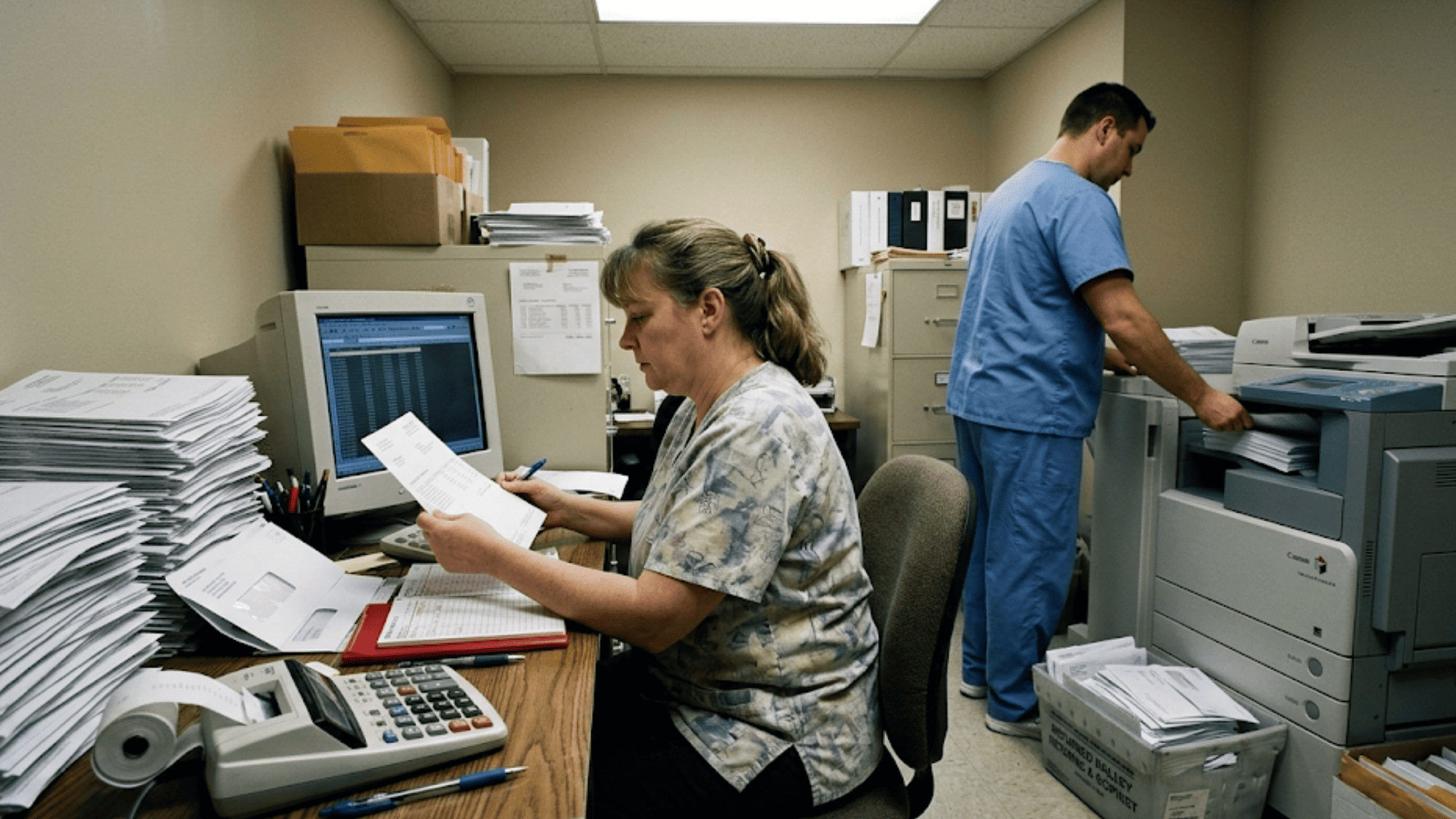
Yet in most Athena practices, that's where too many hours go. Printing statements. Sorting batches. Tracking who got a first notice versus a third. Calling patients who toss the mail. Then doing it all again next month.
It's a grind that eats up skilled labor and returns less money each cycle.
Here's the real cost of that cycle: A paper statement can cost $5 to $12 to print, process, and mail. Multiply that across thousands of patients, and you're spending big just to ask people to pay. Meanwhile, your best billing staff are stuck posting checks by hand instead of chasing down denied claims worth ten times more.
This is the "Statement Run Treadmill." It's the silent drag on your revenue cycle that no one talks about — because it feels like "just how billing works."
But it doesn't have to be.
When an Athenahealth billing team uses text-to-pay to reduce statement costs and automate patient payment posting, the entire collections dashboard workflow changes. Payments come in faster. Posting happens on its own. And your staff finally get to do the work they were hired for.
In this article, we'll walk through how paper statements drain billing teams, how Curogram's Collections Dashboard creates a real-time payment pipeline, and what one practice looked like before and after the switch. We'll also cover the key metrics billing directors should track and how the system fits inside your Athena setup.
If your team is running on the statement treadmill, this is your exit ramp.
Every month, the same loop starts over.
The billing team pulls the patient balance report. They check the numbers. They build the batch of statements. Then they send it off to the print vendor — or worse, do it in-house. After that, they wait.
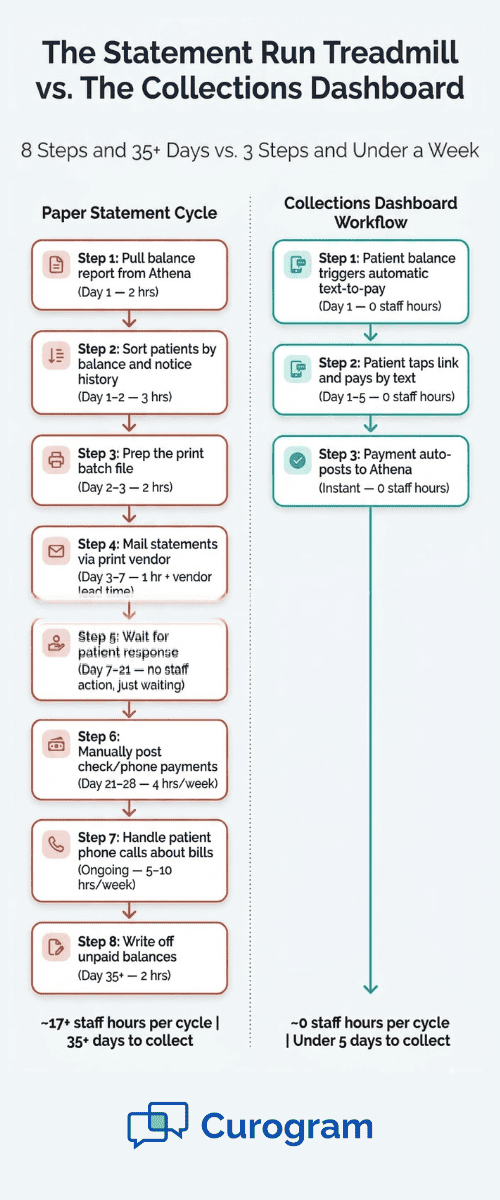
It sounds simple, but the steps behind it are anything but. Here's what a typical statement cycle looks like at a busy Athena practice:
And that's just the patient side. Your team still has insurance AR, denials, and appeals to manage on top of all that.
The real problem isn't the steps. It's who's doing them.
Billing staff are skilled workers. They know the ins and outs of payer rules, denial codes, and claim appeals.
But when 30% to 40% of their week goes to statement prep, mail tracking, and manual payment posting, that skill sits unused. The Athena billing team's time gets pulled toward low-value tasks that a text message could handle.
|
Let's put a dollar figure on this: Say, your practice sends 3,000 paper statements per month. At an average cost of $7 per statement (printing, postage, vendor fees), that's $21,000 a month — or $252,000 a year — just on paper asks. Now, layer in the staff time. If one full-time billing person spends 30 hours a week on statement-related work at $25/hour, that's another $39,000 a year in labor tied to the treadmill. That's roughly $290,000 a year spent asking patients to pay — before a single dollar comes back. |
And the returns shrink fast. First-round statements might get a 15% to 20% response. By the third round, you're mailing to people who have already ignored you twice. The cost per dollar collected climbs with every cycle.
The statement run also creates its own noise. Patients call in with questions:
"What is this charge?"
"I thought insurance covered this."
"I already paid."
Each of those calls takes 5 to 10 minutes of staff time. For a practice sending thousands of statements, that can mean dozens of extra calls a week — all routed to the same team that should be working insurance accounts.
Meanwhile, new patient balances pile up every day. Claims get processed. Copays go unpaid. The queue never shrinks. Your billing staff end up running to keep still.
This is the statement run treadmill. It doesn't just waste time. It wastes your best people on your lowest-return process. Statement run elimination isn't about cutting a line item — it's about giving your team back the hours they need to do real revenue work.
The billing staff efficiency gains from switching to a text payment model aren't found in speed alone. They're found in where your team spends its focus.

Curogram's Collections Dashboard flips the billing model from "send and wait" to "send and track in real time."
Instead of monthly batch runs, the system works like a pipeline. Each step — from balance to text to payment to posting — flows on its own. The billing team sets the rules once and watches the dashboard instead of managing paper.
Here's how each piece works.
When Athena finishes claim processing, the patient balance updates. Curogram picks up that balance and queues a text-to-pay message to the patient.
The billing team sets the rules up front: the lowest balance to trigger a text, the timing after a claim posts, and the follow-up schedule. After that, the system runs. No batch files. No print vendor calls. No manual sorting.
For example, you might set the rule to text any patient with a balance over $25 at 48 hours after their claim is done. The system handles the rest.
The dashboard shows every patient balance in one place, broken into clear groups:
|
Status |
What It Means |
|
Sent |
Payment text was sent to the patient |
|
Paid |
Payment was made and posted to Athena |
|
Pending |
Text was sent, waiting for the patient to pay |
|
Follow-Up |
Non-payer queued for the next reminder text |
No more guessing. No more pulling reports to figure out where things stand. The billing team sees the full patient AR picture at a glance. That kind of view simply doesn't exist in a paper statement workflow.
This is where the time savings stack up the most. When a patient pays through the text link, the payment posts straight to their Athena account. No one on your team types it in. No one matches a check to a ledger. No one updates a sheet.
Think about what that means for a practice that used to process 200 to 400 patient payments a month by hand. If each manual post takes 3 to 5 minutes, that's 10 to 33 hours a month of pure data entry — gone. The collections dashboard workflow with automate payment posting frees that time for work that brings in more dollars.
Based on our internal data, practices that use Curogram's SMS payment tools see higher patient balance conversion rates and faster time to collect. The shift from manual to automated payment posting cuts down both errors and hours.
Not every patient pays on the first text. That's normal. The system handles it.
You set the follow-up timing — say 7 days, 14 days, and 21 days after the first text. Each follow-up includes the balance and a fresh payment link. The patient doesn't need to log in to a portal or call the office. They just tap and pay.
This multi-touch approach catches the patients who meant to pay but forgot. And it does it without anyone on your billing team picking up a phone or printing a second statement.
Here's a quick look at how the old process compares to the new one:
|
Task |
Paper Statements |
Collections Dashboard |
|
Sending the bill |
Print, sort, mail |
Auto text at set time |
|
Tracking status |
Monthly report pull |
Real-time dashboard |
|
Posting payments |
Manual data entry |
Auto-post to Athena |
|
Follow-up |
Repeat print-and-mail |
Auto text reminders |
|
Staff time needed |
30+ hours/week |
Minimal oversight |
The dashboard doesn't just speed things up. It changes what your team does all day.

Let's look at what this shift looks like in a real practice.
Practice Profile: A 10-provider urgent care and family medicine group in the San Diego metro area. They run Athenahealth with Full Circle RCM. The Billing Director, Marcus, leads a team of three billing staff across two locations.
The practice was sending about 3,800 paper statements each month through a print-and-mail vendor. That alone cost real money. At an average of $7 per statement, the practice was spending roughly $26,600 a month on paper billing — just to ask patients to pay.
But the dollar cost was only half the story.
Marcus tracked his team's weekly hours and found that statement-related tasks ate up about 40% of total billing time. That included batch prep, vendor calls, payment posting, balance tracking, and handling patient calls about bills they received in the mail.
One of his billing staff, Carla, spent nearly her entire week on statements and manual payment posting. She'd pull the batch. Call the vendor. Post payments from checks and phone calls. Update the tracking sheet. And still fall behind.
The irony? Carla was the team's best denial analyst. She had a sharp eye for spotting under-coded claims and payer errors. But she never had the time to put that skill to use. Marcus had been asking for a fourth team member for six months, but the budget wasn't there.
"Carla was stuck doing mail," Marcus said.
"She's too good for that."
Let's break down what Marcus was losing. Here's a rough look at the monthly cost of paper-based patient billing for this practice:
|
Cost Category |
Monthly Estimate |
|
Print-and-mail vendor fees (3,800 x $7) |
$26,600 |
|
Carla's time on statement work (~35 hrs/wk x $27/hr x 4.3 wks) |
$4,061 |
|
Other staff time on posting/calls (~10 hrs/wk x $25/hr x 4.3 wks) |
$1,075 |
|
Total monthly cost |
~$31,736 |
That's over $380,000 a year on a process that collected less with each statement cycle. First-round collection rates hovered around 18%. By the third round, they dropped below 5%.
And beyond the numbers, the process created constant noise. Patients called in confused. Staff scrambled to find who got what notice. Returned mail piled up. The billing team was always behind.
Marcus turned on Curogram's text-to-pay feature with the Collections Dashboard. Here's what changed:
Patient balances from Athena now triggered text-to-pay messages on their own. The system sent a text with the balance and a secure payment link within 48 hours of claim processing.
The dashboard gave Marcus a live view of every patient balance — who got a text, who paid, who was still pending, and who was in the follow-up queue. He didn't need to pull a report or ask his team for updates.
Payments posted to Athena by themselves. No hand entry. No matching. No sheets.
For the first time, Marcus could see the whole patient AR picture without asking anyone to build it for him.
Within six weeks, the results were clear.
Paper statement volume dropped sharply. Most balances were being resolved by text before the first statement cycle even started. The practice went from 3,800 monthly statements to a fraction of that. The cost of their print-and-mail vendor fell by a wide margin.
The first-text payment rate was strong. Patients responded to a simple, clear text far faster than they responded to an envelope in the mail.
Based on our internal research, SMS-based payment requests reach patients almost instantly, with open rates near 98% — compared to the days or weeks a paper statement sits on a counter (or in a trash bin).
But the biggest win was what happened with the team.
Carla was moved full-time to insurance denial management. In her first month back on denials, she flagged under-coded claims and payer errors that led to thousands in recovered revenue — money that was sitting on the table while she was busy posting check payments.
Marcus pulled his request for a fourth billing team member. He didn't need one anymore.
"We're collecting more patient AR with less effort," Marcus said.
"And Carla is doing the work she's best at. The statement treadmill is over."
If you're a Billing Director or Revenue Cycle Manager, you want proof. Here are the four metrics to watch before and after you turn on the Collections Dashboard.
Track how many paper statements you send each month. After the dashboard goes live, this number should drop fast. The goal is to resolve most balances by text before the first statement cycle even starts. Fewer statements means lower vendor costs and less staff time spent on print logistics.
Measure where your team's hours go. What share of their week goes to statement prep, posting, and patient calls about bills? What share goes to denial management, insurance AR, and payment plan outreach? As the dashboard takes over patient billing, you should see a clear shift from low-value tasks to high-value ones.
Track what share of patient payments post to Athena on their own versus needing manual entry. The target is near-total automation. Every payment that posts by itself is 3 to 5 minutes of staff time saved. Over a month, that adds up fast.
This is the metric that ties it all together. Add up your total cost for patient billing: vendor fees, staff hours, supplies, and overhead.
Divide that by the total patient AR you collected. Compare that number before and after text-to-pay. A lower cost per dollar collected means your billing operation is running leaner and smarter.
One easy place to start is determining your copay collection efficiency. If you know your average copay, your monthly volume, and your current collection rate at the time of service, you can quickly spot how much revenue is slipping through before it even reaches the statement cycle.
New tools only work if they fit into what you already use. The Collections Dashboard was built to work inside your Athena setup — not around it.
Curogram's text-to-pay posts payments straight to patient accounts in Athena through the official Marketplace link.
Your billing team sees updated balances in real time. There's no need to export data, run a sync, or match records by hand. What the patient pays shows up in Athena right away.
Every practice bills differently. The dashboard lets you set the rules that fit your workflow. Set the minimum balance that triggers a text. Choose how long after claim processing to send the first message.
Pick the follow-up intervals — 7 days, 14 days, 21 days, or whatever works for your patient base. Set paths for high-balance accounts that may need a phone call instead. The system adapts to your billing policies, not the other way around.
If your practice uses Full Circle RCM, you already have support on the insurance side. But Full Circle doesn't address the patient balance piece — the copays, deductibles, and balances that patients owe after insurance pays its share.
That's where text-to-pay fills the gap. Together, Full Circle handles the payer side and Curogram handles the patient side. The result is a complete revenue cycle from claim to patient payment.
There's no overlap. No conflict. Just two systems doing what they do best, working in the same Athena environment your team already knows.
Why the Collections Dashboard Gives Billing Teams Their Time Back
The hardest part of managing a billing team isn't the work itself. It's watching skilled staff burn hours on tasks that don't need a human touch.
Paper statements are a perfect example. They cost money to send, take weeks to get a response, and require manual posting when payments finally come in. Every step in that chain pulls your team away from work that actually moves the revenue needle.
Curogram's Collections Dashboard was built to fix that exact problem.
The dashboard puts the entire patient billing pipeline in one view. When a claim posts in Athena, the system texts the patient. When the patient pays, the system posts it. When the patient doesn't pay, the system follows up.
Your team watches the dashboard and steps in only when a human is truly needed — like a high-balance account that calls for a personal touch.
Based on our internal data, practices using Curogram see higher staff output and faster patient balance turns. That lines up with the broader outcome Curogram delivers: solving unpaid patient AR balances by making the payment process simple, quick, and text-based — which boosts collection rates and cuts the time to collect.
The impact goes beyond billing. When your team spends less time on statement logistics, they have more time for denial recovery, insurance follow-up, and payment plan outreach. Those are the tasks that bring in real dollars and keep your revenue cycle healthy.
Your billing team was hired to manage revenue, not manage mail. The Collections Dashboard makes that possible.
The math is simple. Paper statements are slow, costly, and getting less effective every year. Your billing team spends too many hours on a process that returns too few dollars.
Curogram's Collections Dashboard changes that.
With text-to-pay, patient balances turn into payments faster. With auto-posting, those payments land in Athena without a single keystroke from your team. With the real-time dashboard, your billing director sees the full AR picture at any time — no report pulls, no guesswork.
And the follow-up runs on its own. Patients who forget to pay get a gentle nudge by text at the intervals you choose. No second or third statement needed.
The result? Lower statement costs. Less manual work. More time for your staff to focus on denial management, insurance AR, and the work that actually grows your revenue.
Practices that make this shift don't just save money — they get their team back. Skilled billing staff stop doing data entry and start doing the work that makes the biggest financial impact.
If your Athena practice is still running monthly statement cycles, it's time to step off the treadmill. Start a demo and let your billing team experience the Collections Dashboard for themselves. See the pipeline. Watch the payments post. Feel the relief of knowing your team can finally focus on what they do best.
Your billing team was hired to manage revenue, not manage mail. Give them the tools to do exactly that.
Stop printing statements your patients won't open. Request a demo to see how one text collects what three mailings can't.
Text messages have near-instant open rates and include a direct payment link. Patients tap and pay in seconds instead of finding a check, an envelope, and a stamp.
Full Circle handles insurance-side claims and denials. The dashboard handles the patient-side balance — copays, leftover charges — so the full revenue cycle is covered.
Track four metrics monthly: paper statement volume, staff hours on statement tasks, payment posting automation rate, and cost per dollar collected. Compare before and after at 30 and 90 days.
💡 eClinicalWorks text-to-pay SMS patient payment billing sends secure links to patients right after a visit. Patients pay in seconds from their...
💡 When you collect patient copays upfront with Prime Clinical, you can stop chasing small balances after the visit. Curogram lets practices send...
💡 Text-to-Pay for GE Centricity helps multi-location specialty and radiology clinics accelerate patient payment collection through automated SMS...