

5 min read

Reducing Check-In Times with Allscripts PM

Reducing Check-In Times with Allscripts PM
💡 Reducing check-in delays can improve both patient experience and staff efficiency. Many practices using Allscripts PM still rely on paper intake, which leads to long lines, data errors, and higher admin costs. Digital intake offers a clearer path forward.
  • Shorter check-in times for patients
  • Fewer data entry mistakes
  • Lower staff workload and costs
  • Better billing accuracy and compliance
This article explains how practices can reduce check-in times Allscripts PM teams struggle with by using online forms. You will learn the risks of paper intake, how Curogram improves ROI through digital forms, and why executives and IT leaders benefit from standardized workflows.

Long check-in lines are one of the first things patients notice when they walk into your clinic. They arrive early, fill out paper forms, and wait while staff type the same information into Allscripts PM. This process feels slow and frustrating, even before care begins.

For staff, paper intake creates daily pressure. Forms pile up at the front desk. Data entry takes time and focus. Small handwriting mistakes or missed fields can lead to errors later in billing or compliance. These issues may seem minor at first, but they add up over time.

Reducing delays at check-in is not just about speed. It is also about accuracy and trust. Patients want to feel that their information is handled carefully. Staff want systems that support them instead of creating more work. When intake is manual, both sides feel the strain.

Digital intake changes this experience. Online forms allow patients to complete paperwork before they arrive. Information flows directly into Allscripts PM, reducing rework. Staff can focus on helping patients instead of typing.

In this article, you will learn why manual intake creates business risk, how Curogram improves ROI with digital forms, and the benefits for executives and IT leaders. You will also review a real ROI example showing cost savings from fewer errors.

The guide ends with clear next steps to improve intake efficiency, reduce admin burden, and create a smoother check-in experience for everyone involved.

Business Risks of Manual Paper Intake

Paper intake may feel familiar, but it creates hidden risks. These risks affect patient experience, staff workload, and data quality.

Long lines are often the first issue. Patients arrive early and still wait. They fill out forms by hand, sometimes repeating information already on file.

This slows down the front desk and sets a negative tone for the visit.
Staff costs also rise with paper intake. Team members spend hours each day entering data into Allscripts PM. This work is repetitive and tiring. Over time, it contributes to burnout and turnover.

Manual entry increases the risk of transcription errors. A missed digit in a phone number or insurance ID can cause billing delays. Incorrect data may lead to claim denials or follow-up calls. These errors cost time and money to fix.

Compliance risks also increase. Paper forms can be misplaced or scanned incorrectly. Sensitive patient data may sit unsecured on desks or clipboards. This creates exposure that is hard to track or audit.

Paper intake limits Allscripts intake efficiency. Information is not available until staff finish entering it. Providers may wait for charts to be updated. Appointments can start late, affecting the rest of the day.

Billing accuracy suffers when intake data is incomplete or incorrect. Insurance details may be missing. Consent forms may not be properly recorded. Each issue creates downstream work for billing teams.

These risks grow as practices scale. More patients mean more forms and more chances for error. What worked for a small office becomes unmanageable across multiple sites. Manual intake becomes a bottleneck instead of a support system.


How Curogram Improves ROI with Digital Forms

Digital forms change intake from a manual task into a streamlined workflow. Curogram connects online forms directly to Allscripts PM, reducing friction across the process.

Staff overhead drops quickly. Patients complete forms before their visit. Information flows into the system without retyping. Front desk teams spend less time on data entry and more time assisting patients.

Patient throughput improves. Check-in moves faster when forms are already completed. Appointments start on time. Providers see patients without delays caused by missing paperwork.

Error correction costs decline. Digital forms include required fields and validation checks. Patients cannot skip key information. This reduces follow-up calls and billing rework.

Allscripts intake efficiency improves as data becomes available earlier. Clinical teams can review information before the visit. This supports better preparation and smoother care delivery.

Billing accuracy improves when intake data is complete. Insurance details are clearer. Consent forms are properly recorded. Claims move faster with fewer denials.

Digital intake also supports compliance. Forms are stored securely. Access is controlled and auditable. Practices reduce the risk tied to paper handling and storage.

Over time, these improvements create measurable ROI. Lower labor costs, fewer errors, and faster patient flow combine into real savings. Digital forms support both operational stability and financial performance.

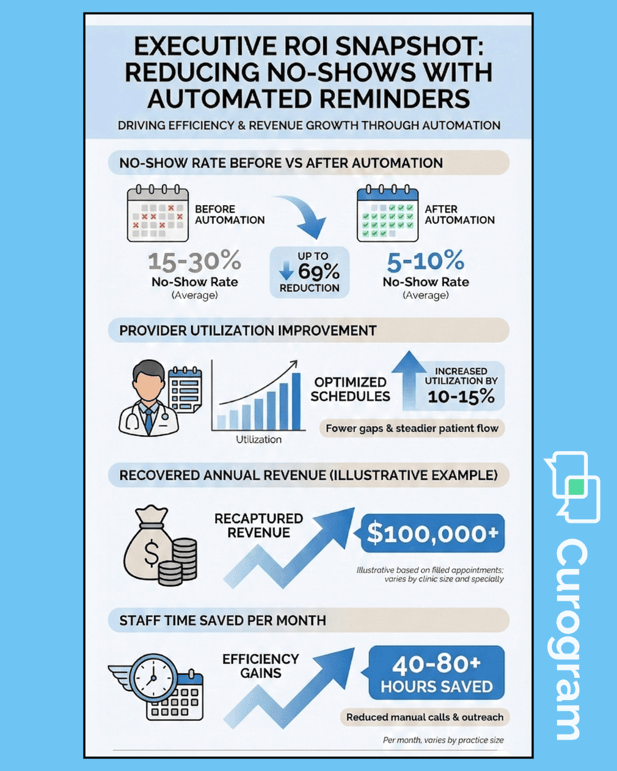
Executive ROI snapshot showing reduced no-shows, higher utilization, and recovered clinic revenue


Benefits for Executives and IT Leaders

Executives and IT leaders focus on scale, control, and risk reduction. Digital intake supports these priorities across the organization.

Workflows become more predictable. Online forms standardize how data enters Allscripts PM. Each patient follows the same intake process. Variability drops across sites and teams.

Standardization supports multi-site growth. New locations adopt the same intake model. Training becomes easier. Performance is easier to compare.

Compliance posture improves. Digital records replace paper stacks. Access logs and timestamps support audits. Risk exposure is easier to manage and explain.

IT teams benefit from reduced system strain. Fewer manual corrections mean fewer support tickets. Data quality improves at the source.

Executives gain clearer visibility into operations. Intake times, error rates, and staffing needs become measurable. Decisions rely on data instead of guesswork.

Billing accuracy supports revenue stability. Clean intake data reduces claim issues. Cash flow becomes more predictable.

Staff satisfaction improves as manual work declines. Teams feel supported by systems that work. This reduces burnout and turnover.

Patients notice the difference. Shorter waits and smoother check-ins build trust. First impressions improve, which supports long-term loyalty.

Digital intake aligns with broader digital transformation goals. It integrates with existing systems instead of adding complexity. Leaders can modernize without disruption.

ROI Example

A specialty group using Allscripts PM struggled with intake errors. Paper forms led to frequent corrections and billing delays. Staff spent hours each week fixing mistakes.

After moving to digital forms, intake errors dropped by 40%. Billing teams spent less time on rework. The group saved $200K per year in admin costs.

Patient flow improved as well. Check-in times shortened. Providers stayed on schedule. The financial and operational gains reinforced the value of digital intake.

Next Steps

Start by reviewing your current intake process. Measure how long check-in takes. Identify where errors occur most often.

Next, map how digital forms could replace paper steps. Focus on required fields and data accuracy. Involve staff early to gather feedback.

Finally, plan a phased rollout. Begin with one location or visit type. Measure results and expand once workflows stabilize.


How Curogram Supports Online Forms in Allscripts PM

Curogram provides HIPAA-compliant online forms designed to integrate with Allscripts PM. Forms are customizable and easy for patients to complete. Data flows directly into the system without manual entry.

The platform supports consistent intake across locations. Required fields reduce missing information. Validation checks improve billing accuracy.

Staff benefit from reduced workload. Patients benefit from faster check-ins. Leaders benefit from cleaner data and lower costs.

Curogram helps practices reduce check-in times Allscripts PM workflows often struggle with, while supporting compliance and scalability.

Conclusion

Manual intake slows down both patients and staff. Paper forms create long lines, data errors, and rising admin costs. Over time, these issues limit growth and strain teams.

Digital forms offer a clearer path. Patients complete paperwork before they arrive. Information enters Allscripts PM accurately and on time. Check-in becomes faster and calmer.

Practices that improve Allscripts intake efficiency see benefits across the organization. Staff spend less time on rework. Billing accuracy improves. Compliance risks decline.

Executives gain visibility and control. IT teams manage cleaner data. Patients experience smoother visits from the start.

The shift from paper to digital intake is not just a technology change. It is an operational improvement that supports care quality and financial stability. By addressing intake at the source, practices build stronger foundations for growth.

Boost efficiency and patient satisfaction with online forms for Allscripts PM. Book a demo today.


Frequently Asked Questions

How do online forms reduce check-in times?

Patients complete forms before arriving. Staff no longer retype information. Appointments start sooner.

Why does digital intake improve billing accuracy?

Required fields reduce missing data. Validation checks catch errors early. Claims move faster.

How does digital intake support compliance?

Forms are stored securely with access controls. Paper handling risks are removed. Audits are easier.

Why do executives prioritize intake efficiency?

Intake affects cost, speed, and data quality. Improvements create measurable ROI. Scaling becomes easier.

How can practices transition from paper to digital forms?

Start small with one workflow. Train staff early. Practices can expand once results are clear.


Reducing Check-In Times and Errors with Online Forms in Dolphin

Reducing Check-In Times and Errors with Online Forms in Dolphin

💡 Reduce check-in times in Dolphin with online patient forms that let families handle paperwork at home before appointments. Traditional...

Read More
Reducing Check-In Times and Errors with Online Forms in DrChrono

Reducing Check-In Times and Errors with Online Forms in DrChrono

💡 Reduce check-in times in DrChrono with HIPAA-compliant online forms that eliminate front desk bottlenecks. Small practices using paper intake...

Read More
Reducing Check-In Times and Errors with Online Forms in Office Ally

Reducing Check-In Times and Errors with Online Forms in Office Ally

💡 Reduce check-in times in Office Ally with digital patient forms that streamline your front desk operations. Small practices often struggle with...

Read More