
 Mira Gwehn Revilla

- In our demo calls, managers at multi-office groups report 80+ calls per office per day, and many are one-question calls.
- Based on our internal data, Curogram clients confirm over 75% of appointments by text, which removes the biggest routine call driver.
- Our clients have cut inbound calls by 24% with automated texting, and some practices see phone volume drop by up to 50%.
- Threads tie to the patient record and route to billing or scheduling, so any authorized staffer at any office can answer.
Eighty calls a day is a normal load for one front desk in a multi-office group. Office managers give us that number in demo after demo, and they rarely sound surprised by it. Multiply it across four or six offices, and the phone becomes the busiest system in the practice.
Most of those calls are short. One patient wants to know if Thursday’s visit is at Summit or Lakewood. Another asks whether her referral went out. A third just wants to confirm, which takes longer to say than to do.
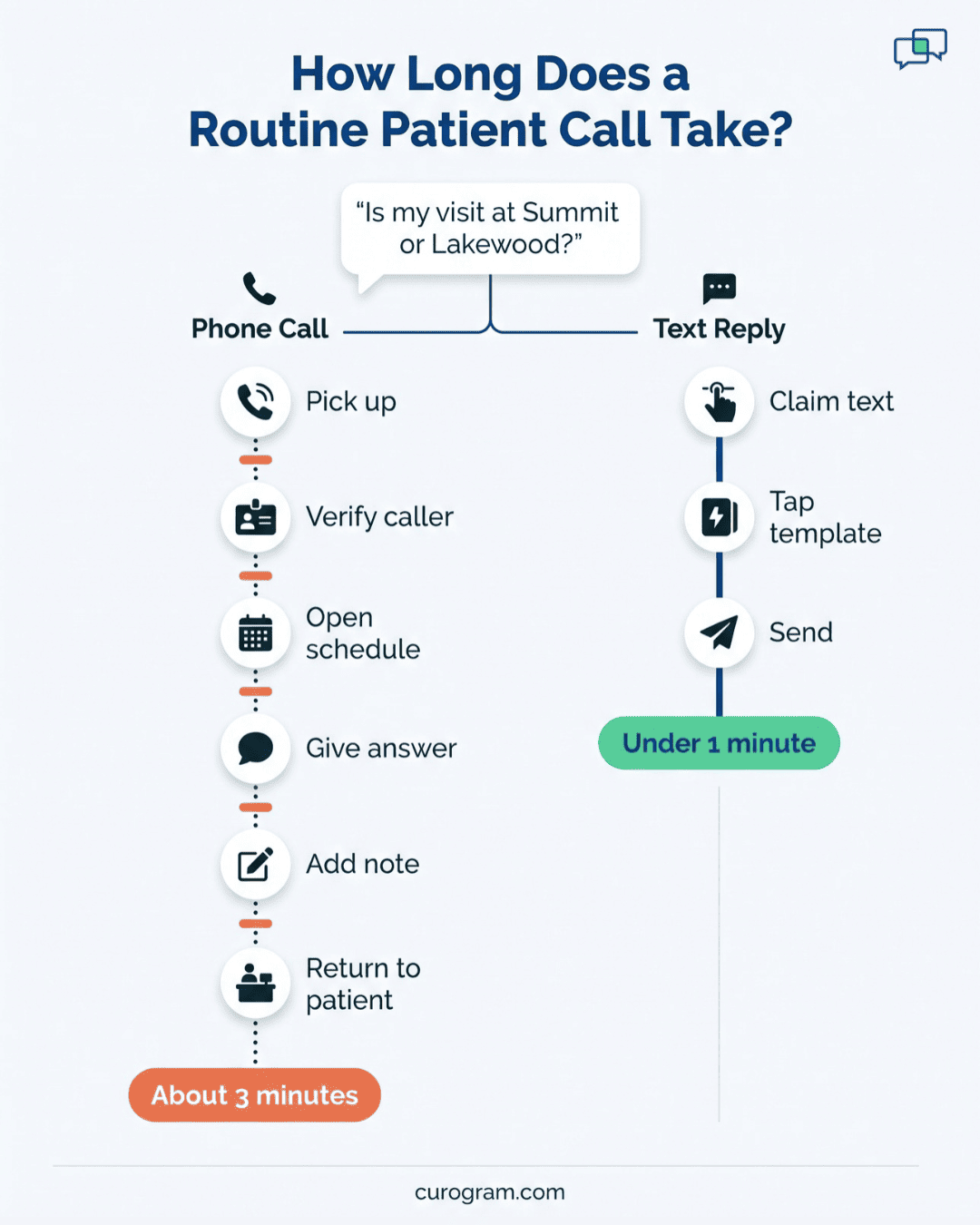
Each call still costs a full cycle. Your staffer answers, checks identity, opens the schedule, gives a ten-second answer, notes it, and turns back to the patient at the window. That patient then repeats what they were saying.
AdvancedMD groups tend to run tight operations. Schedules follow templates, billing has set workflows, and reports roll up by location. The phone is usually the one queue nobody manages. It rings, whoever is closest grabs it, and no one sees the total.
Our view is plain. Cutting front desk call volume across AdvancedMD offices means moving the routine share of calls to 2-way text, worked from one shared queue every office can see. Patients still call when they need a person, and they text when all they need is an address.
The shift works with your current phone system and current staff. What it needs is a list of your routine calls, a fast text answer for each one, and routing to the team that owns it.
You can size the opportunity yourself. One week of call logs, tagged by reason, shows how much of your volume fits the one-question pattern. We’ll walk through that count step by step, with an example from a five-office group.
The Ringing Wall
Behind the desk, AdvancedMD keeps the schedule, the chart, claims, and patient balances in one suite. Patients can’t see any of that. Their way in is the number printed on the appointment card.
So every question takes the same path, no matter how small. A balance question waits in the same ring cycle as a patient with a new symptom.
Your staff can’t tell which is which until they pick up. And each office tends to keep its own answer habits, so one question can get three different answers at three sites.
Most groups we talk to see the same handful of reasons over and over:
|
Call reason |
What the caller needs |
Could a text answer it? |
|
“Am I still on for Thursday?” |
Yes or no, plus time |
Yes |
|
“Which office is my visit at?” |
One address |
Yes |
|
“Did my referral go out?” |
Status check |
Yes |
|
“What do I owe?” |
Balance and a way to pay |
Yes, with a secure link |
|
“Can I move my appointment?” |
New time slot |
Often |
|
“My pain got worse since Monday” |
A clinical decision |
No |
Anatomy of a 10-Second Question
Follow one call from ring to hang-up. A patient asks, “Is my visit at Summit or Lakewood?”
- Your staffer pauses check-in and picks up.
- Name and date of birth come next, to verify the caller.
- She opens the AdvancedMD scheduler and finds the visit.
- “Lakewood, 2:15,” she answers.
- A short note goes on the account.
- After hanging up, she turns back to the window.
The answer took ten seconds. In this illustrative example, the full cycle takes about three minutes once you count the greeting, the lookup, and the note. And the patient at the window has been standing there the whole time, card in hand.
What 80 Calls a Day Does to Check-in
You can see front desk interruption cost at the window. A new patient is halfway through her insurance details when the phone rings. Your staffer holds up a finger, takes the call, and comes back to “Sorry, where were we?”
That happens dozens of times a shift. Copays get missed. A wrong insurance ID slips through because the person entering it lost her place. Lines form at 8:30 and again after lunch.
Callers feel it too. When two lines ring at once, one goes to voicemail. Some patients hang up and try later, and some give up and don’t come in.
Lunch is worse. With half the desk on break, calls stack up in voicemail. The afternoon starts with a pile of callbacks before the first 1:00 patient walks in.
Phone Tag in a Multi-Office Group
Phone tag in a multi-office group has an extra layer. Each office usually has its own line. So a patient calls the Summit number about a Lakewood visit, because that’s the number saved in her phone.
Summit can see the visit but may not know Lakewood’s provider schedule. So the call gets transferred, and Lakewood is busy, so it rolls to voicemail.
Someone calls back at 11:40, and the patient is in a meeting. She tries again at 1:15, and the cycle starts over.
One question has now touched two offices and four calls. Nobody can see that chain, because each office’s phone log only shows its own part.
The Cost Lands on Your Best People
Staff time on routine questions adds up fast, and it crowds out outbound work. Confirmation calls for tomorrow are usually the first task dropped on a heavy day. Those unconfirmed patients become tomorrow’s empty slots.
Now put a number on the hours. Take an illustrative office with 80 daily calls. If half are routine and each runs three minutes, that’s two hours a day per office. Across five offices, it’s ten hours, more than one full shift spent on questions a text could close.
Those hours fall hardest on the experienced people who know where everything is in AdvancedMD, because they’re the ones who answer fastest.
In practice, your strongest front office staff spend the day as human hold music. They know it, too. When a skilled scheduler leaves, the exit interview rarely says “the phone,” but the daily grind of 80 interruptions usually sits behind the decision.
One Inbox for Every Office
Curogram gives your whole group one shared text inbox. A patient texts the number she already has, and the message lands in a queue every authorized staffer can see, at any office.
A staffer claims the thread, answers, and closes it. Claiming stops two people from replying to the same patient, and it shows managers who owns each open message.
Routine call deflection to text works because a text doesn’t demand an answer this second. Your staffer can finish the check-in in front of her, then reply. The patient gets the answer within minutes, and nobody holds up a finger at the window.
A Summit staffer can also answer a Lakewood patient. In a group where one office is slammed and another is quiet, the quiet office picks up the slack without a single transfer.
Templated Replies for the Top 20 Questions
Most groups can list their top 20 questions from memory. Templated replies for common questions turn each one into a one-tap answer. Your staffer picks the template, checks the details, and sends.
Write the first drafts from what your best staffer already says on the phone. Keep each reply under 160 characters where you can, so it arrives as a single text. Then review the set each quarter, since office hours, parking, and provider lineups change.
|
Patient asks |
Template reply |
|
“Which office am I going to?” |
“Your visit on Thu, Nov 12 at 2:15 PM is at the Lakewood office, 410 Pine St. Reply C to confirm.” |
|
“What do I owe?” |
“You have a balance due. Tap this secure link to see details and pay: [SECURE LINK].” |
|
“Did my referral go out?” |
“Your referral was sent on Nov 3. The specialist’s office will call you to schedule.” |
Templates also keep messages clean. Curogram’s HIPAA agreement asks clients to keep diagnoses, test results, and treatment details out of standard SMS. A good template sticks to times, places, and secure links, so no one types PHI in a rush.
Routing Sends Each Text to the Right Desk
Many AdvancedMD groups run billing from one central office. Front desks at the other sites still field balance calls all day and then transfer them.
Department routing fixes that handoff. Billing texts go straight to the billing team. Scheduling texts go to schedulers. A patient who texts “Can I set up a payment plan?” lands with the person who can actually say yes, on the first try.
Routing rules are set once and apply to every office. A new location added next quarter follows the same rules on day one.
Threads Live on the Patient Record
Every thread ties to the patient’s record. So when a patient texts Tuesday and calls Thursday, the person who answers sees Tuesday’s exchange.
That removes two chores. Staff don’t keep side notes in a spreadsheet or on a sticky note. And they don’t flip between a texting tool and the AdvancedMD chart mid-conversation to figure out who they’re talking to.
It also helps with handoffs between shifts. A thread opened at 4:50 PM at one office can be finished at 8:05 AM by someone else, with full context. A manager looking into a complaint can read the whole exchange instead of piecing it together from call notes.
Numbers Managers Can Actually Use
Most phone systems report a raw call count, with no reason attached and no estimate of calls a text could have handled.
Curogram reports deflection by office: threads handled, response time, and estimated calls avoided. A regional manager can see that Lakewood answers texts in four minutes while Summit takes 40, and ask why. That’s the kind of per-location detail AdvancedMD administrators already expect from their schedule and billing reports.
Where Text Stops and the Phone Starts
Some messages shouldn’t stay in SMS. If a patient asks about lab results, staff send a secure message link instead of typing the result. If a patient describes a new or worse symptom, the right move is a phone call from clinical staff.
Set those rules in writing before launch. A short list of “call back, don’t text” triggers might include chest pain, a fall, a reaction to a new medication, or any message with the word “emergency.”
Give staff one reply for those moments, such as: “Thanks for telling us. A nurse will call you within the hour.” That keeps the inbox fast and keeps clinical questions with clinical people.

The Phone Finally Belongs to Real Calls
Confirmation calls are the single biggest routine driver for most front desks. They’re also the easiest to remove. Based on our internal data, Curogram clients confirm more than 75% of appointments by text, with no call from either side.
Covina Arthritic Clinic, for example, confirms over 1,100 appointments a month through automated texts. Each of those used to be either an outbound call from staff or an inbound “just checking” call from a patient. Replies are processed in real time, so staff see who confirmed without dialing anyone.
Set reminder timing once for the whole group, such as 72 hours and 24 hours before the visit. Every office then sends the same sequence, and no site falls back to a morning of manual calls.
Faster confirmation also protects the schedule. Atlas Medical Center cut its no-show rate from 14.20% to 4.91% in three months with automated reminders and confirmations.
Worked Example: Sizing Deflection at a Five-Office Group
The numbers below are illustrative. They show the method a five-office AdvancedMD group could use with its own logs.
Step 1. Pull One Week of Call Logs
Export inbound calls by office for a normal week, not a holiday week.
Step 2. Tag Each Call by Reason
Have front desk staff jot a one-word reason after each call for five days. Use a short list: confirm, location, referral, balance, reschedule, clinical, or other. Seven tags or fewer keeps tagging to about two seconds a call.
Step 3. Count the One-Question Calls
|
Office |
Calls in week |
One-question calls |
Share |
|
Summit |
420 |
210 |
50% |
|
Lakewood |
380 |
175 |
46% |
|
Riverside |
310 |
160 |
52% |
|
Oak Park |
290 |
125 |
43% |
|
Westgate |
260 |
120 |
46% |
|
Total |
1,660 |
790 |
48% |
Riverside and Summit show the highest routine share, so they make sense as the first two offices to launch. Oak Park, at 43%, may get more clinical calls, so check its mix before you set targets.
Step 4. Match Each Reason to a Fix
Confirmations go to automated reminders. Location, referral, and balance questions each get a template. Reschedules route to schedulers.
Step 5. Launch and Measure for 30 Days
Compare the new weekly call count against the baseline, office by office.
Step 6. Fix the Templates That Miss
After 30 days, sort threads by the number of replies. Any thread that took more than three back-and-forth messages points to a template that’s missing or unclear. Rewrite those first.
Curogram Highlight: 2-Way Texting with Templated Replies
2-Way Texting with Templated Replies gives every office in your AdvancedMD group one shared inbox for patient texts. Patients text the number they already use. Each message shows up for every authorized staffer, tied to the patient record and sorted by department.
Take a routine question. A patient texts, “What time is my appointment tomorrow?” The thread routes to scheduling. A staffer at any office claims it, taps the location-and-time template, checks the details, and sends. The whole exchange takes under a minute, and no one at the window waits.
Your team builds the template library once, and it’s shared by every site. Most groups start with their top 20 questions: office addresses, parking, referral status, balance links, forms, and prep reminders. Templates keep PHI out of standard SMS, and secure links handle anything sensitive.
Routing does the sorting. Billing questions reach your billing team, even if it sits at a central office. Scheduling questions reach schedulers. Nothing bounces between sites.
Managers get per-office numbers: threads handled, response time, and estimated calls avoided. That makes it easy to spot the office that needs help and the one that can lend a hand.
Automated reminders run alongside the inbox, so most confirmations clear before anyone has to type a reply.
Conclusion: Deflect the Routine, Keep the Human
Most of the calls hitting your front desks are routine. Routine questions belong on text, where staff can answer them between patients instead of in the middle of one.
AdvancedMD already runs your schedule, your record, and your billing. Curogram adds a faster way for patients to get quick answers, and it works the same at every office. The phone stays open for the calls that need a person: a worried parent, a new symptom, a billing dispute that needs patience.
Those calls get better when the line isn’t jammed. A patient with a real concern reaches someone on the first ring, and that staffer isn’t three interruptions deep.
If you want to reduce phone calls at the AdvancedMD front desk, start with your own numbers. Pull one week of call logs, tag each call by reason, and count the one-question calls at each office. That count is your deflection opportunity, sized office by office.
Then book a demo with us. We’ll take your call mix and model your likely deflection rate and staff hours saved. You’ll also see the template set you’d launch with, for each location in your group.