
1 min read
2-Way HIPAA Texting for eClinicalWorks
 Jo Galvez : Mar 5, 2026, 5:00:00 PM
💡 eClinicalWorks 2-way HIPAA texting with smart routing for enterprise networks gives patients a direct SMS channel — no app download, no portal...
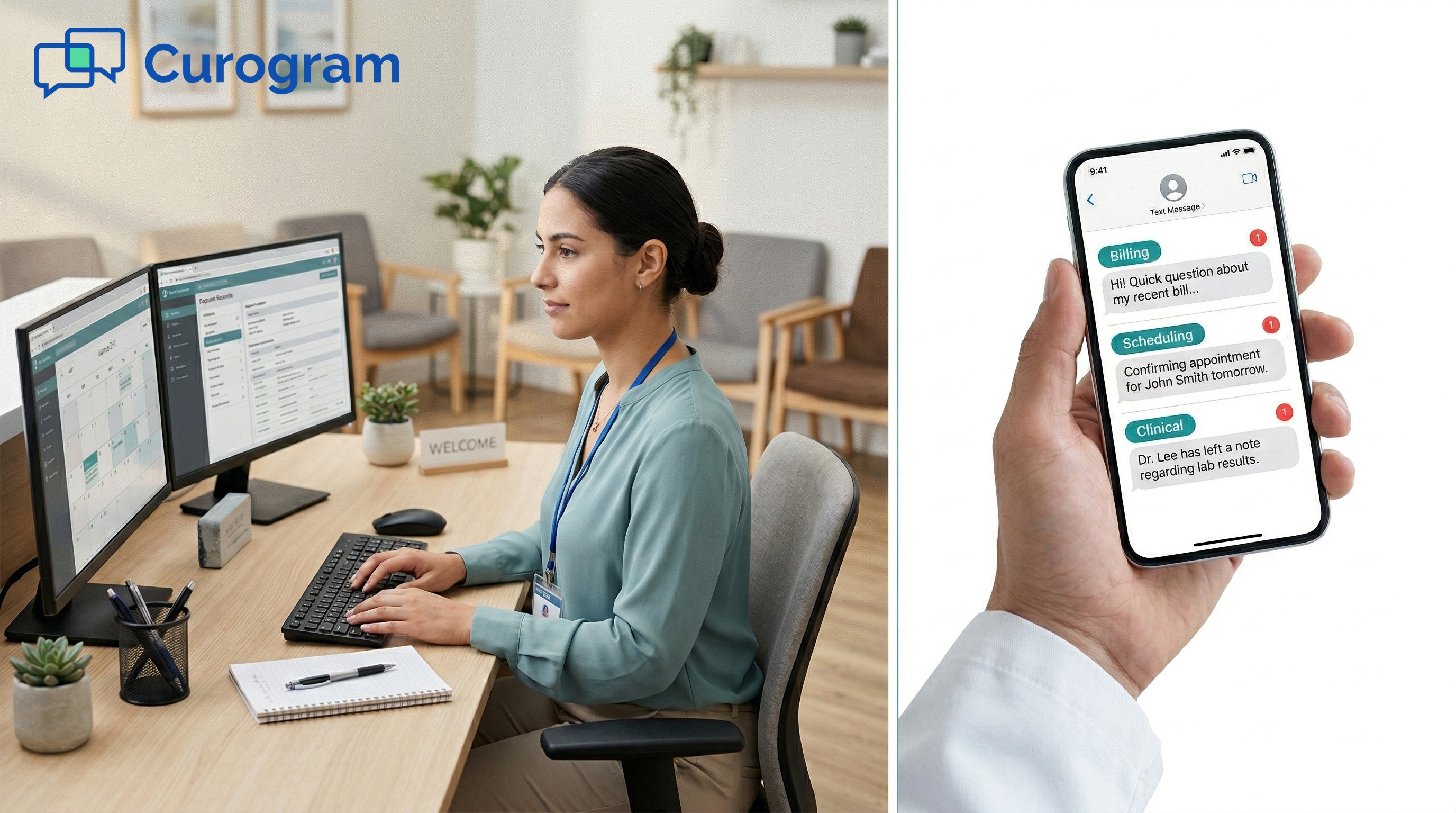
A patient texts your practice: "What's my balance?"
Your front desk reads it. They copy the details and pass them to billing. Billing responds. Someone circles back to the patient. That is four steps for one short text. Now multiply that by 50 texts a day.
Sound familiar? For most growing practices, it does.
AdvancedMD's Communications Platform brings all inbound texts into one dashboard. That is already better than a phone-only workflow.
But a single inbox without routing still leaves all the sorting to the front desk. Billing questions, scheduling changes, refill requests, and clinical follow-ups all land in the same queue. Someone reads each one, decides who owns it, and passes it along before a patient ever gets a response.
For a one to three provider practice, this is workable. Slow, but workable. For a practice with 10 to 20 providers and multiple departments, it turns into a daily bottleneck.
The front desk is not resolving patient needs. It is routing them to someone who can.
Curogram's Smart Routing connects to AdvancedMD and changes this. Each incoming text gets routed to the right team based on message content.
Billing questions go to billing. Scheduling requests go to scheduling. Refill requests go to the clinical team. The front desk does not need to read and forward those messages anymore.
Every conversation is logged in Curogram's HIPAA-compliant inbox. Patient records sync from AdvancedMD, so each message shows the patient's name and record details. Nothing falls through the cracks.
This article explains how AdvancedMD patient text message routing works with Smart Routing, why shared inboxes cause problems in growing practices, and what changes when each team receives its own messages directly.
Most practices start with a shared inbox and make it work for a while. But as provider count grows, the shared inbox stops being convenient and starts creating real friction. Here is what that looks like day to day.
AdvancedMD's Communications Platform consolidates all inbound texts in one messaging dashboard. That is a real upgrade from phone-heavy workflows.
But consolidation without routing creates a new problem: every message, regardless of type, lands in the same queue.
A billing question and a refill request look identical in an unsorted inbox. Nothing labels them by type. Nothing flags urgency.
The front desk has to open each message to understand what it is, and that takes time they do not have.
When every inbound text requires a human to classify it, the front desk is doing constant triage. They read the message, decide what the patient needs, find the right person, and pass it along. For every message. All day. This is not message management. It is manual routing, and it should be automated.
Front desk staff are skilled at what they do. But reading and sorting patient texts is not their core role. Every minute spent on message triage is a minute away from check-in, insurance tasks, and direct patient care.
Manual triage costs more than it looks. When a patient texts "I need to pay my copay from last visit," the front desk reads it, copies the details, contacts billing, and then circles back to the patient. That is three to four handoffs for a single message.
Based on our internal data, practices handle 40 to 60 patient texts per day. When each one needs manual sorting, the front desk spends hours each day doing nothing but routing. That is real time with a real cost.
Without clear ownership, messages get lost. A billing question arrives right between two scheduling requests. No one is assigned to it. No one picks it up.
An hour later, the patient texts again: "Did you get my message?"
The practice looks unresponsive, even though the platform received the first text. The technology is not the issue. The lack of routing logic is.
A shared inbox works for a solo practitioner. Add five providers and it gets harder. Add fifteen and it starts to break down.
Every new provider brings more patients and more texts. But the front desk does not scale with the practice. Without automated routing, message volume grows while the team managing it stays the same size.
Response times slow. Administrative costs rise. The practice ends up spending more just to stay in place.
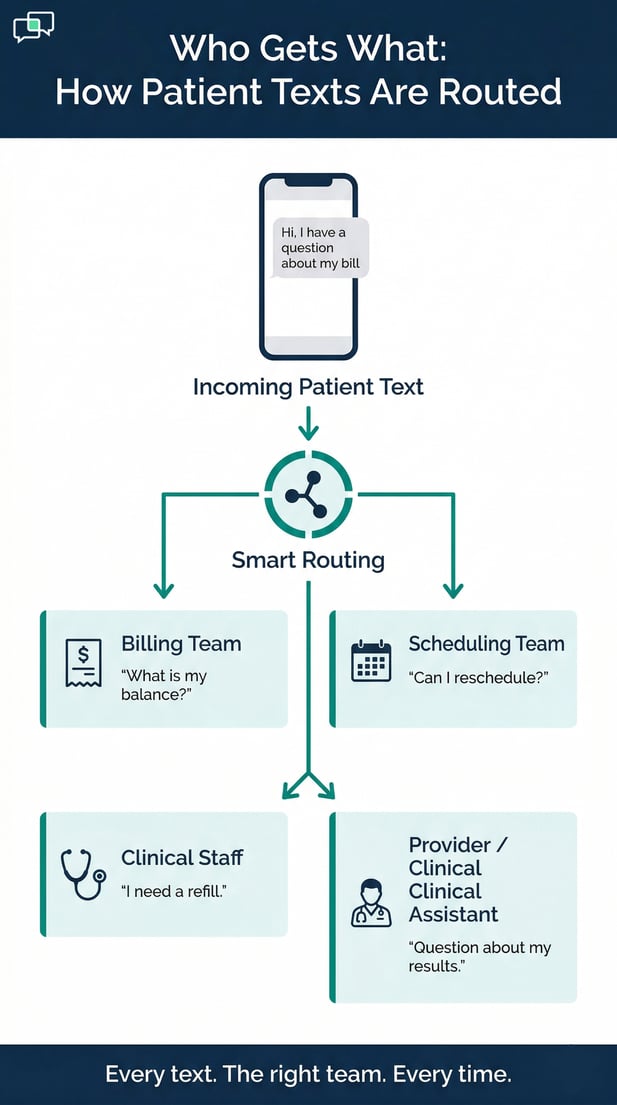
The fix is not more front desk staff. It is removing the front desk from the routing step entirely. Curogram's Smart Routing does this by automatically directing each message to the right department the moment it arrives.
Curogram's Smart Routing reads each incoming text and routes it to the correct team. Billing texts go to billing. Scheduling texts go to scheduling.
Clinical messages go to the assigned provider or clinical assistant. Refill requests route to whoever handles them at that practice.
This is how AdvancedMD patient text routing to billing, scheduling, and clinical departments works without any front desk involvement.
Curogram serves as the communication layer between what the patient is asking and the team that can actually help.
Routing Examples: How Smart Routing Handles Common Patient Texts
|
Patient Message |
Message Type |
Routed To |
|
"What's my balance?" |
Billing |
Billing Team |
|
"Can I reschedule my appointment?" |
Scheduling |
Scheduling Team |
|
"I need a refill on my medication." |
Refill Request |
Clinical Staff |
|
"I have a question about my test results." |
Clinical Follow-up |
Provider / Clinical Assistant |
|
"Do you accept my insurance?" |
General / Billing |
Billing or Default Queue |
Practice administrators set up routing rules by department, provider, or keyword. A practice with separate billing, scheduling, and clinical teams creates three routing channels.
Billing-related messages route to billing staff. Scheduling requests route to the scheduling team. Clinical messages route to the right provider or nurse.
The AdvancedMD text message departmental assignment routing workflow is fully configurable, so it fits the practice's actual structure.
Routing rules are adjustable. If a practice adds a new department, it adds a new routing channel. No full system overhaul. No added headcount.
Each rule is keyword-based. Administrators define which words or phrases send a message to which team. A text with "balance" or "payment" routes to billing. A text with "reschedule" routes to scheduling.
Rules can be added, edited, or removed at any time. As message patterns emerge, the routing logic gets more accurate.
Messages that do not match any rule go to a default queue, usually the front desk or a general inbox. Staff manually assign those from there.
Over time, as more rules are added, the number of auto-routed messages grows and the need for manual handling shrinks.
Curogram does not replace AdvancedMD. It runs alongside it. Patient demographics sync from AdvancedMD, so every routed message shows the patient's name and record details. Staff respond inside Curogram's inbox. AdvancedMD continues to handle charting, billing records, and appointment workflows.
The two systems serve different functions. AdvancedMD manages clinical and billing workflows. Curogram manages the message routing and response layer.
Together, they route AdvancedMD patient messages through billing, clinical, and scheduling channels without requiring any front desk relay.
For AdvancedMD practices with 5 to 20 providers across multiple departments, Smart Routing scales communication without adding headcount.
A practice that brings on three new providers does not need a new front desk hire just to manage the added text volume.
Smart Routing absorbs that growth by directing new messages to the same departmental channels already in place.
The front desk handles in-person workflow. Curogram handles message routing. The practice grows without proportional overhead.

When patient texts reach the right team without a relay step, the benefits show up quickly. Response times drop.
The front desk handles fewer messages. And each department starts owning its own patient conversations.
Based on our internal data, practices using 2-way SMS texting can reduce phone call volumes by up to 50% and increase staff productivity by more than 30%.
When Smart Routing is part of the workflow, the front desk handles far fewer messages before they reach the right person.
Billing staff respond to balance questions as they arrive. The clinical team handles refill requests without a relay.
Scheduling requests go straight to the team managing the calendar. The front desk recovers meaningful time each day.
Consider a practice that receives 50 inbound texts per day. Without routing, the front desk handles all 50 at least partially before the right person sees them.
With Smart Routing, most of those texts route directly to the right department. The front desk sees a fraction of the total. That is a real shift in workload for a team that is already stretched.
Manual routing creates mistakes. A message goes to the wrong person. An urgent follow-up sits in the queue too long.
A patient waits hours for a response because no one owned the message. Automated routing assigns every text a destination when it arrives. Most of those risks go away.
Front Desk Workload: Before and After Smart Routing
|
Task |
Without Smart Routing |
With Smart Routing |
|
Reading all inbound texts |
Every message |
Unmatched messages only |
|
Sorting by message type |
Manual, per message |
Automated by keyword rules |
|
Forwarding to billing |
Required for each billing text |
Not required |
|
Forwarding to scheduling |
Required for each scheduling text |
Not required |
|
Forwarding to clinical staff |
Required for each clinical text |
Not required |
|
In-person patient check-in |
Limited by triage workload |
Full focus available |
This shift matters most to the people working the front desk. When they are no longer triaging every incoming text, their role changes in a real way.
Instead of spending the day reading and forwarding messages, they focus on patients right in front of them. Check-in and intake run faster. Insurance questions get resolved sooner. Patients in the waiting room get more attention.
The front desk stops functioning as the switchboard for all AdvancedMD patient messages and starts working as a patient experience team. That shift also matters for retention. People who feel less overwhelmed tend to stay longer and perform better.
For a 10-provider practice, the value of routing patient texts across departments becomes very clear. Before Smart Routing, one shared queue handles everything.
The front desk manages all of it. After Smart Routing, each department runs its own channel.
The practice handles more patient volume without adding administrative staff. New providers bring more messages, but Smart Routing sends those messages where they belong. The system grows with the practice.
Based on our internal research, practices that adopt structured messaging workflows see real gains in staff efficiency and patient response times within the first few months.

Your AdvancedMD practice has departments for a reason. Billing handles billing. Scheduling handles scheduling. Clinical staff handle clinical care. Each team has its own knowledge and its own role.
The communication setup should match that. But in most practices, all the messages still land in one place, and the front desk becomes the go-between for everyone.
When patient texts route directly to the right team, the practice runs leaner. No delays while the front desk sorts an inbox.
No messages stuck in a queue waiting to be passed along. Each department handles its own patient conversations in a HIPAA-compliant inbox, with full documentation.
This is more than an efficiency gain. It is a structural change in how patient communication works. The front desk stops being the bottleneck. Every team talks directly to the patients who need their help.
Think about what a well-routed workflow looks like. Billing handles balance questions as they arrive. The scheduling team manages reschedule requests on its own. The clinical team handles follow-up care and refill requests directly. Every department owns its conversations.
Manual routing means things get missed. An urgent follow-up slips through. A billing question goes unanswered. A patient waits two days for a response because no one owned the message.
Automated routing assigns every text a home the moment it arrives. There is no gap between receiving the message and knowing who handles it.
Smart Routing mirrors how the practice already works. Billing handles money questions. Scheduling handles calendar questions.
Clinical staff handle clinical questions. Practices configure the rules once, and the system runs from there. As the practice changes, the rules change with it. No disruption to current workflows.
AdvancedMD's Communications Platform already brings patient texts into one place. Curogram's Smart Routing takes it one step further. It routes those texts to the right team, every time, without anyone in between.
Curogram also helps reduce front desk phone volume and text handling for AdvancedMD practices with multiple departments.
It works as a communication layer alongside your existing AdvancedMD setup. No disruption to current workflows. No steep learning curve for staff.
Stop making your front desk the go-between for every patient text. Schedule a demo to see how Smart Routing handles your practice's message volume across departments.
1 min read
Jo Galvez : Mar 5, 2026, 5:00:00 PM
💡 eClinicalWorks 2-way HIPAA texting with smart routing for enterprise networks gives patients a direct SMS channel — no app download, no portal...

1 min read
Jo Galvez : Mar 9, 2026, 9:00:01 AM
💡 eClinicalWorks call center text routing gives enterprise eCW networks a HIPAA-compliant SMS layer that handles routine patient questions before...
1 min read
Jo Galvez : Mar 26, 2026, 2:00:00 PM
💡 AdvancedMD two-way patient texting, delivered through Curogram's Unified Clinical Inbox, gives practices a direct, HIPAA-compliant SMS channel....