
 Jo Galvez

A 2023 Journal of General Internal Medicine study of 1,110 clinicians named six barriers, two of which were low use by colleagues and a sense that the tool was an extra burden. Four failure points drive most of it: messages stranded outside the chart, a reply path patients will not use, no owner on the inbox, and reminders that cannot be tailored by visit type.
Curogram connects with 150+ EMR and practice management systems, at depths that vary by system.
A texting platform rarely fails on a Tuesday. It fades. Staff checks it daily in week one, a few times a week by month two, and by month four the phone has quietly taken the work back.
Ask why and the answer is almost never the software. It is that nobody removed the old step, or the new tool asked for one more screen than the desk had attention for.
We look at the staff side first here, because that is where the abandonment happens and where most buying guides do not look. Patient-side friction matters too, and it comes second for a reason: a tool staff have stopped opening has no patient side left.
Why Do Staff Stop Using A Patient Texting Platform?
What The Adoption Research Found
In 2023, a study in the Journal of General Internal Medicine looked at why a secure messaging system went unused. Researchers read free-text comments from 1,110 clinicians at Northwestern Medicine and grouped the reasons into six barriers.
Two of the six carry over to patient texting. Clinicians judged the tool unneeded next to the channels they already had. And where few colleagues used it, the rest saw no reason to start. One caveat worth keeping: the study covers staff messaging each other, not patient messaging, so it is evidence about how people adopt tools rather than about patients.
The Four Barriers That Do Not Transfer
Worth knowing which is which before anyone cites the study at a vendor. Two of the remaining four are artefacts of that particular app: clinicians reported it drained phone battery even when closed, and a share of them did not know it existed.
The other two are paging problems. Not knowing whether a colleague was free to answer, and not trusting a message had been delivered at all. Neither maps onto a patient thread, where the recipient is a patient and delivery is a carrier question rather than a staffing one.
The Second-Screen Problem
Nobody adds a screen to their rounds when they are already behind. A texting tool that lives outside the workflow gets opened when someone remembers, which is not a schedule.
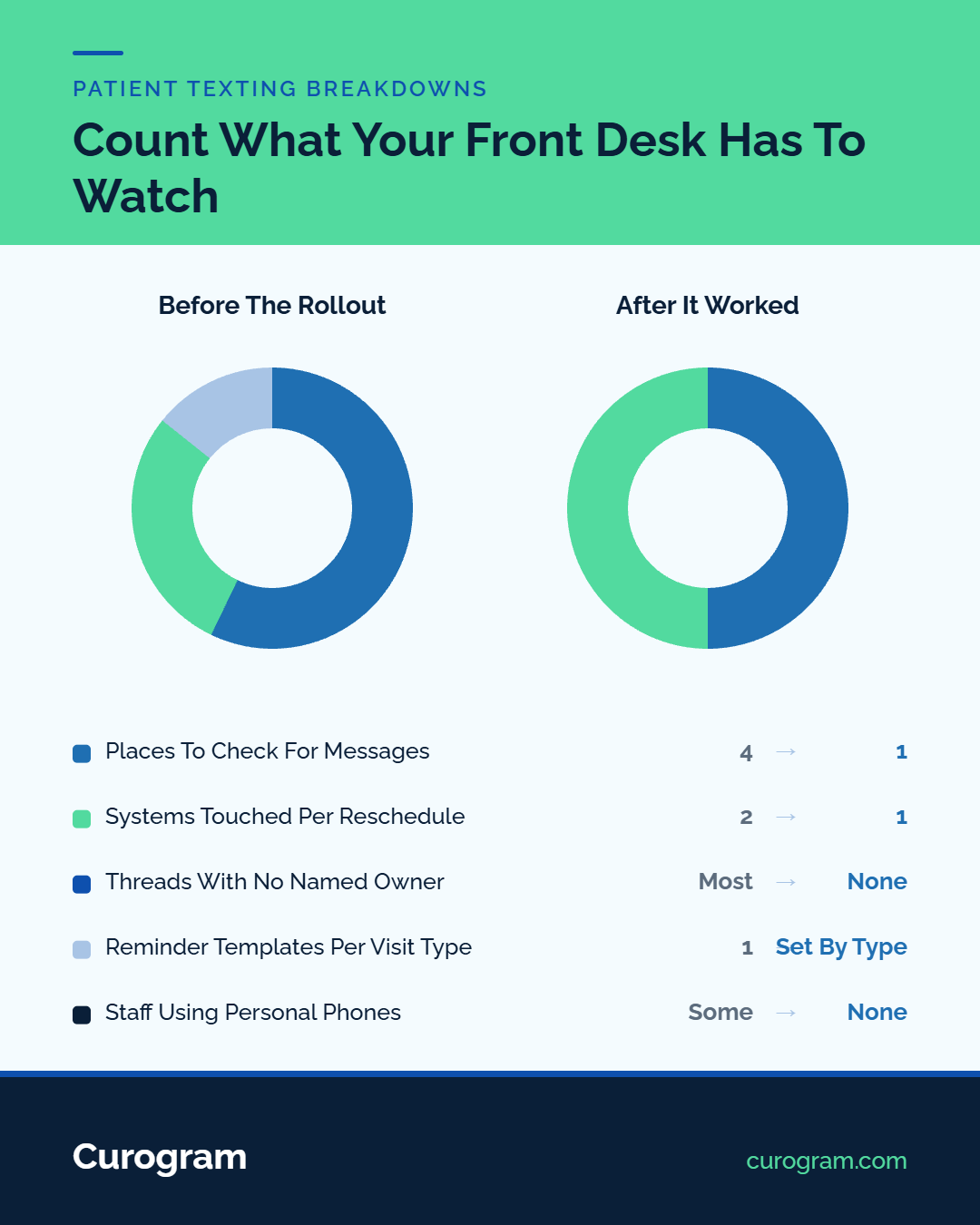
One inbox that holds text, web chat, and voicemail together is what avoids it. The test is simple: after go-live, does your team have one fewer place to look, or one more?
What The First Month Should Look Like
Name the owner before go-live, not after. Who watches the inbox, how fast a reply is expected, and where a clinical question goes when it needs a nurse.
Then pick one workflow and switch the old one off. Running text reminders alongside the phone calls they replace teaches staff that the new tool is optional, and optional tools lose to habit every time.
Who To Train First
Ask the desk which task eats the most time before you configure anything. The answer decides which workflow you switch on first, and it gives the team a stake in the thing arriving.
Then pick one or two people who take to new tools, train them a week ahead, and let them show everyone else. Peer-led adoption holds better than a manager announcing a rollout, because the person answering the questions is sitting at the next desk and knows what the job actually involves.
Where The Work Goes Instead
Staff do not stop communicating when a tool stalls. They fall back to the phone, and some start texting from their own mobiles because it takes four fewer steps.
That second habit is the expensive one. Those messages sit on devices nobody manages, with no audit trail, and staff hand out personal numbers they cannot take back. When that nurse leaves, her patients still have her mobile and you have no record of what was said.
How Disconnected Records Break The Workflow
The Double Entry That Erodes Trust
A patient confirms by text and still reads as unconfirmed in the schedule. Someone opens the chart and fixes it by hand, and the tool that was supposed to save time has just spent it.
Staff notice that faster than any report will show it. After a few weeks of correcting the same records twice, a team stops treating the platform as the source of truth.
Depth, Not Presence
Every vendor says they integrate. Ask which tier your own system uses. Some EMRs connect through APIs and sync in real time. Others go through HL7 or database-level methods that behave differently.
Our EMR and EHR integration page lists what connects. Ask any vendor to demonstrate one reschedule end-to-end, from patient reply to updated chart, before you sign.
Why One-Way Messaging Pushes Patients Back To The Phone
What Patients Say They Want
A reminder with no reply path creates a question and offers nowhere to answer it. The patient dials, and your team fields a call the text was bought to prevent.
Why A Login Ends The Conversation
Portal credentials get forgotten within weeks. Password resets go to an address nobody checks. Few people install an app for a clinic they visit twice a year.
Watch reply rate against send rate to see it. A high send count with almost no replies means the message is arriving and the reply path is blocked. HIPAA-compliant texting on a number patients already know removes both steps.
What Unowned Inboxes And Rigid Reminders Cost
A Message Everyone Assumes Is Handled
A shared inbox without rules turns into a pile. Each person assumes a colleague replied, so the patient waits past the point of patience and then calls.
Route by destination instead: scheduling, billing, clinical. Show the assignment in the thread so anyone can see who owns it, and so a float can pick it up without asking. Set a response window too, and make it a number rather than a value. Same morning for routine questions is a standard a team can actually hit.
One Reminder For Every Visit Type
A patient fasting for a morning lab needs different instructions from someone coming for a routine follow-up. A platform that sends one reminder to both is sending the wrong one to half your schedule.
Practices work around rigid tools by going back to phone calls for the visit types the template cannot handle. Reminders set by visit type, location and language are what keep that workaround from starting.
How To Tell Whether Staff Have Adopted It
Three Staff-Side Numbers
Reply rate tells you about patients. Staff adoption needs three numbers of its own.
- How many of the team opened the inbox at all this week
- What share of threads got answered inside the window you set
- How many threads still start at the desk rather than with a patient
A tool that three of your nine front-office staff open is not adopted, whatever the patient-facing numbers say. That gap shows up in coverage first, usually on the days the three are out.
Keep It Team-Level
There is a line here worth staying on the right side of. Look at team trends with context, not at what any one person did hour by hour. Cross it and you teach the desk that the platform is a monitoring tool, which costs you the adoption you were trying to measure.
The personal-phone question is the same. Ask it once, without consequences attached, and treat every answer as a design note. Staff reach for their own phones because the official route costs four extra steps, and the fix is to remove the steps.
How Curogram keeps a rollout from stalling
Curogram Highlight: Two-Way HIPAA-Compliant Texting
Two-Way HIPAA-Compliant Texting runs on the office number your patients already have saved, and works alongside the EMR you already run rather than replacing it. Patients reply from a standard text thread with no app and no account.

Against the four failure points, one inbox holds every channel, with routing rules and clear ownership. Reminders vary by visit type, site and language. Compliance is standard rather than optional, with SOC 2 Type II alongside HIPAA and full message history kept for audit.
Curogram connects with 150+ EMR and practice management systems, at depths that vary by system. Staff typically learn it in about 10 minutes, because it works the way texting already works. Atlas Medical Center's no-show rate fell from 14.20% to 4.91% in three months, based on our internal data.
In Conclusion: Fix The Staff Side First
A platform patients love and staff have stopped opening is not a working platform. Count the screens your team watches after go-live, and make sure the number went down.
Then check reply rate against send rate. Those two numbers separate a tool that is failing from one that was never given a reply path to begin with.
Book a demo, and we'll walk your setup against these four failure points. We start with one question: what does your front desk have to open on a normal Tuesday?
Frequently Asked Questions