

12 min read

Switch from OhMD to Curogram: Complete Migration Guide

Switch from OhMD to Curogram: Complete Migration Guide
💡 Switching from OhMD to Curogram is a common next step for practices that have grown beyond basic patient messaging. OhMD is a solid entry-level tool, but growing practices often hit a ceiling. They need bi-directional EHR data sync, native telehealth, digital payment collection, automated reviews, and SMS patient recall.

This guide covers the complete migration, from auditing your current OhMD setup to going live on a unified platform. It follows a four-week phased timeline designed to keep disruption low and expand clinical capabilities fast.

Based on our internal data, practices that complete this migration see lower no-show rates, higher confirmation rates, and real revenue growth, often within the first 90 days.

OhMD does its job well. For many practices, it is the first tool they use for secure, HIPAA-compliant patient messaging. It is easy to deploy, simple to use, and makes sense financially in the early days of a practice.

But as a practice grows, messaging alone stops being enough. Staff spend extra hours manually entering patient data into the EHR.

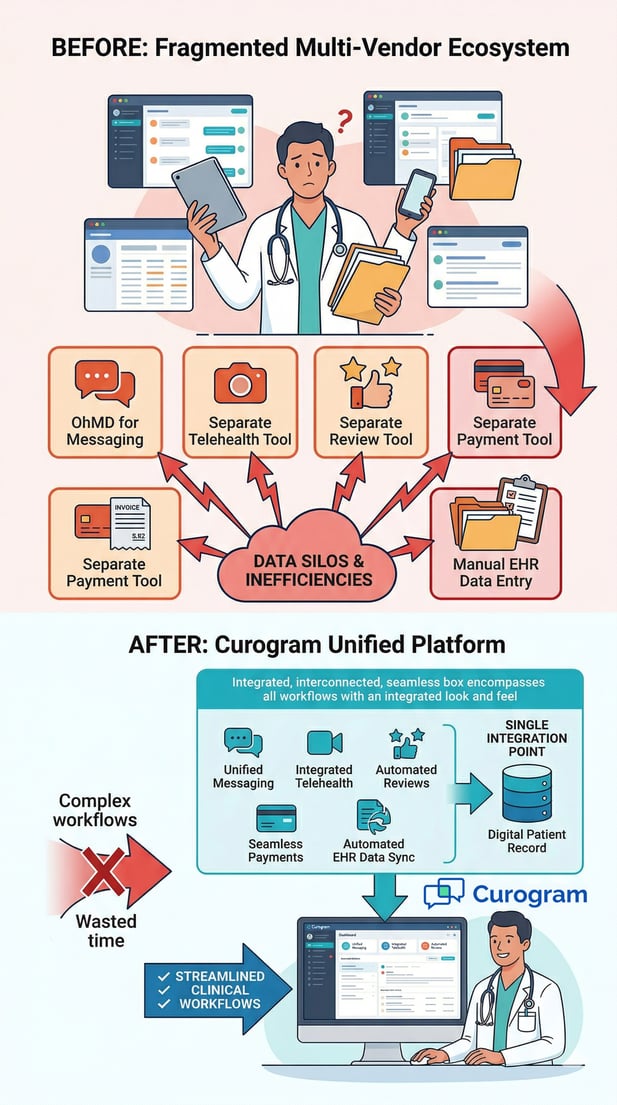
Telehealth visits run through a separate tool, and payment collection uses yet another platform. Appointment confirmations still require a lot of manual follow-up from your front desk team.

At that point, you have two choices. You can keep stacking tools to fill each gap, or you can move to a single platform that handles everything. That second path is what this guide is here to help you take.

Making the switch from OhMD to Curogram is not just about swapping a messaging app. It is a move from single-purpose texting to full clinical automation.

You keep all the secure messaging you already rely on, and you add EHR data write-back, native telehealth, text-to-pay, automated reviews, and patient recall campaigns.

This guide walks through every step of that process. You will learn how to audit your current setup, how to run both platforms at once during the transition, and how to measure your results once you are live.

The four-week migration timeline is built to keep disruption low while expanding what your practice can actually do.

The results speak for themselves. Based on our internal data, Atlas Medical Center cut no-show rates from 14.20% to 4.91% in just three months.

Covina Arthritic Clinic confirmed over 1,100 appointments every month through automation alone. If you are ready to move past messaging and into full clinical automation, this guide will show you exactly how.

Why Medical Practices Outgrow Messaging-First Platforms

Most practices do not switch from OhMD because it is a bad product. They switch because their workflows have grown beyond what a messaging tool can handle.

This section explains why that happens and what it signals about a practice's readiness for a broader solution.

When Messaging Alone Is Not Enough

OhMD fills an important role early on. It gives practices a fast, HIPAA-compliant way to communicate with patients. But as volume, specialties, or locations increase, the gaps become harder to ignore.

The core problem is that OhMD was designed to send and receive messages, not to push structured data back into the EHR.

When a patient confirms an appointment, someone still opens the chart and updates it by hand. When an intake form comes in, staff transcribe it manually. That work adds up quickly.

Signs Your Practice Has Outgrown OhMD

There are a few clear signals that your current setup is no longer working well. Staff are spending large portions of their day entering data that came through messaging.

Your no-show rate stays high even though you are sending reminders. You are paying for a separate telehealth tool, a separate payment platform, and possibly a review service on top of OhMD.

If any of those sound familiar, you are likely paying more and working harder than you need to. The cost of running multiple tools is real, even when each one looks affordable on its own.

The Real Cost of Workarounds

Most practices underestimate the total cost of their multi-tool setup. Subscription fees add up, but the bigger expense is staff time. Every manual step in a workflow costs minutes that multiply across hundreds of appointments per month.

When you factor in the labor, the fragmented setup often costs more than a single unified platform ever would. That gap between perceived cost and actual cost is what drives most practices to look for an alternative.

The Case for Clinical Automation

For practices evaluating an OhMD alternative for their medical practice, the jump to a full automation platform is a meaningful upgrade. It is not about adding features for the sake of it. It is about removing friction from daily workflows so your team can focus on patient care.

What a Unified Platform Can Do

A platform like Curogram combines messaging, EHR integration, telehealth, digital payments, review automation, and patient recall into one interface.

That means one login, one support contact, and one place to train new staff. The efficiency gains are immediate and measurable from the first week after activation.

The shift also simplifies compliance. Managing HIPAA obligations across multiple tools is harder than managing them in one. A unified platform reduces that surface area considerably.

Making the Decision to Consolidate

The decision to consolidate usually comes after a workflow audit. Practices see what they are actually spending in time and money, and the case for switching becomes clear.

The question shifts from "should we switch?" to "how do we make this transition as smooth as possible?"

The next section answers exactly that.

Migration Assessment: Mapping Current State and Workflow Gaps

Before you start migrating, you need a clear picture of where you are today. That means documenting every OhMD workflow, tracking every tool your practice uses alongside it, and putting a number on the manual labor that keeps everything running. This section walks you through that process step by step.

Auditing Your Current OhMD Usage

The goal of the audit is simple: understand what is working, what is not, and how much your current setup is really costing you. This is the work that makes the rest of the migration go smoothly.

Start by listing every active OhMD messaging workflow in your practice. That includes appointment reminders, intake forms, post-visit follow-ups, and any patient communication templates you have built.

All of these should continue without interruption during and after the migration, so you need to know exactly what you have before you start.

What to Document Before You Start

At a minimum, your audit should cover three areas: all active messaging workflows and templates in OhMD, every third-party tool currently used alongside OhMD for telehealth, payments, reviews, or patient recall, and all manual steps your staff take to move data between OhMD and your EHR.

This documentation creates a map of your current state. You will use it to configure Curogram correctly and ensure nothing falls through the cracks during the transition.

Finding the Hidden Labor in Your Workflow

This step is where most practices get a surprise. When you add up the time staff spend manually entering data from OhMD into the EHR, following up on unconfirmed appointments, and managing multiple logins across tools, the total is often significant.

One of the clearest benefits of completing the OhMD to Curogram transition is that this labor largely disappears. With bi-directional EHR integration, patient responses update the chart automatically. Staff no longer have to chase confirmations or re-enter data by hand.

Understanding the True Cost of Your Current Setup

Once you have mapped the workflows and the manual work, the next step is to put real numbers on the cost. This is the baseline you will compare against after the migration, so the more precise you are now, the more clearly you will see the impact later.

Subscription Fees and Tool Overlap

Start with the obvious: list every tool your practice uses alongside OhMD and what each one costs per month. Telehealth platforms, review management tools, and patient recall services all have recurring fees. When you add them up next to OhMD's subscription, the total is often much higher than expected.

This comparison also matters when you evaluate Curogram as your new platform. One unified subscription frequently costs less than two or three separate ones, and eliminates redundant vendor management entirely.

Manual Work Is a Bigger Expense Than You Think

The harder number to track is labor. How many hours per week does your front desk team spend entering data into the EHR after patient exchanges? How much time goes into confirming appointments that could be automated?

When you multiply those hours by hourly wage rates and monthly appointment volume, the number becomes meaningful. This baseline is what you will use to measure the true impact of the migration after it is complete.


Vertical diagram comparing fragmented medical software to Curogram's unified healthcare platform

Parallel Deployment: Expanding from Messaging to Full Automation

The best way to switch from a messaging platform to clinical automation is not a hard cutover. Running Curogram alongside OhMD for a defined period lets you validate each workflow before you fully commit. This section explains how that parallel deployment works in practice.

How the Parallel Transition Works

The parallel approach starts with integration, not replacement. Before you move any patient communications to Curogram, you first connect it to your EHR and confirm that data flows in both directions. This is a capability your practice has never had with OhMD, and it is the foundation of everything else.

Once the EHR connection is validated, you activate appointment confirmations in Curogram. Staff can then compare how those confirmations work against the OhMD messaging-based approach they already know. New patient conversations start moving to Curogram's unified inbox, while existing OhMD threads stay open until they are resolved.

Starting with EHR Integration

Curogram's bi-directional API connects to your EHR and enables discrete data write-back. When a patient confirms an appointment through Curogram, the EHR updates automatically. There is no manual step, no risk of missed updates, and no extra work for your front desk team.

This is a fundamental shift from the OhMD push-to-chart model, where staff still had to open the EHR and make the update themselves. Validating this integration in week two of the migration is a key milestone in the process.

Running Both Platforms at the Same Time

During the transition period, staff work with both platforms at once. New conversations go into Curogram, and existing OhMD threads continue until they close naturally.

This overlap period typically lasts one to two weeks and gives your team time to get comfortable with Curogram before OhMD is turned off.

Training during this phase is straightforward. Curogram's inbox works similarly to OhMD's messaging interface, so the learning curve is low. The main shift is learning the new capabilities that did not exist before.

New Capabilities You Get Right Away

This is one of the most important points about this migration. Unlike a simple messaging swap, migrating from OhMD's secure texting to Curogram adds features your practice did not have before. These go live during the parallel deployment phase, not after everything is fully switched over.

Telehealth, Payments, and Patient Recall

Native telehealth with virtual waiting rooms activates in week three. Patients join visits directly from a text message link, with no app to download. Text-to-pay lets your team send payment requests via SMS, which patients complete from their phones.

SMS patient recall campaigns let you bring back patients who have not scheduled in a while. Based on our internal data, 35% of patients who received a recall message booked an appointment within one month, and one practice saw 1,240 patients return from recall messages alone.

Automated Reviews and Appointment Confirmations

Curogram's automated review tool sends post-visit survey requests that flow directly to Google Reviews.

Based on our internal data, one multi-location practice generated 1,064 new five-star reviews in just three months, with 90% of patients choosing to leave a five-star rating.

Appointment confirmation rates consistently reach above 75% once the automated workflow is live. That is a measurable shift from the manual follow-up approach most practices use with OhMD.

Doctor and medical assistant collaborating efficiently using Curogram's integrated clinical dashboard

Migration Timeline and Milestone Comparison

A well-planned migration keeps your team in control at every stage. The four-week timeline below breaks the process into clear phases, each with specific goals and success metrics.

Use it as a project plan and a progress checklist as you move through the switch from OhMD to Curogram.

Migration Phase

Timeline

Key Activities

Success Metric

Phase 1: Audit and Gap Analysis

Week 1

Document all OhMD workflows and templates; list all third-party tools in use; measure manual EHR entry hours per week

Complete current-state map with workflow gaps identified and labor cost baseline established

Phase 2: EHR Integration and Core Activation

Week 2

Establish Curogram bi-directional EHR API; validate discrete data write-back; activate appointment confirmation workflows

Discrete data sync verified; confirmation workflows live with automatic EHR status updates

Phase 3: Messaging Migration and New Feature Launch

Week 3

Transition patient messaging to Curogram inbox; activate telehealth, intake forms, text-to-pay, reviews, and recall

All patient communications in Curogram; new capabilities operational; existing OhMD threads resolving

Phase 4: Full Go-Live

Week 4

Decommission OhMD and third-party tools; complete full staff training; activate ongoing recall and review campaigns

Single unified platform; confirmation rate at or above 75%; zero manual EHR data entry


Breaking Down the Four-Week Plan

Each week of the migration has a specific focus. Trying to do everything at once creates confusion and raises the risk of something being missed.

The phased approach keeps each step manageable and ensures that the next phase builds on what is already working.

The first two weeks focus on audit and integration. The last two focus on full activation and go-live. By the end of week four, OhMD and any third-party tools should be decommissioned, and your practice should be running entirely on Curogram.

What to Accomplish in Weeks One and Two

Week one is the audit. Document all active OhMD workflows and patient communication templates. List every third-party tool your practice uses.

Measure the manual labor your team spends on EHR data entry and appointment follow-up each week. This creates the baseline you will use to measure results after migration.

Week two is integration. Establish Curogram's bi-directional EHR connection and validate that discrete data write-back is working correctly.

Activate appointment confirmation workflows and confirm that the EHR updates automatically when patients respond. By the end of week two, your new confirmation system should be live and running in parallel with OhMD.

What to Accomplish in Weeks Three and Four

Week three is migration and expansion. Move patient messaging to Curogram's unified inbox. Activate native telehealth, digital intake forms, and text-to-pay.

Begin transitioning existing OhMD threads to Curogram as they resolve. This is also the week when new features go live for the first time, including automated reviews and patient recall campaigns.

Week four is go-live. Decommission OhMD and any third-party tools that Curogram has replaced. Complete staff training and confirm full adoption across the team.

By the end of this week, your practice should have a single platform handling all patient communications and clinical workflows.

Setting Success Benchmarks at Each Phase

Tracking the right metrics at each phase tells you whether the migration is on track. Without clear benchmarks, it is easy to reach week four and not know whether the switch has actually improved anything. Set expectations early and check them at each milestone.

Early Wins to Track

In weeks one and two, success is mostly about setup: the EHR integration is validated, confirmation workflows are active, and staff are learning Curogram basics.

A quick win to watch for is any reduction in manual EHR data entry, even before the full migration is complete. That early signal confirms the integration is working.

Signs the Migration Is on Track

By week three, confirmation rates should be climbing toward 75%. New patient conversations should be flowing into Curogram's inbox with no gaps in coverage.

The new features, such as telehealth and text-to-pay, should be live and functional. If any of these are lagging, week three is the right time to address them before the final go-live in week four.

Post-Migration: Measuring the Impact of Unified Automation

The real value of this migration shows up in the numbers you track after go-live. Comparing your post-migration data to the baseline from your week-one audit is how you demonstrate that the switch was worth it. This section covers what to measure and how to read the results.

Two Categories of Measurable Impact

The outcomes of this migration fall into two groups: cost savings and revenue growth. Most practices focus on one or the other, but the full picture requires both.

Together, they tell the complete story of what the switch from OhMD to Curogram has actually delivered.

Cost savings come from eliminating third-party subscriptions, cutting manual labor, and reducing the complexity of managing multiple vendor relationships. Revenue growth comes from fewer no-shows, more patients returning through recall, digital payment collection, and new patient acquisition driven by stronger online reviews.

Operational Cost Savings

Start with subscriptions. If you were paying for a separate telehealth tool, a review platform, and a recall service alongside OhMD, those costs should now be gone.

Add up what you were paying and compare it to your single Curogram subscription. The difference is immediate savings.

Then look at labor. How many hours per week is your team now saving on EHR data entry and manual appointment follow-up? Multiply that by your hourly wage rate and appointment volume, and you will have a real number to place next to your subscription savings.

Revenue Growth and Patient Engagement

This is where the data from our internal research becomes relevant. Appointment confirmation rates that stay above 75% mean fewer empty slots and more revenue per day.

No-show rates for Curogram users are 53% lower than the industry average, which directly protects your daily schedule from lost revenue.

Recall campaigns bring back patients who have gone quiet. Based on our internal data, 35% of patients who received an SMS recall message scheduled an appointment within one month. Automated reviews build trust with new patients before they ever call your office, which supports long-term new patient acquisition.

Building Your Post-Migration Baseline

The metrics you track after migration are only meaningful if you compare them to where you started. That is exactly why the week-one audit matters so much. Without a starting point, the improvement has no context.

Comparing Before and After

Pull the same numbers you tracked in week one after go-live: appointment confirmation rate, no-show rate, EHR entry time per week, and total monthly subscription costs. The gap between your before and after numbers is your migration ROI. In most cases, it is larger than practices expect.

Metrics That Signal Long-Term Success

Long-term, the metrics to watch are recall reconversion rate, review volume growth, and telehealth utilization. These show whether Curogram onboarding from OhMD has delivered lasting value, not just a short-term improvement. Track them monthly to see how the platform continues to compound results over time. 

Want to see the difference for yourself? Ask an expert.


Frequently Asked Questions

How long does the typical migration from OhMD to Curogram take?

The migration follows a four-week phased timeline. Week one covers the audit and gap analysis, week two focuses on EHR integration and confirmation activation, week three handles messaging migration and new feature launch, and week four completes the go-live and turns off OhMD. Curogram's core workflows can be validated by the end of week two, which keeps the transition period short and the risk low.

Why do medical practices switch from OhMD to Curogram?

Most practices make the switch because their needs have grown beyond what a messaging tool can handle. OhMD works well for secure patient texting, but it does not offer bi-directional EHR write-back, native telehealth, automated Google Reviews, text-to-pay, or patient recall campaigns. Curogram brings all of these into one platform, which removes the need to manage multiple tools and the manual work that comes with them.

How does the migration avoid disrupting patient communications?

The migration uses a parallel deployment model, meaning Curogram runs alongside OhMD during the transition period. New patient conversations move to Curogram while existing OhMD threads stay open until they are resolved naturally. This overlap keeps communications running without any gaps, and staff get time to get comfortable with Curogram before the old platform is turned off.

What new capabilities does Curogram add that OhMD does not have?

Curogram adds discrete bi-directional EHR write-back, which removes the need for manual chart updates after every patient exchange. It also includes native telehealth with virtual waiting rooms, text-to-pay digital payment collection, automated Google Review generation, and SMS patient recall campaigns. These features replace the third-party tools that most practices run alongside OhMD, reducing both cost and complexity.

How do practices measure the success of the migration?

The best approach is to compare post-migration data to the baseline from the week-one audit. Key metrics include appointment confirmation rate (targeting 75% or above), no-show rate reduction, weekly time saved on EHR data entry, and total subscription cost savings. Based on our internal data, practices also track recall reconversion rate and review volume growth as long-term signs of success.