
RIS vs PACS: The Complete 2025 Guide
Learn how Radiology Information Systems (RIS) & Picture Archiving and Communication Systems (PACS) work together in our 2025 radiology systems guide.
20 min read
Most people blame a slow radiology department on the obvious suspect: an overworked radiologist, or a scanner booked solid all day. That's rarely where the delay actually lives. It hides in the handoffs — the moment an exam passes from scheduler to technologist to radiologist to biller, with nothing tracking it in between.
A Radiology Information System is the software built to close those gaps, and that's the real answer to what a RIS is in healthcare.
A RIS runs the non-image side of imaging. It schedules the exam, tracks the patient from arrival to result, holds the order and protocol, feeds the radiologist's worklist, sends the finished report to the referring doctor and the EHR, and captures the codes that turn into a clean claim. PACS stores the actual scans; the RIS keeps everything moving between the steps around them.
The distinction matters because it explains where a department leaks time and money. A scheduling slip made on a spreadsheet doesn't announce itself. It surfaces weeks later as a denied claim in the billing office, and by then nobody connects the two.
When one system tracks the whole path instead, that gap closes — the status of every exam stays visible to everyone at once, so no one waits on a phone call to learn what already happened.
That's the case this article makes: a RIS isn't just a digital filing cabinet for imaging records. It's the coordination layer that decides how fast and how safely a patient moves from referral to result.
We'll walk through what it does, how it connects to PACS and the EHR, what to weigh when choosing one, and where its reach stops — including the patient-contact gap it can't close on its own.
A Radiology Information System (RIS) is the software a radiology department runs on. It tracks patients, orders, schedules, reports, and billing in one place. When people ask what RIS is in healthcare, that's the short answer: the record-and-workflow layer built specifically for imaging.
It helps to picture the full path of one exam. A patient gets referred for a scan. Someone schedules it. The patient arrives, the exam happens, a radiologist reads it, and a report goes back to the referring doctor. The RIS follows every one of those steps and keeps the status current.
That tracking is what sets it apart from a plain database. A database just stores information. A RIS moves work forward — it knows who's scheduled, who's waiting, which exams are read, and which reports are still open.
So the RIS meaning most medical teams care about is practical. It's the tool that keeps an imaging department organized from referral to result, without the paper chase or the phone tag in between.
So, what does RIS stands for? It's an acronym for Radiology Information System. This name itself highlights its specialized nature.
Understanding what RIS stands for provides a foundational understanding of its purpose and scope within the RIS healthcare environment.
RIS software isn't new. The first versions showed up in the 1980s, when imaging volumes climbed and departments needed a better way to track patients than paper and filing cabinets. Those early systems were basic. They handled patient tracking and simple reporting, and not much else.
Three shifts pushed them forward. Digital imaging arrived through PACS, the system that stores and displays the actual scans. Electronic health records took hold across healthcare. And rules around efficiency and compliance kept tightening.
Each of those forced RIS to do more. A modern RIS now schedules exams, routes reports, connects to the EHR and PACS, and pulls analytics on volumes and turnaround times. The core job is the same as it was in 1985 — keep the department organized. The reach is far wider.
So what does a RIS system actually do all day? It runs eight jobs, and they cover a patient's whole path through the department — from the first phone call to the final bill. Packages differ, but these functions show up in almost every one.
Here's the quick version before we walk through each:
| Function | What It Handles |
|---|---|
| Patient Scheduling & Tracking | Booking, room and equipment slots, live exam status |
| Exam & Procedure Management | Orders, protocols, contrast use, tech notes |
| Radiologist Reporting | Worklists, dictation, report status |
| Results Distribution | Sending reports to referring doctors and the EHR |
| Billing & Financials | CPT/ICD-10 codes, claims, unpaid follow-up |
| Inventory & Materials | Supply counts, low-stock alerts |
| Analytics & Reporting | Volumes, wait times, turnaround, trends |
| Workflow Optimization | Automation and centralized coordination |
This is the base layer of any RIS. Staff book exams across every modality — X-ray, MRI, CT, ultrasound — while the system guards a shared calendar of rooms and equipment so two exams never land in the same slot.
Once a patient is in the building, the RIS tracks their status in real time: scheduled, arrived, in progress, completed, read. Automated reminders go out ahead of the visit, which is one of the clearest levers a department has for cutting no-shows.
The payoff is a schedule that reflects reality instead of guesswork, and a front desk that always knows where a patient is.
Once a patient is booked, this function manages the specifics of the exam. The RIS stores the referring doctor's order, holds the correct protocol for each procedure and modality, and logs contrast media and other consumables as they're used.
Technologists document exam details directly — start and end times, contrast given, any deviation from the standard protocol.
That consistency is what keeps one "CT chest with contrast" from being run five different ways by five different techs, which protects both diagnostic quality and patient safety.
PACS stores the actual images; the RIS runs the reporting workflow on top of them. Radiologists open a worklist of exams ready for interpretation, usually sortable by urgency, modality, or referring physician.
Voice recognition speeds dictation, and structured templates keep reports complete and consistent from one radiologist to the next.
The system tracks each report through its stages — dictated, transcribed, preliminary, final, addendum — and links the finished report back to the matching images in PACS. Without that link, radiologists would burn real time hunting for the right study to pair with each report.

After a report is signed, the RIS moves it where it needs to go. It sends to referring physicians by fax, email, or electronic transfer, and drops the report straight into the patient's EHR chart so it's part of the permanent record.
Secure portals let outside doctors — and sometimes patients — pull up reports and images on their own. The most important piece here is critical-findings handling: an urgent result gets flagged and tracked until someone actually acknowledges it, so a dangerous finding never sits unread in an inbox.
The RIS feeds the revenue cycle from the moment an exam is ordered. It captures the data a clean claim needs — procedure codes (CPT) and diagnosis codes (ICD-10) — then either generates the claim or hands the information to a dedicated billing system.
Along the way it tracks insurance details, pre-authorizations, and accounts receivable, and flags claims that haven't been paid for follow-up.
Accurate coding an complete documentation at this stage are what keep denials down, which is why administrators tend to judge a RIS partly on how well its billing side holds up.
Radiology runs on consumables, and this function keeps track of them. The RIS counts contrast media, catheters, films where still used, and other essential supplies, then generates an alert when a stock level drops too low.
It can also manage purchase orders and supplier records so reordering doesn't rely on someone noticing an empty shelf. A missed reorder can stall a scan or force a reschedule, so this quiet piece of the system directly protects both throughput and cost control.
Every action logged in a RIS becomes data a manager can use. The system reports on exam volumes, equipment utilization, patient wait times, report turnaround times, and referring-physician trends — the numbers that show whether a department is running well or dragging.
Those reports surface bottlenecks that would otherwise stay invisible, like a scanner sitting idle at midday or a slow turnaround on one exam type. The same data supports bigger calls too: staffing plans, equipment purchases, quality control, and accreditation.
This is the thread running through the other seven. A RIS automates manual steps, keeps every record in one place, and routes worklists and notifications so nothing falls through a crack.
Communication that used to happen by phone call and sticky note — between technologists, radiologists, admin staff, and referring doctors — moves onto one shared platform. Fewer handoffs mean fewer dropped tasks and fewer errors, which is the whole point of putting a system at the center of the department.
Putting in a RIS isn't really about going paperless. It's about changing how fast and how safely the whole department moves a patient from referral to result.
That shift touches every role in radiology — schedulers, techs, radiologists, and the front desk all work differently once the system is in place.
Patients feel the difference before they ever meet a radiologist. The wait shrinks, because scheduling and room management stop the double-bookings that used to back up a morning.
Reminders and portal access keep them in the loop instead of guessing whether their appointment still stands.
Two things drive most of that improvement:
The net effect is a calmer, quicker visit — which is a large part of what a RIS delivers in healthcare from the patient's side.
Radiologists are the scarcest resource in most departments, so anything that saves them minutes matters. A RIS gives them a worklist sorted by urgency, quick access to prior images through PACS, and dictation that moves at the speed of speech.
Here's where the time actually comes back:
Add those up and turnaround times drop, which lets a department read more studies without adding staff.
Manual steps are where safety slips. A RIS closes several of those gaps with checks built into the workflow, not bolted on after the fact.
Barcode scanning confirms the right patient is getting the right exam. Protocol prompts keep each exam type consistent. Patient-data links flag an allergy or contraindication before contrast is ever administered.
The one that matters most is critical-findings handling. An urgent result gets flagged and tracked until a clinician actually acknowledges it — so a dangerous finding doesn't sit unread while a patient goes home. That single safeguard is the difference between a report that's filed and a result that's acted on.
None of this is exotic. It's the plain result of automating the handoffs, keeping the data in one place, and putting the right information in front of the right person at the right moment.
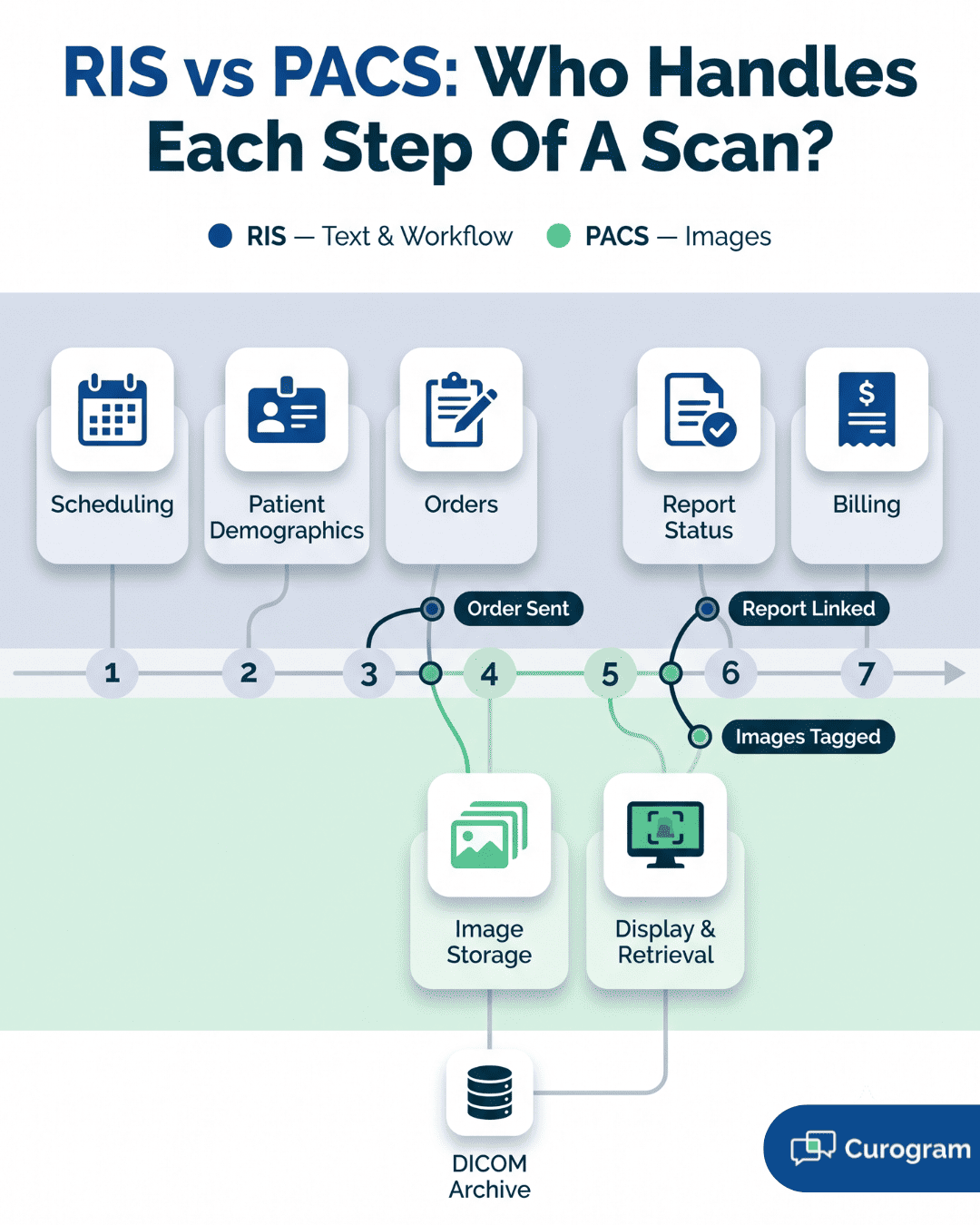
People ask what PACS and RIS systems are and how they differ, and the cleanest way to answer is by what each one holds.
The RIS owns the words: patient demographics, orders, schedules, and reports. PACS owns the pictures: it stores, retrieves, displays, and archives the actual scans. Neither is much use to a radiologist without the other.
The handoff between them follows a set path on every exam:
| Step | What Happens | Which System |
|---|---|---|
| 1 | Exam ordered; details pushed to the scanner and PACS | RIS → PACS |
| 2 | Images acquired and stored, tagged with the RIS patient ID | PACS |
| 3 | Radiologist opens the worklist; selecting an exam pulls up its images | RIS → PACS |
| 4 | Finished report is linked back to the matching images | RIS → PACS |
That linking is the whole point. When the report and the images are joined automatically, a radiologist opens one study and sees both. Break the connection and they're back to matching reports to scans by hand — minutes lost on every read, multiplied across a full worklist.
The EHR connection pulls radiology into the rest of a patient's care.
A referring physician places an imaging order right inside the EHR, and it flows into the RIS without anyone retyping it — which removes a common source of wrong-order and wrong-patient errors. When the read is done, the finished report travels back the other way and lands in the patient's chart.
Two smaller pieces make the link hold up day to day. Demographic data stays synced between the two systems, so a corrected phone number or spelling doesn't have to be fixed twice.
And clinicians ideally reach both the report and the images from one place — the report from the RIS, the images through a PACS link — without leaving the chart. For the referring doctor, that means the scan result sits alongside the labs and notes instead of in a separate silo.
PACS and the EHR are the big two, but a working RIS usually connects to several more systems, each closing a specific gap:
The pattern across all of them is the same: every connection removes a manual step where a person used to copy data from one screen to another.
That's where the errors and the wasted minutes hid, and it's why interoperability — not any single feature — is what makes a RIS the hub of a radiology department.
Buying or upgrading a RIS is a real investment, and the return shows up in more than the reading room. Scheduling, billing, compliance, and planning all shift once the system is running. Five benefits do most of the heavy lifting.
This is the benefit staff feel first. Work that used to eat hours — booking exams, tracking patients, sending reports, prepping bills — runs largely on its own once the RIS handles it.
Keeping data in one place kills the redundant re-entry that breeds errors, and better control of rooms and equipment pushes more exams through the same day.
The clearest signal is report turnaround. When a radiologist moves from image to sign-off inside one workflow, findings reach the referring doctor faster. That's the efficiency that actually pays: lower cost per exam, and room to see more patients without hiring more people.
Patients don't see the software, but they feel its effects. Waits get shorter — for the appointment and for the result. Fewer identification and ordering errors mean fewer repeat visits and less anxiety over a mix-up.
Two things carry most of that experience:
For the patient, that adds up to a calmer visit and a shorter gap between the scan and the plan.
The money side improves in four specific places rather than one vague "profitability" bump:
| Where | What Changes |
|---|---|
| Billing | Accurate coding and complete documentation cut claim denials |
| Collections | Tighter tracking of accounts receivable |
| Costs | Less paper and film, and staff time spent better |
| Throughput | More exams per day, which can lift revenue |
None of these is dramatic on its own. Stacked across a year of exam volume, they're the difference between a radiology service that carries its weight and one that leaks margin.
Compliance is where a RIS quietly earns trust. It protects patient information under HIPAA and logs every access and change, so there's an audit trail when someone asks who saw what.
Standardized reporting keeps the department aligned with quality rules like MQSA for mammography, and retention policies govern how data is archived and pulled back. The plain value here is avoiding penalties — and keeping the patient trust that one breach can erase.
Everything a RIS logs turns into numbers a manager can act on. Exam volumes, turnaround times, equipment use, and referring-physician patterns all become trackable instead of anecdotal.
That's how a department spots a real bottleneck — an idle scanner, a slow exam type — rather than guessing at one.
The same data steadies bigger calls. Staffing, equipment purchases, service expansion, and quality projects all land better when there's a measured baseline behind them instead of a hunch. Objective numbers are what let a department prove an improvement worked, not just claim it did.
Picking a RIS is a decision you live with for years, and switching later is expensive and disruptive. There are a lot of vendors, and their systems aren't interchangeable. Six factors matter more than the rest — walk through each before you shortlist anyone.
The system has to fit the practice you'll be in three years from now, not just today's. Start with volume: can it handle your current exam load and the growth you're projecting?
If you run more than one location, check whether it supports centralized scheduling or keeps each site separate.
Two more questions decide how well it ages:
Can you customize the workflows, reports, and screens to match how your staff actually works — not bend your process to fit the software?
Does the vendor sell add-on modules, like advanced analytics or a patient portal, so you can grow into features instead of buying everything upfront?
A powerful system that staff avoid is a failed purchase. The people who live in it all day — techs, radiologists, schedulers, front desk — need to move through it without fighting the screens. Ask how long a new hire takes to get proficient, because that number is your real onboarding cost.
Pin down the training too. Find out what the vendor actually provides — on-site, remote, recorded — and whether there's usable documentation staff can search when you're not on a call with support.
You're not just buying software; you're buying a decade-long relationship with whoever answers the phone when the system goes down mid-shift. Get specific on support before you sign:
A vendor's reputation is the part you can't reverse after go-live, so it's worth the phone calls now.
A RIS that won't connect cleanly to your other systems recreates the manual copying you bought it to remove. Confirm four things in writing before you trust a vendor's "it integrates" claim:
| Check | What to Confirm |
|---|---|
| PACS | Proven, working integration with your existing or planned PACS |
| EHR/EMR | Real experience connecting to your specific EHR, not a generic promise |
| Standards | Adherence to HL7 and DICOM interoperability standards |
| APIs | Available APIs if you need custom connections later |
Ask for a named reference site running the same PACS and EHR you use. A vendor who can't produce one is telling you something.
The sticker price is the smallest part of what a RIS costs. Total cost of ownership includes implementation, training, hardware, ongoing maintenance, and future upgrades — the fees that don't show up until after you've signed.
Nail down the licensing model early, since a perpetual license, a SaaS subscription, and a per-exam charge lead to very different bills at scale.
Then work the return side with the vendor. Where does the payback actually come from — faster turnaround, fewer denials, more exams per day — and how long until it covers the spend?
A vendor confident in their product will help you model that payback period; a vague answer is its own signal.
No two practices weigh these factors the same way, so the right RIS depends heavily on what kind of shop you run:
Match the system to your setting first. A platform built for a 12-scanner hospital can be the wrong tool for a two-room imaging center, no matter how strong its feature list looks.
The "AI will revolutionize radiology" framing has been around for a decade. What's actually happening in 2026 is more specific and more useful to plan around.
Four shifts are real, funded, and in some cases now required by regulation. Here's what each one means for a department choosing or upgrading a system.
The change this year isn't that AI arrived — it's that departments stopped treating it as an experiment. Radiology teams now run AI the way they run PACS or the EHR: essential, governed, and upgraded without disrupting care.
The buzzword for it is "invisible AI." It processes images in the background and surfaces findings inside the reading environment, with no separate login and no extra click.
Concretely, that means AI feeds the RIS worklist. Tools flag priority cases for urgent review, draft structured reports, and track workflow bottlenecks in real time.
At RSNA 2025, Siemens Healthineers showed an end-to-end AI suite covering scheduling, image generation, and reporting — a sign that vendors now compete on AI, not add it as an afterthought.
The reported gains are real but bounded: roughly a 20% cut in diagnostic errors and about a 48% drop in administrative workload across large hospital networks.
For years RIS lived on servers in the building. That's flipped, especially for smaller providers who can't justify the hardware. Cloud-based systems held 78.4% of RIS deployments in 2025 by one market analysis, though estimates vary by how "cloud" is defined.
One caution worth knowing before you sign: not all "cloud" is the same. A cloud-native system is built from scratch on microservices and scales without per-client setup.
A cloud-enabled one is a legacy on-premise product lifted onto Azure or AWS — and it carries the old performance ceiling and lock-in risk no matter where the servers sit. Ask which one a vendor is actually selling.
FHIR has been "coming soon" for years. In 2026 it's being enforced rather than encouraged.
| Rule | What It Requires | In Effect |
|---|---|---|
| ONC Information-Blocking Rule | Penalties for withholding radiology reports past 24 hours | March 2024 |
| TEFCA exchange | Images and reports treated as standard shareable data across networks | Active in 2026 |
| CMS electronic prior authorization | Automated auth checks inside the workflow | 2027 |
The practical effect on buying: HL7 and FHIR support went from a nice-to-have to a hard procurement requirement for any RIS, EHR, or portal. A vendor who can't show working FHIR APIs is now a compliance risk, not just a weaker option.
Lab results and clinical notes have been in patient portals for years. Imaging is the last major category to catch up, mostly because DICOM files are large and hard to render in a consumer-friendly way.
That gap is closing in 2026. Patients increasingly expect a shareable link or portal access to their study rather than a disc or a records request — and practices that offer it cut the staff time spent managing physical media.
This is the one trend that reaches past radiology into the front desk and the patient's phone. It's also where a communication layer that handles reminders, results-ready notifications, and secure messaging connects to what the RIS is doing behind it.
Everything above describes what a RIS does when it works. This section looks at the opposite: where a department springs a leak without one, and why the damage usually starts in a place you wouldn't expect.
If you're weighing whether your current setup is good enough, this is the part to read closely. The pattern in failing radiology workflows is almost always the same. A break at one handoff doesn't stay contained — it travels downstream and lands on someone who didn't cause it.
Most people picture a radiology bottleneck as a slow radiologist or an overbooked scanner. It rarely is. The delay almost always hides in the gap between two steps — the moment work passes from one person to the next with nothing tracking it.
Walk one exam through a department with no RIS tying it together:
| Stage | The Break | Who Pays For It Downstream |
|---|---|---|
| Scheduling | Paper requests and spreadsheets collide | Two patients booked into one MRI slot |
| Registration | A tech retypes the name at the console | Wrong-patient mismatch flagged mid-exam |
| Reading | Films or worklists sit unsorted | An urgent case waits behind routine ones |
| Reporting | Dictation and sign-off run through email | The referring doctor plays phone tag for the result |
| Billing | Staff match procedures to reports by hand | A claim goes out miscoded and gets denied |
Read down that right-hand column. The scheduler's spreadsheet error surfaces as a denied claim three weeks later, in a completely different office. That distance is exactly why these problems are so hard to fix by hand — by the time the pain shows up, nobody connects it to where it started.
Plenty of small imaging setups do run on phone calls and shared spreadsheets, and at low volume they get away with it
The trouble is that manual coordination doesn't scale in a straight line. Double the exams and you more than double the handoffs, because every added step interacts with all the others.
A RIS doesn't make any single task dramatically faster. What it does is remove the gaps — it keeps the status of every exam visible to everyone at once, so no one is waiting on a phone call to learn what happened.
That's the real RIS meaning in daily practice: not a faster typist, but a system where the handoff no longer drops the ball.
.png?width=2000&height=1125&name=What%20RIS%20is%20in%20Healthcare%2c%20Its%20Meaning%2c%20and%20Impact%20on%20Radiology-inline2%20(1).png)
A RIS pays off, but the install is where projects fail — usually from underestimating the move, not from bad software. Five problems cause most of the damage, and the first one is almost always misdiagnosed.
Teams treat migration like copying files. The images move fine; DICOM protocols are mature. What breaks is patient identity — the ID data in the old system rarely lines up with what the new one expects.
Automated matching often falls below the 94% accuracy it needs, so a department running 200,000 studies a year can end up with roughly 12,000 mismatched records to fix by hand. Cleanse the data first, run a pilot migration, and verify a sample before trusting the full batch.
Pushback isn't stubbornness; it's a fair read of risk from people who'll eat the slowdown during a full patient day.
Skip the generic training session. Radiologists care about priors search and how studies hang; techs care about the worklist and re-send steps. Pull a few frontline users into a pilot and let them become in-house champions.
A RIS that won't talk cleanly to PACS, the EHR, and billing just recreates the manual copying you meant to end. Duplicate patient IDs and clunky registration interfaces are common failure points.
Demand HL7, DICOM, and IHE compliance, ask for a reference site on your exact PACS and EHR, and test the interfaces under real load before go-live.
Copying a broken paper process into new software just gives you a faster broken process — a migration is the chance to redesign the workflow, but only if you involve the people who run it.
And plan for downtime: because RIS and PACS are tightly linked, one outage can freeze scheduling, reporting, and images at once.
| Safeguard | What It Prevents |
|---|---|
| One accountable lead + fixed scope | Budget overrun from creeping requirements |
| Contingency workflow + backup image access | A standstill during downtime |
| Phased go-live over "big bang" | One failure taking down everything |
The departments that recover fast are the ones that wrote the contingency plan before they needed it.
The needs for an RIS system can vary based on the type of facility:
Understanding these diverse needs allows for a more tailored approach when selecting and configuring an RIS system.
A RIS started as a scheduling and tracking tool. It's now the layer that holds a radiology department together — running the workflow, tying PACS and the EHR into one record, and turning daily activity into numbers a manager can act on.
The value isn't in any single feature. It's in closing the gaps between steps, where delays and errors used to hide. A booked exam, a read, a signed report, a clean claim — one system keeps all of it moving without the phone tag in between.
Two shifts are reshaping what a RIS can do. AI now feeds the worklist instead of sitting in a pilot, and cloud deployment has passed on-premise for most new buys. Both point the same way: more capability, less hardware to babysit.
One gap a RIS doesn't fully close is reaching patients — confirming the appointment, sending the reminder, handling the reschedule.
That's a different layer, and it's where the no-show either gets caught or costs you a scanner slot. Pairing the right RIS with a reliable way to reach patients is what keeps a schedule full and a department running clean.
A reminder only works if it lands somewhere the patient actually checks. Book a demo and watch how Curogram turns confirmations, reschedules, and results-ready alerts into replies.
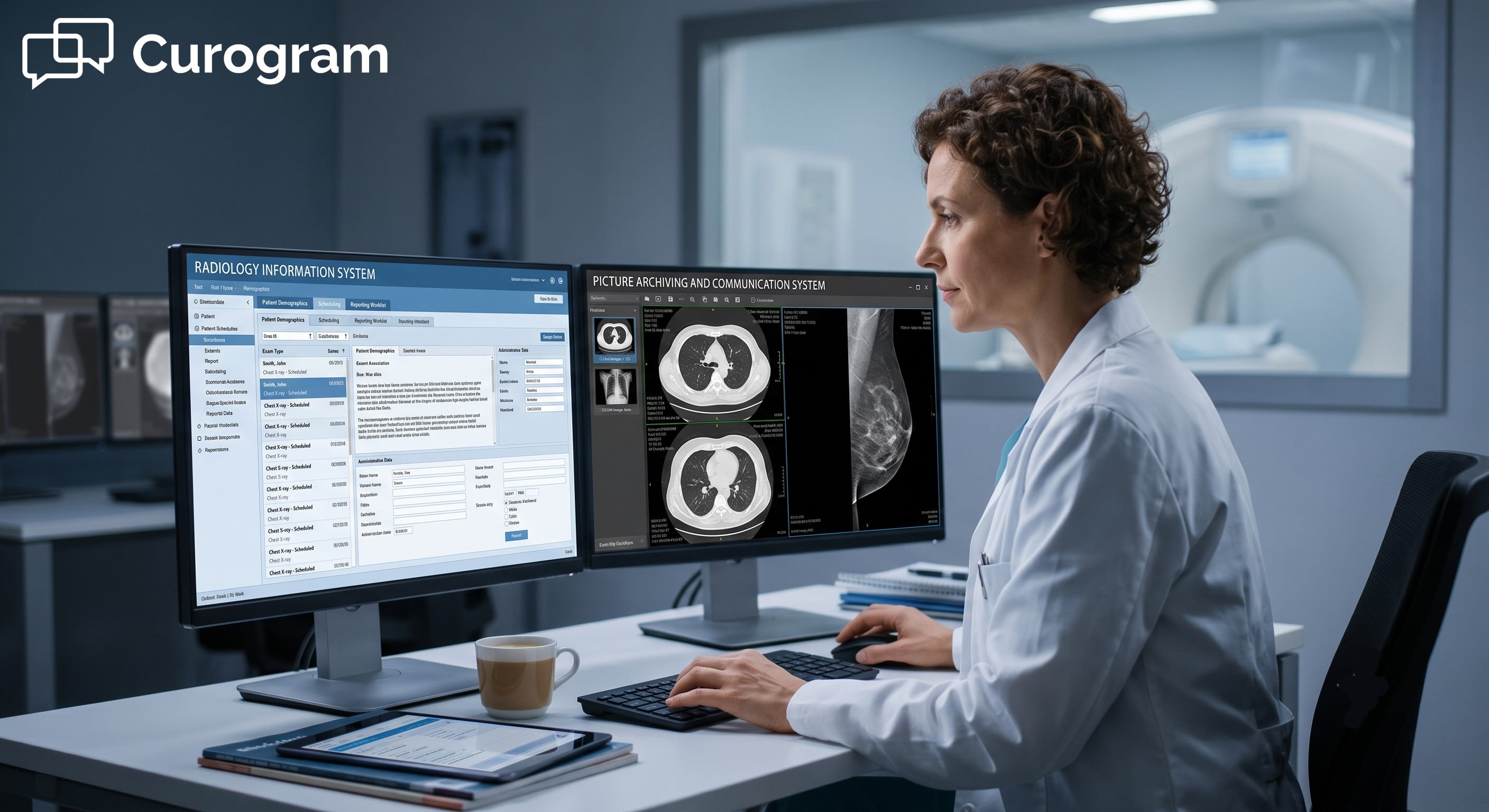
Learn how Radiology Information Systems (RIS) & Picture Archiving and Communication Systems (PACS) work together in our 2025 radiology systems guide.
Learn what a PACS radiology system is, how it works, its key components, benefits, and why it's essential for modern medical imaging.
Optimize radiology scheduling with proven best practices to reduce no-shows, improve imaging workflows, and boost patient satisfaction.