
The Definitive Guide to Mastering Radiology Workflow Optimization
Unlock unparalleled efficiency in your radiology department with this comprehensive guide to a streamlined medical imaging workflow.
14 min read

Your MRI scanner doesn't care if a patient shows up. It costs the same either way.
That is the hard math behind every imaging center. You spent six or seven figures on the machine. You staffed it with trained techs. You built a referral base to keep it busy.
Then one patient misses a prep step, or never got the reminder call. A 45-minute slot vanishes.
It happens more than most imaging leaders admit. And it almost never happens because someone messed up.
It happens because radiology scheduling is hard. One CT visit can hinge on contrast prep, a fasting window, insurance approval, tech coverage, and whether the patient has a ride home. Now stack dozens of exams a day across four or five machines. No spreadsheet was built for that.
Most teams answer with more people. More calls, more sticky notes, more chasing. It works, sort of. Then volume grows or someone calls in sick.
There is a better path. Modern radiology scheduling software takes the repeat work off your team and hands it to a system that never forgets a reminder or double-books a scanner.
This guide covers what breaks in manual imaging scheduling, what good software fixes, and 12 steps that set smooth imaging centers apart. You will also see the math behind each change, so you can size the impact on your own schedule first.
Radiology scheduling is far more than just booking appointments; it's a complex logistical puzzle that forms the backbone of any diagnostic imaging service. The efficiency of your radiology scheduling process directly influences patient access to care, the utilization of expensive imaging equipment, and the overall productivity of your radiology scheduler and technical staff.
Radiology scheduling refers to the comprehensive process of coordinating and managing patient appointments for various diagnostic imaging procedures, such as X-rays, CT scans, MRIs, ultrasounds, and nuclear medicine studies.
This intricate task involves matching patient needs with available resources, including specific imaging modalities, qualified technologists, radiologists, and examination rooms, all while considering preparation requirements, exam durations, and insurance pre-authorizations.
Effective radiology scheduling aims to create a seamless flow for patients and staff, minimizing wait times and maximizing throughput with the help of a skilled radiology scheduler and often, sophisticated radiology scheduling software.
Efficient radiology scheduling is non-negotiable because it directly impacts patient throughput, resource utilization, and operational costs, forming the bedrock of a successful imaging department. Delays or errors in imaging scheduling can lead to a cascade of negative consequences, including frustrated patients, underutilized expensive equipment, increased staff overtime, and potential diagnostic delays that can affect patient outcomes.
In a value-based care model, optimized radiology scheduling, often managed by a dedicated radiology scheduler using specialized radiology scheduling software, becomes a critical component for delivering timely, cost-effective, and high-quality patient care.
Effective imaging scheduling significantly enhances patient outcomes by ensuring timely access to diagnostic procedures, which is crucial for prompt diagnosis and treatment planning.
When radiology scheduling is streamlined, patients experience shorter wait times, reduced anxiety, and a more positive overall healthcare journey.
This efficiency, often driven by proficient radiology scheduler teams and advanced radiology scheduling software, also allows for better coordination with referring physicians, leading to quicker report turnaround times and more cohesive patient management. Ultimately, a well-organized radiology scheduling system contributes to faster and more accurate medical interventions.
Manual or outdated radiology scheduling systems are often fraught with inefficiencies that can cripple a department's performance and negatively affect both staff and patients. Reliance on spreadsheets, paper-based methods, or legacy software for imaging scheduling makes it difficult for even the most dedicated radiology scheduler to manage the complexities involved.
Outdated radiology scheduling systems inherently breed inefficiencies and delays, creating significant bottlenecks in patient flow and resource management.
These systems often lack the intelligence to optimize schedules, manage complex exam dependencies, or provide real-time visibility into resource availability, leading to longer patient wait times, frequent rescheduling, and a frustrated radiology scheduler.
The manual effort required also increases the likelihood of human error in imaging scheduling, further compounding delays and impacting the overall efficiency targets that modern radiology scheduling software can help achieve.
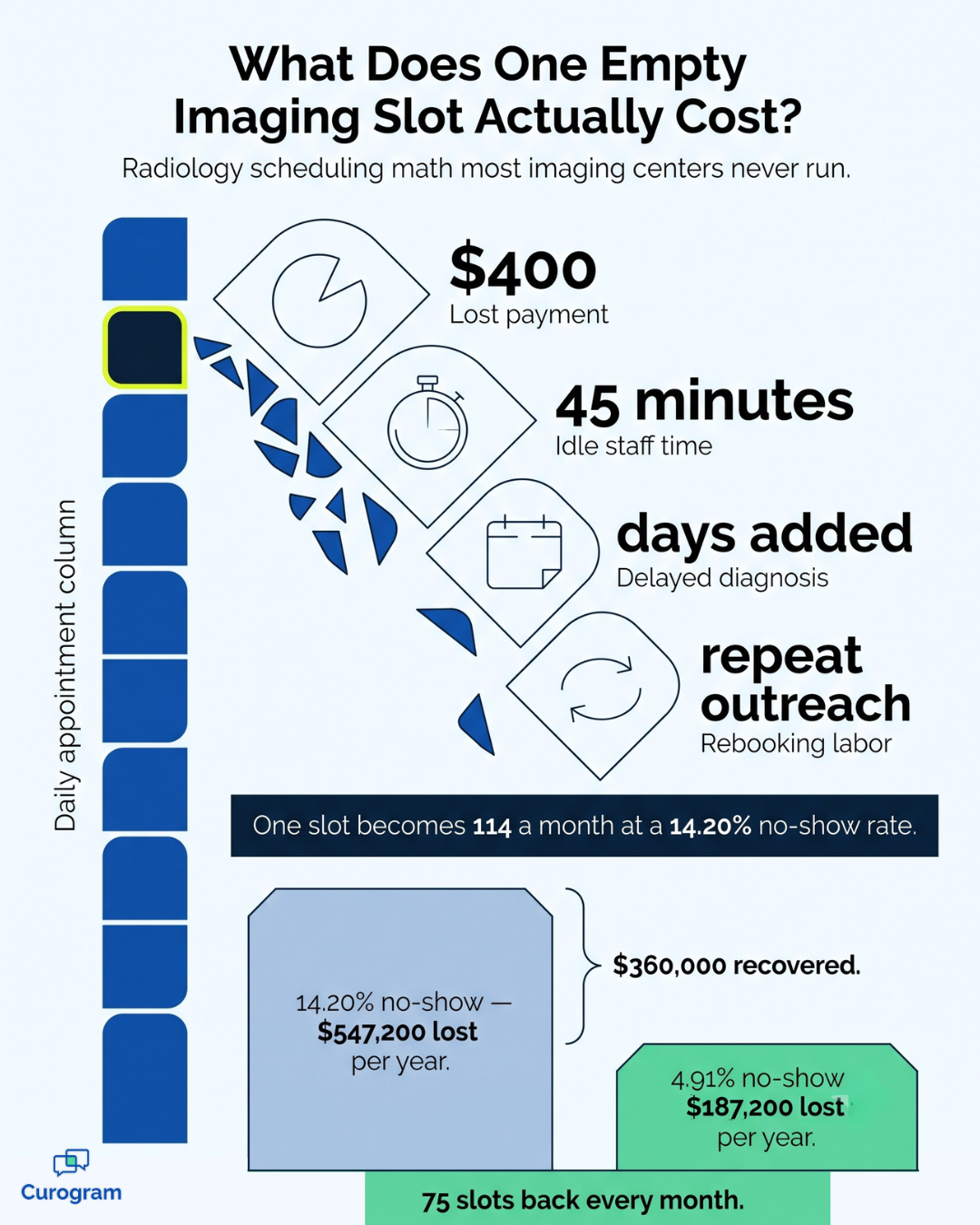
Here is where the vague becomes concrete. Take a mid-sized imaging center that runs 800 exams a month and gets paid $400 per exam.
| Setup | No-show rate | Missed exams/month | Lost per month | Lost per year |
|---|---|---|---|---|
| Manual scheduling | 14.20% | 114 | $45,600 | $547,200 |
| Auto reminders | 4.91% | 39 | $15,600 | $187,200 |
| Gain | 9.29 points | 75 exams | $30,000 | $360,000 |
Those no-show rates are real. They are the before-and-after numbers from Atlas Medical Center, a Curogram client that cut no-shows from 14.20% to 4.91% within three months of turning on auto reminders. The volume and payment figures are just an example, so swap in your own.
Here is what that means for your team. Those 75 saved slots a month are not only revenue. They are 75 patients who got answers on time.
Staff hours follow the same pattern. If your radiology scheduler spends three hours a day on confirm calls, that is about 780 hours a year. At a loaded cost of $30 an hour, you spend near $23,400 a year on work software can do on its own.
Managing complex imaging scheduling demands, such as those involving multi-part exams, specific radiopharmaceutical preparations, or coordinated appointments with other departments, becomes exceedingly difficult with manual or basic systems.
These complexities often overwhelm a radiology scheduler relying on inadequate tools, leading to errors, suboptimal resource allocation, and patient inconvenience.
Advanced radiology scheduling software is designed to handle these intricate requirements, ensuring that even the most complicated radiology scheduling scenarios are managed smoothly and efficiently, incorporating radiology scheduling best practices from the outset.
An idle scanner costs the same as a busy one. Rent, wear, service plans, and staffing do not pause between patients.
Before you shop for radiology scheduling software, track two numbers for one month. First, your no-show rate by machine. Second, how much of each day's open time you actually fill.
Most imaging centers are surprised by the second number. Whatever it turns out to be, those two figures give you a baseline. Without them, you cannot tell whether new software actually worked.
The advent of advanced radiology scheduling software has fundamentally transformed how imaging departments manage appointments, resources, and patient flow. This technology empowers the radiology scheduler and the entire team to overcome the limitations of manual processes, ushering in an era of efficiency and patient-centered care in radiology scheduling.
Radiology scheduling software is a digital tool that books, confirms, and manages imaging visits on its own. It holds your rules, applies them the same way every time, and reaches patients without anyone dialing a phone.
Good systems do four things well:
That last point matters more than it sounds. Double entry is where most scheduling errors are born.
How Modern Software Revolutionizes the Radiology Scheduler Role
The job stops being clerical. It starts being about judgment.
Instead of dialing 60 patients to confirm, your radiology scheduler reviews what the system flagged. The patient who wrote back with a question. The approval that has not cleared. The tricky case that needs a person to sequence it.
That is a much better use of a skilled staffer. It is also a better job. Turnover in scheduling roles is costly, and repeat phone work is a top reason people quit.
Software alone will not fix a broken process. These 12 steps pair the right tools with the right habits, and most centers can start several within one quarter.
Centralizing your radiology scheduling workflow with specialized software provides a single source of truth for all appointment-related information, accessible to every authorized radiology scheduler and staff member.
This approach eliminates information silos, reduces redundancy, and ensures consistent application of radiology scheduling best practices across the department. Centralized radiology scheduling software allows for real-time updates and visibility, making imaging scheduling more transparent and manageable.
Leveraging automated appointment reminders through your radiology scheduling software is a highly effective strategy for reducing costly no-shows in imaging scheduling. These reminders, sent via SMS, email, or automated calls, significantly improve patient compliance and allow the radiology scheduler to proactively fill any last-minute cancellations.
This simple yet powerful feature within radiology scheduling systems enhances throughput and optimizes resource use, a cornerstone of radiology scheduling best practices.
Implementing intelligent patient prioritization rules within your radiology scheduling software ensures that urgent cases are scheduled promptly, aligning imaging scheduling with clinical necessity.
This feature allows the radiology scheduler to define criteria based on referral urgency, patient condition, or exam type, ensuring that the radiology scheduling process adheres to medical protocols and improves patient outcomes.
This is a key component of advanced radiology scheduling best practices.
Optimizing modality utilization through smart radiology scheduling involves using radiology scheduling software to intelligently sequence exams, minimize downtime between appointments, and ensure that expensive imaging equipment is used to its fullest capacity.
The software can analyze exam durations, preparation times, and staff availability, allowing the radiology scheduler to create efficient schedules that maximize throughput for all imaging scheduling needs.
This practice is crucial for cost-effectiveness in radiology scheduling.
Enhancing communication between the radiology scheduler, technologists, radiologists, and referring physicians is vital, and modern radiology scheduling software often includes integrated communication tools to facilitate this.
Real-time updates, secure messaging, and shared access to schedules improve coordination, reduce misunderstandings, and ensure that everyone involved in the patient's imaging scheduling journey is informed.
This supports seamless radiology scheduling operations.
Integrating radiology scheduling software with your Radiology Information System (RIS) and Electronic Medical/Health Record (EMR/EHR) systems is a critical best practice for seamless data flow and operational efficiency.
This integration ensures that patient demographic information, order details, and imaging scheduling updates are consistent across all platforms, reducing manual data entry for the radiology scheduler and minimizing errors in the radiology scheduling process.
Utilizing data analytics and reporting features within your radiology scheduling software allows for continuous improvement of your imaging scheduling processes. By tracking key performance indicators (KPIs) such as wait times, no-show rates, modality utilization, and radiology scheduler productivity, management can identify bottlenecks and implement data-driven radiology scheduling best practices.
This analytical approach is essential for refining radiology scheduling effectiveness over time.
Mastering complex exam dependencies, such as those in nuclear medicine or interventional radiology, is achievable with advanced features in radiology scheduling software.
These systems can manage multi-part exams, prerequisite procedures, and resource coordination (e.g., specific isotopes, recovery rooms), ensuring that all components of complex imaging scheduling are accurately booked by the radiology scheduler.
This capability transforms the handling of intricate radiology scheduling tasks.
Empowering patients with self-service radiology scheduling options through a patient portal integrated with your radiology scheduling software enhances patient satisfaction and reduces the workload on your radiology scheduler. Patients can book, confirm, or reschedule their imaging scheduling appointments online at their convenience, leading to fewer phone calls and greater patient engagement.
This is a modern approach to radiology scheduling best practices.
Ensuring compliance with regulations like HIPAA and maintaining robust data security are paramount when selecting and using radiology scheduling software.
The software must have features that protect patient privacy, control access to sensitive information, and provide audit trails for all imaging scheduling activities. A responsible radiology scheduler relies on these security measures for compliant radiology scheduling.
Thoroughly training your radiology scheduler team and all relevant staff is crucial for maximizing the adoption and benefits of new radiology scheduling software. Comprehensive training ensures users are comfortable with all features, understand new workflows, and can effectively apply radiology scheduling best practices using the system.
Ongoing training is also important for new features and reinforcing efficient imaging scheduling techniques.
Regularly reviewing and refining your radiology scheduling best practices is essential to adapt to changing needs, new technologies, and performance data.
This involves periodic audits of your imaging scheduling processes, gathering feedback from your radiology scheduler and staff, and making adjustments to optimize efficiency and patient care based on insights from your radiology scheduling software analytics. Continuous improvement is key in radiology scheduling.
Once you start comparing vendors, the feature lists all blur together. These are the ones that decide whether your team uses the system well.
| Feature | Why it matters | What to check in a demo |
|---|---|---|
| Clean, simple interface | Schedulers work fast; a clunky screen costs seconds on every booking | Can a new hire book a contrast CT with no help? |
| Custom rules and templates | Exam length shifts by protocol, patient type, and machine | Can you set two lengths for the same exam type? |
| Live updates and alerts | Cancels only get filled if someone sees them right away | Does an opening ping staff on its own? |
| Reports and analytics | You cannot improve what you do not measure | Can you pull no-show rate by machine without IT? |
| PACS and RIS links | Stops double entry and keeps records aligned | Is it a true link or a nightly file transfer? |
| Mobile access | Managers adjust schedules away from a desk | Is the phone view usable or just readable? |
Two of these carry extra weight. A clean screen drives daily use more than any other factor. And deep links to your other systems decide how much manual work really goes away.
Ask about setup timelines. Curogram, for one, connects with most EMR systems in under 30 minutes. That is a very different rollout than a months-long build.
The wins arrive in a set order, and each one feeds the next.
Patients wait less. Tighter radiology scheduling shrinks the gap between referral and exam. Shorter waits mean fewer cancels, since patients rarely walk away from a visit that is days out rather than weeks.
Machines earn more. Better sequencing and fewer no-shows lift fill rates on the assets that cost you most. This is where the money case usually lives.
Staff stay longer. Automating confirm calls strips out the dullest part of the job. Your radiology scheduler spends the day solving problems, not leaving voicemails.
Patients rate you higher. Clear updates, easy booking, and prep steps that land on time all show up in survey scores. Curogram clients using auto post-visit surveys have seen up to 90% of responding patients leave 5-star reviews.
Revenue climbs. Practices using auto reminders and two-way texting report revenue gains of 10% to 20%, driven mostly by saved visits. Curogram's own model puts recovered revenue from text reminders near $72,000 a year for a typical practice, assuming a $100 visit value. Imaging exams usually bill higher than that, so the imaging number tends to run higher too.
Each win compounds. Better fill rates fund better staffing, and better staffing lifts the patient experience, which drives more referrals.

Software picks go wrong in the same few ways. Work through these four steps in order and you will dodge most of them.

Step one matters most. Vendors will steer the talk toward their strengths unless you anchor it to your own needs from the start.
Step four is the one teams skip, and it costs them. The people who will live in this tool eight hours a day should test it, not just sign off on it.
One last question is worth asking every vendor: what happens when something breaks? The answer tells you more about the partnership than any feature list will.
Turning the system on is the easy part. Getting people to use it well is where rollouts win or quietly fail.
Start by explaining the why. Staff push back when change feels forced rather than earned, so be specific about the problem you are solving. "You will spend two fewer hours on the phone" lands better than "we are modernizing."
Bring your schedulers in early, ideally during selection. People defend systems they helped pick.
Train by role, not by feature. A front desk coordinator and a lead radiology scheduler need different depth, and one-size training wastes both their time. Cover the new workflows and radiology scheduling best practices next to the software steps, since the process shift matters as much as the buttons.
Then measure. Track your baseline numbers at set checkpoints and hold a short check-in with the scheduling team at each one.
| Checkpoint | What to review | What you are looking for |
|---|---|---|
| 30 days | Reminder delivery and reply rates | Are messages reaching patients at all? |
| 60 days | No-show rate by machine | Has the rate moved against your baseline? |
| 90 days | Slot fill rate and staff phone hours | Is capacity actually freeing up? |
Most adoption problems are easy to fix if you catch them at the 30-day mark. Six months later, they are nearly impossible to undo.
AI in scheduling is no longer a promise. It is showing up in real products, and it is useful for a few specific jobs.
The strongest use today is no-show prediction. By reading past patterns, lead time, exam type, and prior attendance, these models flag which upcoming visits are most likely to be missed. Your radiology scheduler can then double-confirm those patients or line up a standby, rather than treating every booking the same.
Machine learning also helps with sequencing. It can weigh exam urgency, prep time, staff coverage, and room turnover all at once, then suggest an order a person would not find by hand. On a busy scanner, small gains here mean more exams per day.
The real-world effect is narrower than the hype suggests, and that is fine. AI will not replace your scheduling team. It spots patterns at a scale people cannot, which frees skilled staff for the judgment calls that genuinely need a human.
Imaging efficiency is not won through heroics. It is won by clearing the small snags that quietly drain your day.
The centers running smoothly are not working harder than yours. They automated the repeat work, gave their radiology scheduler tools that match the job, and built the habit of checking their own data. That is usually the whole gap between a strained imaging center and a thriving one.
You do not have to fix it all at once. Start with the change that pays back fastest, which for most centers is auto reminders. Then measure. If your no-show rate moves even half as much as Atlas Medical Center's did, the next choice gets easy.
Modern radiology scheduling software makes that first step simple. Auto reminders, HIPAA-compliant two-way texting, prep steps sent ahead, and online booking all work next to the systems you already run. You are adding reach, not ripping anything out.
Want to see what that looks like in your center? Request a demo of Curogram and find out how automated patient messaging can cut no-shows, free up your schedulers, and keep your scanners full.
Frequently Asked Questions
Unlock unparalleled efficiency in your radiology department with this comprehensive guide to a streamlined medical imaging workflow.
Learn what is RIS in radiology, why it matters to your department, and how it closes the costly gaps between scheduling, reporting, and billing per...

Master radiology coding with 12 essential guidelines to improve accuracy, avoid claim denials, and stay compliant with the latest coding standards.