
 Joshua Inciso
How To Be HIPAA-Compliant When Using Mobile Devices
Using mobile devices offers healthcare professionals advantages in patient engagement and providing quality care, but you must comply with HIPAA.
"Can I just send it to you on WhatsApp?"
If your front desk hasn't heard that question yet, it probably will soon. Many patients rely on WhatsApp every day to talk with family, friends, and even local businesses. So when they want to send a photo of a rash or ask about a prescription refill, the same app feels like the obvious choice.
For your practice, that simple request raises a serious question. The moment a message includes protected health information (PHI), HIPAA regulations apply, and the tool you use to send, receive, or store that message has to follow those regulations too.
WhatsApp is free, familiar, and encrypted, which makes it tempting for busy teams that want a quick way to reach patients. But familiar and encrypted are not the same as compliant. That difference can expose your practice to financial penalties, data breaches, and damaged patient relationships.
This guide answers the question directly: is WhatsApp HIPAA compliant? You'll learn why the answer is no, which safeguards the app is missing, and why its newer features still don't solve the problem. We'll also explain what happened to the COVID-era exception that temporarily allowed some providers to use everyday apps for telehealth.
Finally, we'll walk through what a HIPAA-compliant patient engagement platform should include. That way, you can give patients the convenience they expect without putting their information at risk. You'll also see how a platform designed for healthcare handles reminders, forms, payments, and video visits in one secure location.
The stakes are real, but the solution doesn't have to be complicated. Most practices can switch to a secure option without changing how patients prefer to contact them, keeping the speed of texting while removing the compliance risk.
Let's start with the short answer and the important reasons behind it.
In short, no, WhatsApp is not HIPAA Compliant. Let’s explore why.
If it’s used for transferring electronic PHI, WhatsApp is legally considered a business associate (BA) of the healthcare provider employing it. In order to be HIPAA compliant, a BA needs to enter into a business associate agreement (BAA) with the HIPAA covered entity. This agreement outlines all the safeguards that need to be put in place in order to ensure the protection of PHI.
WhatsApp is a consumer app, and there are no indications anywhere that Facebook would sign a BAA with any organization. This fact alone makes WhatsApp non-HIPAA compliant by default.
One of the major features that make medical professionals consider WhatsApp is its end-to-end encryption of all communication. This is a great security feature that allows only the sender and receiver to see the transferred data. However, WhatsApp doesn’t have any access and authentication controls in place to prevent unauthorized access.
Encryption is useless if anyone can take a person’s phone, open their WhatsApp freely, and view the sent content. Once you install the app on your device, it doesn’t require you to enter a password to open it. It is always accessible. This constitutes a severe violation of the HIPAA Security Rule.
We can safely conclude that, due to its security shortcomings and Facebook’s unwillingness to enter into a BAA, WhatsApp is not HIPAA-compliant and healthcare providers shouldn’t use it to contact patients.
There are many other reasons that WhatsApp isn’t the best choice for healthcare businesses.
Ideally, your communication platform should integrate with your EHR. WhatsApp doesn’t integrate with any EHRs, and your staff will have to coordinate information between the two platforms.
This means having to enter all the relevant data twice, which leaves much room for error. When your patient communications platform integrates with your EHR, you only have to enter appointments and other notes once. Patients receive text and email appointment reminders with the video chat links without any additional work from your staff.
In order to communicate with patients via WhatsApp, your staff will have to use their personal numbers. One workaround for this issue is to have a dedicated mobile device with a business mobile phone number.
However, both of these options are highly impractical for the following reasons:
Fortunately, options like Curogram exist, providing a centralized communication platform with appropriate encryption and access controls. Only authorized personnel can see patient messages and chat histories.
Appointment reminders are essential to reducing patient no-shows. In person and online consultations are easy to forget, especially when scheduled several weeks or even months in advance.
WhatsApp doesn’t integrate with your schedule, so it can’t send appointment confirmations and reminders automatically. Your staff hasto text or call everyone individually, which is inefficient and time-consuming.
Patients prefer text-based communication as it’s more efficient and takes less time than phone calls. Moreover, SMS text messages are the first to pop up on your patients’ phones, as they are not tied to any app that might have notifications turned off.
SMS templates can save your staff a lot of time. Your staff probably answers the same questions several times a day. With WhatsApp, they’d need to manually type and send the same message over and over again.
The best you can do in WhatsApp is to perform a chat search, copy-paste the text, and adjust it for a new patient. This can lead to mistakes and PHI accidentally being shared with other patients.
Online reviews and ratings can make or break your business. A bad review is notoriously difficult to convert into a positive one, and it has a significant impact on how people perceive your practice. Your platform for communicating with patients should have some kind of a reputation management feature to help you reap five-star ratings.
If you use WhatsApp, all you’ll be able to do is pester your patients to go online, find your practice, and rate it on Google or Yelp. This can seem pushy, and it’s often a lot of work for the patient.
WhatsApp's calling features have improved considerably over the years. Video calls now work on its desktop apps and, as of 2026, in web browsers too. Group calls even include a waiting room where the host can approve people before they join.
Those updates make WhatsApp more useful for personal calls, but they don't make it appropriate for virtual care.
Here's what's still missing:
A telehealth visit should feel like a natural part of your clinical workflow. With WhatsApp, it becomes a separate call your team has to arrange and document manually. Now that you know where WhatsApp falls short, let's look at what your platform should include.
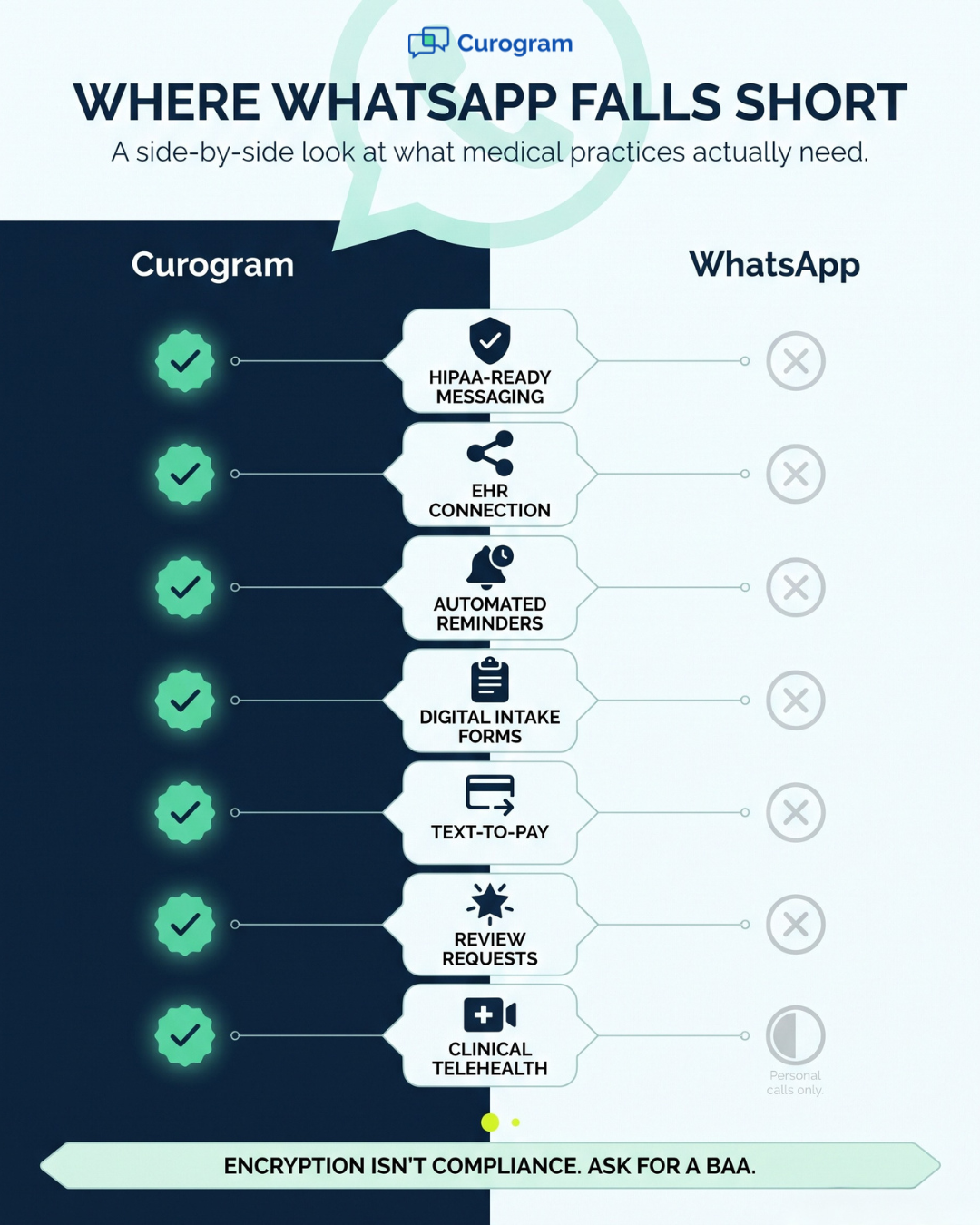
If you’re looking for a patient engagement and telemedicine platform, WhatsApp certainly won’t do. You need a platform that combines secure, HIPAA compliant communications, automated messaging, and video conferencing. Your telemedicine and patient engagement solution should have the following features:
You need a solution that’s as easy to use as WhatsApp or even easier. You may have patients who aren’t tech-savvy and don’t have WhatsApp or even use smartphones.
You need software that can send auto-generated appointment reminders and telehealth links to patients. Then, all your patient has to do to join the appointment is click the link.
When they click the link, they enter the virtual waiting room where a nurse or an MA helps them prepare or they’re prompted to complete any necessary paperwork online. Once the patient is ready, the provider takes over. After the consultation, a nurse gives them any necessary post-visit instructions and documents.
You need a platform that mimics the workflows everyone’s already used to — including doctors, nurses, and patients. You, your staff, and your patients don’t waste time with unnecessary steps, streamlining your processes and the patient experience. .
This is something you can’t achieve with WhatsApp. It doesn’t have waiting rooms and, once an MA calls the patient (or the patient calls them), doctors and other staff can’t join or exit the call without ending it.
As we have mentioned, WhatsApp offers end-to-end chat encryption but doesn’t provide proper access controls and a centralized platform. This means electronic PHI could easily get compromised.
You need a platform where you can keep track of all communication threads in one place, including text messages, emails, and phone calls as well as patient forms and documents.
WhatsApp group chats are not appropriate for professional healthcare internal messaging. As mentioned, WhatsApp doesn’t include any access controls which means that anyone who sees a phone screen could access PHI. Additionally, as most people use WhatsApp on their phones, any professional messages would be lost among personal messages.

During the COVID-19 public health emergency, the HHS Office for Civil Rights (OCR) issued a Notification of Enforcement Discretion for telehealth. It let providers use everyday video apps, such as FaceTime or Skype, in good faith without facing HIPAA penalties. Even then, public-facing apps like Facebook Live, Twitch, and TikTok were not allowed.
That flexibility was always meant to be temporary. Here's how it wound down:
Today, that old exception no longer protects your practice. If your team started using WhatsApp or a similar app during the pandemic, now is the time to move patient communication to a platform built for healthcare.
| End-to-end encryption protects a message while it travels between devices. HIPAA requires much more than that: a signed BAA, access controls your practice manages, and a record of who viewed PHI. Before you adopt any messaging tool, ask the vendor one question first: "Will you sign a BAA?" If the answer is no, the tool isn't appropriate for patient data. |
Free consumer apps are tempting because your team already knows how to use them. However, patient communication works best on a platform designed for healthcare. Curogram is aHIPAA-compliant patient engagement and telehealth platform built for medical practices.
Curogram takes over the front desk tasks that fill up your team's day. It sends automated appointment reminders and confirmations, and patients can text back to reach a real person on your staff. Your team can tailor reminders by send time, appointment type, and more.
The results can be significant. Atlas Medical Center cut its no-show rate from 14.20% to 4.91% in just three months with Curogram's automated reminders. Curogram's current clients see an average confirmation rate above 75%.
Curogram also goes well beyond reminders, allowing you to send online intake forms, request payments by text, and ask for Google reviews automatically. Telehealth is built in as well, so your team can conduct virtual visits from the same platform.
Curogram connects with many EHR and practice management systems, and what syncs depends on your system.
| Feature | Curogram | |
|---|---|---|
| Built for HIPAA-compliant patient communication | Yes | No |
| EHR integration | Yes (varies by EHR) | No |
| Automated reminders and confirmations | Yes | No |
| Online patient intake forms | Yes | No |
| Payment requests by text | Yes | No |
| Automated Google review requests | Yes | No |
| Telehealth built for medical practices | Yes | No (consumer calls only) |
WhatsApp earned its place on billions of phones by being simple, free, and private for everyday conversations. Those same qualities explain why patients ask to use it and why your staff might be tempted to agree. But once a message includes PHI, convenience alone isn't enough.
As you've seen, the central problem is the missing BAA. Add user-controlled locks, phone numbers your practice can't manage, and no connection to your schedule or EHR, and the risks multiply quickly. Even WhatsApp's newer calling features don't change that reality. Each gap on its own is a concern; together, they make WhatsApp a liability for any practice that handles PHI.
The COVID-era exception that once gave practices some flexibility has also ended, and full HIPAA enforcement for telehealth returned in August 2023. If any part of your patient communication still runs through a consumer app, it's worth addressing now, before a breach or complaint forces the issue.
The good news is that you don't have to choose between convenience and compliance. Patients still receive quick, familiar text messages, while your team gets automated reminders, intake forms, payment requests, review requests, and telehealth in one secure platform. Your practice, in turn, gets the safeguards HIPAA expects.
So when the next patient asks, "Can I just WhatsApp you?" you'll have a better answer ready. You can offer a fast, secure way to reach your office that protects their information from the very first message, with the same speed patients appreciate and none of the risk.
Ready to move patient conversations off personal phones? See how Curogram replaces risky messaging apps in a quick, personalized demo. You'll learn how two-way texting, automated reminders, and telehealth can fit into your daily workflow and work alongside your existing EHR, so your team can communicate confidently from day one.

Using mobile devices offers healthcare professionals advantages in patient engagement and providing quality care, but you must comply with HIPAA.

 Joshua Inciso : 11/10/22, 12:56 PM
Discover how the 5 rules for texting your patients can improve your practice. Maintain proper and secure communication by implementing these rules.

 Mira Gwehn Revilla : 4/18/26, 1:00 PM
Compare the best patient engagement software for small and mid-size medical practices. Learn what features matter most and how to evaluate your...