
 Mira Gwehn Revilla

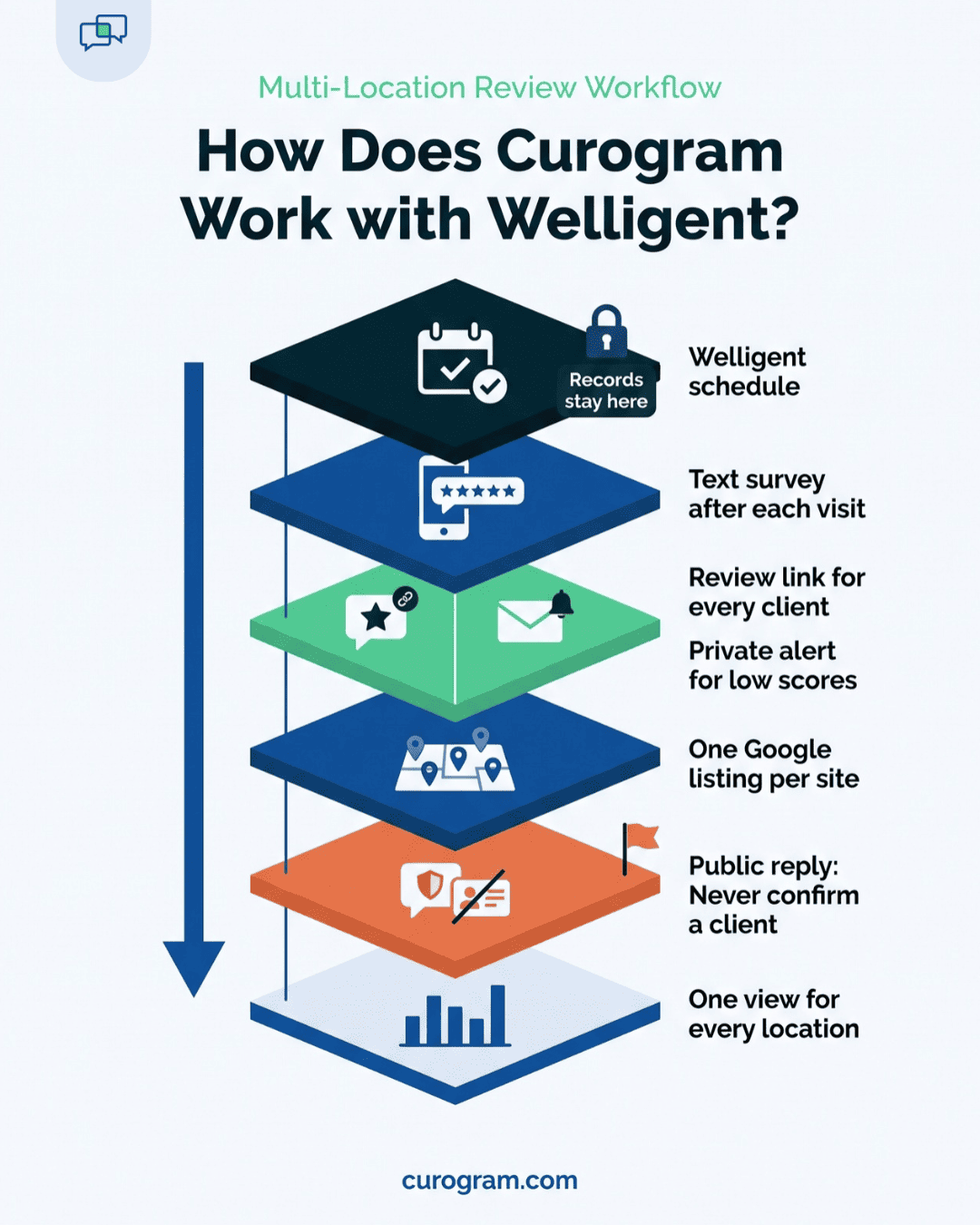
- A short survey goes out by text after each completed visit, with no PHI and no program or treatment named.
- Every client who answers gets the same one-tap link to their own location’s Google review page.
- Low scores also send a private alert to the leader you choose, so you can call back the same day.
- One dashboard shows review count, rating, and trend for each site.
- Based on our internal data, one multi-location practice added 1,064 new 5-star reviews in 3 months with this setup.
Most behavioral health agencies file Google reviews under “marketing.” In practice, that means a task with no owner and no due date.
At a five-site network, it shows. The outpatient clinic’s newest review is two years old. The I/DD day program has a handful.
Nobody is sure who has the login for the foster care office’s listing. And when a client does post, nobody sees it for weeks.
Our view is simple: at a multi-site agency, reputation is a workflow problem, and the asking should never fall to staff.
A counselor who asks an SUD client for a 5-star review crosses a clinical line. A coordinator handing out cards at the front desk looks like begging. So the request has to go out on its own, after the visit, the same way for every client.
Those listings carry more weight than most ops teams assume. Based on our internal research, 90% of new patient leads see a Google Business Profile before they visit the website.
Hospital discharge planners and school counselors can see that same page when they pick where to send someone. Google also says review count and score factor into how high a listing ranks in local search.
Welligent runs your programs, notes, and claims well. It has no built-in way to request reviews, though. And Welligent Connect’s portal gives clients no natural moment after a visit to leave one.
What follows is the full setup from the operations chair. It covers the survey trigger, send timing, routing for complaints, the per-site dashboard, and how to reply to reviews without exposing PHI.
The Reputation Nobody Manages
Welligent does the heavy lifting across programs. Intake, notes, auth tracking, and claims all live in one place, whether the client is in outpatient therapy or a day program. Ops leaders can pull a report on almost anything.
Reputation is the gap. There’s no field for it, no report, and no job title that names it. Ask who owns the Google listing for the SUD IOP and you’ll often get two answers: “marketing, I think,” and a shrug.
That’s odd, given who reads those listings. A parent searching for a teen program sees the stars before the phone number. A school counselor choosing between two providers sees the date of the newest review. Your agency is judged on a score nobody tracks, and no Welligent report will show it slipping.
How 'Get Some Reviews' Falls Apart
It usually starts at a leadership meeting. Someone notes that the foster care office has three Google reviews. The program coordinator walks out with a new task: get some reviews.
Then the options run out fast.
- Print cards for the front desk. It feels desperate, and most cards end up in the trash by the door.
- Ask clients in person. For a counselor, that’s a boundary problem. Asking someone in early recovery to praise you in public mixes therapy with marketing.
- Send an email blast. There’s no clean list, and pulling one from Welligent means a ticket to IT.
So nothing happens, and the task slides to next month’s agenda. Meanwhile, a two-line complaint posts on the outpatient clinic’s listing. It sits there for six weeks with no reply because nobody was watching that profile.
Why Counselors Can’t Do the Asking
The obvious fix is to have clinicians ask, since they know which clients are happy. Their own ethics codes push back on that. The ACA Code of Ethics says counselors don’t solicit testimonials from current or former clients, or from anyone open to undue influence. APA’s code has a similar rule for current therapy clients.
Power is the reason. A client who depends on a counselor for care, a court report, or a housing letter may feel they can’t say no.
That rules out the most natural asker at a behavioral health agency. It’s why the request should come from the agency, by text, with no clinician’s name on it.
5 Locations, 5 Jobs Nobody was Hired For
Each Google Business Profile is its own small job. Someone has to check it for new reviews and reply within a few days. Someone also has to keep hours and phone numbers current and add fresh reviews so the page doesn’t look stale.
Multiply that by five sites and you’ve built a part-time marketing role. Few Medicaid-funded agencies have budget for it. The work lands on whoever cares most, which is usually an office manager who already covers the phones.
|
Task per listing |
Typical owner today |
What slips |
|
Check for new reviews |
Nobody assigned |
Complaints sit for weeks |
|
Reply to reviews |
Whoever sees it first |
Replies that leak PHI |
|
Ask for new reviews |
Program coordinator |
Never gets done |
|
Update hours and info |
Office manager |
Old phone numbers stay up |
Location-level Google Business Profile management takes steady time each week, per site. At most agencies, that time isn’t on anyone’s calendar.
The Screenshot in the Executive Director’s Inbox
The ops manager usually finds out the worst way. A board member Googles the agency, spots a 1-star review, and forwards a screenshot to the executive director. It comes down the chain with one line attached: “What happened here?”
There’s no good answer. The review doesn’t name a program. It could be the outpatient clinic or the IOP, from last week or last spring.
By now, the client is long gone. At no point did they have a private place to say “my session got canceled twice” while someone could still fix it. With agency review monitoring across programs assigned to no one, the first person to read the complaint was a board member.

The Review Workflow That Runs Itself
Three jobs leave your team’s day: asking for reviews, watching five listings, and tracing where a complaint came from. Curogram’s automated post-appointment surveys take all three. Think of it as a virtual access center assistant that sends every request on time and never asks in person.
Nobody at the front desk clicks “send.” Nobody prints a card. Counselors never bring up reviews in session, so the clinical relationship stays clean.
Staff time shrinks to two tasks. Someone reads the dashboard, and a leader handles the private feedback that comes in.
The Flow, One Step at a Time
Post-appointment survey automation for CMHCs follows the same path for every visit:
- A visit is marked complete on the Welligent schedule.
- After a delay you set, a short text goes to the client.
- The client rates the visit on a 1 to 5 scale.
- Everyone who responds gets a one-tap link to that location’s Google review page.
- A low score also triggers a private alert to the leader you name, with the site and date attached.
- The dashboard logs the response, rating, and review activity by site.
The text stays generic on purpose. A typical one reads: “Thanks for visiting us today. How was your visit? Reply with a number from 1 to 5.”
It names no program, no clinician, and no service. That keeps the same message safe for an SUD IOP client and for a parent at a school-based program.
Choosing the Send Delay
The delay is the one setting worth real thought. Send too soon and the client is still in the parking lot. Wait two days and the visit has blurred into the rest of the week.
Most agencies land on a few hours after the visit closes, inside normal daytime hours. Group programs need care here: if a group ends at 7 p.m., a next-morning text reads better than one at 9 p.m.
Why Every Client Gets the Same Link
Some review tools send only happy clients to Google and hold back the rest. That practice is called review gating. Google’s review policy bans selectively asking for positive reviews, and the FTC’s 2024 rule on consumer reviews targets review suppression.
An agency that answers to Medicaid auditors and state licensing boards shouldn’t take that risk. So the link goes to everyone.
Negative feedback routing for behavioral health agencies then runs as a second track on top of that ask. A client who rates the visit a 2 can still post in public. Leadership also gets an alert with the site, date, and score. That way, a program director can call back the same afternoon about the double-booked session.
How It Works with Welligent
Welligent doesn’t offer a public API. Curogram runs as a workflow integration alongside the Welligent schedule. It’s the same path behind our Welligent mass messaging and automated reminder workflows.
For surveys, data only needs to flow one way, from the schedule out to the text. The survey needs three facts: a visit happened, where it happened, and the client’s mobile number.
Our team handles setup with yours. Welligent stays the system of record for every clinical and billing record. That’s what makes a Welligent review request workflow for multi-location agencies possible without changing anything inside Welligent.
One Listing per Program
Agencies with many programs get the most from the mapping step. Each site or program links to its own Google listing, and each listing has its own audience.
|
Program |
Linked review page |
Referral sources who check it |
|
Outpatient mental health clinic |
Clinic profile |
Hospitals, primary care offices |
|
SUD IOP |
IOP profile |
Managed care plans, courts |
|
I/DD day program |
Day program profile |
Families, state case managers |
|
Foster care office |
Foster care profile |
Courts, county child welfare |
|
School-based program |
School program profile |
School districts |
Survey timing can differ by program, too. A day program that sees the same clients five days a week needs a longer gap between surveys than a clinic with weekly sessions.
Every Location, Managed from One Screen
Based on our internal data, a multi-location practice using Curogram’s post-appointment surveys added 1,064 new 5-star reviews in its first 3 months. Across that practice, 90% of patients left 5-star reviews.
That client was a multi-location medical group. What carries over to a behavioral health agency is the workflow: a text after the visit, a link to the right listing, and one screen to watch it all.
A Worked Week Across 5 Sites
Take an illustrative five-site CMHC network. It runs an outpatient clinic, an SUD IOP, an I/DD day program, a foster care office, and a school-based program. One week with the workflow live might look like this.
|
Day |
What happens |
Who acts |
|
Monday |
Ops huddle opens with one row per site: new reviews, average rating, survey response rate |
Ops manager |
|
Tuesday |
An IOP client rates a session 2 after a group moved without notice; an alert lands with site and date |
IOP program director |
|
Wednesday |
Director calls the client, rebooks the group, and logs the fix |
IOP program director |
|
Thursday |
A 4-star review on the clinic’s listing mentions a long wait; a PHI-free reply goes up |
Ops manager |
|
Friday |
The school program’s response rate looks low; front desk finds old parent numbers and updates them |
Front desk lead |
Monday takes about two minutes. It’s a multi-location Google review dashboard behavioral health leaders can scan the way they scan a no-show report.
Tuesday and Wednesday matter most. The complaint reached a director within hours, and the call went out the next morning.
5 Numbers to Review Each Month
Weekly huddles catch the fires. A monthly look at five numbers per site shows whether the workflow is working:
- Survey response rate, which drops when contact numbers go stale.
- Average rating, compared with the prior month.
- Days since the newest Google review.
- Private alerts received, and how many got a callback within one business day.
- Public reviews still waiting on a reply.
A site with a falling response rate usually has a data problem at the front desk. A site with plenty of alerts but slow callbacks has an ownership problem, and that one goes on the program director’s agenda.
Curogram Highlight: Automated Google Reviews Across Every Location
Automated Google Reviews is the Curogram feature behind this workflow. It sends the survey after each completed visit and links every respondent to the right location’s Google page. Low scores get flagged for leadership in private.
Compliance is built in. Curogram is HIPAA-compliant and SOC 2 Type II certified, and we sign a BAA with every client. Consent and opt-outs are tracked for you, in line with TCPA rules.
Clients don’t need anything new. There’s no app to download, no account to create, and no portal activation campaign to run. They get a text, tap a number, and they’re done.
Your staff barely need training. Our developers built Curogram by sitting beside front desk staff in real clinics. Most front desk users learn it in under 5 minutes. For a Welligent agency, setup happens with our team, and each location’s review link is mapped before the first survey goes out.
The dashboard rolls every site into one view. Ops can sort by location, see rating trends over time, and spot a site where response rates have dropped.
Conclusion: Put Your Reputation on a Workflow
The fastest reputation gain open to a Welligent agency is taking people out of the asking. Automated, PHI-free review requests go to every client. Private alerts catch complaints early. One dashboard covers every location.
Welligent handles your programs, documentation, and claims. Curogram handles the first impression, the Google profile a referral coordinator checks before calling your intake line.
Try a quick count. Add up the Google reviews across all your locations, then pull the number of clients you served last quarter. That gap is your unmanaged reputation.
Start with the site whose listing you’d least like a referral source to open today.
Book a demo with our team and bring your location list. We’ll map the survey routing, the dashboard, and your response workflow live, site by site.