
 Mira Gwehn Revilla
- Welligent’s built-in telehealth launches from the provider’s note, covering the provider side.
- Sessions get lost on the client side, at portal logins, app installs, and meeting IDs on weak rural signal.
- One HIPAA-compliant, SOC 2 Type II certified text thread carries the confirmation, the reminder, and the link.
- Providers keep charting in Welligent, the clinical system of record.
- Based on our internal data, Covina Arthritic Clinic confirms 1,100+ visits monthly by text, and Atlas Medical Center cut no-shows from 14.20% to 4.91% in three months.
A virtual no-show code in Welligent records one fact: nobody showed up on screen. It can’t tell you whether the client forgot, changed their mind, or sat in a library parking lot watching an app download stall halfway. For rural caseloads, that last group is larger than most clinical directors assume.
Welligent already gives your providers HIPAA-compliant video that launches straight from the progress note, and it works well. Trouble starts on the client’s end of the call.
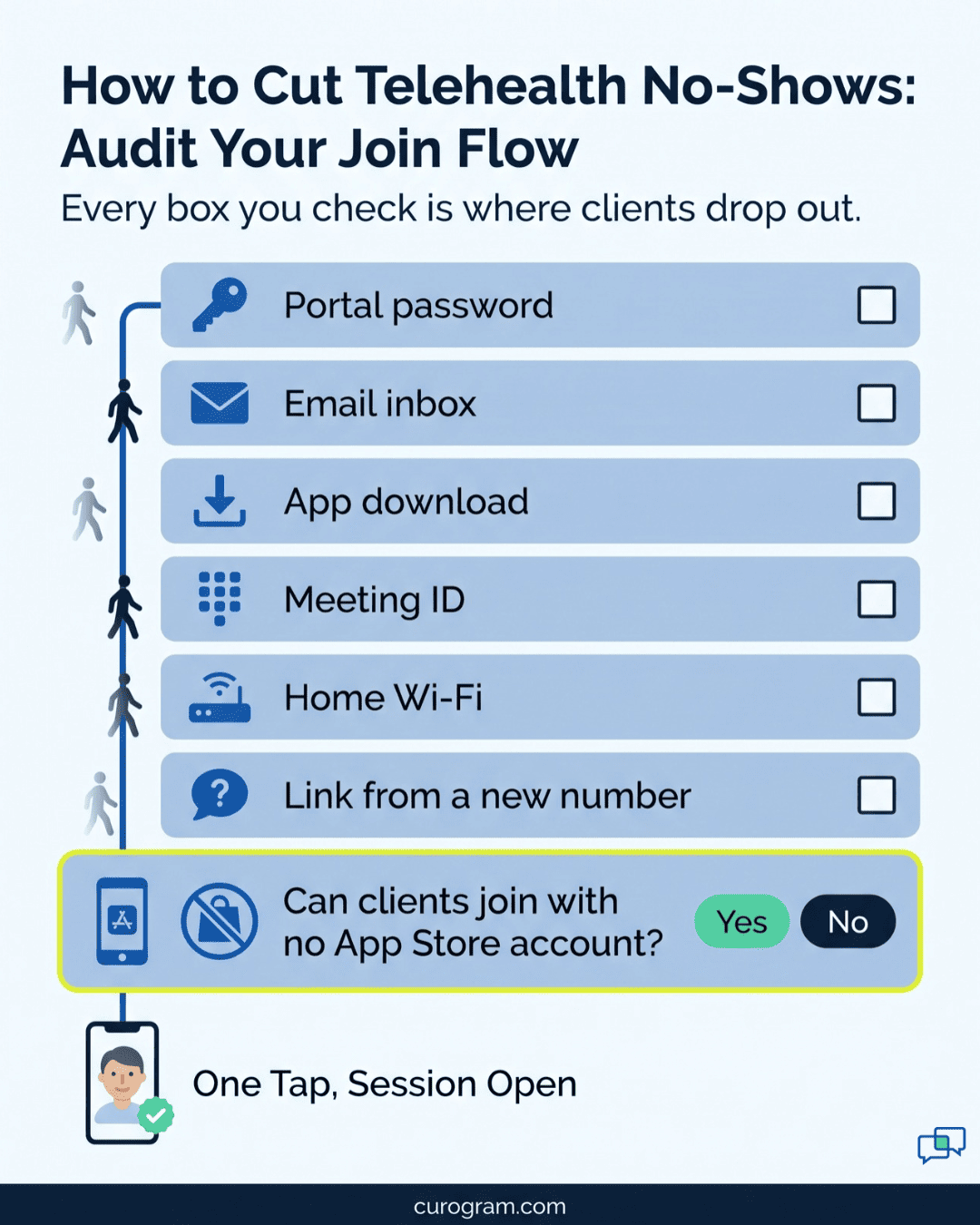
That end asks a lot. It might want a portal password set up once at intake and never used again, or an app store login on a phone with 300 MB of free space.
Then comes a meeting ID, typed with one thumb while a toddler pulls at the other arm. Each step is small, and each one drops some clients who fully meant to attend. Staff rarely see it happen, because the failure takes place on a phone 40 miles away.
So we’ll take a clear position. Shrinking the client’s side of the join to a single tap on a text message is the fastest way to recover lost virtual sessions. That link arrives in the same thread that confirmed the visit, and the video opens in the phone’s browser.
That matters most for the people Welligent organizations serve every day. Think of the medication management client 60 miles from the clinic, the I/DD consumer whose mom handles every phone task, and the client stepping down from residential care on a brand-new number.
The Download Barrier
Credit first. Welligent builds telehealth into the EHR itself. A provider opens the progress note, clicks to start video, and the session runs inside a HIPAA-compliant tool the organization already pays for. Plenty of EHRs still send providers to a separate video vendor with its own login and its own billing.
That design solves the provider’s half of a virtual visit. Your psychiatric nurse practitioner doesn’t hunt for a meeting room or paste a link into a chat window. Documentation lives where the session started.
On the client’s half, things get harder. Reaching that same video room usually means getting through what we call the Portal Wall: portal credentials, an app install, or an emailed link that assumes a working inbox.
For a staff member with a work laptop, those steps take seconds. For the clients most Welligent organizations serve, any one of them can end the visit before it starts.
Where the Client-Side Join Breaks Down
Walk a single failed join from start to finish, and the weak points show up fast:
- The session gets scheduled, and a notice goes to a portal the client hasn’t opened since intake.
- A backup link goes out by email, but the client’s phone has no email account set up.
- Eventually the client finds the link and taps it. A login screen or an app install prompt appears.
- That download stalls on one bar of rural signal, or on a borrowed phone that’s out of storage.
- Your provider waits in an empty video room.
- Your access center calls at minute 8. By the time the client picks up, flustered, the 15-minute window is gone.
- Welligent records a “no-show.”
Every step in that chain is mechanical. Each one sits on the client’s side of the screen, and none of them measures whether the client wanted care.
What a Failed Join Costs at Program Scale
Behavioral health already runs high no-show rates. A quality project at the University of Texas Health Science Center at Houston logged a 31% no-show rate in its outpatient psychiatry clinic before making changes, with about 800 visits scheduled each month.
Telehealth was supposed to bring that number down. When the join itself fails, it just moves the loss online. The math below follows one prescriber running video med checks. These figures are illustrative, so swap in your own.
|
One Prescriber, Video Med Checks (Illustrative) |
Per Week |
Per Year (48 Weeks) |
|
Scheduled 20-minute sessions |
60 |
2,880 |
|
Lost to failed joins at 1 in 5 |
12 |
576 |
|
Prescriber time spent in empty rooms |
4 hours |
192 hours |
That’s nearly five full work weeks of prescriber time each year. For medication management, the cost runs past billing. A missed check-in can mean a lapsed refill, then a crisis call, then an ER visit.
Broadband Maps Don’t Match Client Homes
Rural coverage has improved. The FCC’s 2026 Section 706 Report found that the share of rural Americans without 100/20 Mbps fixed broadband fell by over 44% in two years.
Coverage on a map still isn’t a working plan in a client’s kitchen. That same report notes that remote areas can still see slower speeds and higher latency. In her statement on the report, FCC Commissioner Anna Gomez pointed out that fewer than half of satellite broadband users actually got 100/20 Mbps speeds in 2025.
For your clients, that gap shows up as a stalled app store download or a portal page that times out. Telehealth for clients without reliable broadband has to assume the weakest link: a prepaid phone, a cellular signal, and no home Wi-Fi at all.
A join flow that needs a large install or a long login will miss these clients. Then the chart logs them as non-compliant.
The People in the Empty Room
Put faces on those numbers. A psychiatric nurse practitioner blocks 20 minutes for a med check and spends them watching a “waiting for participant” screen. She can’t bill the time, and she can’t fill it.
Across town, an I/DD consumer’s mother sits in the public library parking lot because that’s where the Wi-Fi is. She’s trying to install an app she’s never heard of, on her own phone, so her son can see his coordinator.
Back at the office, the clinical director reads the weekly attendance report. She knows most of these clients wanted to attend. It was the join flow that failed them, and the report has no code for that.
The One-Tap Session
Almost every client on your caseload has one piece of technology that works without setup: a phone that gets texts. It needs no password, no spare storage, and no app store account. Even a $30 prepaid phone handles it.
Curogram builds the session around that phone. Think of it as a virtual access center assistant. It sends the confirmation, the reminder, and the video link in one text thread, so the client never has to find a second channel.
This is Welligent telehealth access expansion on the client side. Your providers keep launching video the way they do today. What changes is the number of clients who can actually get into the room.
Text link video visits in behavioral health also suit how your access center already works. Staff send and answer texts all day. A join link is one more message in a thread the client already knows and trusts.
It also cuts down on the calls your staff make at session time. When the link sits in the thread, a client who can’t find it can scroll up instead of phoning the front desk. And a staff member can resend it in two taps while still on another line.
What the Client Actually Sees
The full client-side experience takes one message. A text arrives from your organization’s number:
“Hi Dana, your video session with Jordan at Riverbend is today at 2:00 PM. Tap here to join when it’s time.”
Dana taps the link. Her phone’s browser opens, asks to use the camera and microphone, and she’s in the session. She doesn’t create an account or type a password. She doesn’t visit an app store or enter a meeting ID.
If she needs to reschedule, she replies in the same thread, and your front desk sees it. If she’s running late, she can say so there too.
That’s what no-app telehealth for CMHC clients looks like in practice. The technical work happens behind the link, so the client’s only task is to tap.
How It Works Alongside Welligent
Welligent has no public API, so Curogram doesn’t run a two-way API sync with it. Instead, Curogram works as a practical workflow integration that runs alongside Welligent.
In daily use, that means:
- Sessions are scheduled and coordinated through Curogram’s text channel.
- Providers document each encounter in Welligent exactly as they do today.
- Welligent remains the clinical system of record for notes, programs, and billing.
Your clinical workflow doesn’t move. Charting templates, program rules, and billing setup all stay put. Curogram handles the client-facing messages that get people to the session and keeps that thread in one place for your staff.
Our published guides on Welligent mass messaging and automated appointment reminders show the same pattern already in use with Welligent organizations.
Four Caseloads the Portal Was Never Going to Reach
Portal-first telehealth assumes the client has home Wi-Fi, a working email address, and time to set up an account. On most Welligent caseloads, some clients are missing at least one of those. Four groups feel it most.
Rural Outpatient Clients
For a rural telehealth behavioral health agency, the hardest clients to reach live where broadband is weakest. A browser link over cellular data skips the large app download that stalls first.
Medication Management Check-ins
Some clients can’t make a 90-minute round trip for a 15-minute med check. Others lean on a county van that runs twice a week. A one-tap link keeps the visit on the prescriber’s schedule, so a refill decision doesn’t wait on a ride.
I/DD Consumers and Their Caregivers
Caregivers already juggle transport, day programs, and paperwork. Asking them to manage one more app adds a task they may skip. A text link asks them to tap once.
Clients Moving Between Programs
A client leaving residential SUD care for IOP, or moving from school-based services to a community clinic, may change programs, staff, and even phones. The text thread follows the number on file. When the step-down session link arrives in the same thread that texted him through treatment, he knows who’s asking.

The Continued Care: What the Case Numbers Show
Our strongest proof comes from confirmation volume, since attendance is what a virtual session depends on.
Based on our internal data, Covina Arthritic Clinic confirms more than 1,100 appointments a month through automated text confirmations. Atlas Medical Center cut its no-show rate from 14.20% to 4.91% in three months.
Both are medical practices outside behavioral health. We use them because they show what happens when confirmation, reminder, and follow-up all run through text: more people show up. Across our platform, confirmation rates run above 75%.
For virtual care attendance at Welligent organizations, the same mechanics apply. The client confirms in the thread, gets reminded in the thread, and joins from the thread. Nothing new to learn at 2:00 PM on session day.
A Worked Example: One Rural Med Check, Start to Finish
A single session with Curogram in place runs like this. Client and clinic are illustrative, and the timing is a typical setup your team can adjust.
|
When |
What Happens |
Who Acts |
|
2 days before |
Confirmation text goes out: “Reply C to confirm, R to reschedule.” |
Curogram |
|
Same day |
Client replies “C.” Staff see the confirmation in the thread. |
Client, access center |
|
2 hours before |
Reminder text arrives with the join link. |
Curogram |
|
2:00 PM |
Client taps the link. Browser opens, camera turns on. |
Client |
|
2:01 PM |
Client is on screen. Provider starts the visit. |
Provider |
|
After the visit |
Provider writes the note in Welligent as usual. |
Provider |
Two details make this work. For one, the confirmation and the link come from the same number, so the client trusts the link when it shows up. Also, a client who replies “R” two days out gives your access center time to rebook the slot. That’s a far better outcome than an empty room at 2:00 PM.
If a client hasn’t joined by 2:05, staff can text the link again in the same thread. That takes seconds, compared with a phone call that may go to voicemail. Texts often get through on a weak signal that drops calls.
Curogram Highlight: Easy Telemedicine
Easy Telemedicine is Curogram’s HIPAA-compliant video visit. It starts from a text link and opens in the phone’s browser. Clients don’t download an app, create a portal account, remember a password, or type a meeting ID.
For Welligent organizations, it fills the client-side gap next to Welligent’s provider-side telehealth. Your team gets:
- Invites, confirmations, reminders, and join links all live in one text thread the client already uses.
- Clients can confirm, reschedule, or say they’re running late by replying in that same thread.
- Staff can resend a link in seconds if a client hasn’t joined by a few minutes past start time.
- Session texts stay short and discreet: a time, a name, and a link, with no treatment details.
- Curogram is HIPAA-compliant and SOC 2 Type II certified. We sign BAAs and manage TCPA consent and opt-outs for texts.
Your providers keep charting in Welligent, and your program and billing rules stay where they are. Curogram runs the client-facing communication that gets people into the session.
It fits best where a missed video visit carries real clinical risk: med management panels, I/DD check-ins between day program visits, and SUD step-down care.
Conclusion: Open the Session to Everyone
Welligent gives your providers a solid, HIPAA-compliant way to launch video from the note. Curogram gives your clients a way into that session: one text, one tap, and a browser window that opens on whatever phone they have.
Welligent handles clinical documentation, provider workflows, and program management. Curogram handles the messages that bring clients to the session. In behavioral health, getting the client into the room is the first step of any treatment plan.
Start with your own numbers. Pull last month’s virtual no-shows across your programs. Then ask your access center how many of those clients later said they tried to join and couldn’t.
Some of those codes are join-flow failures. The client wanted care, and the login, the app store, or the meeting ID stopped them.
Bring your telehealth attendance by program to a demo. We’ll launch a session from a single text on a phone with nothing installed, and you can judge the join flow yourself.
Schedule a demo to see Easy Telemedicine running alongside Welligent.