
 Mira Gwehn Revilla
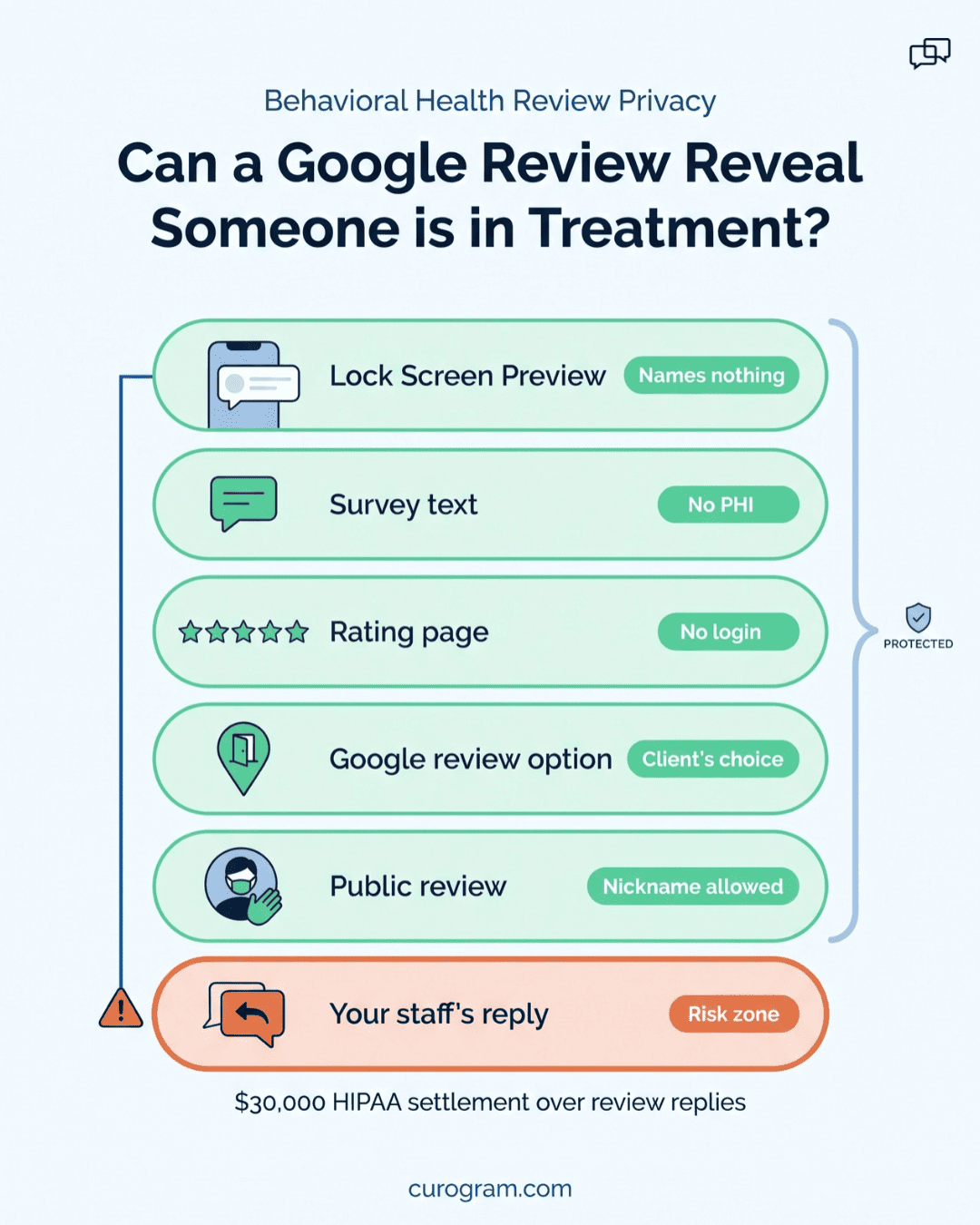
- The text holds no PHI and names no diagnosis, program, or type of care.
- No portal login, app, or email is needed, so clients who never set up Welligent Connect get the same ask.
- Every client who replies sees the same optional link to Google, whatever score they gave.
- Google’s custom display name setting lets a client post under a nickname.
- Low scores also go privately to agency leaders for a personal follow-up.
A thin Google profile at a community mental health center usually gets read as proof that clients would rather stay quiet. We read it as a channel problem. Satisfied clients and their families stay silent because nobody has handed them a safe, simple way to speak.
For agencies on Welligent, the client-facing channel is the Welligent Connect portal. It works for clients who register and log in. Plenty never do.
Think of the outpatient client with no working email address. Or the I/DD consumer whose sister handles every call and form. The foster parent tracking three caseworkers has no time for one more login, and the man six weeks into recovery has deleted every app he doesn’t need.
Those are the clients a portal survey can’t reach. They’re also the clients a public review request can worry most. Posting about a behavioral health provider can feel like telling the world you’re in treatment, and that fear keeps good stories off the page.
A plain text answers both problems. It needs no login and carries no PHI. It leaves every choice with the client: whether to reply, whether to post, and what name Google shows if they do.
That design is what makes text the fair feedback channel for behavioral health clients. It reaches the people your programs serve on the phone they already carry, and it treats their privacy as a design rule from the first word of the message.
A client who had a rough week gets a private call from leadership, so a public post never has to be the only way to be heard.
The Feedback Channel That Excludes the Client
Welligent Connect does the job it was built for. A client registers, sets a password, logs in, and can then check visits, fill out forms, and message the team. For a client with a steady email address and a phone that isn’t shared, that’s a fine setup.
The catch is the first step. Front desk staff who hand out portal codes at intake know the pattern well. The code goes into a coat pocket, the welcome email lands in an inbox the client stopped checking, and the account never gets turned on.
Every touchpoint in the portal sits behind registration and login, so a feedback form placed there only hears from clients who cleared that bar. Welligent also has no review request tool of its own. Nothing nudges a happy client toward your Google listing.
So your public reputation gets written by whoever finds the listing on their own. Often that’s someone upset about the parking lot, a long hold, or a confusing billing letter. Those reviews count, and they come from a small, skewed slice of the people you serve.
What the Gap Looks Like From the Client’s Side
Take a mother whose son has spent a year in your I/DD day program. He talks more now. He has a job coach and a lunch group he looks forward to.
She’d gladly say so in public, and she has never logged into a portal. No request lands on her phone, and no link shows up in her texts. So she says nothing, and the only recent review on your listing is a two-star note about parking.
Then there’s the IOP graduate who credits your program with his first sober year. He’d post, as long as his name stayed off it. He isn’t going to search Google, pick the right one of your four locations, and write a review from a blank box. Nobody made it a one-tap action, so it never happens.
The Digital Divide in Client Feedback for Behavioral Health
Nearly every client carries a phone. The vast majority of U.S. adults (98%) own a cellphone of some kind, and about 91% own a smartphone, according to Pew Research Center’s mobile fact sheet.
Reliance on smartphones for online access is especially common among Americans with lower household incomes and those with less formal education, the same households many community mental health centers serve.
That gap shapes who gets counted. A portal survey needs an account, a password, and often an email inbox. A text needs a phone number that’s already in the chart. Even a basic flip phone can read it.
Your Google profile is where this lands. Based on our internal data, 90% of new patient leads see a Google Business Profile before they reach the website. When satisfied clients stay quiet, the next family searching for care reads a profile shaped by the few who showed up on their own.
|
Feedback channel |
What the client needs first |
Who it tends to reach |
|
Portal survey |
Account, password, email, login |
Clients already active in Welligent Connect |
|
Text survey |
A phone number on file |
Nearly every client with a cellphone |
The Fear Clients Don’t Say Out Loud
Clients carry a real worry, and it deserves a straight answer. Posting a review of a behavioral health provider can feel like posting a diagnosis. “If I write something, everyone knows I’m in treatment.”
That worry is reasonable. A review sits under a name, on a public map, beside an address that tells people what kind of care happens there. For a client in early recovery, a review tied to a real name can reach an employer, an ex, or a landlord.
Caregivers feel a version of it too. A parent who praises an I/DD day program is hinting at her child’s needs in public, so she wants the same control over what shows.
Agencies that wave this concern off tend to end up with silence. Designing for it comes down to three choices. The request names nothing about care, and identity stays in the client’s hands. Nobody on the care team applies pressure either, because declining has to cost the client nothing.
A Request Designed for Dignity: The Text a Client Actually Sees
Start with the message itself, since that’s the only part most clients will ever see. An example might read:
“Thanks for visiting Riverside Community Services today. How did we do? Tap to rate: [link]. Reply STOP to opt out.”
Nothing in it names a diagnosis, a program, a clinician, or a type of care. It could be a note from a dentist or a car shop.
That plain wording matters on a lock screen at work, on a foster youth’s family phone plan, and on a shared phone in a group home.
One small detail is worth a look at your agency. If a program’s name signals its focus, such as “Hillside Recovery Services,” use the most neutral form of your organization’s name in the text.
This is the same sender clients already get reminders and form links from. Curogram texts clients for visits and intake, and the survey arrives on that same thread, so it reads as routine.
Built for 42 CFR Part 2 Sensitivity
SUD programs work under an extra layer of privacy rules in 42 CFR Part 2, and the updated rule has been enforced since February 16, 2026.
A survey text that never mentions treatment keeps the message itself from becoming a disclosure. Curogram is HIPAA-compliant and SOC 2 Type II certified, and the request carries zero PHI by design.
The same care applies to how your staff answer reviews. Manasa Health Center paid $30,000 to settle with HHS’s Office for Civil Rights after its responses to Google reviews disclosed patient information. A safe reply thanks the reviewer and never confirms the person is a client, even when they say so first.
What Happens After the Client Taps
A client who taps the link rates the visit in a few seconds. Every client who answers then sees the same choice to post on Google, whatever score they gave. Inviting only happy clients to post is called review gating, and it runs against Google’s review policies and the FTC’s 2024 rule on consumer reviews. The ask has to go to everyone in the same way.
Low scores and worried comments get a second path as well. They trigger a private alert to agency leadership, so a client who had a bad week hears from a real person. That client still sees the same Google option as everyone else.
On Google, the client decides how they appear. As of November 2025, Google allows users to leave a review by creating a custom display name and profile picture. A caregiver might post as “Grateful Mom.” A graduate might post as “J.R.,” or under a name that points to no one.
Honest Integration with Welligent
Welligent has no public API, so Curogram runs as a practical workflow integration alongside the Welligent schedule. It’s the same pathway behind our Welligent mass messaging and Welligent automated appointment reminders work. See the main Welligent integration page for setup details.
Welligent stays the system of record. Nothing changes in the client’s chart, portal account, or clinical workflow. Your clinicians don’t open a new screen, and your front desk doesn’t add a step to checkout.

Why Automation is the More Respectful Ask
For CMHC clients, I/DD consumers and caregivers, foster families, and people in recovery, “reply to this text” versus “log into the portal” decides who gets heard.
A portal-only survey measures the digitally connected slice of your caseload. SMS satisfaction surveys for community mental health clients reach anyone with a phone number in the chart.
Automation also takes the counselor out of the ask. No therapist has to request a public favor from a client inside a clinical relationship, which raises real boundary questions. The text comes from the agency after the visit, and saying no changes nothing about care.
Clients Finally Get to Say So
Based on our internal data, a multi-location practice using Curogram’s automated surveys saw 90% of its patients leave 5-star reviews.
That came to 1,064 new 5-star reviews in three months, or about 80 a week and roughly 16 every working day across its sites. For an agency whose listing shows 40 reviews, that pace would pass 100 in under a week.
Those were medical results across several specialties, from a practice outside behavioral health. What carries over is the ask: short, easy, and sent to every patient after every completed visit. Your volume will depend on caseload size and how many clients choose to post. The mechanics stay the same.
A Worked Example: One Week at a Three-Site Agency
The walkthrough below is illustrative. It follows three clients at a made-up agency running Welligent, from a finished visit to a Google profile.
|
Step |
What the client sees |
What the agency sees |
|
1. Visit marked complete in Welligent |
Nothing yet |
The appointment closes on the schedule |
|
2. Survey text sends |
One generic text with a rating link |
A sent survey on the client’s thread |
|
3. Client rates the visit |
A short rating screen, no login |
The score and any comment |
|
4. Client sees the Google option |
An optional link, same for every score |
Nothing until a review posts |
|
5. Low score follow-up |
A call from a program leader |
A private alert with the comment |
Monday. Dana’s brother attends the I/DD day program, and she handles his texts. She rates the visit 5, taps through to Google, and posts under the custom name “Day Program Sister.” She writes two lines about his new job coach.
Wednesday. Marcus finishes an IOP group and rates it 5. He opens the Google link, reads it, and closes it. That’s a fine outcome. His score still tells your team the group is working, and nobody follows up to push.
Thursday. A client at the third site rates a visit 2. Her group was canceled with an hour’s notice, and she drove 40 minutes. She gets the same Google option as the others.
The program director also gets an alert, calls her Friday morning, and books her into the next session. Her comment also goes on the list for that site’s next staff meeting.
Curogram Highlight: Stigma-Safe Review Requests in Mental Health Care
Automated Post-Appointment Surveys give behavioral health agencies on Welligent a review request process that runs without staff effort. When a visit is marked complete,
Curogram sends one PHI-free text with a short rating link. Clients don’t need a portal account, an app, or an email address, so review requests without portal login reach the families and clients Welligent Connect misses.
Every client who replies sees the same optional Google link, which keeps the ask even-handed. Low scores also send a private alert to the program leaders you choose, so service recovery can start the same day. Opt-outs are handled on their own when a client replies STOP.
The survey lives on the same channel as the rest of your client texting. Clients already reply to visit reminders through 2-Way HIPAA Texting and complete intake through Secure Online Forms, both with the same tap-a-link, no-login experience.
Conclusion: Let Your Clients Speak — Safely
Your most satisfied clients have probably never been asked. The mother who watched her son find a job coach, the graduate counting his sober months, the foster parent who finally got a call back. Each of them would say something kind about your programs if saying it were safe and took one tap.
A one-text, PHI-free, always optional request gives every client that chance, including the ones who never set up a portal account. It also answers the fear behind the silence. Nothing in the message names care, Google lets them choose their name, and a hard week gets a private call from a leader.
Welligent holds the clinical record of each client’s care. Curogram gives clients a way to speak about that care, on their own phone and on their own terms. Client anonymity on Google reviews in behavioral health becomes something your agency plans for, and the reviews families read start coming from caregivers and graduates.
Ask your clients the way they already talk to you. Schedule a demo to see the exact text a client receives, the anonymity protections around it, and how one practice gained 1,064 five-star reviews in three months.