
 Mira Gwehn Revilla

- Texts go out on a set cadence, such as 7 days, 48 hours, and the morning of the visit.
- Patients reply to confirm, cancel, or ask for a new time, and every reply lands in one shared inbox.
- Confirmations and cancellations update the RXNT schedule, so nobody retypes them.
- Based on our internal data, Curogram clients average confirmation rates above 75% and no-show rates 53% below industry average.
- In psychiatry, our clients average 11.03% no-shows against a 23% industry average.
Most RXNT front desks can tell you whether a reminder went out. Far fewer can tell you whether anyone read it. The scheduler marks the message as sent, the slot looks covered, and nobody checks again until the patient doesn’t walk in. On a full day, there’s no time to check.
We’d put it plainly. A reminder only does its job when it reaches a screen the patient checks and the answer comes back to your staff without a phone call. For most small practices, a two-way text is the one channel that does both.
Getting this wrong is expensive. Industry no-show averages run 19% in primary care and 23% in psychiatry, based on the benchmarks in our internal research. Say your clinic loses three $200 slots a day. Across 250 clinic days, that’s $150,000 a year in visits you staffed, prepped for, and never billed (illustrative math).
RXNT handles the scheduling side well. It’s affordable, and in August 2026 it added its own two-way text reminders. But a yes-or-no reply covers only part of what patients need to say. “Can I come Thursday instead?” is the reply that saves a slot, and it needs a person on the other end.
Curogram adds that loop next to your RXNT schedule. Your team keeps booking in RXNT, patients answer by text, and the replies come back to one shared inbox your staff already watch.
Atlas Medical Center shows what happens when replies reach people. Its no-show rate fell from 14.20% to 4.91% in three months, based on our internal data.
The Silent Reminder: RXNT Gets the Scheduling Right
RXNT earns its spot in a lot of small practices. Capterra lists its scheduler at $29 per user per month, with the EHR bundle near $118. For a two-provider family practice, that buys a clean calendar, e-prescribing, and a patient portal at a fair price.
Reminders are where the line items shift. Third-party pricing listings show automated reminders as an add-on to the EHR bundle, so what RXNT appointment reminders cost depends on your contract. Pull last year’s invoice and check before you assume they’re included.
RXNT has also improved the product. In August 2026 it launched two-way SMS reminders. A patient texts Yes to confirm or No to cancel, and the status updates in RXNT. For practices that relied on one-way texts or portal notices, that’s a real step forward.
Where the Reminder Goes Quiet
Two gaps remain, and both show up on your schedule.
Reach comes first. A notice routed through the patient portal only reaches people who set up MyRXNT. A patient who booked by phone and never downloaded the app gets nothing they’ll notice.
Then there’s the reply itself. RXNT’s launch post describes two answers, Yes and No. It doesn’t describe rescheduling by text. Replies sent within 24 hours of the visit get an automatic message telling the patient to contact the office.
Follow one booking through. Dana books a Tuesday 2 p.m. follow-up. On Monday night she answers the reminder with “Can I do Thursday instead?” An auto-reply tells her to call. She means to, then forgets, and on Tuesday the room sits empty.
Your front desk calls her at 2:10 and gets voicemail. It’s message number 41 of the day.
Why Portal Notices Miss So Many Patients
Portal setup is a step many patients skip, and the reasons are ordinary. A new patient books by phone and gets an invite email that lands in a promotions folder.
A daughter books for her 78-year-old father using her own cell, so the portal account sits under a name nobody checks. Someone coming in once for a sports physical sees no reason to download an app.
In each case, the reminder went through a door the patient never opened. Your schedule can’t tell these patients apart from people who saw the message and chose to skip.
What the Empty Slots Cost
Lost fees are the easy part to measure. Take an illustrative site with 222 no-shows a month at $120 a visit. That’s $26,640 a month in visits that were booked, staffed, and never billed, or close to $320,000 a year. A three-provider clinic could hit that number with a no-show rate under 20%.
Some specialties take a bigger hit. Industry averages in our internal research put pediatrics at 30% and dermatology at 25%. Psychiatry sits at 23%.
Staff time is the cost nobody logs. If each confirmation call takes three minutes, 40 calls eat two hours of the front desk’s day (illustrative). Most of those calls end in voicemail, and none of them refill a slot that opens at 2:10 p.m.
Who Feels It First
A solo provider feels it in the chart room. She read the intake notes for her 2 p.m. new patient over lunch, flagged two medication questions, and blocked a full hour. Now she has a gap she can’t fill and notes she’ll need to read again next month.
Your office manager feels it on the weekly report. Thursday’s schedule holds the same three patients who no-showed twice last quarter. Her only tool is another round of calls, made during the hours the phone is already ringing.
Your front desk lead feels it at check-in. When the 2 p.m. doesn’t show, she texts the 2:30 to ask if they can come early, gets no answer, and spends the next half hour fielding a provider who keeps poking her head out to ask.
The Schedule Guardian
Curogram has one narrow job in an RXNT practice. It gets every booked patient to answer before the visit and puts that answer where staff can act on it.
A Reminder on the Lock Screen
A text shows up on the lock screen. There’s no app to install, no password to reset, and no portal invite to accept. If the patient has a cell phone, the reminder reaches them.
Curogram sends reminders by SMS, email, or phone call. You set the cadence by provider, appointment type, or the patient’s language. A common setup for a family practice looks like this:
|
Touch |
Timing |
Job |
|
First reminder |
7 days out |
Surfaces conflicts while the slot can still be refilled |
|
Second reminder |
48 hours out |
Catches patients who missed the first text |
|
Day-of reminder |
Morning of the visit |
Confirms time and address |
Answers Come Back to a Person
Every reply has somewhere to go. A YES marks the visit confirmed. A cancellation frees the slot right away. Anything else, like Dana’s “Can I do Thursday instead?”, drops into a shared inbox where your front desk answers in the same thread.
That’s what two-way appointment confirmation should mean in practice. Staff don’t sort through 40 names each afternoon. They see the few slots still unconfirmed after the 48-hour text and call only those patients.
Confirmations and cancellations write back to the RXNT schedule. Your providers see current status without anyone retyping it.
How It Fits Next to RXNT
You keep scheduling in RXNT. Appointment data syncs from RXNT to Curogram, so nobody uploads a spreadsheet or keeps a second calendar. We’d hold any patient reminder software to that test. If staff have to enter a visit twice, the tool gets skipped on a busy Monday.
The daily workflow runs in four steps:
- Staff book the visit in RXNT as usual.
- Curogram picks up the appointment and queues the reminders.
- Patients reply by text, and the status updates in RXNT.
- The front desk works the short list of unconfirmed slots and any open threads.
When a patient asks to move, staff book the new time in RXNT. The next reminder cycle picks it up without any extra step.
Not every patient texts. For a landline or a patient who prefers email, you can set that patient’s reminders to a voice call or an email instead, using the contact details already in RXNT.

What Patients Actually Text Back
Most replies are a single word. The rest are the ones a Yes/No system can’t handle, and they’re often the most useful messages your front desk gets all week:
- “Running 10 minutes late, still coming.” Staff note it, and the provider keeps the slot.
- “Do I need to fast for the blood work?” A medical assistant answers in the thread before the patient eats breakfast.
- “My insurance changed last month.” Billing gets a heads-up before check-in, which saves a claim rework later.
- “Can my husband come to this one with me?” Staff confirm, and the room gets a second chair.
Each of these would have been a phone call or a surprise at the desk. In a shared inbox, any staff member can answer, and the thread stays attached to the patient.
The Full Schedule
Atlas Medical Center started at a 14.20% no-show rate. Three months after it turned on Curogram’s automated reminders, the rate was 4.91%, about 3X better than the industry average, based on our internal data.
The drop came in steady steps: 11.16% in April 2023, 7.62% in May, and 4.91% by June. Across our clients, the average confirmation rate sits above 75%, through a fully automated process.
Before you start, pull your RXNT no-show rate for the last 90 days. That’s your baseline, and it’s the number you’ll hold month three against.
One Tuesday, Step by Step
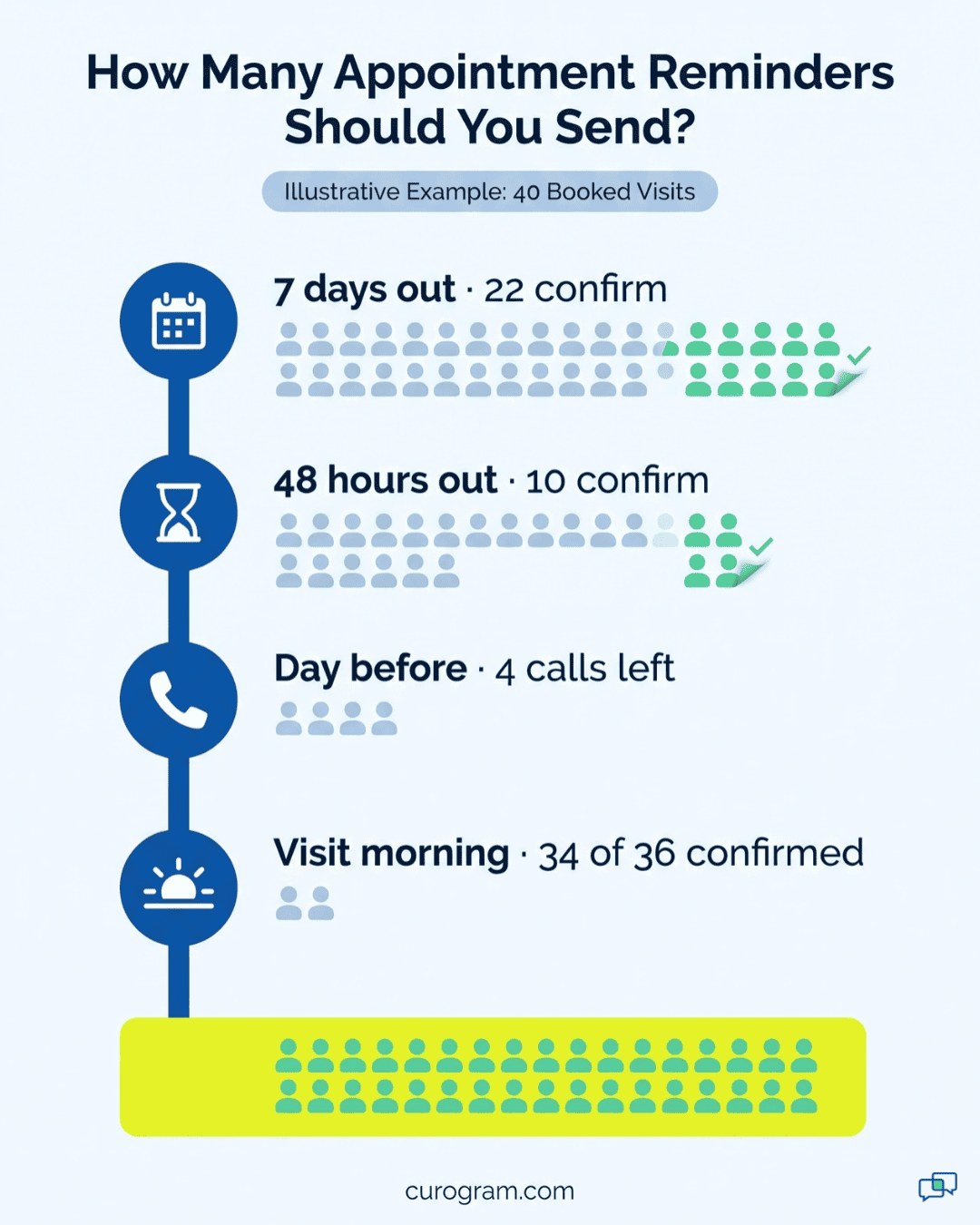
Take an illustrative two-provider family practice on RXNT with 40 visits booked for next Tuesday.
|
When |
Sent To |
What Happens |
|
7 days out |
40 patients |
22 confirm, 1 cancels |
|
48 hours out |
17 unconfirmed |
10 confirm, 2 ask to reschedule, 1 cancels |
|
Monday afternoon |
4 still silent |
Front desk calls 4; 2 confirm, 2 go to voicemail |
|
Tuesday morning |
36 still booked |
Day-of text with time and address |
By Monday evening, 34 of the 36 remaining patients have confirmed. The two reschedule requests came in as texts, and staff booked both into Thursday from the shared inbox.
Four slots opened up: two cancellations and two moves. Each one surfaced at least 48 hours ahead. The front desk filled three of them from its waitlist before the weekend ended.
At an illustrative $150 a visit, that’s $450 kept on one Tuesday. Even if only a third of that repeats across 250 clinic days, it adds up to $37,500 a year.
Compare that with the old Monday. Without SMS reminders, a medical office this size calls all 40 patients and leaves two dozen voicemails. It still learns about most cancellations when the chair stays empty. With them, the call list is four names.
Curogram Highlight: Automated SMS Reminders With Two-Way Confirmation
Automated SMS Reminders with Two-Way Confirmation is the Curogram feature behind the numbers on this page. It runs alongside your RXNT schedule and handles outreach, replies, and status updates.
Setup starts with your RXNT appointment data, which syncs to Curogram on its own. From there, you choose:
- Reminder timing for each provider or appointment type, such as 7 days, 48 hours, and morning-of
- The channel: SMS, email, or phone call
- The language each patient receives
Patients confirm, cancel, or ask to reschedule by text. Confirmations and cancellations update RXNT, and free-text replies land in a shared inbox your whole front desk can work. A short list shows which slots are still unconfirmed, so follow-up calls go only where they’re needed.
At Covina Arthritic Clinic, this workflow confirms more than 1,100 appointments a month, based on our internal data.
Compliance is built in. Curogram is HIPAA-compliant and SOC 2 Type II certified, and we sign a business associate agreement (BAA) with every practice. Consent and opt-outs are tracked automatically, so a patient who texts STOP stops receiving reminders without anyone editing a list.
Conclusion: Guard Every Slot
The cheapest revenue in your practice is the appointment that’s already booked. You’ve paid to fill it, your provider prepped for it, and the room is staffed. Losing it to a reminder nobody saw is the most avoidable loss on your books.
RXNT keeps the schedule, and its native texts handle Yes and No. Curogram adds the rest of the conversation: reschedule requests, questions, and a shared inbox where your staff answer them by text.
Run your own math before you talk to anyone. Multiply your daily slots by your average visit value, then by your no-show rate. A practice with 30 daily slots at $175 and a 15% no-show rate loses $787.50 a day. Over 250 clinic days, that’s $196,875 a year (illustrative).
Schedule a demo and bring last month’s no-show count from RXNT. We’ll map it against your calendar and show you what a no-show rate 53% below industry average looks like for your providers.