
 Jo Galvez

Curogram reads the RXNT schedule. After each visit, it texts the patient a short survey and a link to your Google review page.
Replies land in a shared inbox, so a manager can follow up on a concern the same day. One Curogram practice with several sites gained 1,064 new five-star reviews in three months this way.
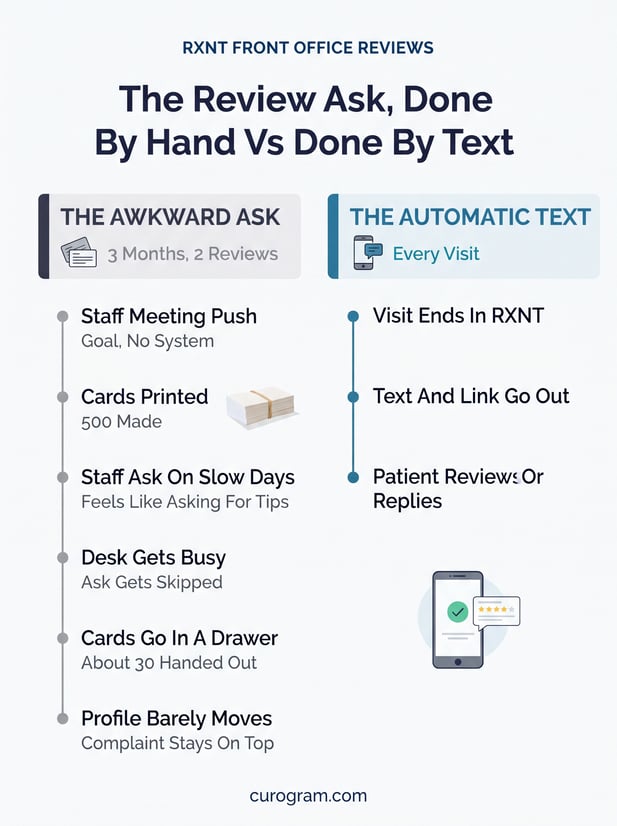
The review cards are still in the drawer under the check-in counter. Someone printed 500 after a staff meeting about Google. About 30 went out.
Nobody on the team is against reviews. The trouble is the ask itself. Saying "Would you mind leaving us a review?" to a patient holding a copay receipt feels a lot like asking for a tip.
On a day with a full waiting room, it doesn't happen at all. Staff also hesitate, fairly, to ask a patient who seemed upset or rushed.
The goal usually lands on the front desk lead, on top of phones, check-ins, insurance cards, and the fax queue. Reviews come last on that list, and nobody can blame her.
So review volume tracks desk traffic and staff mood. A practice seeing 100 patients a week can easily add two reviews in a quarter, and one of them is a complaint. The practice's real reputation never reaches the page where new patients look.
Our position is that the review request belongs to the system, after every visit, with nobody on staff saying the sentence. A front office running RXNT already has the schedule data to make that happen.
This guide covers why the manual ask fails, and why some versions of it now break Google's rules. Then it walks through the automated pipeline next to RXNT, step by step, and what it asks of the manager each week.
It's written for office managers and front desk leads, the people who usually get handed the review goal.
The Awkward Ask at the RXNT Front Desk
RXNT handles charts, scheduling, and billing for the practice. The review ask lives outside it, which means it lives with people.
How a Review Push Fades
Most practices have run some version of this:
- The manager announces a review push at the staff meeting.
- Cards get printed with a QR code.
- Staff ask a few patients on a slow Tuesday.
- The desk gets slammed on Wednesday.
- The cards move to a drawer.
- Three months later, the profile has two new reviews.
Front desk review asks fail at step four every time, because check-ins and phones come first.
When the Manual Ask Breaks Google's Rules
Some fixes for the fade make things worse. Google's policy bars pressuring people to review while on the premises, and asking staff to hit a set number of reviews. It also bars asking for reviews that name a staff member.
A push with per-person targets, or a script that asks patients to mention the nurse by name, runs straight into those rules. A staff review request workflow built on quotas carries the most risk.
Who Ends Up Posting
With no steady ask, the patients who post are the ones motivated by a bad day. Grateful patients go home, and the profile drifts sour.
That drift hurts. In a 2024 study, a higher share of negative reviews lowered people's intent to choose a physician. The manager is still measured on growth, with no tool that produces it.
Ask the front desk lead about the last review push and you'll hear the same story. She knows the script and believes in the practice. She still can't make herself say it to a patient who just paid a $40 copay.
A Review Engine That Runs Alongside RXNT
The fix is an ask that happens every time, by text, with no one on staff having to make it.
How the Request Works After Each Visit
Curogram connects with RXNT through a private API and reads your appointment schedule. After each visit, the patient gets a short text like this:
"Thanks for visiting Maple Family Medicine today! Tell us how we did here: [link], or just reply with any questions."
The text goes out a few hours after the appointment, while the visit is fresh, and no one at the desk has to remember who was seen. That's patient review automation at its simplest: one message, one link, sent the same way to every patient. You can see the RXNT setup on Curogram's RXNT integration page.
The Rules That Keep It Clean
Google's policy bars businesses from selectively soliciting positive reviews or discouraging negative ones. So the link goes to everyone, and nobody is screened out by their answer. The same policy bars pressuring people to review while they're still on the premises, which a text sent later avoids.
HIPAA-compliant review requests also keep the text generic. The message names no condition, treatment, or provider specialty. Responses to reviews need the same care: HHS settled with a New Jersey psychiatry practice for $30,000 after it disclosed patient details while answering online reviews.
Curogram Highlight: Automated Post-Appointment SurveysAutomated Post-Appointment Surveys send the review request for you after every visit on the RXNT schedule. Staff don't print cards, keep lists, or say a script at checkout. When a patient replies with a concern, it lands in a shared inbox, so the manager can call them the same day. Curogram is HIPAA-compliant and SOC 2 Type II certified, and it signs a BAA with your practice. Behavioral health practices can keep the wording discreet. Family medicine and physical therapy offices tend to see the steadiest gains, since their patients visit often. Learn more about reputation management for RXNT users. |

Growth Without a To-Do List
Once the ask is automatic, review volume follows visit volume.
The Numbers From One Practice
A multi-location practice using Curogram's post-appointment surveys gained 1,064 new five-star reviews in three months, and 90% of the practice's patients left five-star reviews.
Its total Google reviews grew from 993 in August 2023 to 8,159 by December 2024, based on Curogram client data from clinical settings.
That works out to dozens of new reviews a week across the group's sites. No one on that staff printed a card or kept a tally sheet to get there.
The Manager's Weekly Routine
A medical office reputation workflow on autopilot still needs about 15 minutes of judgment a week:
- Read new replies in the shared inbox and call anyone with a concern.
- Reply to new Google reviews with a short thank-you.
- For negative reviews, invite the person to call, and never confirm they're a patient.
What the Front Desk Gets Back
Nobody says the awkward sentence again. Review automation small practice teams can run asks nothing of the people at the counter, so check-ins get their full attention.
Follow-up conversations can stay in the same thread through 2-way HIPAA texting. A stronger profile also helps mass messaging campaigns that invite past patients back.
For the bigger picture, see Google review automation for RXNT practices, and for the patient side, read about post-visit survey texts RXNT patients actually answer.
Conclusion: Delete the Ask Script
The only review pipeline that works in a busy practice is the one that doesn't need staff to run it.
Try one count before your next staff meeting. Pull your Google reviews from the last 90 days, then pull completed visits from RXNT for the same stretch. Divide the first by the second. That ratio is the review pipeline you don't have yet.
Bring both numbers to a short session with us, and we'll show you what the same count looks like with an ask after every visit.
Book a demo. We'll show you the survey text, the reply inbox, and the weekly routine for your RXNT front office in one short session.
Frequently Asked Questions