

9 min read
Patient-Friendly Telemedicine for Oracle Health | Curogram
Aubreigh Lee Daculug
:
May 12, 2026
HealtheLife portal logins, password resets, and Zoom authentication push 40-50% of invited patients to drop off before their appointment.
The fix is simpler than most teams expect. Zero-download telemedicine sends a single text link, the patient taps it, and joins instantly. No account. No password. No app.
Practices that remove this friction see virtual visit penetration jump from 8-12% to 18-22% in just six months, with patient satisfaction climbing right alongside it.
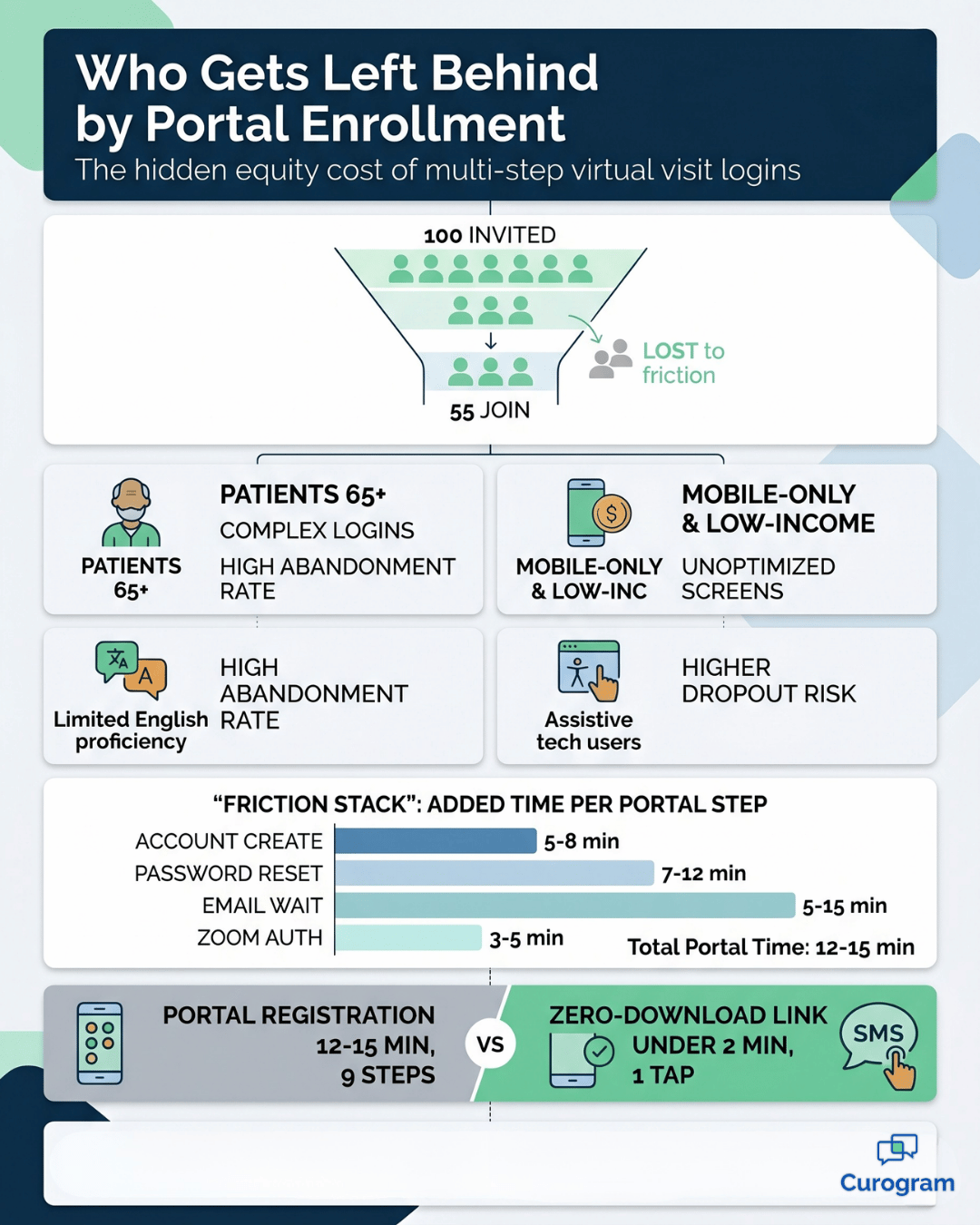
Imagine this. Your front desk just texted 100 patients a virtual visit invitation. By appointment time, only 55 of them actually join.
The other 45? They couldn't remember their portal password. Or they got stuck on the security questions. Or they tapped the link on their phone, hit a Zoom prompt, and gave up.
It sounds simple to invite a patient to a video call. It isn't.
For most medical practices using Oracle Health, the gap between "appointment scheduled" and "patient on screen" is a quiet revenue leak. Each abandoned virtual visit is a no-show, a rescheduling call, or worse, a patient who decides telemedicine just isn't for them.
This is where telemedicine friction becomes more than an IT issue. It becomes a clinical operations problem, a patient experience problem, and a financial problem — all at once.
When 40-50% of invited patients never make it past virtual visit enrollment, your telehealth ROI quietly collapses.
And yet most practices blame the patient. "Older patients struggle with technology." "Some folks just prefer in-person." Sometimes that's true. But far more often, the issue isn't the patient. It's the path you're asking them to walk.
Think about what that path looks like. Click an invitation link. Land on a HealtheLife login screen. Create an account if you don't have one. Pick a password. Confirm an email. Log in. Find the right button. Launch Zoom. Authenticate again. Wait.
That's not enrollment. That's an obstacle course.
In this guide, we'll walk through exactly where patients drop off, why those drop-offs happen, and what a frictionless enrollment process actually looks like in practice — with real numbers attached.
Where Patients Get Stuck Before They Ever See a Provider
Before we talk about fixing the patient experience, you need to see where it actually breaks. Most enrollment failures don't happen at one step. They happen across a chain of small frictions that quietly add up.
The Account Creation Wall
The first wall most patients hit is account creation. When someone receives a text or email inviting them to a virtual visit, the link sends them to the HealtheLife portal.
If they don't already have an account, the portal asks them to complete a short registration before they can go any further:
- Choose a username
- Create a password that meets complexity rules
- Answer security questions
- Confirm their identity through email
For a 38-year-old patient who lives on their phone, that's a minor speed bump. For a 72-year-old patient, it's a wall.
About 35-40% of any health system's population is over 65. Research on portal sign-ups shows this group has 2-3× higher abandonment rates than patients aged 35-50. The anxiety isn't irrational. They're worried about clicking the wrong button and exposing their medical records.
Then there's the password problem. If your portal requires 12 characters, mixed case, a number, and a symbol, expect failure.
Studies of password creation show that 35-40% of users give up after 2-3 validation errors. Each "Password must include at least one number" message chips away at confidence.
Email confirmation makes it worse. The patient registers, then waits. The confirmation email is slow, or it lands in spam. Five to fifteen minutes pass. The patient assumes the system is broken and walks away.
55-60% |
| Average enrollment-to-join conversion for portal-based virtual visits. Out of every 100 patients you invite, roughly 40-45 never make it to the appointment. |
The Forgotten Password Loop
Even patients who already have an account often can't get back in. Picture this scenario. Your team creates a portal account for a new patient in March. They book a virtual visit for late April. By appointment time, they've forgotten their password.
Now they have to click "Forgot Password," confirm their identity, reset, and try again. What was supposed to be a 3-minute join becomes a 10-15 minute scramble, a common issue in patient access and telehealth onboarding workflows.
If they mistype three times, they're locked out for 30 minutes. So they call your front desk. Your staff hears, "Your portal isn't working." The portal is fine. The patient just couldn't remember their password — but the result is the same. Another rescheduled appointment.
Mobile makes this worse. SMS-delivered links lead patients to a portal interface that wasn't designed for small screens. Forms don't reflow. Keyboards block fields. Patients who could log in from a desktop fail on their phone.
The Double Authentication Problem
Once patients finally clear the portal, they hit a second gate. HealtheLife shows a "Launch Video Visit" button that opens Zoom. But Zoom has its own authentication.
The patient is now asked to download an app or launch a web client. That's two enrollment systems for one appointment.
When something fails, no one knows what to fix.
Was it Zoom credentials?
A network issue?
An outdated app?
Patients can't tell, so they call your office. Your team spends 10-15 minutes on what should have been a 30-second join. That's pure operational drag.
| Friction Point | Average Time Added | Drop-Off Risk |
|---|---|---|
| Portal account creation | 5-8 minutes | High |
| Password reset loop | 7-12 minutes | Very High |
| Email confirmation wait | 5-15 minutes | High |
| Zoom secondary auth | 3-5 minutes | Medium-High |
| Mobile interface mismatch | 4-10 minutes | Very High |
What this means for your team:
Every minute you add to enrollment cuts conversion.
A 15-minute path doesn't just feel slow — it teaches patients that virtual visits are harder than in-person ones.

The Human Side of Why Patients Walk Away
Technology friction is only half the story. The other half is psychology. Patients aren't abandoning your virtual visits because they're lazy. They're abandoning them because the process makes them feel incompetent, exposed, or unsafe.
Tech Anxiety and the Generational Gap
Older patients carry real, reasonable concerns about doing something wrong online. The fear isn't of the doctor. It's of breaking something. "If I create an account wrong, will I leak my medical history?"
That worry is amplified when the steps feel opaque. Patients with limited prior telemedicine experience — those who've never used Zoom, FaceTime, or Google Meet — often ask things like, "Will the doctor see me clearly? Will this be recorded? Can someone listen in?" Those are not silly questions.
Health literacy adds another layer. Patients reading at a 6th-grade level encounter portal instructions written at a 10th-grade level. The word "video conferencing" doesn't translate well across cultures or languages. Add limited English proficiency, and the dropout rate climbs sharply, a known issue in equitable telehealth access and patient communication strategies.
For your team, the takeaway is simple. Every word, screen, and step you add becomes a tax on the most vulnerable patients in your panel.
The Confidence Cliff
Behavioral research shows something useful here. When people invest effort and succeed, they grow more committed. When people invest effort and fail repeatedly, they conclude the activity isn't for them.
That's why the third failed password attempt is so dangerous.
The patient doesn't think, "Password reset is hard." They think, "Telemedicine isn't for me."
The reverse is just as powerful.
When telemedicine feels as easy as opening a text message, patients build confidence fast and tell others.
Word-of-mouth adoption is the cheapest growth lever you have, but only if the experience is shareable. "I just clicked a text link — no account, no login" is a story patients pass along.
+12-18% |
| The lift in patient satisfaction scores when virtual visit enrollment is friction-free. Easier joining doesn't just feel better — it shows up in your NPS. |
Equity and Accessibility Blind Spots
Then there are patients your enrollment process actively excludes. The barriers stack differently for different populations.

But the result is the same — they get locked out before they ever reach a provider:
- Patients using screen readers, who hit forms and password meters that don't translate to assistive tech
- Mobile-only patients, often 20-25% of lower-income populations, navigating desktop-built interfaces on small screens
- Patients without stable email, including those experiencing housing insecurity or domestic violence
- Patients with limited English proficiency, reading instructions written above their literacy level
These aren't edge cases. In practice, this means your virtual visit program may be serving the patients who need it least, while excluding the ones who'd benefit most.
What Frictionless Telemedicine Actually Looks Like
Once the problem is clear, the fix becomes obvious. Strip out the layers. Authenticate invisibly. Meet patients where they already are — their text inbox.
This is the promise of zero-download telemedicine, and it's where Curogram's approach changes the math.
One Click. Zero Downloads. Patient On Screen.
Curogram replaces the multi-step portal journey with a single SMS link. The patient gets a text. They tap. They're in the video room.
That single change wipes out the entire portal-side enrollment chain:
- No account creation
- No password to remember or reset
- No email confirmation wait
- No Zoom prompt or app download
Authentication still happens — the link itself contains a secure token tied to the patient's identity and appointment ID — but it runs invisibly in the background. The whole process collapses from 15-20 minutes of friction to under 2 minutes of joining.
When the patient lands in the video room, they immediately see their provider's name, their appointment time, and clinical context. That instant reassurance — "I'm in the right place, my doctor is expecting me" — is something portal-based virtual visit enrollment almost never delivers.
Built for Phones, Built for Everyone
Zero-download links work the same on any device. Smartphone, tablet, laptop — same experience. No app to install. No browser config. No "this doesn't work on iPhone" support call.
That matters because text messaging is the most reliable channel you have. SMS open rates sit at 92-95% within five minutes. Email open rates from healthcare organizations are often just 10-15%, thanks to spam filters and patient skepticism.
If you want patients to actually receive and act on appointment invitations, SMS isn't optional.
A simple, single-button join screen is also far easier to make accessible. Screen readers can navigate it. Patients with low vision can find the button. Patients with limited tech experience don't get lost.
For your patient engagement team, this is what equity-driven design looks like in practice.
The Numbers Behind the Switch
Here's where it gets interesting for clinical operations leaders. When the friction comes out, the numbers move in the same direction across the board.
Enrollment-to-join conversion climbs from around 55-60% to 92%+. For a typical 1,000-invitation month, that's an extra 320-370 completed visits — roughly $27,000-$31,000 in recovered revenue at $85 per visit. Average join times drop from 12-15 minutes to under 2.
The metric that compounds over time, though, is patient loyalty. A successful first visit becomes the reason patients book a second. Repeat telemedicine usage climbs from 65-70% to 78-85%, and patients who breeze through their first appointment tend to tell other patients about it.
This is how virtual visit penetration moves from a stuck 8-12% of total volume to 18-22% within 3-6 months. Not by adding features. By removing steps.
Ready to Stop Losing Virtual Visits to Friction?
If 40-50% of your virtual visit invitations are slipping through the cracks, the issue isn't your patients. It's the path you're sending them down.
Every forgotten password is a missed appointment. Every "the link doesn't work" call is staff time you can't get back. Every confused 70-year-old who gives up is a patient who tells their friends that telemedicine is too hard.
That's not a marketing problem. That's a workflow problem. And it's solvable.
Curogram's zero-download telemedicine integrates directly with Oracle Health, removes the HealtheLife enrollment maze, and gets patients into video visits with a single text-message tap. No accounts. No app. No second authentication. Just a link, a click, and a face-to-face conversation with their provider.
For practices already on Curogram, this slots into the same HIPAA-compliant 2-way texting platform your front desk uses every day. For practices new to Curogram, training takes about 10 minutes per team member.
Within 6 months, the picture changes fast. Virtual visit penetration moves from 8-12% to 18-22% of total volume. Enrollment-to-join conversion jumps from around 55-60% to 92%+. Patient satisfaction with telemedicine rises 12-18%, and repeat usage climbs from 65-70% to 78-85%. Those aren't projections built on hope.
They're the patterns we see when friction comes out of the patient experience.
If you're a clinical operations director, patient engagement manager, or chief medical officer trying to make telemedicine actually pay off, the next step is simple. See it in motion.
Schedule a demo with Curogram today. We'll walk you through how zero-download telemedicine works inside Oracle Health environments, show you the conversion math for your patient volume, and answer the specific operational questions your team needs answered before launch.
Frequently Asked Questions
The barrier isn't "just a login." It's a chain of small frictions stacked together: account creation, password rules, email confirmation waits, login attempts, two-factor codes, Zoom authentication, and troubleshooting whenever any step fails.
Authentication still happens — it just happens invisibly. Each zero-download link contains a cryptographic token that encodes the patient's identity, the appointment ID, and the link's validity window.
It's an easy fix. Most platforms allow patients to request a new link through SMS, the patient portal, or a quick call to the front desk. Your staff can resend the link or share the video room URL directly.
Yes. HIPAA compliance is about how protected health information is transmitted, stored, and accessed — not whether a patient types a password. Zero-download links use encrypted, time-limited tokens that authenticate the patient's identity behind the scenes, and the video session itself runs on a HIPAA-compliant platform with end-to-end encryption.
Most practices are live within 2-4 weeks, depending on team size and existing workflows. The platform integrates with Oracle Health to pull appointment data, so your front desk doesn't double-enter information.