
 Mira Gwehn Revilla

Curogram adds that thread on top of Open Dental, so a balance can go out the day it becomes patient responsibility.
- The patient taps the link, pays on a phone, and gets a receipt in the same thread.
- No portal account, password, or app is needed to pay.
- Card details go into a secure payment page and never sit in the text itself.
- Open Dental stays your ledger, and your team posts from same-day payment confirmations.
- Because Curogram runs in the cloud, payment texts don’t depend on a server in your back office.
A patient who confirms a cleaning by text in under a minute can still leave a $64 statement on the counter for six weeks. That gap is where a lot of dental balances age.
Open Dental does its part well. The ledger is clear, the treatment-plan estimate was honest, and insurance posted cleanly. Then the patient’s share drops into a paper statement, and the clock starts.
That envelope sits on a kitchen counter for two weeks. A second one prints. Someone at your front desk adds the name to a Friday call list, and the patient says they never saw a bill.
Meanwhile, that same patient answered your reminder text last Tuesday. They confirmed the visit with a “C” and filled out the health history form on their phone in the parking lot.
Our position is simple: the payment request belongs in that same text thread. A balance sent as a secure link, in a conversation the patient already trusts, gets paid faster than any statement can be printed, folded, and mailed. Even Open Dental’s own Message-to-Pay feature, added in version 24.1, points in this direction.
This guide walks through where the mailed-statement cycle breaks, how text-based collection works next to Open Dental, and what one balance looks like when it moves from envelope to tap.
You’ll also get a simple way to run your own numbers: what you spend on statements each month, how many of them turn into payments, and how long the rest sit in your aging report.
If your office manager spends Friday afternoons dialing patients about $60 hygiene balances, this is written for you.
The 45-Day Envelope: What Open Dental Gets Right on Billing
Credit where it’s due. Open Dental’s Account Module gives your team an honest, line-by-line ledger. Treatment-plan estimates are solid, and when you use an integrated card processor, payments taken at the desk post cleanly.
Open Dental has also moved toward mobile payments. Its Message-to-Pay feature, available in version 24.1 and later, lets staff send a text or email with a link to the Payment Portal. Patients can pay without logging into the Patient Portal.
The catch is in the setup. Message-to-Pay needs the Payment Portal, an integrated processor, and the eConnector service running on a computer in your office. Sending it by text also means paying for Integrated Texting as a separate eService.
Each piece is another line on the bill. That’s the add-on meter. And the payment link still arrives as a one-off message, apart from the reminder and form texts your patients already answer.
How the Statement Cycle Actually Runs
A hygiene balance in an Open Dental office usually moves like this:
- Insurance pays, and the claim is received in Open Dental.
- The leftover amount drops to patient responsibility.
- Your next billing run prints a statement, and it goes in the mail.
- Two weeks pass with no payment and no reply.
- The patient means to deal with it but sets it aside.
- A second statement prints at the next billing cycle.
- Your office manager adds the account to the call list.
By day 45, the balance is still open. It’s also now sitting next to a fresh batch of statements for this month’s work.
Each step on that list asks the patient to act later, and each one adds days.
Why Statements Stall
A dental statement asks a lot of the reader. It lists procedure codes, insurance estimates, adjustments, and a balance at the bottom. Many patients can’t tell whether that number is final or whether insurance is still working on it.
So they wait. If they do decide to pay, the next step is a check, a phone call during your office hours, or a website login they set up once and forgot. Each of those is a reason to put the envelope back down.
Address changes make it worse. A returned statement means your team has to track down a new address before the cycle can even restart, and the balance keeps aging while they do.
What the Envelope Costs You
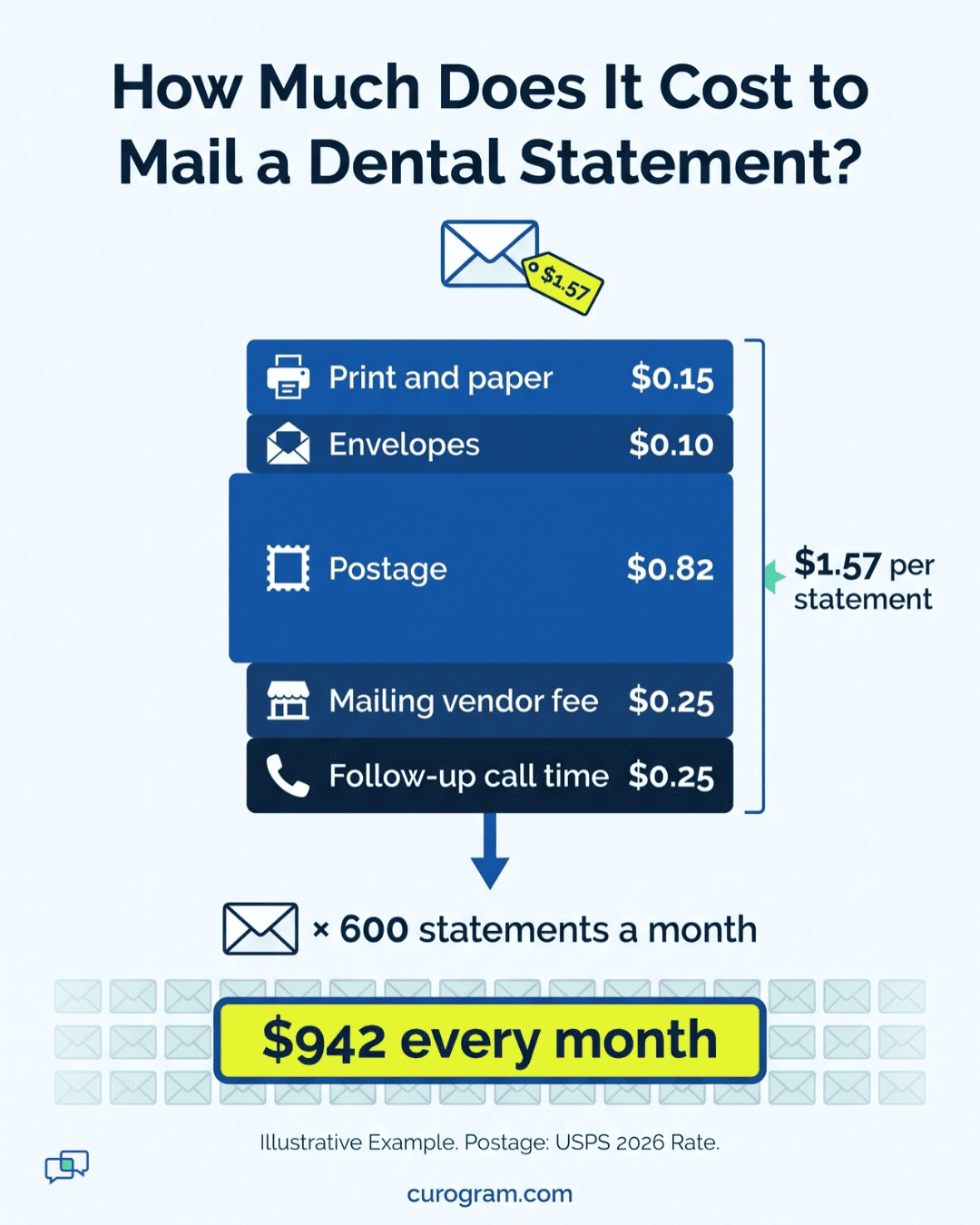
Paper statements look cheap one at a time. In bulk, they aren’t. Printing, envelopes, postage, and outsourced mailing fees add up fast for a busy general practice.
As an illustrative example, take an office spending $800 to $1,000 a month on statements. That’s $9,600 to $12,000 a year. If only about 1 in 5 of those statements leads to a payment, most of that budget goes to paper that gets ignored.
|
Statement math (illustrative) |
Monthly |
Yearly |
|
Statement spend |
800-1,000 |
9,600-12,000 |
|
Share that leads to payment |
~20% |
~20% |
|
Spend tied to unpaid statements |
640-800 |
7,680-9,600 |
Swap in your own figures. Open Dental’s billing history and your mailing vendor’s invoices will give you both numbers in a few minutes.
Why the Pressure Keeps Growing
Patients now carry a large share of the dental bill. According to the ADA Health Policy Institute, out-of-pocket spending made up the largest share of the $189 billion spent on dental care in the US in 2024.
So more of your production now depends on what patients pay directly. A balance that ages past 90 days tends to end in one of three places: a discount to close it out, a collections agency, or a write-off.
The Friday Call List
Your office manager knows this cycle by heart. Friday afternoon is aging-report time.
She works down the list. One patient insists no statement came. Another moved and the envelope went back to the office. A third says, “Can you just text me the amount?”
On Monday, the dentist-owner asks at the morning huddle why work done in March is still unpaid in May. Your team is working hard. The statement is the slow part.
The Same-Day Payment: A Payment Request Where Patients Already Reply
Curogram shares Open Dental’s view on a few things that matter to independent practices. One clear price. No long lock-in. Your patient relationships belong to you.
Where Curogram differs is the channel. We built collections into the HIPAA-compliant text thread your patients already use with your front desk. The same thread that confirmed Tuesday’s cleaning and delivered the intake form can now carry the balance.
That’s a dental text-to-pay solution designed around one idea. A patient who answers your texts will answer a payment request in the same place.
As Open Dental payment collection software, Curogram doesn’t ask your team to learn a new billing system. Your ledger stays where it is. The conversation around the bill gets better.
What the Patient Sees
A balance text can be this short:
Hi Maria, this is Bright Smiles Dental. After your insurance paid for your June 3 cleaning, your balance is $64.20. You can pay securely here: [link]. Reply with any questions.
Maria taps the link. A secure payment page opens on her phone. She enters her card, taps pay, and a confirmation lands in the same thread.
There’s no account to create and no password to reset. She doesn’t download an app. Secure dental payment links like this one keep card details on the payment page, out of the text thread.
If she replies “Can I split this into two payments?”, the message goes to your shared team inbox. Whoever is free at the front desk answers it. It doesn’t sit in a voicemail box until Thursday.
How It Works Next to Open Dental
Open Dental remains your system of record. The ledger, production reports, and treatment plans all stay there.
Curogram gives your team same-day payment confirmations and reporting. Your front desk uses those records to post payments to the Open Dental ledger as a short daily task. How posting fits your setup depends on your card processor, and we walk through it with your team during the demo.
There’s also a reliability gain. Open Dental’s hosted eServices depend on the eConnector, a service that runs on a Windows computer in your office. If that machine is off or rebooting for updates, eServices that rely on it pause.
Curogram runs in the cloud. Payment texts keep going out, and patient replies keep coming in, even when the back-office server is down.
What Changes at the Front Desk
Payment questions used to mean phone calls. Patients called to ask what a charge was for, whether insurance had paid yet, or if they could pay next week. Each call pulled someone away from check-in.
Text moves most of those questions into the inbox. Your team can answer “What is this $64 for?” between patients, with the ledger open on the other screen. Based on our internal data, practices using automated texting see 24% fewer inbound calls.
Fit for General Dentistry
General dental offices carry lots of small balances. Think of a $38 fluoride charge, a $64 cleaning balance after a coinsurance split, or a $210 filling that insurance paid at 80%.
Each one costs about the same to chase by mail, no matter the amount. That’s why small balances are where statements lose the most money.
When you collect patient balances by text, your team can send each one the day insurance adjudicates. A hygiene patient who sat in your chair last week still remembers the visit. The payment request makes sense to them.
Fit for Oral Surgery
Oral surgery practices have the opposite problem. Fewer balances, but bigger ones. A patient’s share of a third-molar extraction or implant placement can run well into four figures.
Large balances deserve a better first touch than a form letter. A text in an ongoing conversation feels personal, since the patient already traded messages with your team about pre-op instructions and arrival time.
If they need to talk about a payment plan, they can reply right there. Your billing coordinator sees the question in the shared inbox and can call back with the plan options ready.
The Collected Balance: Proof That Patients Adopt Text Workflows
Payment links work when patients trust the thread they arrive in. That trust gets built by every reminder, confirmation, and form text before it.
Based on our internal data, Covina Arthritic Clinic confirms more than 1,100 appointments a month through automated Curogram texts.
Covina is a medical practice, and the lesson carries over to dental. Once patients get used to answering an office by text, they keep doing it.
A payment link rides on that habit. It shows up from the same number, in the same conversation, with the same office name at the top.
Walkthrough: One Balance, Two Paths
Take one illustrative case. A patient comes in on March 4 for a crown. Insurance pays its share on March 18, leaving $340 in patient responsibility.
|
Day |
Statement path |
Text-to-pay path |
|
Mar 18 |
Balance waits for the next billing run |
Front desk sends the balance by text |
|
Mar 18 |
Still open |
Patient taps, pays, gets a receipt in the thread |
|
Mar 19 |
Still open |
Team posts the payment to the Open Dental ledger |
|
Apr 1 |
First statement mailed |
Account closed |
|
Apr 15 |
No reply |
Closed |
|
May 1 |
Second statement mailed |
Closed |
|
May 10 |
Account added to Friday call list |
Closed |
All dates are illustrative.
On the statement path, the $340 sits in your aging report for 45 days or more. On the text path, it can close before the first statement would have printed.
Step by Step: Sending a Balance the Same Day
An office manager can run this as a daily routine:
- Check the morning insurance payments. Open Dental shows which claims were received and which balances moved to patient responsibility.
- Send each new balance by text. In Curogram, open the patient’s thread and send the amount with a secure payment link.
- Watch for replies. Questions like “Why do I owe this?” or “Can I pay half now?” land in the shared inbox.
- Review confirmations at day’s end. Curogram lists the payments that came in.
- Post to the ledger. Your team records each payment in Open Dental, so the ledger stays the single source of truth.
Most days, that means a handful of texts and a few minutes of posting.
Running Your Own Numbers
Before you change anything, pull three figures:
- What you spent on statements last month, including postage and any mailing vendor fees.
- How many statements went out, and how many led to a payment within 30 days.
- Your patient balance total in the 31-60 and 61-90 day buckets of the aging report.
Those three numbers tell you what the envelope really costs. They also show how much cash is waiting in the gap between “insurance paid” and “patient paid.”
Curogram Highlight: Text-to-Pay Inside the Patient Thread
Curogram Text-to-Pay puts a secure payment link into the same HIPAA-compliant thread that handles your reminders, confirmations, and intake forms. Patients see one conversation with your office, from one number, with the full history in view.
With it, your team gets:
- A balance request that takes seconds to send from the patient’s existing thread.
- A secure payment page that opens on the patient’s phone, with no login or app.
- Payment confirmations in the thread, so patients don’t call to ask if it went through.
- A shared team inbox for payment questions, so replies reach whoever is free.
- Same-day confirmations and reporting that make posting to Open Dental a short daily task.
- Cloud delivery that doesn’t depend on an office server staying awake.
Curogram is HIPAA-compliant and SOC 2 Type II certified. The thread also handles appointment reminders, two-way texting, online forms, and review requests, so payment is one more step in a conversation patients already know.
For an Open Dental office, it works as a strong alternative to mailed dental statements for most balances. Keep paper for the patients who ask for it.
Conclusion: Unplug the Meter, Collect the Balance
Open Dental runs your ledger. Curogram runs the conversation. When the payment link lives inside that conversation, balances get paid the same day they’re sent.
Open Dental is built for your records: production, treatment plans, and the ledger. Curogram is built for your patients’ convenience: the 30-second tap that replaces the 45-day envelope.
Your statement run is already costing you money each month. Pull this month’s statement spend and the share that got paid, then put those figures next to a link sent in a thread your patients already answer.
Book a Curogram demo. We’ll use your schedule, your aging report, and your numbers to show what same-day collection looks like in your Open Dental office.