7 min read

GE Centricity Clinics Improve Billing with HIPAA Text-to-Pay

GE Centricity Clinics Improve Billing with HIPAA Text-to-Pay
💡 GE Centricity clinics struggle with manual payment collection. Staff spend hours calling patients about overdue balances while paper processes slow cash flow. 
  • Sends SMS payment requests immediately after visits
  • Syncs with GE Centricity for accurate billing data
  • Routes payments by location and department
Radiology and specialty departments benefit from automatic pre-procedure co-pay collection, faster payments, reduced staff work, and fewer disputes.

Medical billing teams know the frustration. Patient balances pile up after visits. Staff make countless calls that go unanswered. Paper statements get ignored or lost in the mail. The cycle repeats week after week.

Multi-location GE Centricity clinics face an even bigger challenge. Each site handles billing differently. Some locations follow up quickly while others fall behind. Front desk staff get overwhelmed during busy periods. Billing reminders become inconsistent across departments.

The problem grows worse in specialty practices. Radiology centers deal with expensive imaging procedures. Patients often owe hundreds or thousands of dollars. Traditional collection methods take too long. Cash flow suffers while bills age past 30, 60, or 90 days.

What if patients received payment requests instantly after their visit? What if they could pay from their phone in seconds? What if this happened automatically without staff involvement?

Text-to-Pay technology makes this possible for GE Centricity users. The system works with your existing setup. It sends secure payment links via SMS. Patients click once and pay their balance. No phone calls needed. No paper statements required.

Curogram connects directly with GE Centricity patient data. Payment requests go out based on visit information. The timing is perfect because patients remember their care. They are more likely to pay right away. Collections improve across all locations.

This guide shows how to collect payments GE Centricity clinics can use to improve their billing process. You will learn about payment workflow automation that reduces staff workload. You will see how billing reminders become consistent and effective. Most importantly, you will discover how to get paid faster while improving patient satisfaction.

Workflow Challenges in Multi-Location GE Centricity Clinics

Operating multiple clinic locations creates unique billing challenges. Each site serves different patient populations. Some handle routine checkups while others perform complex procedures. The variety makes standardized billing difficult.

Balances accumulate quickly across locations. A typical multi-site practice sees thousands of unpaid bills at any time. Front desk teams can’t keep up with follow-up calls, and patients slip through the cracks when staff get busy.

Manual processes create inconsistency problems across your network:

  • One location sends statements weekly
  • Another sends them monthly
  • A third location only calls patients with large balances

This scattered approach confuses patients and delays payment. Staff turnover makes things worse. New employees need training on billing procedures. They make mistakes while learning the system.

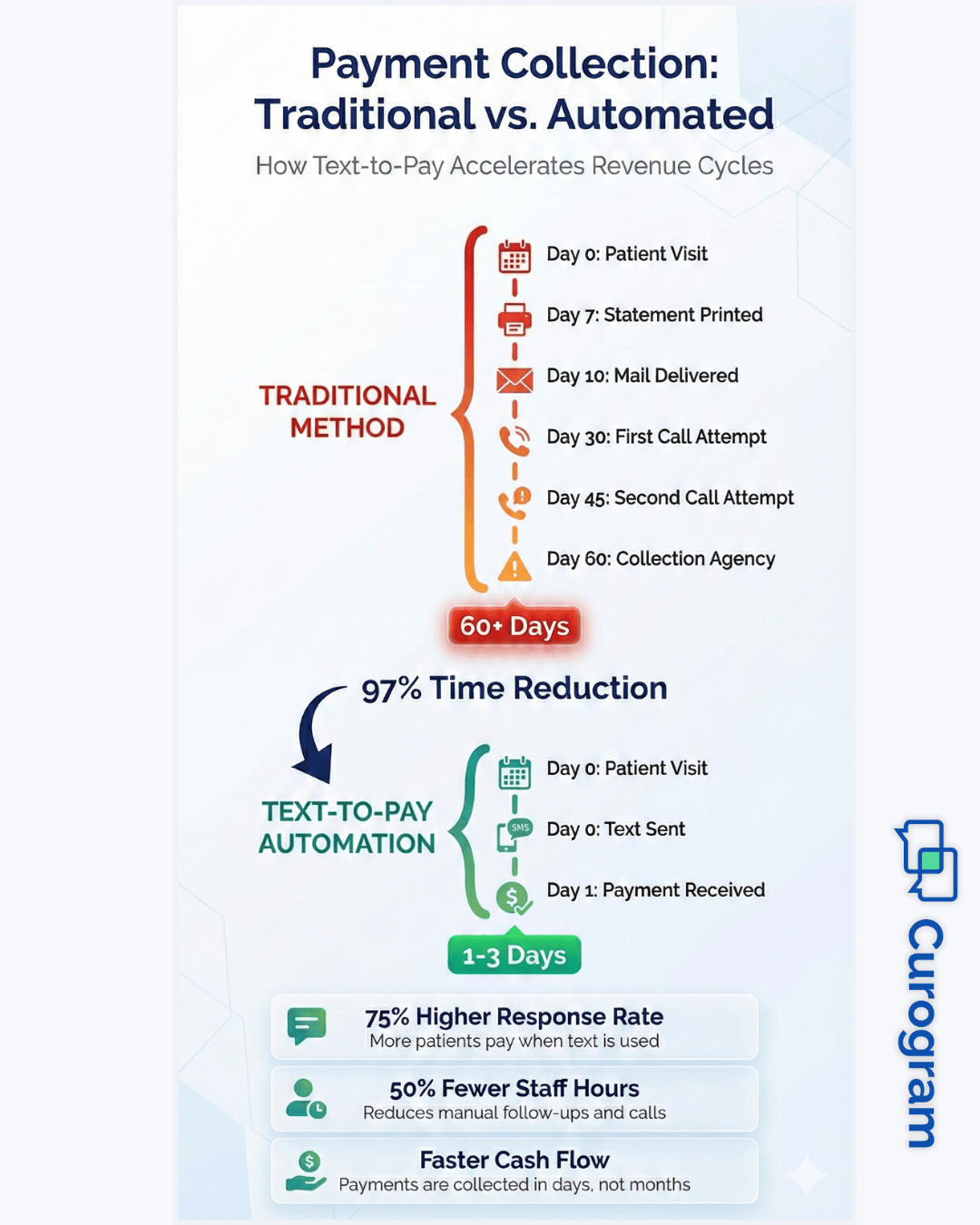
Paper billing slows everything down. Statements must be printed, folded, and mailed, which costs money and takes days. Many patients never open the envelope.

Phone calls take up staff time. A billing specialist may spend 4–6 hours daily calling patients, with many going to voicemail or reaching disconnected numbers.

Different departments add another layer of complexity:

  • Radiology handles high-dollar imaging bills
  • Physical therapy deals with ongoing treatment balances
  • Each specialty requires different collection approaches

Coordinating these efforts across multiple sites becomes nearly impossible. Staff members feel overwhelmed by payment-related tasks. Front desk workers answer billing questions during check-in while processing payments and scheduling appointments.

Technology limitations create problems. Some GE Centricity users rely on outdated billing modules, while others have customized systems that don’t work well together. Integration gaps prevent smooth data flow between locations.

Patient expectations have changed. People want to pay bills online, receive text notifications, and use mobile-friendly payment options. Traditional methods feel outdated and inconvenient.

These challenges hurt cash flow. Accounts receivable days stretch longer, revenue cycles slow, and clinics have money tied up in unpaid balances.

Solving these issues requires automated workflows that work consistently across locations, reduce manual tasks, and integrate seamlessly with GE Centricity systems patients already use.

How Manual Payment Collection Creates Operational Bottlenecks

Manual billing processes create problems that ripple through your entire operation. The issues start small but grow into major roadblocks. Understanding these bottlenecks helps explain why automation matters.

Delayed billing cycles hurt revenue. Staff may wait days or weeks to send payment requests, giving patients time to forget about their visit. Long accounts receivable periods tie up money for 45, 60, or even 90 days, straining financial resources.

Missed payments happen frequently when:

  • Patients move and change phone numbers
  • Statements go to old addresses
  • Contact information becomes outdated in your system

Each failed attempt costs time and money. Your billing team must track which patients received statements and who promised to pay.

Staff workload steadily increases. Each day brings new balances while old ones still need attention. Front desk workers juggle greetings, phones, scheduling, billing questions, and payments, leaving no task with full focus and lowering service quality.

Billing specialists spend hours on repetitive tasks like printing statements, stuffing envelopes, and making collection calls. These manual activities prevent them from handling complex issues and create communication gaps between departments.

Manual processes can’t scale with growth. Adding providers or locations multiplies the workload, raising labor costs while efficiency stays low. Errors happen more often, such as sending duplicate statements or calling about already-paid balances.

Patient frustration grows when billing feels disorganized. Multiple calls about the same bill or paper statements after online payment create a cycle: delayed billing leads to more balances, heavier workload, staff errors, and further delays.

How Text-to-Pay Automates Billing Workflows Across All Clinic Locations

Text-to-Pay technology transforms how clinics handle patient billing. The system automates repetitive tasks that consume staff time. It creates consistent workflows that work the same way at every location.

Automated SMS payment requests go out immediately after patient visits. The system reads appointment data from GE Centricity and identifies balances owed. Within minutes of checkout, patients receive a text with a secure payment link, taking advantage of their clear memory of the visit.

The payment process is simple. Patients open the text, click the secure link, enter payment information, and complete the transaction in under two minutes—no stamps, envelopes, or trips to the mailbox needed.

The system follows a schedule you define:

  • First requests go out immediately after checkout
  • Follow-up reminders send three days later
  • Additional reminders trigger after seven days

This automation removes human error completely. No staff member can forget to send a statement.

Manual outreach tasks disappear from daily routines. Staff no longer print or mail statements or make collection calls for standard balances, freeing hours to focus on patient service and complex insurance issues.

Automated payment workflows adapt to different clinic schedules. Morning procedures trigger messages by afternoon, evening appointments the next morning. Smart filters ensure only relevant communications reach the right patients.

The system scales effortlessly. Payment tracking is automatic, logging every message, noting when patients open texts, and recording completed transactions. All data flows back into GE Centricity for full visibility.

Patients receive payment requests through their preferred channel. Mobile payments are convenient, professional, and HIPAA-compliant with encrypted messages and secure processing.

Automation runs continuously, including weekends and holidays. Cost savings grow through reduced postage, fewer calls, and smaller teams handling larger patient volumes.

Collect Payments GE Centricity - mid

GE Centricity + Curogram Workflow Synchronization

Integration between systems determines automation success. When GE Centricity and Curogram work together seamlessly, billing becomes effortless. The connection creates a smooth flow of information from patient visit to payment completion.

Payment requests triggered by appointment or billing data

The system monitors GE Centricity for specific events. When a patient checks out, the data updates automatically and triggers the payment request workflow without any manual input. Billing data can also initiate payment messages when insurance processes a claim and patient responsibility becomes clear.

Accurate patient matching from GE Centricity

Curogram reads patient names, phone numbers, and account identifiers from GE Centricity. The integration validates this information before sending any messages. When someone changes their phone number in GE Centricity, Curogram knows immediately and updates automatically.

Location-based payment routing

Multi-location practices need location-specific payment handling. The integration routes payments to the correct destination based on service location. Location data also customizes patient communications with specific clinic addresses and phone numbers.

Workflow Improvements for Radiology and Specialty Departments

Specialty departments face unique billing challenges. Radiology centers, imaging facilities, and other specialty units deal with high-dollar procedures. Text-to-Pay automation solves their specific workflow problems.

Pre-procedure co-pay collection

Many imaging procedures require upfront payment. Traditional methods involve front desk staff collecting cash or cards. This creates delays during check-in. Text-to-Pay allows pre-collection before the appointment. Patients pay from home the day before their visit. Check-in becomes faster and simpler.

Imaging-specific balance collection after visits

Radiology balances often exceed several hundred dollars. Patients might not have that amount readily available at checkout. Automated payment requests give them time to arrange funds. They can pay when convenient rather than feeling pressured immediately after their scan.

Multi-stage specialty billing workflows

Complex procedures might involve multiple billing stages. Initial consultation, procedure scheduling, actual imaging, and results review each could generate charges. Automated workflows handle these stages separately. Patients receive appropriate payment requests at each point. The staged approach prevents overwhelming patients with large single bills.

Reduced need for repeat calls after high-cost procedures

High-dollar imaging bills traditionally required multiple collection calls. Staff would call weekly trying to secure payment. These calls created friction with patients recovering from procedures. Automated text reminders replace repetitive phone calls. Patients appreciate the less intrusive approach. Collection rates improve while patient satisfaction stays high.

How Curogram Enhances GE Centricity Billing Efficiency

Curogram brings powerful automation tools specifically designed for healthcare practices. The platform connects seamlessly with GE Centricity systems used by thousands of specialty clinics nationwide.

The HIPAA-compliant messaging system protects patient privacy at every step. All communications use encrypted channels and payment processing meets the highest security standards. Setup takes minimal time with most clinics going live within days rather than weeks.

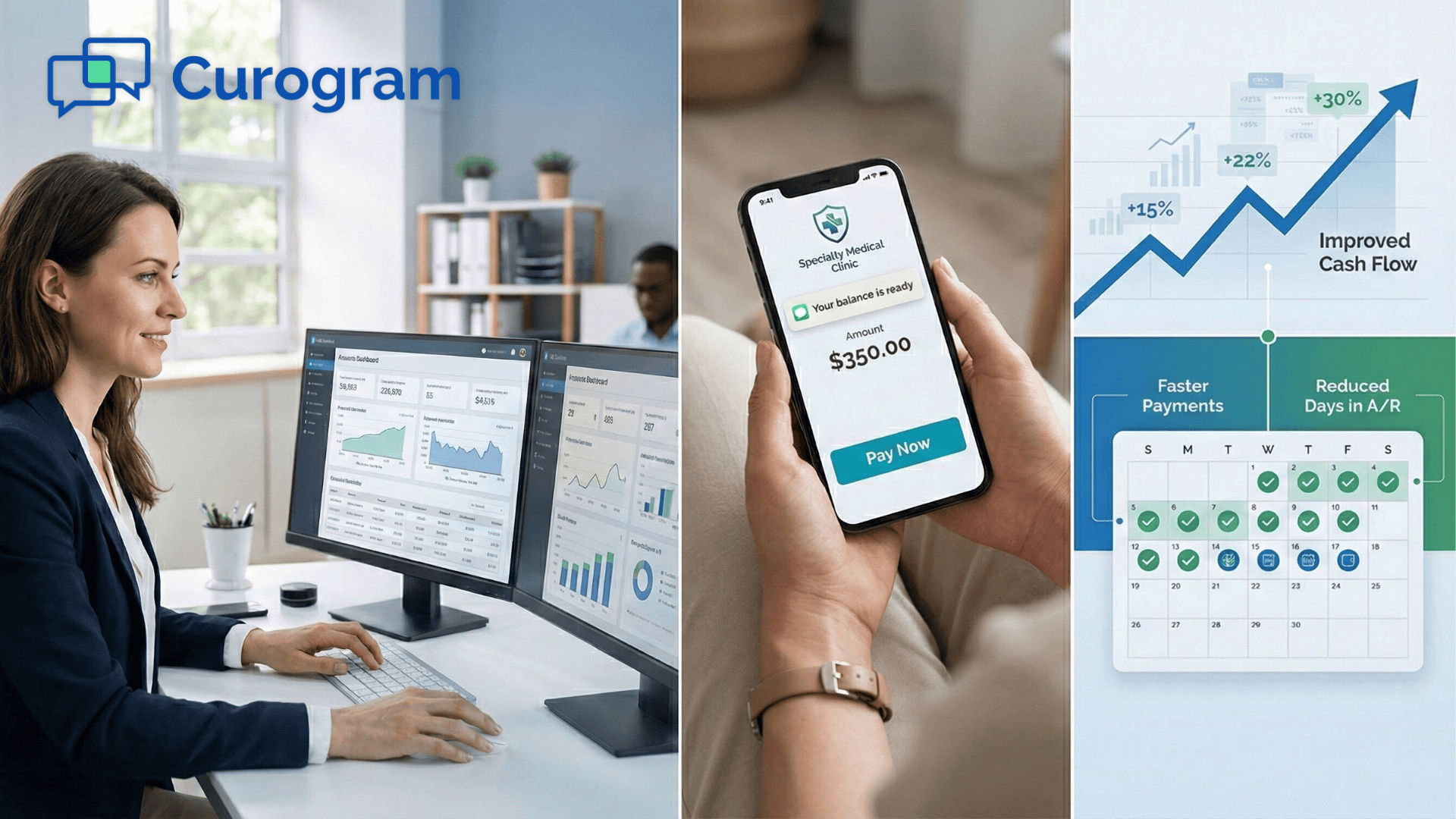
Customization options let you match the system to your workflow. You choose message timing, content, and frequency. Real-time reporting shows exactly how your billing performs with dashboard views displaying collection rates, response times, and payment patterns.

Thousands of practices already use Curogram to streamline billing. They report faster payments, happier staff, and better patient relationships.

Conclusion

Modern billing requires modern solutions. Manual processes cannot keep pace with patient expectations or clinic growth. Text-to-Pay automation solves these problems while reducing costs and improving cash flow.

GE Centricity clinics have specific needs that generic billing solutions cannot address. You need tools built for healthcare workflows. You need systems that understand specialty billing challenges. You need technology that protects patient data while delivering convenience.

Curogram provides exactly what multi-location practices need. The platform connects directly with GE Centricity. It automates billing reminders and payment requests. It handles complex specialty workflows with ease. Your staff saves time while collection rates improve.

The benefits extend beyond faster payments. Staff morale improves when tedious tasks disappear. Patients appreciate convenient mobile payment options. Your clinic operates more efficiently at every level. These improvements compound over time as automated systems optimize performance.

Implementation happens quickly without disrupting operations. The Curogram team guides you through setup. Staff training takes minimal time. You start seeing results within the first billing cycle. Many practices report noticeable improvements in the first month

Your next step is simple. Book your demo today to see the system in action. 

Frequently Asked Questions

How does Text-to-Pay integration work with GE Centricity?

The integration connects directly to your GE Centricity database and reads patient appointment data, billing information, and contact details. When a patient completes a visit, the system automatically sends a secure SMS payment link to their registered phone number. Payment confirmations flow back into GE Centricity to update account balances automatically.

Why do automated billing reminders improve collection rates?

Automated systems send payment requests immediately after visits when memory is fresh. Patients can pay instantly from their phones without writing checks or mailing payments. The consistent follow-up prevents balances from aging. Text-based payment requests get response rates up to 75% higher than paper statements.

How does the system handle patients without mobile phones?

Smart filtering identifies patients with landlines or no phone numbers. These patients automatically fall back to traditional billing methods like paper statements or staff follow-up. You configure the fallback method based on your clinic preferences.

What makes Text-to-Pay more effective than phone calls for collections?

Phone calls interrupt people during work or family time and most go to voicemail. Text messages arrive on patient schedules so they can read and respond when convenient. The impersonal nature of text reduces anxiety around payment conversations.

How quickly can a clinic start using automated payment workflows?

Most clinics complete setup within one week. The process includes connecting to GE Centricity, configuring message templates, and setting timing rules. Staff training takes about one hour per person. Many practices send their first automated payment requests within 48 hours of deciding to implement the system.


Text-to-Pay for GE Centricity: Faster Collections With Curogram

Text-to-Pay for GE Centricity: Faster Collections With Curogram

💡 Text-to-Pay for GE Centricity helps multi-location specialty and radiology clinics accelerate patient payment collection through automated SMS...

Read More
Improving Cash Flow and Reducing Billing Costs with InSync Text-to-Pay

Improving Cash Flow and Reducing Billing Costs with InSync Text-to-Pay

💡 Text-to-pay technology is changing how behavioral health practices handle billing. For organizations using InSync EMR, adding this payment method...

Read More
Improving Cash Flow and Reducing A/R with Text-to-Pay in Exa

Improving Cash Flow and Reducing A/R with Text-to-Pay in Exa

💡 Text-to-pay solutions help imaging centers improve cash flow and reduce accounts receivable days significantly. When integrated with Exa...

Read More