
 Aubreigh Lee Daculug

Staff step in only when a family replies ready to come back. There are no awkward calls and no lists dying in a drawer.
The result is that every clinic's paused panel gets worked each month. About 35% of families who get a recall text return to care.
Every therapy clinic has a drawer like this, full of paused-family lists that were printed with good intentions and never finished. Nobody threw them away on purpose; they simply got buried under the next quarter's list.
A new list comes out, the front desk makes a handful of calls between appointments, and then the afternoon pickup rush takes over.
Here's the part most leaders miss.
The list doesn't fail because your team doesn't care about these families. It fails because the calls are genuinely uncomfortable, and telling a parent "we noticed Leo stopped coming" can feel like a guilt trip for everyone involved.
So staff postpone the calls, and families let them go to voicemail. What's left is a paused patient list never called in full, at every clinic in your group, each quarter.
That pattern carries a real cost. Each paused family still has sessions remaining on a plan of care, which means revenue your group can recover and, more importantly, a child who stopped getting the therapy they need.
Multiply that across five, ten, or twenty locations, and the largest pool of recoverable revenue in your organization sits untouched. The problem isn't motivation; it's a system that depends on phone calls nobody has time to make.
This is where automating family reactivation outreach in Ensora Fusion groups changes the math. Instead of a printed list, you get warm text campaigns sorted by plan status and pause length, sent from each clinic's local number, and paced to match the openings you actually have.
Your staff stop making uncomfortable cold calls and simply book the families who text back "yes."
In this guide, you'll see why the call-down list keeps failing, how Curogram works the entire list every month, and what changes when your front desk focuses on happy returns.
Why the Paused-Family Call List Never Gets Finished
Recall by phone is set up to fail in therapy practices because it loses twice: once to the daily workload and once to human emotion. That's why staff tend to avoid it, even during the rare moments when the front desk is quiet.
It Loses to the Pickup Rush
Front desks in pediatric therapy operate on a tight clock. Sessions end, parents arrive, children need to be checked out, and the next family is already walking through the door, so outbound calls become the task that can always wait until later.
Phones already consume a large share of the day. In a March 2026 MGMA Stat poll, 31% of practice leaders named scheduling as their most time-consuming phone task.
When you add the staff time outbound recall calls require on top of that, from dialing to voicemails to documentation, it's easy to understand why recall drifts to the bottom of the pile.
It Feels Like a Guilt Trip
Even when the phones finally go quiet, the conversations themselves are awkward. Many paused families already feel uneasy about stepping away from therapy, so when they see the clinic's number on their screen, they let it go to voicemail.
That isn't a staffing problem; it's a channel problem. A phone call asks a parent to explain a four-month gap to a real person, on the spot, with no time to think about what to say.
How One List Falls Apart
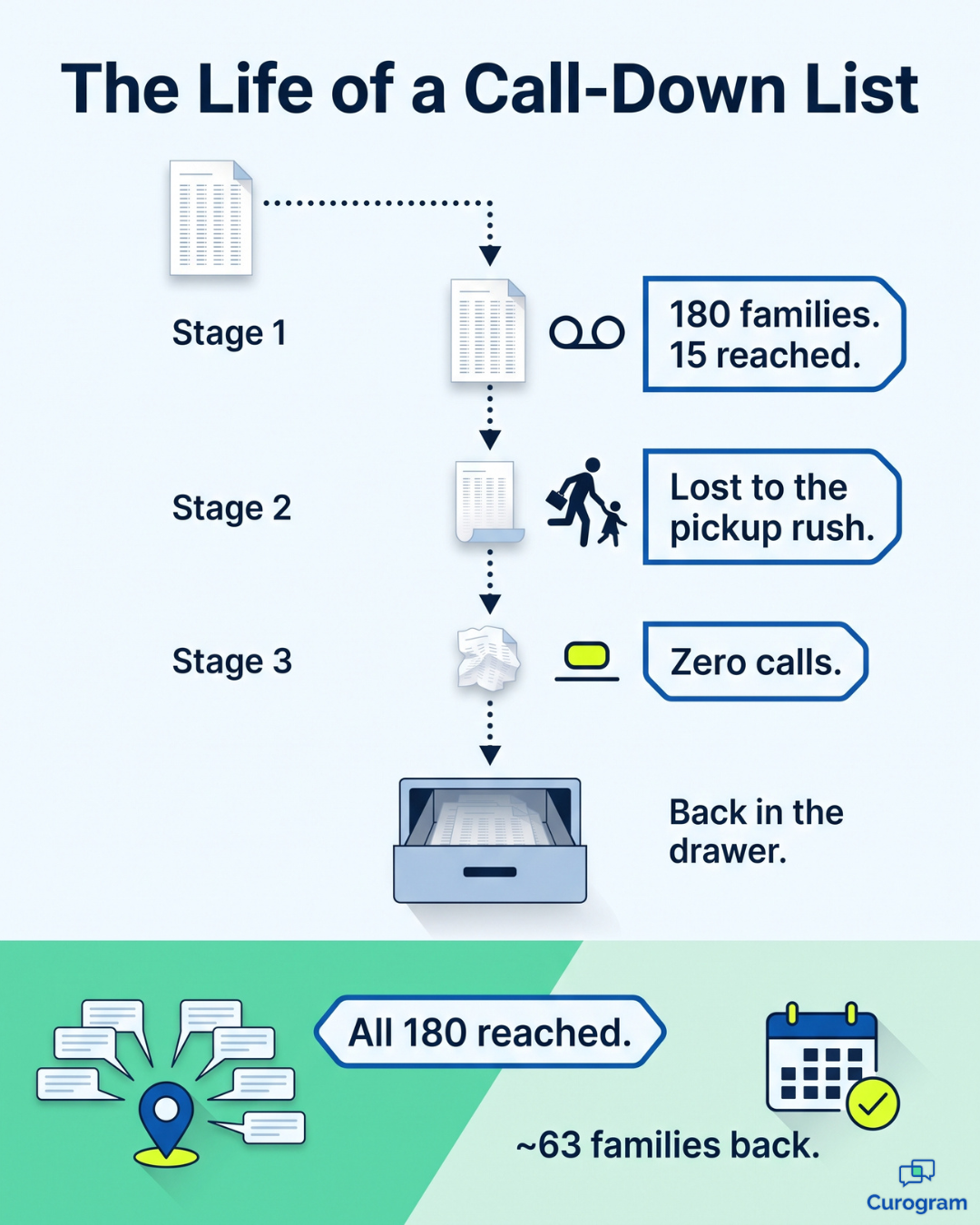
Consider a typical scenario. A director prints a list of 180 paused families for the Brookside clinic and hands it to the front desk on Monday morning.
In the first week, staff manage to reach 15 families, and most of those contacts are voicemails. By the third week, nobody is calling at all, and the list joins its predecessors in the drawer.
What It Costs Your Group
Every paused family has sessions remaining on their plan. As an illustrative example, assume the average family has 8 sessions left at $110 each, which adds up to $880 per family.
For 180 families, that's roughly $158,400 in planned care sitting idle at a single clinic, and the total grows quickly across a multi-clinic organization. Because the list is never fully worked anywhere, the outreach with the highest return and the most patient care stays stuck at about 5% execution.
How Curogram Turns Recall Into a Recovery Engine
Curogram acts as your panel recovery engine. It works the entire paused list during every cycle, at every location, without requiring a single uncomfortable phone call from your team.
The reactivation workflow therapy group leaders usually inherit is a printout and a hope.
Curogram replaces that with segmented recall campaigns that run quietly in the background, and here's how they work:
- Sort the list. Curogram pulls plan-of-care data from Fusion and organizes families by pause duration and plan status. A family that paused three weeks ago receives a different message than one that has been away for six months.
- Send warm, approved messages. Templates are written once and approved at the group level for consistency. Each text comes from the local clinic's number, so families recognize a name they already trust.
- Pace sends to open appointments. With campaign throttling, booking capacity stays in charge of the schedule. A clinic with a long waitlist sends fewer messages, while a clinic with open hours sends more.
- Route replies to one inbox. When a parent responds, the message lands in a shared inbox along with full context. Staff can immediately see who the family is, which plan they paused, and what message they received.
- Book the return. Resumed sessions flow back into the Fusion schedule, so your system of record stays accurate without extra data entry.
This approach also handles seasonal patterns well.
For example,
A summer pause reactivation campaign can go out in late August to families who stepped away for camps and travel, and it runs automatically while your team prepares for the fall rush.
There's an emotional reason this works, too. A text lets a parent say yes privately, without explaining why they stopped or apologizing to anyone on the phone.
That small shift is a major reason texts outperform calls. This is what automating family reactivation outreach in Ensora Fusion groups looks like in practice: less guilt for families, less pressure on staff, and more open doors.
What Happens When Your Front Desk Only Books the Yeses
The results speak clearly. About 35% of families who receive a Curogram recall text return to care, compared with manual lists that rarely get past 5% execution.
Here's what that difference could look like for the Brookside list of 180 families, using the same illustrative assumption of 8 sessions at $110 each:
| Printed Call-Down List | Curogram Recall Campaigns | |
|---|---|---|
| Families contacted | 15, mostly voicemail | All 180 |
| Staff task | Make 180 phone calls | Book the families who reply |
| Families returning | About 4 | About 63 (35%) |
| Sessions recovered | About 32 | About 504 |
| Revenue recovered | About $3,520 | About $55,440 |
In practice, this means your front desk stops chasing families and starts scheduling them. The job shifts from "call 180 families" to "book the 60-plus who replied," so every minute of staff effort lands at the productive, positive end of the process.
For your team, the workday feels noticeably different. Recall work becomes a steady stream of welcome returns, where a parent texts "Yes, we're ready" and staff simply find an available time.

Leaders gain clear visibility as well. Per-clinic recall reporting shows sends, response rates, and resumed plans for each campaign. You can see which clinics bring back the most families, where pacing needs work, and how every paused panel gets worked in full each month.
Rolling Out Recall Campaigns Clinic by Clinic
Launching recall campaigns across a group doesn't require a sudden, all-at-once switch. Most organizations see better results by starting with a clear plan, testing it at one or two locations, and expanding once the process feels routine for staff.
A practical rollout usually comes down to a few early decisions:
- Choose your first segments. Families who paused recently tend to be the easiest to bring back, so a short-pause segment makes a strong starting point.
- Set pacing for each clinic. Match weekly sends to the number of open appointments each location can realistically fill.
- Approve templates once. Agree on a small set of warm, on-brand messages at the group level, then let clinics adjust language mix and sender identity.
- Decide who owns replies. Name the staff members at each clinic who will book returning families from the shared inbox.
Once those choices are made, campaigns run on schedule, and directors can track progress through the same per-clinic dashboards described above.
From there, expanding is mostly a matter of repeating what works. A clinic with a long waitlist might focus on recently paused families, while a location with open capacity can reach further back in the list.
Either way, every site follows the same group-level rules, so families get a consistent experience no matter where they receive care.
Stop Printing Lists Nobody Will Finish
The call-down list was never going to work, because it fails on two fronts at once. It loses to the afternoon pickup rush, and it asks staff and families to have a conversation neither one wants.
You can't solve that with a better printout or another motivational meeting. You solve it by changing the channel and taking the list off your front desk's plate.
That's the real value of automated outreach to paused families: each tool gets a clear job. Fusion holds your record of who paused and why, while Curogram gives those families a graceful, low-pressure path back to care.
Your staff stay focused on the work where they add the most value, so instead of cold-calling parents who already feel guilty, they welcome back families who have already said yes.
The impact compounds across your organization. When every clinic's paused panel gets worked each month, sessions return, plans of care get completed, and children receive the therapy they started. Revenue that once sat in a drawer becomes booked appointments on the schedule.
Here's a simple first step to take this week.
Ask each clinic director what happened to the last paused-family list, how many families they reached, and how many returned.
Their answers will tell you a great deal, and in most groups, those answers become the entire business case for change.
When you're ready to explore a better approach, we'll help you build it around your real numbers. Our team will map segments to your plan-of-care data and set pacing that fits each clinic's open capacity, then walk you through how replies route, how bookings flow into Fusion, and how results appear clinic by clinic.
Schedule a Demo with Curogram and see how your group can bring paused families back without making one more uncomfortable phone call.