
 Aubreigh Lee Daculug
There's no portal login, no app download, and no new account with the practice.
CureMD offers patients a Patient Portal for satisfaction feedback and an AI Contact Center for phone calls, but neither one turns a positive visit into a public review. It stays inside "The Private Satisfaction Score." Curogram works alongside CureMD to close the gap.
At one multi-location Curogram practice, 90% of patients left 5-star reviews, adding 1,064 new five-star reviews in three months.
"Tell Dr. Reyes she's the best." Your front desk hears some version of that sentence every week, usually from a patient who lingers at checkout and genuinely means every word.
Then the patient walks out the door, and that praise disappears with them.
Most medical practices have far more satisfied patients than their Google profile suggests.
The difference isn't about the quality of care; it's about effort. Leaving a review without a prompt means searching for the right listing, signing in, and facing an empty box, and very few people finish that process once they're back in the car.
Timing makes the problem bigger. BrightLocal's 2026 Local Consumer Review Survey found that 74% of consumers only consider reviews written in the last three months. An older collection of five-star reviews loses value quickly, because new patients want recent evidence that your practice still delivers the experience people describe.
If your practice runs on CureMD, you already have dependable tools for clinical documentation and patient communication. The portal gives patients a private place to share feedback, and the AI Contact Center answers phone calls around the clock. However, none of that feedback reaches the person comparing doctors on their phone tonight.
That's exactly where easy Google review requests for CureMD patients by text make a difference. A short message arrives after the appointment, one tap opens your Google review page, and the patient finishes in seconds on a device they already carry everywhere.
This guide explains why positive feedback gets trapped inside your system and how a simple text releases it.
You'll also see what happened when one practice made the request this effortless, and why texting works for nearly every patient on your schedule.
Your patients already want to help your practice grow. Your job is to make helping easy.
Why Your Patients' Best Praise Never Leaves the Building
CureMD gives patients several useful options. Patients can log in to the Patient Portal to message the office, review results, and share feedback about a recent visit. CureMD's AI Contact Center also answers calls 24/7 in 14 languages, which gives many practices dependable coverage after hours.
The problem is where each path ends. Portal feedback stays inside your system, and a phone conversation disappears once the call is over. Neither channel publishes a review on Google, which is exactly where the next patient is deciding where to book an appointment.
As a result, a five-star experience gets filed away inside "The Walled Garden." Your team can see it, but nobody outside your practice ever will.
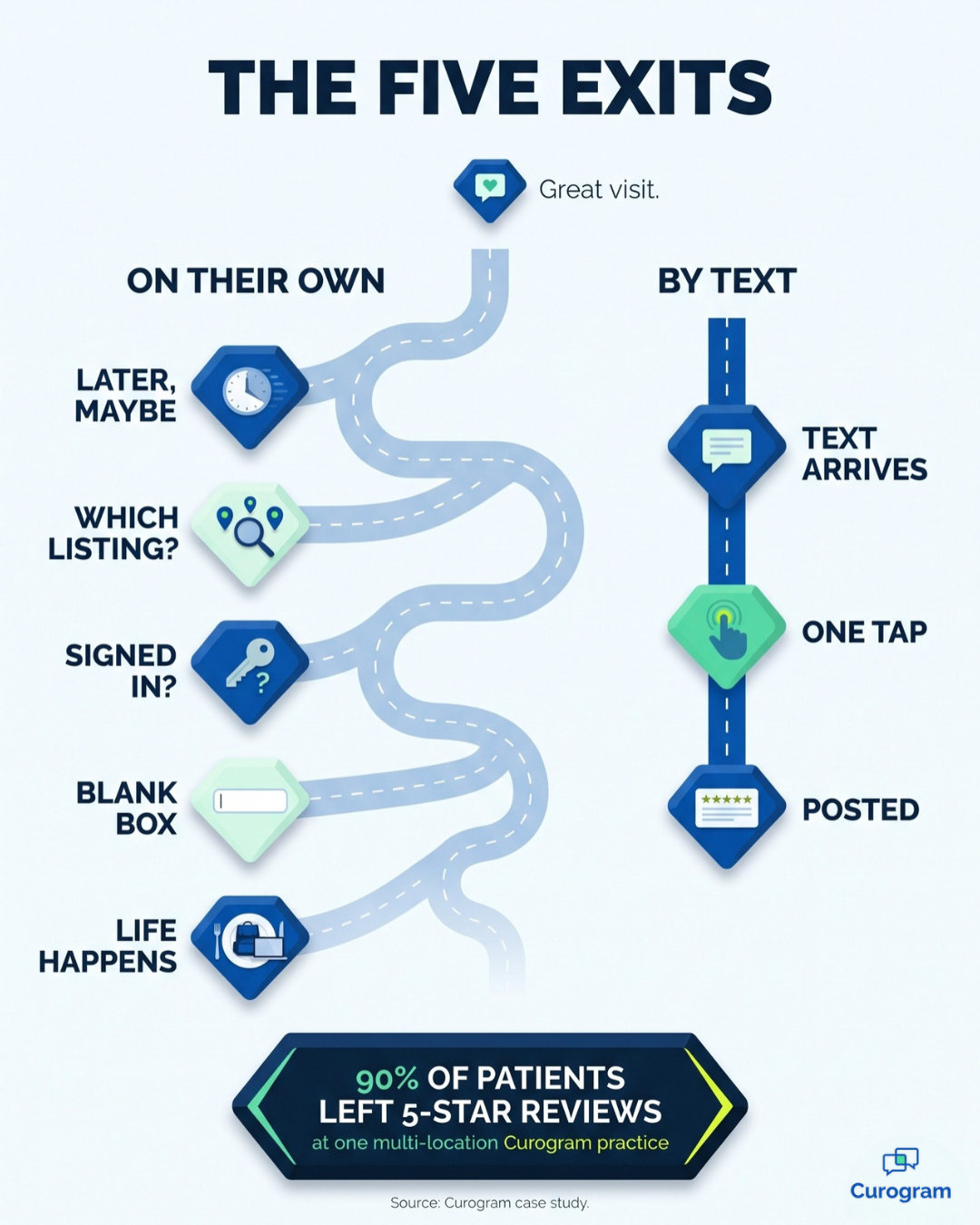
Consider what a satisfied patient faces when they try to post a review on their own:
- The appointment goes well, and the patient plans to "say something nice" later that day.
- Later, they need to search for your practice and choose the correct Google listing.
- They need to be signed in to Google, and many people aren't sure which account they actually use.
- They face an empty text box and have to decide what to write about their visit.
- Dinner, homework, and work emails take over, and by bedtime the intention is gone.
Every step creates another opportunity to quit. The patients who complete all five steps are usually the ones with the strongest feelings, and a frustrated patient often has more motivation to finish than a satisfied one.
That imbalance creates a distorted picture of your practice. Based on Curogram's internal data, 90% of new patient leads see your Google Business Profile before they visit your website. The first impression a new patient receives is shaped by whoever had the energy to write, not by the satisfied majority.
The damage is greatest with first-time patients. Someone choosing a new primary care office or specialist is often anxious already, and a few negative reviews can push them toward a competitor, even when hundreds of recent visits went smoothly.
Now consider the situation from your perspective. You open your profile and discover a single two-star review about a long wait. During that same month, hundreds of patients thanked your team on their way out, yet not one of them received a path that took less than five minutes.
The Ten-Second Thank-You: How One Text Changes the Ask
Curogram functions as a review engine designed around one principle: the patient should do almost nothing. Your practice handles the remembering, and the patient handles a single tap.
A Quick Check-In, Then One Tap
After the appointment, Curogram automatically sends a post-appointment survey by text. The message is a short check-in that asks how the visit went and invites a quick rating. A patient who had a positive experience taps straight through to your Google Business Profile.
That one-tap Google review link for patients eliminates the searching, the guesswork, and most of the blank-page pressure.
A patient with a concern, on the other hand, is heard privately by your team. They don't need to post publicly to get your attention, and your staff gets a genuine opportunity to resolve the problem.
No Portal, No App, No Extra Login
These are patient review requests with no portal login, no app download, and no new account with your practice. Review requests without app download steps naturally reach more people, because every additional step removes someone from the process. Text messages also see a 98% open rate, so the request actually gets read.
Patient-friendly review request texts keep the tone warm, personal, and brief. They read like a thoughtful note from your front desk rather than a marketing message.
How It Fits With CureMD
Curogram connects to CureMD through a ready integration that syncs appointment information into Curogram. CureMD remains your clinical system of record, so your charts, notes, and portal stay exactly where they are.
The text conversation simply carries the patient experience forward after the visit.
For patients, the technology is invisible, and they never need to open the portal to leave a review. It's the kind of text-to-review link healthcare teams can run quietly in the background without adding another task to the front desk.
A Fit for Every Patient on Your Panel
Think about the people on your schedule this week.
There's the 78-year-old who ignores portal emails but answers every text from her grandchildren, and the father leaving a review while he waits in the school pickup line.
There's also the college student who deletes any application she doesn't use every day.
Texting works for all of them because it requires very little technical comfort. That's why Google reviews from older patients become far more likely when the request arrives by text. There's nothing new to learn and nothing extra to remember.

From Private Praise to Public Proof
The results show what happens when a review takes almost no effort. One multi-location practice had struggled with patient feedback and its online reputation.
Then it began using Curogram's automated post-appointment surveys linked to Google Reviews. Within three months, 90% of its patients left 5-star reviews, adding 1,064 new five-star reviews.
We call that shift "The Public Proof." Your online reputation begins to reflect what actually happens in your waiting room, with new reviews arriving through the same channel patients check every day, a channel with a 98% open rate.
| The Private Satisfaction Score | The Public Proof | |
|---|---|---|
| Where praise ends up | Portal feedback and phone calls inside your system | Your Google Business Profile |
| Effort for the patient | Search, sign in, write from scratch | One tap from a text |
| Who shapes your profile | Whoever pushes through the friction | Your satisfied majority |
| Review freshness | Whenever someone remembers | New reviews after visits, week after week |
| Patient with a concern | May vent in public | Heard privately by your team |
Volume and recency both matter to new patients. BrightLocal's 2026 survey found that 47% of consumers won't use a business with fewer than 20 reviews. A consistent flow of recent reviews helps your practice clear that threshold and stay above it.
Now imagine someone who recently moved to the area comparing three local practices. Two show a few old reviews, while yours shows hundreds of recent stories that sound like real visits: a nurse who explained everything clearly, a short wait, a doctor who really listened.
That person books with your practice and arrives already trusting your team.
Your existing patients feel heard in both directions as well. They're praised in public when they're happy and called back in private when something went wrong.
What It Takes to Start Review Texts on CureMD
Getting started is simpler than most practices expect, because the CureMD integration is already marked ready on Curogram's side. Your team mainly needs to gather a few account details and decide how you'll handle the feedback that comes in.
Here's what to have in place before launch:
- CureMD access details: your practice URL, username, password, API key, and API secret, which Curogram uses to connect the two systems.
- Appointment information flowing in: upcoming appointments sync every 15 minutes for the next three days and every 30 minutes for the four days after that.
- A Google Business Profile your practice controls, so every review link sends patients to the correct listing.
- A clear owner for private concerns, so every patient who raises an issue hears back quickly.
Plan for replies as well. BrightLocal's 2026 survey found that 89% of consumers expect business owners to respond to reviews. A short, personal thank-you on each new review shows future patients that real people are listening, as long as every reply stays free of health details.
Once those pieces are ready, the process runs quietly in the background. Your front desk keeps working in CureMD, while patients do their part in about ten seconds.
Turn Every "Thank You" at Checkout Into a Review
Your patients already want to recommend your practice. You hear it at checkout, during follow-up calls, and in the thank-you cards that appear at the front desk. The missing ingredient was never goodwill; it was a path short enough for a busy person to finish.
A post-visit text provides that path. With one tap and a few sentences, a patient's gratitude becomes something the next patient can actually read, so the review becomes as effortless as the appreciation is genuine.
It helps to view the two systems as partners rather than competitors. CureMD is designed for your charts, your satisfaction analytics, and your phone coverage. Curogram is designed for your patients' convenience, delivering the one-tap thank-you that also becomes one of your most effective ways to attract new patients.
Right now, many practices unintentionally ask more of their happiest patients than of their unhappiest ones. A frustrated patient only needs a moment of irritation to post a complaint, while a grateful patient needs a search, a sign-in, and a blank page. That imbalance appears on your Google profile every single day.
You can reverse it. When easy Google review requests for CureMD patients by text go out after appointments, the quiet majority finally gets a voice, and your profile starts reflecting the care your team provides daily instead of one difficult afternoon. Your staff also never has to chase a single review manually.
Every visit becomes another chance for a patient to tell the next one what your practice is like.
Ready to see it in action? Schedule a Demo with Curogram and discover how one practice generated 1,064 new five-star reviews in three months by turning patient satisfaction into public proof. Your next great review is already sitting in your waiting room, so give that patient one easy tap.