
 Aubreigh Lee Daculug

CureMD already covers two channels: the Patient Portal handles secure messaging behind a login, and the AI Contact Center answers calls 24/7 in 14 languages.
Neither one gives your front desk an open, two-way text conversation with patients, which leaves the "Missing Middle Channel" closed.
Curogram opens it with a shared inbox that staff monitor together, while patients reply from any cell phone. Atlas Medical Center reduced no-shows from 14.20% to 4.91% in three months using Curogram.
Your patients text their pharmacy, their landlord, their kid's coach, and the mechanic fixing their car. Then a notification arrives from your office telling them to log in to view a new message. Many of them simply never do, and the message sits there unopened.
That small barrier costs more than it appears. A patient with a simple question suddenly faces two unappealing choices: recover a forgotten password or call and wait on hold. Plenty of people quietly choose a third option and do nothing at all, which leads to missed appointments and unanswered questions.
CureMD gives your practice capable tools on both sides of that barrier. The Patient Portal manages secure messages, refills, and bill payment for patients who log in regularly.
The AI Contact Center answers the phone around the clock, and both products genuinely earn their place in your technology stack.
However, neither one offers a plain text conversation between your front desk and a patient. No patient can easily reply "Can I move Thursday to Friday?" and receive a human answer within minutes.
This guide calls that gap the "Missing Middle Channel," because it sits directly between the phone and the portal.
In the sections below, you will learn why that channel matters and what it costs to leave it closed. You will see how a direct text line operates next to CureMD without replacing anything you already use. You will also find Curogram client data from clinical settings, including one clinic that cut its no-show rate by more than half in three months.
If your phones keep ringing while portal alerts sit unread, the solution may be simpler than you might expect. Your patients already understand how to send a text message.
The real question is whether your practice is ready to answer one quickly.
Why the Phone and the Portal Still Leave a Gap
CureMD has plenty going for it, including Best in KLAS honors for small-practice EHR and practice management. Its Patient Portal covers secure messaging, prescription refills, and bill payment. Its AI Contact Center is real, impressive technology as well.
The AI Contact Center answers calls 24/7 in 14 languages, books appointments, verifies insurance, and collects payments. CureMD also highlights SOC 2 controls in its security setup. So the phone side is covered, and the logged-in side is covered too.
The trouble is the space between them. "The Walled Garden" keeps both channels inside the CureMD ecosystem, and a direct text conversation with your staff is not one of them.
Here is how one routine question typically plays out:
- A patient wants to move Thursday's appointment, but it is 9 p.m., so she decides not to call.
- She locates last week's portal notification email and taps the link.
- Her login fails, and the password reset sends her back to the same login page.
- Frustrated, she gives up for the night.
- The next morning, she calls your front desk and waits in the hold queue, or she forgets entirely and becomes a no-show.
Those are exactly the outcomes two well-built tools were supposed to prevent. They are also the CureMD patient portal messaging limitations most offices notice first: the message exists, but the patient cannot easily reach it.
The financial picture makes this frustrating. CureMD's published pricing starts around $195 per provider per month and reaches $395 for the combined EHR and practice management bundle.
Even with that investment, many offices still handle a steady stream of daily calls about confirmations, reschedules, directions, and insurance cards.
For most patients, the choice between calling and logging in gets resolved by doing neither. Now consider your office manager at 8 a.m., watching the AI dashboard report calls handled while the hold queue still backs up.
She knows many patients never activated a portal account. She wonders why a top-ranked system still leaves her team playing phone tag with people who would have answered a text within a minute or two.
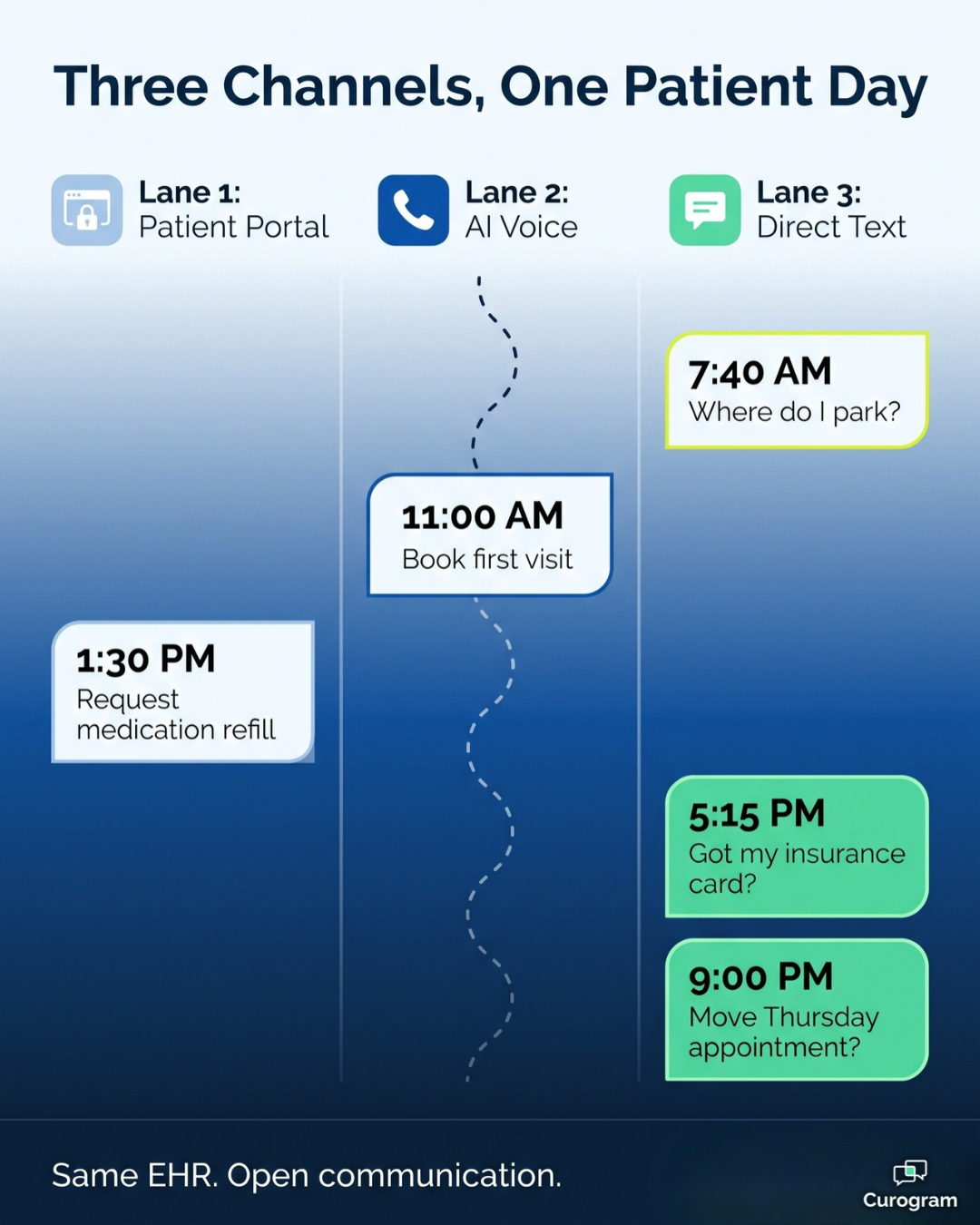
Adding a Direct Text Line Next to CureMD
Your AI Answers the Phone. Curogram Handles the Texts.
Curogram is a text-first patient communication platform designed to complete CureMD rather than compete with it. Your AI continues answering the phone, while Curogram sends the text messages your patients actually respond to.
Think of it as texting alongside CureMD AI Contact Center coverage:
The phone line serves callers, and the text line serves everyone who would rather type than talk.
One Shared Inbox for the Entire Front Desk
The core feature is two-way, HIPAA-compliant texting through a shared team inbox for patient texting. Every conversation stays visible to the whole front office, so threads get answered, handed off, and reviewed instead of stranding in one person's voicemail.
Each message is logged in a single dashboard, which gives you a clear record for audits.
Curogram is HIPAA-compliant, holds SOC 2 certification, and signs a Business Associate Agreement (BAA). That combination is what HIPAA compliant SMS for CureMD practices should look like.
For patients, the experience feels like CureMD secure messaging, no app required, because the text simply appears on their phone.
How Curogram Works With CureMD
CureMD does offer FHIR APIs, but access is carefully gated. Developers must register their application, receive credentials, and complete SMART on FHIR 1.0.0 and OAuth 2.0 authorization steps. That is significant technical work for a busy medical practice.
That is why Curogram's texting operates independently from day one, while CureMD remains your system of record for charting, scheduling, and billing. Because the text line runs on its own, it can also stay with your practice if your technology stack changes later.
Practices that want deeper automation can activate Curogram's ready CureMD integration, which connects through CureMD's public API. It imports upcoming appointments every 15 minutes for the next three days and every 30 minutes for the following four days.
When patients confirm or cancel by text, that status writes back to CureMD, and completed intake forms can return as well. Setup requires your practice URL, a username and password, and a CureMD API key and secret.

A Fit for Every Size of Practice
CureMD supports more than 30 specialties and practices of every size, and the direct text line fits across all of them.
A solo primary care office, where the owner doubles as the IT department, can start texting without a technology project.
A multi-specialty group can keep the entire team working from one organized set of patient conversations.
Even a geriatric panel that will never download an app can still reply to a text. This kind of automation actually feels more personal, not less. Patients receive a human answer within minutes on the same channel they already use with everyone else in their lives.
What Practices See When Patients Finally Reply
The results from practices using two-way texting speak clearly.
Atlas Medical Center reduced its no-show rate from 14.20% to 4.91% in just three months after adding two-way SMS through Curogram. Across clients, Curogram messages see a 98% open rate and confirmation rates above 75%, based on Curogram client data from clinical settings.
Call this transformation "The Answered Text," where routine questions move out of the hold queue and the unread portal inbox into text conversations that resolve in seconds.
A single staff member can often manage several short conversations in the time one phone call previously required.
Here is how a typical front desk workday changes after implementation:
| Task | Before | After |
|---|---|---|
| Confirming visits | Outbound calls and voicemails | Patients reply to a text |
| Rescheduling | Hold queue the next morning | A quick thread the same night |
| Simple questions (parking, forms) | Phone calls | Short text replies |
| Hand-offs between staff | Notes in one person's voicemail | A shared inbox everyone can see |
Same EHR. Open communication. CureMD still manages the chart, the schedule, and the phone AI, while your front desk works from one text dashboard instead of a voicemail backlog.
The patient who previously went silent now confirms from the parking lot, the pharmacy line, or the couch at 9 p.m.
Matching Each Patient Message to the Right Channel
A text line works best when your team knows which conversations belong where. According to Pew Research Center, 98% of U.S. adults own a cellphone, and 91% own a smartphone.
That reach makes texting the natural default for quick, routine exchanges, while the phone and the portal handle everything else.
A simple routing guide helps your front desk categorize requests immediately:
- Phone (AI Contact Center): callers who would rather talk, new patients booking a first visit, and after-hours calls that need a fast answer.
- Patient Portal: longer secure messages, refills, and bill pay for patients who like to log in.
- Text (Curogram): appointment confirmations, quick reschedules, directions and parking, form reminders, and insurance card follow-ups.
One rule applies across every text conversation. Keep clinical details out of the text itself, and stick to visit basics like the date and time. For anything more personal, point patients to a secure link or the portal.
Write these guidelines down once and review them at your next staff huddle. When everyone follows the same playbook, patients get faster answers, and no channel ends up carrying work it was never designed to handle.
Give Patients the Text Line They Already Use
CureMD covers the phone and the portal effectively, and Curogram opens the text channel between them. The result is HIPAA-compliant, fully two-way communication that reaches every patient with a cell phone. There is no login, no app, and no password reset involved for anyone.
The simplest way to understand the pairing is by asking who each tool serves. CureMD is for your records, your schedule, and your phone coverage, and it genuinely deserves to stay at the center of your practice. Curogram is for your patients' convenience, delivering the quick text that replaces a lengthy call or an unread portal message.
These two platforms do not compete, because they cover different moments in a patient's day. The phone AI catches callers, and the portal serves patients who prefer to log in. The text line catches everyone else, which often represents a significant portion of your patient population.
Consider how much of your front desk's day disappears into routine administrative communication. Confirmations, reschedules, directions, and insurance card questions all fit easily into a text message. When those conversations move to a shared inbox, your team regains valuable time for the patients standing right in front of them.
So stop routing every routine question through a login wall or a phone menu.
The answer is already sitting in your patients' pockets, and you simply need a secure way to reach it. Patients have already told you how they prefer to communicate, through every message they ignore and every text they answer.
Schedule a Demo with Curogram today. In 15 minutes, our team will show you the communication channel your AI Contact Center is not covering. Bring your current call volume and no-show rate, and we will map out what a direct text line could look like for your practice and your patients.