
 Aubreigh Lee Daculug

CureMD helps you track how patients feel, but that "Private Satisfaction Score" stays inside your system. Prospective patients never see it. Curogram turns that goodwill into public reviews, while concerns reach your manager first.
The results are measurable. One multi-location practice using Curogram earned 1,064 new 5-star reviews in just three months.
Your best marketing happened today. A patient thanked your nurse, smiled at checkout, and told the front desk it was her easiest appointment all year. Then she walked out, and that praise left with her.
Most medical practices hear compliments like this daily. Very few ever reach Google, where they could influence the next patient's decision. The gap isn't about the quality of care. It's about timing, and about whether anyone remembers to ask.
CureMD gives your team capable tools for running a busy practice. Its AI Contact Center answers patient calls around the clock in 14 languages, and its platform helps you gauge patient satisfaction. But feedback measured inside your EHR lives in what we call "The Walled Garden," where staff can see it and prospective patients never will.
That matters more than most owners realize. Based on Curogram client data, 90% of new patient leads see your Google Business Profile before they ever visit your website.
A prospect comparing two clinics doesn't read your internal dashboard; they read your stars, your review count, and the date of your latest review.
So the real question in any CureMD patient satisfaction survey vs Google reviews discussion is simple: who actually gets to see the proof? For many CureMD practices, the honest answer is "only our staff."
This is where automated Google review requests for medical practices change the picture. Instead of relying on staff memory, a text goes out automatically after each visit. The patient taps once and lands on your review page, with no extra effort from your team.
This guide explains why private satisfaction scores leave growth on the table and how Curogram operates alongside CureMD.
You'll also see the connection requirements, documented results, and how to respond to an unhappy patient before frustration becomes a public review.
Why a Private Satisfaction Score Can't Win You New Patients
CureMD has earned its place in many practices. It brings charting, billing, scheduling, and a patient portal under one roof, and its AI Contact Center handles incoming calls 24/7.
Those capabilities represent genuine operational strengths. But none of them carries a satisfied patient's praise to the one place prospective patients look first.
The result is a feedback loop that begins and ends inside your own walls.
Here's how an excellent visit quietly fails to become a review:
- The visit goes well. The provider stays on schedule, and the patient feels genuinely respected.
- The patient says so at checkout. Your receptionist smiles, thanks them, and moves on to the next person in line.
- Your internal score ticks upward. It's an encouraging number on an internal dashboard that only authorized staff can access.
- The patient drives home and life takes over. The review that was one text message away is never written.
- A new patient chooses someone else. Three weeks later, they compare two clinics on Google, and one has 400 recent reviews while yours has 40 older ones.
Those figures are an illustrative example, but the pattern is common across specialties. Google Business Profile reviews for medical practices work like a storefront window. Review volume and recency both influence where you appear in local search results, and they also shape how much trust you earn once someone finds you.
Patients notice freshness and consistency, too. BrightLocal's 2026 Local Consumer Review Survey found that 97% of consumers read reviews for local businesses, and that most strongly prefer reviews written within the last three months.
Every review you don't request becomes a small advantage for the practice across town, whether you operate a solo office or ten locations.
Consider the practice owner experiencing this gap firsthand. She knows her team delivers excellent care, yet her public rating sits at 4.1, built on a handful of outdated reviews and one angry post from two years ago. She watches potential new patients choose competitors and can't understand why.
Meet the Review Engine That Runs Beside CureMD
Curogram acts as "The Review Engine." It's the layer that turns each CureMD appointment into a review chance without adding a task to the front desk.
This is the post-visit review request text healthcare teams have wanted for years, because it runs by itself. Your AI Contact Center answers the phone, and Curogram sends the texts your patients actually read.
A Quick Check-In After Every Visit
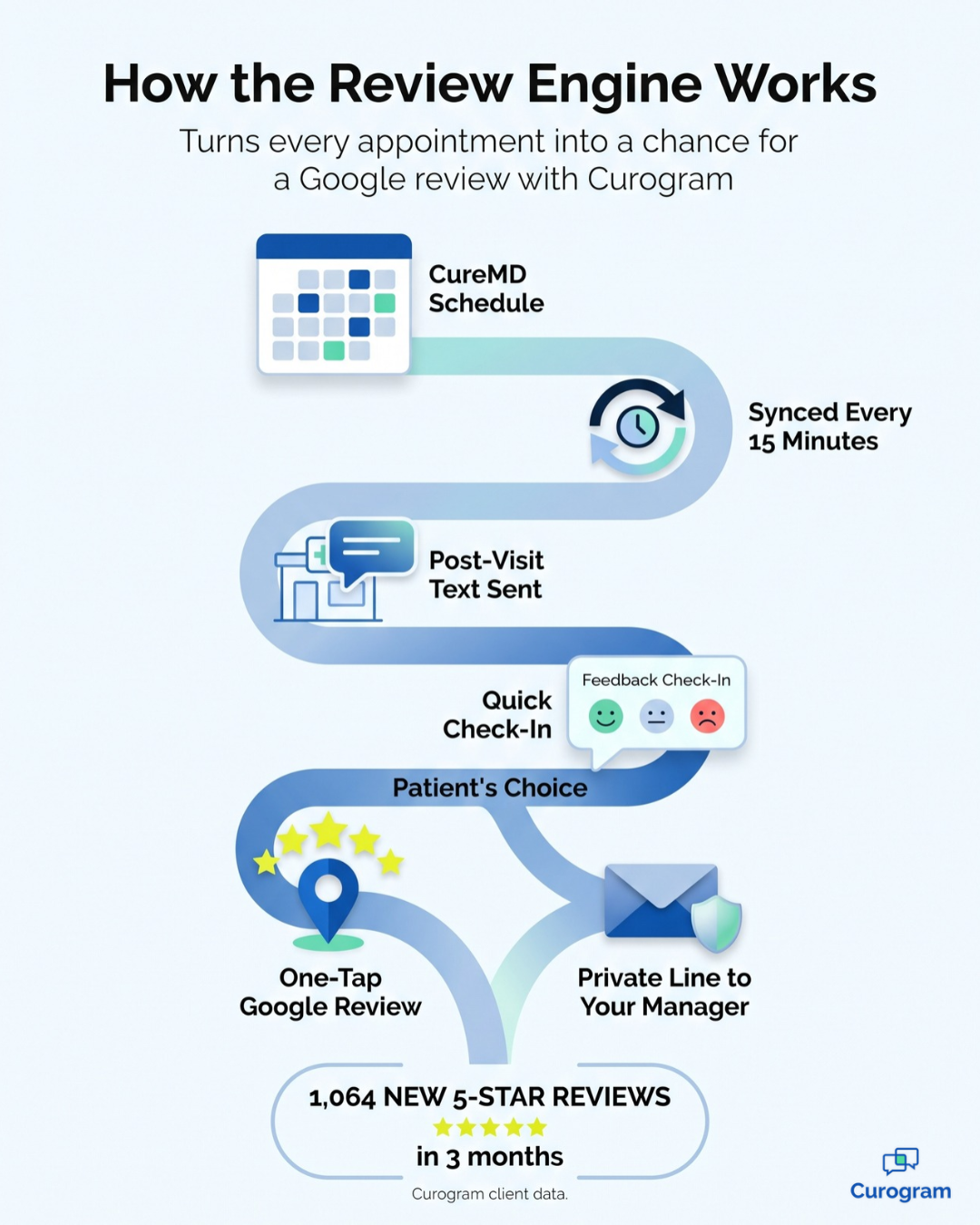
After each appointment, Curogram texts the patient a short satisfaction check. It's the same automated post-appointment survey, integrated with Google Reviews, that Curogram clients use today. Patients who had a good visit get a one-tap link straight to your Google Business Profile.
If something went wrong, the patient has a private way to tell you. That feedback goes to your practice, so your manager can call back and make it right. Problems reach your team instead of showing up first in search results.
How the Connection Works Without a FHIR Project
CureMD does offer FHIR R4 APIs. But building on them means app registration, SMART on FHIR 1.0.0 authorization, and OAuth 2.0 token handling. That's a developer project, not a front-desk fix.
You don't need to take that on. Curogram connects through an existing integration that uses CureMD's public API, and your practice supplies a few details: your practice URL, a username and password, and an API key and secret.
From there, Curogram pulls appointment data every 15 minutes for the next three days and every 30 minutes for the four days after that. CureMD stays your system of record.
One Approach for Every Practice Size
A solo primary care office uses review texts to compete in local search. A multi-specialty group uses them to keep its reputation steady across every provider. A multi-location organization watches its reviews stack up into the thousands.
Automation can even feel more personal than a busy staff member's ask. Every patient gets asked, every time, in the same text thread your practice already uses. The request is just a thank-you and a link, with no visit details.
That's the idea behind HIPAA compliant review request texts: nothing clinical, just an easy way to share.
From Private Praise to Public Proof
Curogram's numbers come from real client results, not projections. One multi-location practice struggled with patient feedback and its online reputation. It turned on Curogram's automated post-appointment surveys, integrated with Google Reviews.
Here's what the data shows:
| What We Measured | Result |
|---|---|
| New 5-star Google reviews | 1,064 in 3 months |
| Share of the practice's patients leaving 5-star reviews | 90% |
| Curogram SMS open rate across clients | 98% |
| New patient leads who see your Google profile before your website | 90% |
Source: Curogram client data from clinical settings.
This is the shift we call "The Public Proof." Satisfaction stops being a private number and becomes a public asset that grows over time. Because nearly every text gets opened, a steady flow of fresh reviews keeps your recency signals strong month after month.

Here's what that looks like day to day.
A prospective patient searches, sees a profile full of recent five-star reviews, and books before ever reaching your website. Your manager checks the Curogram dashboard instead of nudging patients at checkout.
And the occasional unhappy patient?
They get a phone call from your team instead of a public back-and-forth on Google. That's how you grow practice Google reviews automatically while still caring for every single patient.
Getting Your CureMD Practice Ready for Review Requests
Turning on automated review texts doesn't require a long project. Still, a little preparation helps the first weeks run smoothly and keeps your new reviews working in your favor.
Here's what to line up before launch:
- Gather your CureMD credentials. Curogram needs your practice URL, a username and password, and an API key and secret to connect. Having these ready shortens setup.
- Claim and polish your Google Business Profile. Confirm your hours, address, phone number, and categories for each location. A review link only helps if it leads to an accurate, complete profile.
- Ask every patient, not just the happy ones. Google's review policy says businesses shouldn't selectively solicit positive reviews. Automation makes fairness easy, because every patient receives the same request after every visit.
- Assign an owner for private feedback. Decide who reads concerns and how quickly they call patients back. A fast, personal reply often turns a frustrated patient into a loyal one.
- Plan to respond to public reviews. BrightLocal reports that 89% of consumers expect business owners to respond to reviews. A short, warm reply shows prospects that real people are listening.
Once these pieces are in place, the system mostly runs on its own. Because Curogram syncs CureMD appointments every 15 minutes for the next three days, new bookings flow into the review workflow without manual entry.
Your team's job shifts from asking for reviews to reading them and responding.
Let Your Best Reviews Leave the Building
CureMD measures satisfaction. Curogram publishes it. That's the whole idea, summarized in two short sentences.
Your EHR is designed for your clinical record, your billing, and your internal quality signals. It handles those responsibilities well, and it should remain your system of record. But the praise patients share at checkout deserves a much bigger audience than a staff dashboard.
Curogram fills that gap with an automated post-visit text. Each patient receives a quick check-in after the appointment, and happy patients can post to Google with a single tap. Patients with concerns reach your practice manager privately first, so your team has a chance to make things right.
Think of the two platforms as partners rather than competitors.
CureMD maintains your records, while Curogram handles the ten-second tap that turns a positive visit into a five-star review. It's the same EHR, with far more open communication with the people you serve.
The cost of waiting is real, and it compounds quietly over time. Every week without review requests is a week of fresh reviews you'll never get back. Meanwhile, prospective patients are comparing your profile with the clinic down the street, and recency is part of how they decide.
So stop letting "The Private Satisfaction Score" bury your most valuable marketing asset in a dashboard only staff can log into. Your patients are already happy with their care. They simply need to be asked politely at the right moment, through a channel they actually use every day.
Ready to see the review engine in action? Schedule a Demo with Curogram. In about 15 minutes, you'll see how one practice earned 1,064 five-star reviews in three months.