
Automating Patient Review Requests in Dolphin Practices
 Sharee Narciso : Dec 1, 2025, 11:00:00 AM
Learn how orthodontic and oral surgery practices using Dolphin capture more positive reviews with Curogram’s automated system.

With automated workflows connected to your DrChrono schedule, patient feedback becomes steady, predictable, and easier to manage. Families feel heard, your online reputation reflects your everyday work, and staff no longer need to remember to ask for reviews during busy clinic hours.
If you run a small practice, you probably have more grateful patients than your online reviews suggest. People thank you at the end of a visit, bring small gifts during the holidays, or refer family quietly. Yet when you look at your profile online, you may see only a handful of comments, and a few of them might be negative. This gap feels unfair because it does not reflect the daily care you provide.
In many clinics, staff simply forget to ask for reviews, or they feel awkward bringing it up. There is no consistent process, so some patients are asked and others are not. Often the only people motivated enough to leave a review are the ones who had a bad experience. This is how a small number of upset voices can shape the public picture of your practice. It hurts morale and may make you feel like your work is invisible.
Automated review requests in DrChrono offer a calmer and more reliable way to collect feedback. Instead of relying on memory, you connect review invitations to completed appointments. After each visit, patients receive a short message with a link where they can share their thoughts.
In this blog, you will explore why manual review collection is so difficult, how Curogram supports DrChrono review automation, and what benefits you gain when reviews start to reflect your real level of care. You will also see a simple use case of a pediatric clinic that reshaped its online reputation by making reviews part of an everyday workflow. Finally, you will learn practical next steps for bringing this type of system into your own practice.
Without an automated system, asking for reviews depends completely on human memory and comfort. Front-desk staff may try to ask when patients check out, but they are often busy handling phone calls, forms, and payments. Providers might want to ask, but the moment passes by quickly at the end of the visit. There is no built-in trigger that reminds anyone to follow through. As a result, review collection happens only sometimes, and never in a consistent pattern.
Happy patients rarely take the extra step on their own. Many people intend to leave a review but forget as soon as they get back to their daily routine. They have work, family, and other responsibilities pulling their attention. Negative experiences, though, tend to stick in people’s minds. When upset patients write reviews and satisfied patients stay silent, the public picture of your practice becomes unbalanced.
Staff also feel the strain of manual review workflows. If you ask team members to remind patients individually, they may feel uncomfortable or unsure of the right wording. Some worry that it will sound pushy. Others simply forget when the front desk gets busy. Over time, the idea of asking for reviews becomes one more task that no one truly owns.
Tracking becomes another challenge. If you hand out paper cards or ask verbally, you cannot easily see which visits led to reviews. You do not know which messages worked or which patients responded. This makes it hard to refine your approach. You might change your script or process without any clear data to guide you.
For small and mid-sized practices, or patient feedback SMB clinics depend on, the result is often frustration. You know your team provides careful, personal care, yet online ratings do not keep pace. The people reading those ratings may assume your clinic is less capable than it really is. This can feel discouraging, even if it is not directly tied to patient volume. It affects pride in your work and the way your team feels about the effort they put in every day.
In short, without automated review requests in DrChrono or a similar system, reviews remain random. Happy patients have no simple doorway to share their stories. Staff have no steady process to follow. Negative feedback stands out more than it should. A structured, automated workflow can change this pattern by making review collection a quiet, regular part of your daily operations.
Curogram helps you turn patient feedback into a simple routine by tying it directly to your DrChrono schedule. Instead of staff trying to remember who to ask, review invitations are triggered automatically after a completed visit. You decide which appointment types should receive requests and how soon after the visit to send them. The system does the rest. This keeps your process consistent without adding more tasks to the front desk.
When a visit concludes in DrChrono, DrChrono review automation can signal Curogram to send an SMS or email with a friendly review request. The message is short and clear. It thanks the patient for their visit and offers a link to your chosen review platform. Patients can tap the link on their phone and share their experience while the visit is still fresh in their minds. This timing makes it easier for them to remember details and express how they felt.
One important part of this workflow is the handling of negative feedback. Instead of sending every patient directly to a public review site, Curogram can route unhappy responses into a private feedback channel. Patients who had a problem can answer a few questions or explain what went wrong. Your team has a chance to respond, apologize, or fix the issue. This keeps sensitive conversations off public pages and turns problems into learning opportunities.
On the technical side, the integration with DrChrono means you do not have to juggle separate lists or exports. Your appointment data becomes the source of truth. For automated review requests DrChrono acts as the trigger point, while Curogram handles the messaging and response management. Everything is anchored in the same visit data you already use for scheduling and billing. This makes the workflow feel natural for your team.
Over time, Curogram provides a clearer picture of how many patients received requests and how many responded. You can see patterns, such as higher response rates for certain message styles or timing. This allows you to refine your templates without guessing. The result is a quiet, steady system that delivers more reviews with less effort. It protects your time while giving patients an easy channel to share their voice.
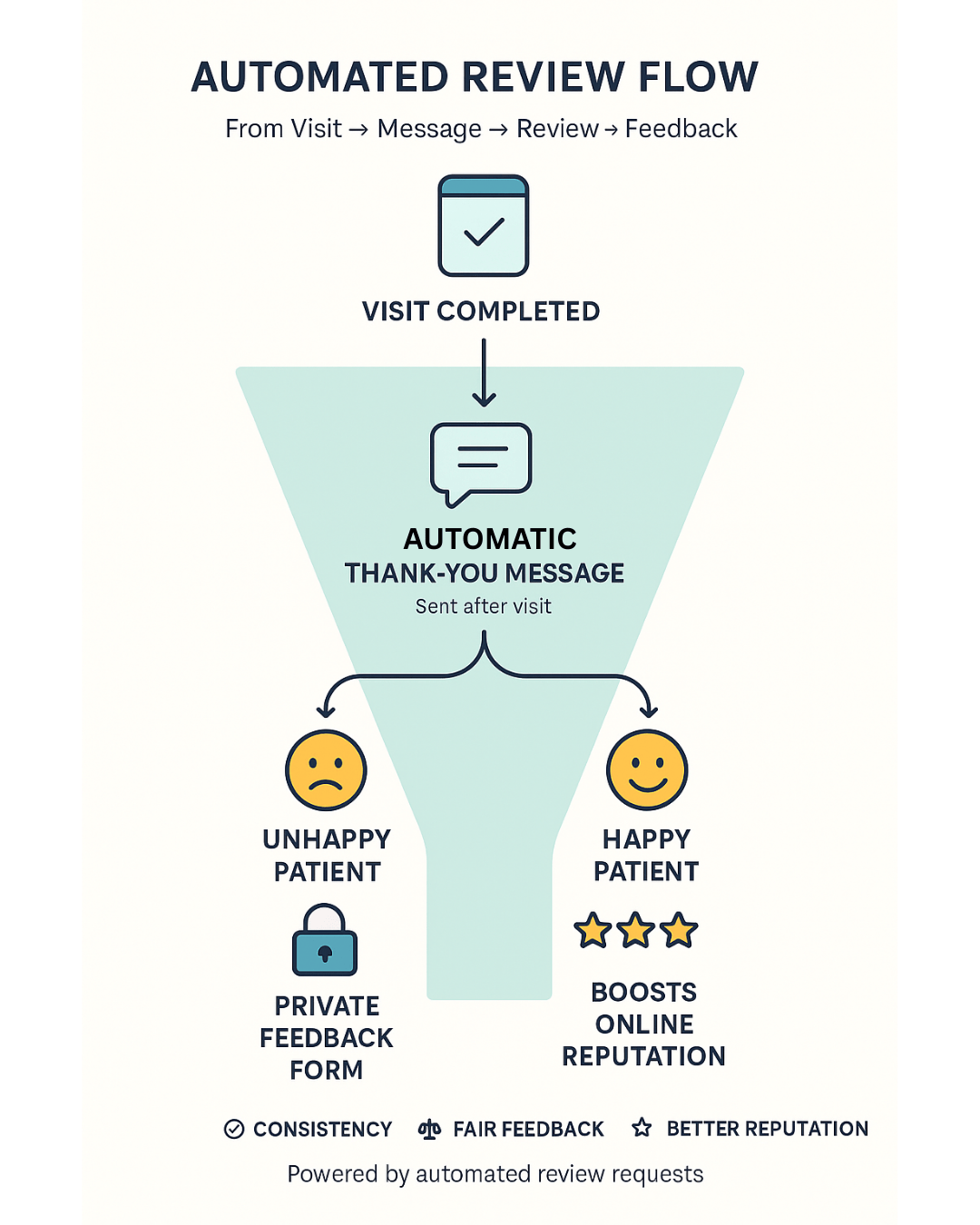
Automating review requests touches both sides of the care relationship. It lightens the workload for your staff and gives patients a gentle way to share their experience. When you combine DrChrono review automation with Curogram’s messaging tools, reviews stop feeling like a stressful side project. They become a natural part of how you close the loop after each visit.
In a small practice, everyone wears multiple hats. Asking staff to remember review requests on top of phones, forms, and checkouts is not realistic. Automated workflows take that pressure away. Your team can focus on the patient in front of them instead of worrying about the next review.
When review requests go out to every patient automatically, you hear from a broader group. You are no longer relying only on the most upset or the most vocal people. This helps your online presence better match your real day-to-day care. It feels more fair to your team and more accurate to anyone reading your reviews.
Many patients never leave reviews because no one clearly invites them. A simple message that thanks them and asks for feedback makes a big difference. It shows that you care about their experience, not just their diagnosis. Patients feel that their voice matters.
Every clinic has visits that do not go as planned. With internal routing for unhappy feedback, you see those concerns privately first. You can respond, investigate, or make things right. This reduces public conflict and supports a more respectful dialogue.
For patient feedback SMB clinics depend on, consistency matters. When you collect feedback little by little after each visit, you build a steady stream of insight. You see patterns in what patients appreciate and where they struggle. This helps you improve care slowly and realistically over time.
Some staff members feel uncomfortable asking directly for reviews. They worry about sounding pushy or making patients feel obligated. Automated messages remove this social pressure. Staff can still encourage feedback in person, but they do not have to carry the full burden.
Providers already manage tight schedules and emotional conversations. Tracking review requests on top of that can add mental load. Automated review requests free providers from that task. They know the system will gently follow up after the visit, so they can stay focused on clinical care.
When feedback arrives in a steady and organized way, it becomes easier to talk about it as a team. You can review themes during meetings without feeling overwhelmed. Positive comments can be shared to celebrate wins. Critical comments can be studied calmly and used as a guide for improvement.
Review data can highlight issues that might not show up in clinical metrics alone. Patients may point out communication gaps, wait time frustrations, or front-desk challenges. By watching these patterns over time, you can adjust your processes. This kind of continuous improvement supports better experiences for both new and returning patients.
Asking for feedback sends a simple message to your community. It says, “We care about your experience.” Patients who feel listened to are more likely to stay engaged in their care plans. Even if they do not respond, the invitation itself can strengthen the relationship.
From the patient’s point of view, automated review requests in DrChrono feel easy. The message arrives on a device they already use. The link is short and direct. There is no need to search for your listing or remember how to spell your clinic’s name.
Without a structured system, patients might send feedback through random channels, such as old emails or personal messages to staff. Those comments can get lost. A review workflow keeps responses in known locations. You always know where to look for insight.
Clinic leaders often carry quiet worry about what people might be saying online. When reviews are automated, leadership can see a clear and growing record of patient voices. This transparency brings calm. You no longer feel in the dark about public perception.
As your patient volume increases, manual review outreach cannot keep up. Automation scales with you. Whether you see ten patients a day or one hundred, the process is the same. This gives you a stable foundation for the future.
Over time, a good review workflow shapes the culture of your clinic. Everyone knows that patient feedback is welcomed. Staff understand that comments will be seen and discussed fairly. This culture of listening supports better communication and more thoughtful care.
A pediatric clinic noticed that its online rating had stalled around 3.5 stars, even though families often expressed gratitude in person. The director felt the reviews did not match the warmth and effort the team brought to each visit. Staff occasionally asked for reviews, but there was no formal process. Only a few frustrated parents took the time to post comments, and those comments stood out more than they should.
The clinic decided to connect automated review requests to its DrChrono schedule through Curogram. Every completed visit triggered a simple thank-you message with a link to leave a review. Families who rated their experience poorly were invited to share more details privately instead. Over nine months, the clinic’s average rating rose from 3.5 to 4.9 stars. More importantly, the comments began to reflect the everyday kindness and attention the team showed in person.
If you are thinking about adding automation to your review process, you can start with a few simple steps. First, decide which visit types should trigger review requests. Many clinics begin with routine visits and follow-ups, then expand slowly. Next, write a short and friendly template that thanks patients and invites them to share their thoughts.
Then, work with your DrChrono setup and Curogram configuration so that review messages send based on completed appointments. Test the workflow with a small group of patients and adjust timing or wording if needed. Finally, make a plan for how you will monitor private negative feedback and respond. Over time, you will build a stable, respectful system that makes it easier for patients to speak and easier for you to listen.
Curogram helps you bring automated review requests into your DrChrono workflow without creating extra stress for your team. It uses your existing appointment data as the trigger, so you do not have to manage separate lists or spreadsheets. Messages go out automatically after visits, which keeps your process steady and fair. Everyone gets the same invitation, not just the patients someone remembered to ask.
Because Curogram supports two-way messaging and internal routing, you can separate public reviews from private concerns. Happy patients can move straight to your preferred review sites. Patients who had a difficult experience can share details in a quieter space where your team can listen and respond. This balance protects relationships and turns criticism into guidance instead of public conflict.
For busy clinics, the most valuable part is peace of mind. DrChrono review automation with Curogram gives you a system that runs in the background, collecting small pieces of patient feedback every day. You do not have to chase reviews or push staff to ask. The workflow simply continues, visit after visit, building a more accurate and human picture of your practice over time.
Automated review requests in DrChrono offer a gentle way to bring patient voices into the open. They turn a stressful, uneven process into a steady part of your daily workflow. Instead of relying on rare, emotional reviews, you hear from many patients in small, honest moments. This helps your online presence reflect the care you already give in person.
By connecting your schedule to review messaging, you reduce the burden on staff and remove the awkwardness of asking for feedback face to face. Patients receive a simple, respectful invitation on their phones. They can respond when they have a quiet moment. This structure supports both the emotional and practical sides of communication.
For patient feedback SMB practices depend on, a clear workflow matters more than a single campaign. With the right tools, you can listen more, react calmly, and grow at a pace that feels sustainable. Over time, automated reviews do more than shape ratings. They help you understand what your patients see when they look at your work, and that insight is valuable on its own.
See how Curogram automates reviews with DrChrono. Book your demo today.
 Sharee Narciso : Dec 1, 2025, 11:00:00 AM
Learn how orthodontic and oral surgery practices using Dolphin capture more positive reviews with Curogram’s automated system.
 Sharee Narciso : Dec 1, 2025, 8:00:00 AM
Learn how orthodontic practices using Cloud 9 automate review requests with Curogram to capture more positive family feedback.
 Sharee Narciso : Dec 1, 2025, 3:59:59 PM
Learn how small practices using Office Ally capture more positive reviews with Curogram’s automated reputation management.