
Automated Appointment Reminders in AdvancedMD | Reduce No-Shows
Learn how automated appointment reminders in AdvancedMD reduce no-shows. Discover workflows, benefits, and real-world examples of success.
12 min read
Monday, 8:40 a.m. Tomorrow's NextGen book holds 62 appointments, and eleven of them have never been confirmed. Your scheduler starts calling.
Four voicemails, two disconnected numbers, and one patient who says she rescheduled last week, which turns out to be true and never reached the appointment record.
At 9:00 the phones open and the calling stops. Those eleven slots go into tomorrow unresolved. Two or three will sit empty.
No-show rates have crept back toward where they sat before 2020. MGMA DataDive Practice Operations data puts the single-specialty aggregate at 6.81% in 2023, up from 5% across 2021 and 2022, and close to the 7% recorded in 2019. On a 62-slot day, that is roughly four visits gone.
Most NextGen practices already send reminders of some kind. The return path is what separates a reminder program that protects capacity from one that just adds outbound volume. A confirmation that lands back on the schedule is worth more than three that land in a voicemail box.
We will walk through what a missed visit actually costs, what NextGen sends on its own versus what an integrated platform adds, and which send windows earn their place.
We will also share numbers from our own client base, including a medical center that took its no-show rate from 14.20% to 4.91%. Every figure below is either sourced or labeled as ours.
A missed visit costs more than one billing slot. It costs the rebooking call, the chart note, and often the follow-up that never happens.
Put a number on it, and the internal argument gets easier. Guzek, Gentry, and Golomb tracked a full academic year at an Indiana University pediatric neurology clinic and found a 26% no-show rate against $257,724.57 in lost revenue. Monthly losses ranged from $15,652.33 in October 2013 to $27,042.44 that January.
That is one clinic in one specialty. Your own math will differ. The shape holds, though: losses repeat, they swing by season, and they are big enough to fund the fix many times over.
Sending reminders is cheap next to that. One Hong Kong trial put the cost at about US $0.03 per SMS.
Empty slots do not refill themselves. A 20-minute follow-up left open at 10:20 cannot be recovered at 10:15, because nobody knew it had opened.
Without automated appointment reminders in NextGen, your providers absorb those gaps as dead time between charted visits, and the schedule keeps reporting a full day right through it.
Scheduling reminder integration matters mostly for timing. A cancellation landing 26 hours out gives your team a full business day to work the waitlist, call the patient who asked to be seen sooner, and close the slot. Under two hours, a refill is rare.
Every no-show creates a small task queue. Rebook the patient, note the chart, mail a letter, sometimes chase a referral that has now gone stale. None of it is billable. On a 30-provider site, it eats real front-desk capacity every week.
A NextGen appointment reminder system that writes replies back to the schedule takes most of that queue off your staff. Every confirmation or cancellation lands where your schedulers already look. Nobody retypes anything.
Practices already on NextGen usually start with reminders that run through Curogram's NextGen integration, because it keeps the confirmation inside the system schedulers already have open.
Skipped visits do not stay administrative for long. A missed three-month diabetic follow-up becomes a six-month gap, then an A1C drawn well after it would have changed anything.
Behavioral health feels this most sharply. Low and colleagues, working in the psychiatry outpatient department at Hospital Melaka in Malaysia, tested messaging reminders with patients treated for depression.
They tracked attendance and medication adherence together. Reduce no-shows with reminders, and the first thing you get back is continuity.
Patients notice when a practice loses track of them. Being called about a visit you already moved reads as careless. It is a fair reading.
MGMA's December 2025 Stat poll asked 236 practice leaders to name their top patient access focus for 2026. No-shows won the largest share at 27%, ahead of online scheduling at 24%, phone access at 22%, and wait times at 21%.
Most of those leaders described reaching for HIPAA-compliant reminder workflows: timed sends, confirmation texts, and same-day nudges.
Pinning down the term matters, because "reminder" currently covers everything from a printed letter to a two-way text thread.
|
Automated appointment reminders are SMS, email, or voice notifications fired straight from NextGen's schedule. Sent 24 to 48 hours ahead and again the morning of, they let patients confirm, cancel, or reschedule without a phone call. |
Channel choice comes down to who you are reminding. SMS reminders for enterprise clinics carry the load, because a text reaches a phone the patient already has in hand and needs no portal login.
Email suits prep steps that run long, like a full bowel prep or a pre-op checklist. Voice still earns its place for older panels and for records with no mobile number.
Most practices we work with run two channels rather than three. Text first, voice as the fallback for numbers that bounce.
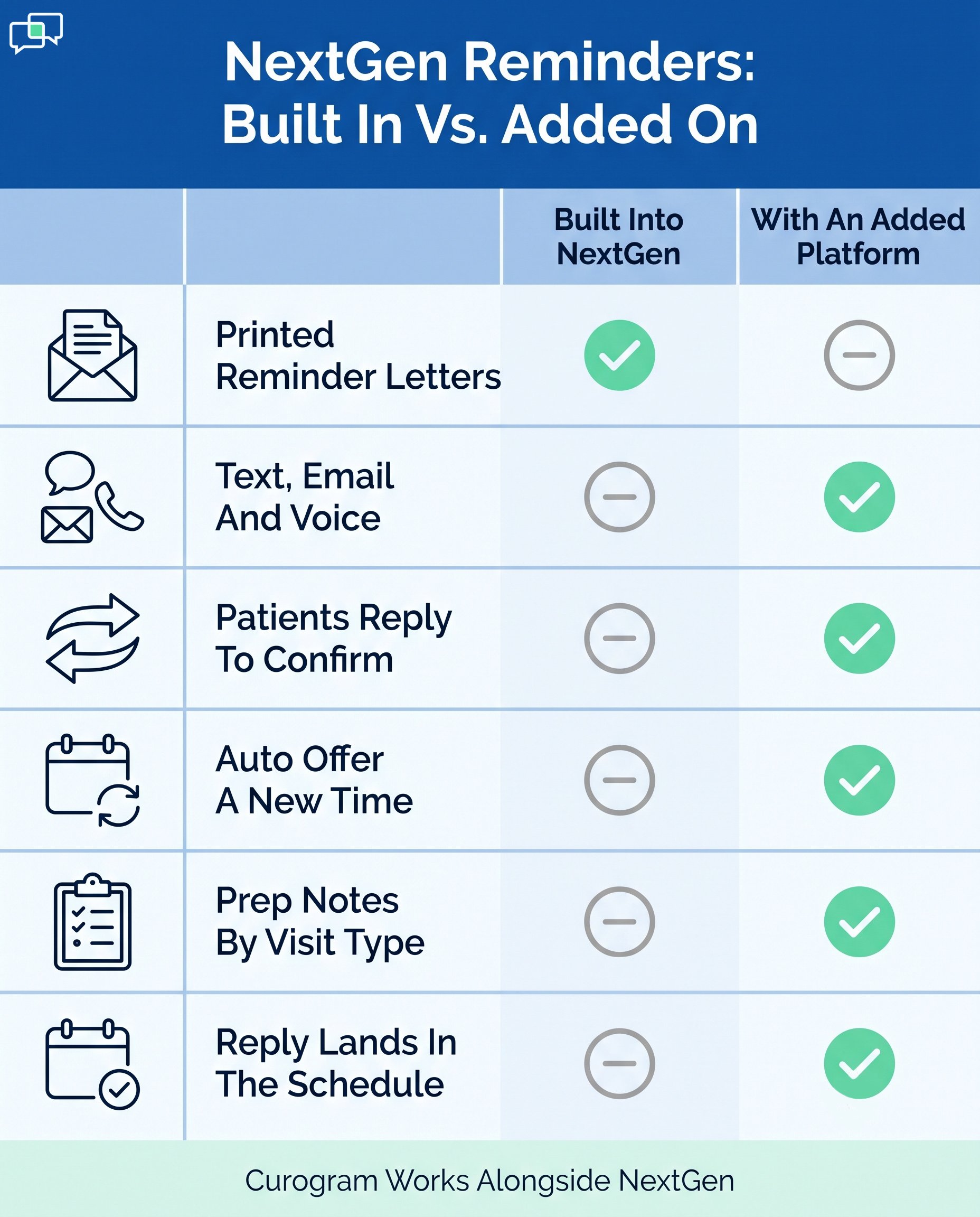
Precision here protects you in a vendor conversation. NextGen Enterprise PM includes reminder features built around reminder letters.
Staff can preview, print, export, and reset them, and the reminder activity is logged to the patient chart. That is a real feature, and a paper-based one.
Multi-channel reminders come from the Luma side. NextGen and Luma Health announced an alliance in 2023, and NextGen now sells NextGen Patient Engage powered by Luma as an add-on module.
NextGen's own product page says that with Patient Engage, reminders tie into the schedule and prompt patients to confirm, cancel, or reschedule. A patient who replies that they cannot attend is sent an option to pick a new time.
NextGen Self-Scheduling powered by Luma adds text and web booking into the appointment book in Enterprise PM. Both Luma-powered products serve patients in more than 20 languages.
|
Capability |
NextGen Enterprise PM, no add-ons |
Patient Engage add-on or integrated platform |
|---|---|---|
|
Printed reminder letters |
Yes |
Not needed |
|
Automated SMS, email, or voice sends |
No |
Yes |
|
Two-way confirm, cancel, reschedule |
No |
Yes |
|
Automatic reschedule offer after a decline |
No |
Yes |
|
Multiple send windows with cadence control |
Limited |
Yes |
|
Prep text branched by appointment type |
No |
Yes |
|
Multi-language sends |
No |
Yes, 20+ languages |
|
Reply written back to the appointment record |
n/a |
Yes |
What NextGen sends natively vs. what an integrated platform adds
Curogram sits in that second column, and it complements NextGen rather than replacing any part of it. Your chart, your billing, and your appointment book stay where they are.
Texting patients is allowed. HIPAA-compliant reminder workflows come down to four things:
Minimum necessary detail
Encryption in transit and at rest
Consent with a working opt-out
A signed BAA with whoever sends the message
TCPA consent rules
Minimum necessary is where most practices slip. A reminder can carry date, time, provider, and location.
Naming the procedure in the message body gives away a condition. Phrase it as instructions for Thursday's appointment and put the clinical detail behind a secure link.
Four outcomes are worth measuring, and only one of them is the no-show rate itself.
Across our clients, automated reminders and two-way texting hold no-show rates roughly 53% below the industry average, based on our internal data.
One medical center moved from 14.20% to 4.91% within three months, and appointment confirmation rates run above 75%.
Published research points the same way with smaller numbers. A 2026 review and meta-analysis from Trinity College Dublin pooled 10 trials covering 8,236 patients.
Patients who got reminders were 11% more likely to attend, at a risk ratio of 1.11 with a 95% confidence interval of 1.05 to 1.19. The SMS subgroup came in at 1.14 across four trials.
The authors flagged high spread between studies, and that caveat is worth carrying. Effect size moves a lot with patient mix and setting. Single trials swing much wider than the pooled number.
Valero-Bover and colleagues at Hospital Municipal de Badalona in Spain cut non-attendance by 50.61% in dermatology and 39.33% in pneumology with phone reminders.
|
Measure |
Result |
Source |
|---|---|---|
|
No-show rate, one medical center |
14.20% to 4.91% in three months |
Curogram internal data |
|
No-show rate vs. industry average |
About 53% lower |
Curogram internal data |
|
Appointment confirmation rate |
Above 75% |
Curogram internal data, current clients |
|
Phone call volume |
Down by as much as 50% |
Curogram internal data |
|
Outpatient attendance, 10 pooled RCTs |
11% more likely to attend |
Al-Turbag et al., 2026 |
|
Non-attendance, dermatology clinic |
Down 50.61% |
Valero-Bover et al., 2022 |
Reminder outcomes, internal and published
More than 75% of appointments get confirmed across our current clients, based on our internal data.
A confirmation only counts once it reaches the schedule your team has open. Replies that sit in a separate vendor inbox still create retyping work.
On a feature grid, reminder capability looks much the same from vendor to vendor. Differences show up in how the reply is written back, which is worth reading up on before you sign.
It is worth reading how EMR-integrated reminder platforms compare on write-back behavior before shortlisting.
Reminder calling is the easiest task to hand to software. Practices using Curogram cut phone volume by as much as 50% and report roughly 30% higher staff output, based on our internal data.
Day to day, that shows up as a scheduler who clears the prior-auth queue before lunch instead of after close.
Prep failures are no-shows with extra steps. The patient arrives, the study cannot be done, and the slot burns anyway.
Automated patient notifications in healthcare work here for a plain reason: the instruction arrives pinned to a date, at the point when the patient still has time to act on it.
Cadence does more work than message wording. Four send windows cover almost every specialty.
|
Send window |
Job it does |
What to watch |
|---|---|---|
|
7 days out |
Surfaces conflicts early, gives the waitlist room |
Too early to prevent forgetting on its own |
|
48 to 24 hours |
Primary confirmation window |
Useless without a working reply path |
|
Morning of |
Last catch for same-day forgetting |
Too late to refill the slot |
|
Timed to the prep instruction |
Fasting, bowel prep, contrast, telehealth link |
Keep PHI out of the message body |
Reminder send windows and what each one does
This send does the most work. More than 75% of our clients' patients confirm at this stage, based on our internal data. Those replies arrive with enough runway for a scheduler to work the cancellations that come back.
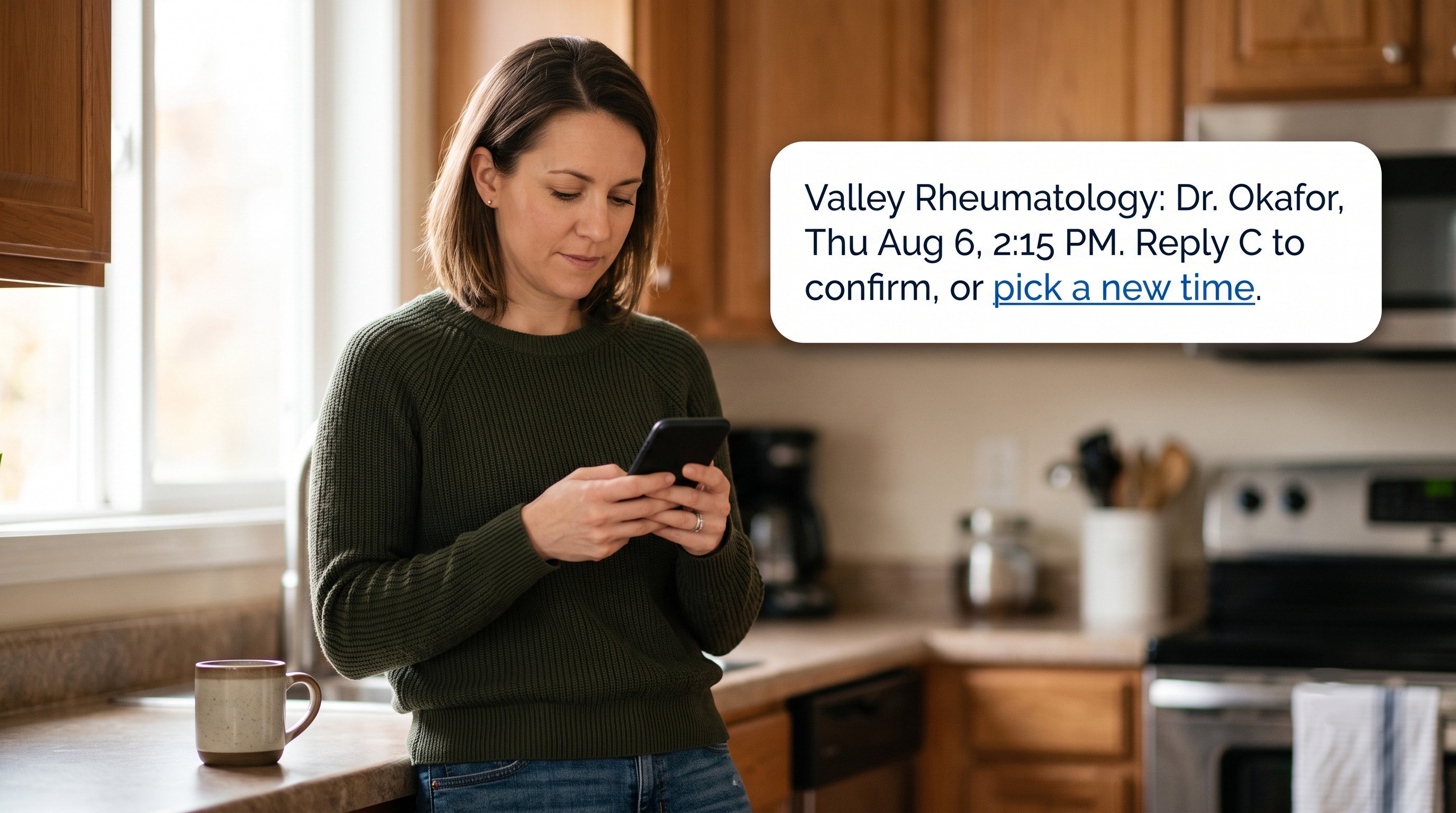
Keep the message short and the reply path obvious:
|
Hi Maria, this is Valley Rheumatology. Dr. Okafor, Thu Aug 6, 2:15 PM, Suite 210. Reply C to confirm, R to reschedule, STOP to opt out. |
Nothing in that message reveals why she is coming in. Appointment confirmation in NextGen works the same way once the reply writes back to the appointment record rather than to a separate inbox.
Morning-of sends catch the patient who confirmed on Tuesday and forgot by Thursday. Send between 7:00 and 8:00 a.m. Any later and the workday has already swallowed the phone.
Do not expect this send to save the slot. At 8:00 a.m. you are not refilling a 10:00 a.m. appointment. Treat morning-of as attendance insurance, and the 48-hour send as your capacity tool.
NextGen appointment reminder texts get far more useful when they branch by appointment type. Imaging patients need contrast and metal-screening notes. Telehealth patients need the link and a device check.
Lab patients need the fasting window as a clock time. A cutoff of 10 p.m. draws far fewer calls than a rule about 8 hours.
Build these as templates keyed to the NextGen visit type, so nobody is choosing a message by hand at 4:45 on a Friday.
NextGen Patient Engage powered by Luma supports patients in more than 20 languages, and whatever you run alongside it should match.
Language preference should drive the send automatically from the patient record, not from a staff member remembering.
One caution worth naming. Translated prep instructions need clinical review, and machine translation alone is not enough for anything a patient has to act on before arriving. A mistranslated fasting window produces a cancelled procedure and a wasted room.

Three results from our own client base. Figures come from the Curogram case study set and are de-identified where we do not hold naming approval.
High no-show volume was costing this multi-specialty center both revenue and a workable schedule. Manual follow-up could not keep pace.
After moving to timed reminders with live reply handling, its no-show rate fell from 14.20% to 4.91% inside three months, based on our internal data. That runs about three times better than the industry average.
Confirmation here used to be somebody's afternoon. Staff worked the next day's list by phone, one patient at a time, and on a heavy clinic day the list simply did not get finished before the desk closed.
This clinic now averages more than 1,100 appointments confirmed per month with the process fully automated, based on our internal data. No added headcount went into it.
Overdue follow-up care is where revenue leaks without anyone logging it. One multi-location practice ran SMS recalls to patients who had not booked within the advised window.
35% of them booked inside a month. In all, 1,240 patients were seen from those recall texts alone, based on our internal data.
Three things determine whether an integrated reminder platform is worth the line item: what it reads, what it writes back, and what it can prove.
Curogram connects with NextGen scheduling and reads live appointment data. Every reminder carries the current date, time, provider, and location.
When a patient replies, the answer writes back to the appointment record. Your schedulers keep working in NextGen.
Curogram complements NextGen and replaces no part of it. Nothing moves out of your chart, your billing, or your appointment book.
Template control is where large NextGen sites get their value. A twelve-site group can run different parking and check-in notes at each location while keeping one confirmation flow across all of them. Procedure visits pick up prep text. Routine follow-ups stay at two lines.
Templates key off the NextGen visit type, so the branching happens without staff choosing a message.
Curogram is SOC 2 Type II audited and HIPAA compliant, and we sign a BAA. Messages are encrypted and logged. That gives you an audit trail when someone asks who was told what, and when.
Reporting deserves as much thought as the sends. Track confirm rate by location, no-show rate by visit type, and opt-out rate. You will see fast which send window carries the program.
Feature-level detail lives on our automated patient reminders page.
Missed visits come down to a confirmation loop that nobody has time to close by hand. NextGen gives you the schedule.
Through Patient Engage powered by Luma, it also gives you an add-on route to multi-channel sends. An integrated platform adds the reply path, cadence control, and the write-back.
Two numbers belong on a dashboard this quarter. Confirm rate at the 48-hour send, and the share of cancellations landing more than 24 hours out. Together they tell you whether your reminders are protecting slots or just making noise.
Our own figures are real and repeatable. No-show rates about 53% below the industry average, confirm rates above 75%, and one medical center at 4.91% after three months. Getting there depends mostly on how the reply is handled. That is an integration question.
Want to know what your 48-hour confirmation rate looks like today? Schedule a demo and we will walk through your NextGen numbers with you.
Learn how automated appointment reminders in AdvancedMD reduce no-shows. Discover workflows, benefits, and real-world examples of success.
Learn how automated appointment reminders in Tebra reduce no-shows. Discover reminder workflows, benefits, and real-world examples of success.
Learn how automated appointment reminders in Athenahealth reduce no-shows. Discover workflows, benefits, and real-world examples of reminder success.