

4 min read

Access Controls for AdvancedMD Messaging | RBAC

Access Controls for AdvancedMD Messaging | RBAC
💡Role-based access controls for AdvancedMD patient messaging scope each user to the offices and duties they actually work. Most texting tools skip this step, so one login opens every thread at every location.

Curogram scopes access by office, duty, and specialty from a single console your practice administrator runs. A float covering two sites gets both for two weeks.

Your central biller sees billing threads across the group and clinical threads nowhere. A departing employee loses all of it in one click, while their history stays in the log. Same permission thinking your administrators already apply in the suite, now applied to conversations.


Your practice administrator spent most of a week on AdvancedMD roles. Which users see which schedules. Who posts a charge, who can void one. Every setting was deliberate.

Then the group added a texting tool, and that same administrator got one choice: user or admin. A front-desk hire at the physical therapy office logged in on day one and could open scheduling threads from the behavioral health office eleven miles away. Nobody granted that. The tool had no way to withhold it.

That mismatch is where permission management for a practice admin usually breaks down. The suite thinks in offices, duties, and specialties. The messaging layer thinks in one switch.

We'd argue a shared platform is only safe when the sharing is scoped. Group-wide reach and per-role visibility have to arrive together, or the group drifts back into the office-by-office tools it just paid to consolidate.

The All-or-Nothing Login

What one switch actually grants

Count the accounts. Six offices, 30 staff, one shared platform, and every one of those logins can read every thread the group has ever sent. That includes the behavioral health line, the fertility clinic schedule, and the message where a patient explained why she needs a Friday slot.

No administrator would accept that inside AdvancedMD. They accept it in the texting tool because the tool offers nothing else, and because the alternative is running six separate systems again.

Exposure math here is simple. Every account becomes a group-sized surface. One phished password reaches conversations from all six locations, not the one where that person works.

The departure problem

An employee gives notice on a Tuesday. Where does her access actually live? Sometimes in a shared login the whole front desk uses, which means changing a password everyone needs by Wednesday morning.

Offboarding access revocation turns into a small project: reset the shared credential, tell 12 people the new one, hope nobody wrote it on a sticky note. Meanwhile, her old activity sits in a log you can't filter by user, because everyone was that user.

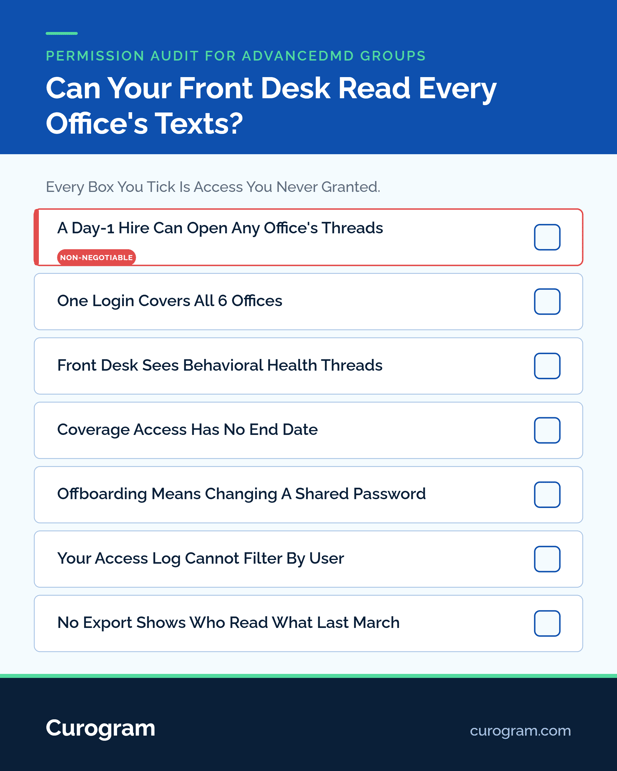
Checklist infographic for permission audit for advancedmd groups

What Scoped Access Actually Looks Like

Least privilege for patient messages means each person sees the threads their job requires and nothing past that line. Permissions have to compose, because real staffing does.

Permissions compose: office, duty, role

A group doesn't split cleanly by location or by function. It splits by both at once, which is why a single dropdown never fits.

Role

Offices seen

Threads they open

Can export

Front desk, PT office

1

Scheduling, that office

No

Float scheduler

2, for 14 days

Scheduling, both sites

No

Central biller

All 6

Billing threads only

No

Behavioral health intake

1

All threads, that office

No

Practice administrator

All 6

All, plus the access log

Yes


Sensitive specialty thread access is the row that matters most. Behavioral health threads stay with the behavioral health team, and the PT front desk never sees them exist.

Coverage without permanent sprawl

Floats are why most permission models rot. Someone covers Riverside for two weeks in July, gets access, and still has it in March.

Time-boxed grants fix that without anyone remembering to. Your administrator sets a window, access opens, and it closes on its own. This follows the least-privilege principle in federal security guidance, applied to a queue instead of a server.

Curogram Highlight: Granular RBAC

Granular RBAC lets your practice administrator scope staff access by office, by duty, and by specialty from one console. No ticket to IT, no vendor request, no waiting until Thursday.

Every permission change writes to the audit log for patient texting alongside the messages themselves: who changed what, when, and for whom. An access review reads it top to bottom without a single interview.

Offboarding is one deactivation. Access closes across all six offices at once, and the departed user's history stays intact in the log, which is exactly what a reviewer wants to find. Building this on top of a governed channel is the part we cover in why ungoverned staff texting breaks a group's audit trail.

Exactly Enough Access, Everywhere

What changes for the administrator

Work moves from firefighting to configuration. A new hire gets a role, not a shared password. A coverage request gets a two-week grant, not a permanent one. A departure gets a checkbox.

Groups that run this well audit their own permission list twice a year and find almost nothing to fix, because the model matched the org chart from the start.

What an access review sees

Two questions decide most reviews. Can you show who had access to a given patient's messages last March? Can you show it changed the day that person left?

Scoped access answers both from one screen. The same console that grants permission records it, so there is no second system to reconcile. Groups pair this with one shared inbox for every location, since scoped permissions are what make a shared inbox safe to share.

Share the Platform, Not the Exposure

List every person who can currently read patient messages at an office they have never worked in. For most groups on a basic texting tool, that list is the entire staff roster.

Shrinking it to zero is a configuration task, not a policy rewrite. Permission discipline already exists in your group, sitting in the suite your administrator tuned. Conversations are the last place it hasn't reached.

Book a demo. We'll map your offices, duties, and coverage patterns to a working permission model on the call, and your administrator will run it from there.


Frequently Asked Questions

How do we keep behavioral health threads from appearing to front-desk staff at other offices?

Scope those threads to the specialty team at that location. Users outside the scope never see the conversation listed, and every attempt to open a record is captured in the access log.

Why does a float scheduler need a time-boxed grant instead of standing access?

Coverage ends, but permissions rarely do. A two-week window expires on its own, which keeps a July fill-in from still holding access to another office's messages in March.

Who should administer messaging permissions in a multi-office group?

The practice administrator who already manages suite roles. The console assumes that skill set, logs every change, and needs no IT department or vendor ticket to add, scope, or remove a user.

What does an access review actually look for in patient texting?

Two things: a list of who could read a given patient's messages on a given date, and proof that the list shrank when staff left. Both come from one export.

How fast does access close when someone resigns?

One deactivation removes access across every office immediately. Their past activity stays in the audit log under their own name, so the record of what they saw survives the account.