
A Practical Guide to Optimize Clinical Workflows in Your Practice
Improve care quality with clinical workflow optimization for private practices—reduce delays, prevent errors, and streamline team communication.
13 min read

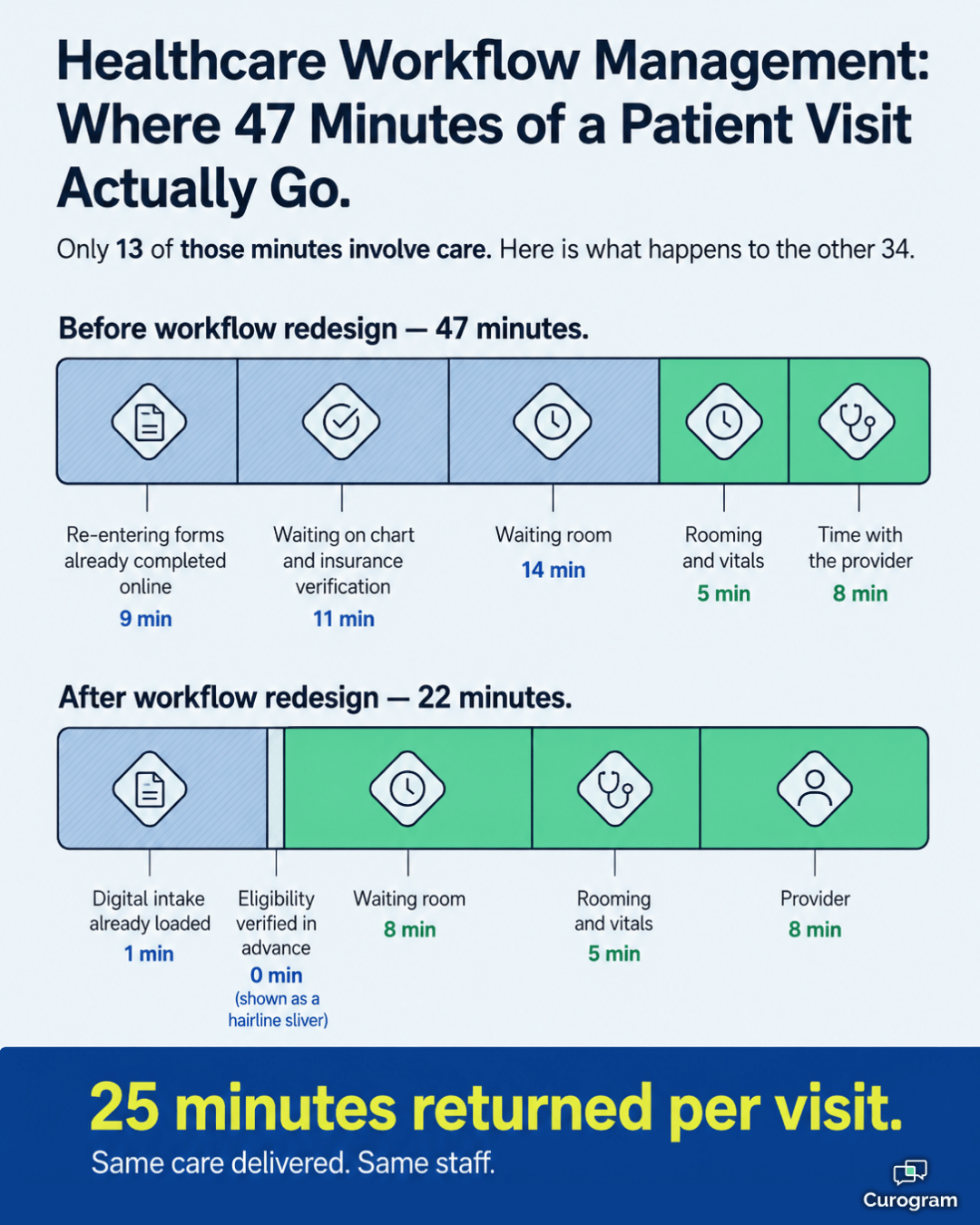
A patient checks in at 9:02 a.m. for a 9:15 appointment. The front desk hands her a clipboard she already filled out online. Her chart lives in one system, her insurance status in another, and her lab result is still sitting in a fax queue. By the time she sees a provider, 47 minutes have passed, and not one of them added anything to her care.
That gap is not a people problem. Your staff is not slow or careless. The problem is the path they are forced to follow.
In healthcare, almost nothing happens on its own. Scheduling, intake, triage, charting, handoffs, discharge, and billing are links in one long chain. When one link is weak, the damage does not stay in that department. It shows up as a late diagnosis, a denied claim, an empty bed, or a nurse who quits.
That is why healthcare workflow management has moved from a back-office concern to a leadership priority. It is the work of studying how tasks actually get done, then rebuilding the path so the right information reaches the right person at the right moment.
This guide walks through what workflow management in healthcare really involves.
You will see how it protects patients, where it recovers money, what a strong system is built from, and how to roll one out without disrupting care. You will also see what the results look like when it works.
Healthcare workflow management is the practice of analyzing, designing, automating, and tracking the sequence of tasks that make up care. That includes the people who do the work, the systems they use, and the data that travels between them.
Think of it as traffic engineering for your practice. A road can be perfectly paved and still jam if the lights are timed badly. Your team can be excellent and still fall behind if the process routes them through six stops they do not need.
The goal is a workplace where the next step is obvious, the needed information is already there, and nothing depends on someone remembering to follow up. That kind of predictability protects patients and staff at the same time.
It sounds simple. It isn't. Most healthcare processes grew by accident over many years, shaped by old software, staff turnover, and quick fixes that nobody ever removed.
The modern healthcare landscape is a crucible of immense pressure. Organizations are tasked with delivering exceptional care, improving patient outcomes, adhering to a labyrinth of regulations, and controlling escalating costs. Inefficient, legacy workflows are a primary antagonist in this narrative, acting as a source of latent risk and a significant drain on resources.
A strategic implementation of healthcare workflow management directly confronts these systemic challenges, fostering an environment of organization, transparency, accountability, and continuous improvement.
Patient safety is the most sacred responsibility of any healthcare provider, and it is inextricably linked to the quality of its underlying workflows. A poorly designed or managed workflow is a breeding ground for medical errors. Consider a manual process for communicating critical lab results: a delayed phone call, a missed page, or a note lost in a paper chart can lead to a catastrophic delay in diagnosis and treatment.
Error Reduction Strategies through Optimized Workflow Management in Healthcare:
The pattern in all three is the same. You are not asking people to try harder. You are removing the moments where a single missed step can cause harm.
Inefficiency is a quiet drain on a practice's finances. Wasted staff time, idle equipment, longer patient stays, and rejected claims all trace back to processes that were never designed on purpose.
The clearest place to see the return is administrative time. Here is a sample calculation for a mid-sized practice with four front-desk staff, based on a 250-day work year. These figures are illustrative, not client-reported.
| Manual task | Minutes per day | Minutes after automation | Hours saved per year |
|---|---|---|---|
| Insurance eligibility checks | 90 | 20 | 292 |
| Appointment reminder calls | 75 | 10 | 271 |
| Intake and demographic entry | 120 | 35 | 354 |
| Chasing lab and referral status | 60 | 25 | 146 |
| Total | 345 | 90 | 1,063 |
What does that mean for your team?
Roughly 1,063 hours a year is about half of one full-time position, recovered without hiring anyone.
At a loaded cost of $22 an hour, that is close to $23,000 back in the budget every year.
Just as important, those hours do not vanish. They move to work that actually needs a human, like financial counseling, complex scheduling, and calming an anxious caller.
The savings continue past the front desk:
Each of these is a compounding gain. One fewer denied claim per day is small. Two hundred fifty fewer per year is a budget line.
A chaotic environment makes patients anxious and wears staff down. Long waits, missing paperwork, and the same three questions asked by four different people all signal the same thing: the process is not holding the information.
Staff feel it even more sharply. Fighting clumsy tools all day is one of the most reliable paths to burnout, and burnout is expensive to replace.
This is the human-centered side of hospital workflow management, and it is easy to undervalue. A calmer team makes fewer mistakes and stays longer.
|
The most common workflow failure has nothing to do with technology. It happens when a practice automates a broken process and simply makes the mess run faster. Map your current steps first. Cut the ones that add nothing. Then automate what is left. The software is the last step, not the first. |
A strong system is not one piece of software. It is four capabilities working together. Understanding each one helps you judge vendors and avoid buying a tool that solves only a slice of the problem.
Before you improve anything, you need a truthful picture of how work happens today. That means more than a quick flowchart.
Three mapping methods do most of the heavy lifting:
Once you pick a method, the analysis itself follows six steps:
Automation is the engine of any modern workflow program. The trick is matching the type of automation to the type of work.
Rules-based automation follows simple if-then logic. If a lab result is marked critical, alert the ordering physician. If an appointment is booked, send a confirmation. It is predictable, easy to audit, and covers most everyday needs.
Intelligent automation adds AI and machine learning on top. It might weigh a physician's schedule, a patient's history, and current capacity to suggest the best slot for a non-urgent procedure. It learns from outcomes and adjusts over time.
You also have three practical tool categories to choose from:
Data is the lifeblood of care, but it usually sits in silos. The EHR holds one piece, the lab system another, billing a third. Breaking those walls down is a core job of any workflow program.
Two standards make it possible. HL7 has been the long-standing method for passing clinical and administrative data between applications. Its modern successor, FHIR, uses web-based technology that makes connections faster to build and easier to maintain. Any platform you consider should speak FHIR fluently.
APIs are the bridges that carry those messages. A workflow engine uses them to pull demographics from your practice management system, fetch results from the lab, and push an order to the pharmacy, all in the background while your staff does something else.
You cannot manage what you cannot see. Live dashboards turn workflow data into decisions you can make this morning instead of next quarter.
Here is what to watch, and what a bad number is actually telling you:
| Area | Metrics to track | What a poor number usually means |
|---|---|---|
| Emergency department | Door-to-doctor time, left-without-being-seen rate, discharge length of stay | Triage or bed assignment is the choke point |
| Operating rooms | On-time first-case starts, turnover time, room utilization | Pre-op clearance or patient transport is running behind |
| Laboratory | Routine and STAT turnaround, critical value reporting time | Results are reaching clinicians too late to change care |
| Front office | Reminder response rate, no-show rate, eligibility errors | Patient communication is one-way and not landing |
Some larger hospitals take this further with a physical command center modeled on mission control. Nursing supervisors, bed managers, and transport dispatchers work side by side under live dashboards, resolving bottlenecks before they turn into crises.
That is data-driven hospital workflow management at full strength.

Implementation is a change management project first and a technology project second. Rushing it, or skipping buy-in, is the fastest way to end up with expensive software nobody uses.
Start by forming a steering committee with real authority. Include executive leadership, IT, and respected clinical and administrative champions from the departments you plan to touch.
Then set goals you can measure. "Improve efficiency" is not a goal. "Reduce door-to-doctor time by 20% within 12 months" or "cut the claim denial rate by half within 18 months" gives everyone a target and a deadline.
Finally, build the business case. Use your own workflow analysis to show what the current process costs and what the new one should return.
Take the future-state maps from your analysis and refine them with the people who will live in them. This is iterative work, and frontline input is not optional.
For vendor selection, write a request for proposal tied to your actual needs rather than a generic feature list. Weigh technical strength, especially FHIR support, against how easy the tool is to use day to day.
Then look at how well it scales, how much healthcare work the vendor has done, and how much help you get during setup. Ask to speak with practices similar to yours that already use the system.
Do not attempt an all-at-once rollout. Pick one contained, well-defined workflow, such as outpatient appointment scheduling, and pilot it there.
A pilot lets you find the problems in a low-risk setting. Once it works, expand in phases so your implementation team can support each group properly.
Training deserves its own budget line. Role-based sessions should cover the reason behind each change, not just which buttons to press. Name super-users on every team so staff can get help from a peer standing next to them.
Go-live is the starting line, not the finish. Track the metrics you defined in Phase 1 and review them on a set schedule.
Then make it permanent. A standing governance committee should own workflow performance, approve changes, and prioritize the next round of improvements. This is how healthcare workflow management becomes a habit instead of a one-time project.

Theory is useful. Numbers are better. The two examples below show what changed once the underlying process was redesigned.
Example 1: A large urban hospital cuts emergency wait times
A busy level-one trauma center faced constant emergency department crowding. Average door-to-doctor time passed 90 minutes, and too many patients were leaving before being seen.
The fix targeted the front end. A quick-look nurse triage started within five minutes of arrival. Low-acuity patients were routed to a fast-track area. The system placed lab and radiology orders automatically based on triage protocols, and live dashboards flagged any patient whose case was stalling.
| Metric | Before | After 12 months |
|---|---|---|
| Door-to-doctor time | 90+ minutes | 60 minutes |
| Left-without-being-seen rate | Baseline | Cut by half |
| Emergency patient satisfaction | Baseline | Up 15 points |
For that department, 30 minutes saved per patient is not just a better score. It is capacity, because every patient who moves through faster frees a room for the next one.
Example 2: A multi-specialty group repairs its revenue cycle
This group was denying 18% of claims and carrying 55 days in accounts receivable. Billing was manual, split across systems, and vulnerable to coding and demographic errors.
The redesign checked insurance eligibility on its own, 24 hours before every visit. It prompted physicians for missing notes at the moment of charge capture. Then it ran each claim against payer rules and flagged errors before anything went out the door.
| Metric | Before | After |
|---|---|---|
| Claim denial rate | 18% | 4% |
| Days in accounts receivable | 55 | 32 |
Here is what those numbers mean in cash. For a group billing $1.2 million a month, shortening A/R by 23 days releases roughly $920,000 that used to sit in limbo.
That figure is an illustrative calculation, but the mechanism is real: money that arrives sooner is money you can actually use.
Every workflow you automate touches protected health information. A reminder text, an intake form, a routed lab result — each one moves patient data from one place to another. That makes compliance a design question, not a box you tick after go-live.
Here is the part most practices miss. A well-built automated workflow is usually more compliant than the manual one it replaced, because manual processes run on sticky notes, personal phones, and shared inboxes. Automated ones leave a record.
So require these five things from any workflow before you put it into production:
One caution is worth naming plainly. Automation spreads a mistake just as fast as it spreads a good process, so a routing rule pointed at the wrong group will misfire hundreds of times before anyone notices.
Test every new rule against real scenarios before you switch it on. Put a human review step on anything that leaves your organization. This is why compliance belongs in every healthcare workflow management plan from the first design session, not the final review.
Healthcare workflow management has grown from a niche IT topic into a core strategic discipline, and for good reason. It is the machinery that turns good intentions into results your team can repeat on a Tuesday afternoon in flu season.
When you study how work actually moves, cut the steps that add nothing, and automate what is left, you build a practice that holds up under pressure. Safety improves because fewer things depend on memory. Margins improve because fewer hours and fewer claims are lost along the way. Staff stay longer because the tools stop fighting them.
None of this happens by accident, and none of it happens overnight. It takes an honest look at your current processes, a real commitment from leadership, and the patience to fix one workflow well before moving to the next. But the payoff compounds. Every bottleneck you clear gives your team back time, and every hour you return is an hour they can spend on a patient instead of a workaround.
The best place to begin is the process that frustrates your team most, because it is usually the one costing you the most. If patient communication, intake, or scheduling sits at the top of that list, take a closer look at what a connected platform can handle for you.
Book a demo with Curogram to see how automated messaging, digital intake, and two-way patient communication fit into the workflows you already run. Bring your hardest bottleneck to the conversation. That is the one worth solving first.

Improve care quality with clinical workflow optimization for private practices—reduce delays, prevent errors, and streamline team communication.

Spot workflow bottlenecks before they cost your clinic patients and revenue. Healthcare workflow automation through EMR integration holds the key.

Learn how to improve clinic efficiency without hiring more staff. Discover workflow strategies, automation, and eCW integrations that maximize...