
The #1 Cause of Administrative Burnout in Medical Practices
Admin burnout is fueled by poor integration. See how connected systems save staff time.
12 min read

Nothing in your practice looks broken. Notes get closed. Refills get filled. Results get read.
Yet the day still ends with a pile of loose ends nobody planned for.
That gap is where private practices quietly lose time. It rarely arrives as one big failure.
It arrives as a nurse repeating a handoff because the first one skipped an allergy note. Or a refill request sitting in a shared fax folder for three days. Or an abnormal lab waiting in an inbox while the provider is on vacation.
Small gaps. Real consequences.
This guide walks through clinical workflow optimization for private practices, step by step. The goal is simple: replace habits that depend on a specific person with systems that work no matter who is on shift. We will focus on the three flows that carry the most risk and the most repeat work, which are patient handoffs, prescription refills, and lab result management.
For each one, you will get a way to standardize it, a way to automate it, and a way to check whether it is actually working. You will also see the frameworks that make this practical, including SBAR handoffs, refill triage ladders, and clear routing rules for results.
None of this asks you to buy a new EMR or hire more staff. It asks you to decide, one time, how each process should run. Then you build that decision into the tools your team already opens every day.
If your team patches gaps with sticky notes, hallway updates, and callback lists, the sections ahead will show you what to put in their place. Start with the map. The rest gets easier from there.
You cannot fix a process you have never written down. Start by listing the clinical steps that touch the most visits and cause the most harm when they stall. For most private practices, three rise to the top.
Walk each one and capture how it works today. Note every handoff point and every way it fails.
A failure mode can be blunt:
"refill denied because we never got a blood pressure reading." That honesty is the point.
| Process | Where it usually breaks | What to capture first |
|---|---|---|
| Patient handoffs | Room to room, provider to provider, care to billing | Who sends, who receives, and what is required every single time |
| Prescription refills | Between the patient's request and the provider's inbox | Which medications are routine, which need data, which need review |
| Lab and imaging results | Between the result arriving and the patient hearing about it | Separate paths for normal, abnormal, and critical, each with a deadline |
Long protocols get ignored. Short ones get used. Aim for a rule a new hire can read once and apply the same day.
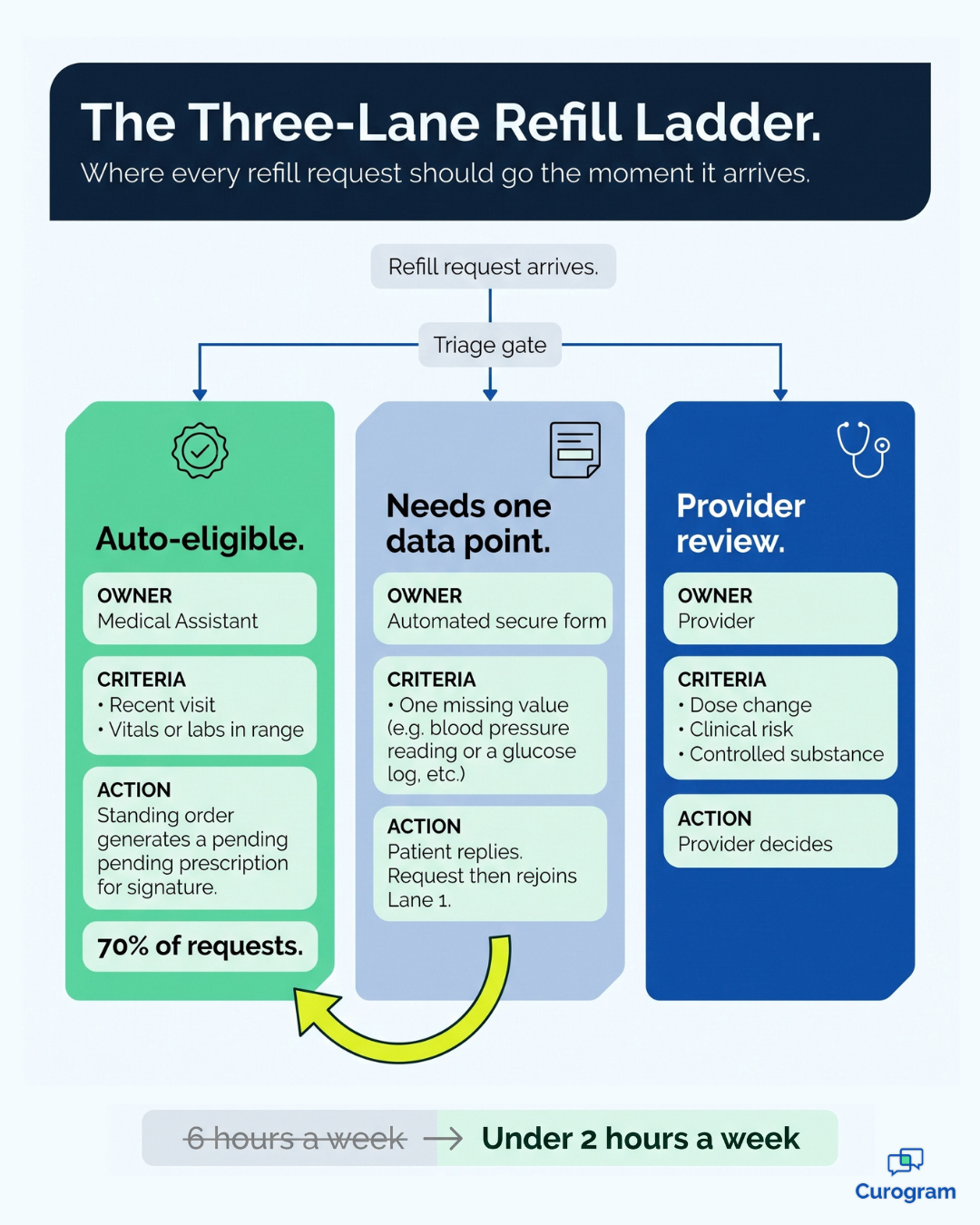
For handoffs, adopt SBAR as your shared language, which stands for Situation, Background, Assessment, and Recommendation. Build it as a one-screen template so the sender can finish it in under 60 seconds. For refills, create a triage ladder with three rungs: requests that meet clear criteria, requests that need one missing piece of data, and requests that need a provider to weigh in.
For results, define the route and the clock together, so a normal result auto-notifies the patient while a critical one pages the provider and escalates after 30 minutes.
This is where healthcare workflow automation earns its keep. Rules do the passing so people do not have to remember.
Closing a note can push an SBAR summary to the next role's queue.
A refill that meets your criteria can generate a pending prescription waiting only for a signature.
An abnormal lab code can open a task with a deadline and an escalation path already attached.
Pick a few measures and review them monthly. Handoff completion rate and turnaround time tell you whether the template is being used. Refill cycle time and the share of requests cleared by protocol tell you whether triage is working. Result acknowledgment times, split by normal, abnormal, and critical, tell you whether patients are hearing back on schedule.
When the work is written down and the software handles the passing, your practice gains speed and safety at the same time. Clinicians carry less in their heads. That alone changes how a busy Tuesday feels.
Before jumping into solutions, it’s important to understand exactly where—and why—private practices lose efficiency and introduce risk.
Every delay, missed communication, or incomplete task has a ripple effect that impacts both patient care and staff workload. Below, we’ll break down the most common problem areas in clinical workflows, explain their root causes, and set the stage for how optimization strategies can resolve them.
One of the biggest threats to care continuity is inconsistent patient handoffs. In many practices, how information is shared depends entirely on the person doing the handoff.
A nurse might mention a recent medication change but omit allergy updates.
A provider might verbally update a colleague but forget to document the rationale for changing a treatment plan. This variability means critical details can slip through the cracks, leading to duplicate work, unnecessary tests, or even adverse patient outcomes.
Without a standardized handoff protocol, such as SBAR (Situation, Background, Assessment, Recommendation), staff rely on personal habits and memory. The problem is amplified during shift changes, provider coverage, or high-volume clinic days when cognitive load is at its peak.
Prescription refill requests often get trapped in a no-man’s-land between the patient’s call and the provider’s inbox. They’re buried in email threads, mixed into the EMR task list, or sitting in a shared fax folder. The lack of clear triage criteria means all refills are treated the same—whether it’s a straightforward renewal for a long-term medication or a high-risk controlled substance requiring provider review.
This bottleneck results in delays that frustrate patients, trigger repeat calls, and consume staff time. In worst-case scenarios, it interrupts treatment adherence, potentially impacting the patient’s health and increasing the likelihood of an urgent visit.
Lab and diagnostic test results—especially abnormal ones—demand timely review and patient communication. But in many private practices, result management is reactive and scattered.
A critical result may be routed to a provider’s inbox while they’re out of office.
A normal result may languish unacknowledged for days, leaving patients wondering about their status.
The lack of automated routing rules, clear SLAs (service-level agreements), and escalation protocols creates risk for both patient safety and legal compliance.
When results are missed or delayed, it erodes patient trust, forces clinicians into “damage control” conversations, and increases malpractice exposure.
Fragmented communication is another major culprit. Information might live in the EMR, on sticky notes, in personal email accounts, or in a chat app. Each tool serves a purpose, but without integration and agreed-upon workflows, staff must constantly switch contexts to piece together a complete patient picture.
This patchwork approach increases the chance of missed messages, duplicated effort, and overall inefficiency. It also makes onboarding new staff harder because there’s no single “source of truth” for how the clinic communicates and completes tasks.
Finally, many practices operate without a real feedback loop for process performance. Cycle times for handoffs, refill approvals, and result acknowledgments are rarely tracked. Without data, delays feel “normal” and systemic issues remain hidden. Staff may assume a process is efficient simply because “we’ve always done it this way.”
Lack of performance metrics means there’s no objective way to identify bottlenecks, coach underperforming workflows, or celebrate improvements.
The result is stagnation—where small inefficiencies accumulate into major operational drag over time.
At the core, these pain points exist because most private practices evolve organically rather than by design.
Roles shift as staffing changes; new tools are added without process redesign; protocols are informal and stored in people’s heads rather than the clinic’s systems.
This “accidental workflow” environment depends on individuals rather than reliable structures, making it fragile and prone to error.
The good news: these problems are solvable with deliberate private practice optimization. Standardizing communication, embedding protocols into tools, and automating routine steps can remove variability and restore control. In the following sections, we’ll show how to apply these principles to three high-impact workflows—handoffs, prescription refills, and result management—so your team can deliver safer, faster, and more consistent patient care without adding to the workload.
If you'd like to learn more about improving healthcare workflow management for small clinics, we've previously covered that, including why it's key to the patient experience.
Numbers make this concrete. Say your practice handles 60 refill requests a week, and each one consumes about 6 minutes of staff time across calls, faxes, and follow-ups. That is 6 hours a week, or roughly 312 hours a year. Put another way, it is about 8 full work weeks spent moving refills from one place to another.
Now add clear triage rules so staff can clear 70% of those requests without a provider touch. Your 6 hours a week drop to under 2. That is more than 200 hours returned to your team annually.
Choose SBAR or IPASS. Then use it with everyone. Providers, nurses, medical assistants, and care coordinators all fill the same four fields.
Consistency is the whole benefit. A partial rollout gives you almost nothing.
Build a card your team can finish in a minute:
A protocol works only when using it is easier than skipping it. Four pieces make that true:
That last piece matters more than it sounds. An escalation rule is what turns a good intention into a system you can trust.
Review these with the whole team before you review them with any one person. A low completion rate usually points to a clunky template, not a careless staff member. Fix the form first.
With this approach, patient handoffs stop being hallway updates and scattered emails. They become traceable steps that protect patients and provider time.
Every refill should land in one of three lanes the moment it arrives. Auto-eligible requests have a recent visit and vitals or labs in range. "Needs info" requests are missing one specific data point. Provider-review requests involve risk, dose changes, or controlled substances.
Medical assistants own the first lane through standing orders. Providers see only the exceptions. That single change is what shrinks the queue.
Most stalled refills are waiting on one number. A blood pressure reading. A glucose log. A two-question depression screen.
Send a secure link and ask for it directly. The patient replies from their phone in under a minute, and the request moves forward without a single phone call. Digital forms make this collection routine instead of a special project.
Normal results auto-notify the patient with context. Abnormal results enter a provider queue with a 24-hour deadline. Critical results trigger an alert with a read receipt and a set escalation path.
Every message and every acknowledgment logs back to the chart on its own. Documentation stops being a separate chore.

By this point the workflow design is done. What you need is a communication layer that can run it.
Curogram handles the patient-facing half. Two-way texting is HIPAA compliant, so you can reach patients fast for vitals, clarifications, or instructions. Every message carries an audit trail. Digital forms collect refill criteria and pre-visit data on the patient's phone, with no portal login to fight through.
An after-hours auto-responder confirms that a request arrived and sets expectations. Urgent items route to whoever is on call. Read receipts show that patients actually saw their results.
The numbers here are worth a pause. Curogram clients cut phone call volume by as much as 50%. Front desk productivity climbs 30% or more once routine communication moves to text. Staff learn the platform in under 5 minutes.
Here is what that looks like for a practice fielding 400 calls a week at 3 minutes each.
That is 20 hours of phone time. Cut it in half and you get 10 hours back every week. For your team, that is more than a full day of capacity returned to patient care.
Paired with your EMR, this shortens cycle times and builds a defensible record of every message sent. Those are core wins for private practice optimization.
Lab result management gets easier the moment you stop treating every result the same. Sort them into three categories, then assign an owner and a clock to each one.
| Result type | Who acts | Target turnaround | What the patient receives |
|---|---|---|---|
| Normal | Auto-notify after provider sign-off | Within 24 hours | Plain-language result and the next step |
| Abnormal, not critical | Provider review required | Within 24 to 48 hours of receipt | Guidance on diet, medication, or follow-up scheduling |
| Critical | Provider alert with read receipt | Immediate, escalate at 30 minutes | Phone call first, then a written recap |
The deadlines matter as much as the categories. A rule without a clock is a suggestion.
Write templates that translate clinical terms into plain English and link to a reputable source for anything complex. Add clear if-then instructions so patients know what to watch for, such as "if your fasting glucose reads above 130 on two separate days, message us."
Then document every attempt to reach the patient. Secure messaging gives you that trail without extra work, which protects the patient and the practice at once.
Check the results queue twice a day and assign owners by provider or panel, so nothing sits in a shared bucket with no name on it. Keep dashboards showing unreviewed results sorted by age and category, because age is what turns a minor delay into a real problem. Run a weekly spot-check on turnaround compliance and coach the outliers before the pattern sets.
This is medical practice management at its most tangible. Fewer rounds of phone tag. Faster answers for patients. Clear accountability for every result that comes through the door.
Optimizing clinical workflows is not about adding steps to an already full day. It is about removing the guesswork that makes each day unpredictable.
When handoffs follow one format, refills move through clear lanes, and results carry a deadline and an owner, your practice gets faster answers, fewer errors, and calmer staff. You also get something harder to measure but easy to feel, which is confidence that nothing important is sitting somewhere unnoticed.
Start smaller than you think you should. Pick the one flow that generates the most callbacks this month and map it end to end. Write the protocol on a single page.
Then build that protocol into the tool your team already uses, and watch the three numbers attached to it for 30 days. One workflow fixed properly will teach your team more than five fixed halfway.
Tools carry real weight here too. Curogram's HIPAA-compliant messaging, digital forms, after-hours auto-responders, and read receipts help your team communicate clearly, collect the data they need, and document the work without extra clicks. The technology should disappear into the routine. That is when you know it is working.
Ready to see these workflows running in a real practice? See how Curogram streamlines clinical workflows and get a walkthrough built around your specialty and staffing model.
Frequently Asked Question

Admin burnout is fueled by poor integration. See how connected systems save staff time.

 Aubreigh Lee Daculug : 3/8/26, 10:00 AM
See how practices achieved seamless workflows with Curogram EMR integration. 5 detailed case studies with before/after metrics and implementation...

5 integration wins every clinic administrator will love. Learn how the EMR integration benefits for administrators bodes well for your medical...