
What Causes Patient Texting Adoption Gaps in Clinics
 Aubreigh Lee Daculug : 9/17/26, 5:59 PM
Learn why patient texting platforms stall and how to overcome compliance, workflow, and usability barriers for better adoption.

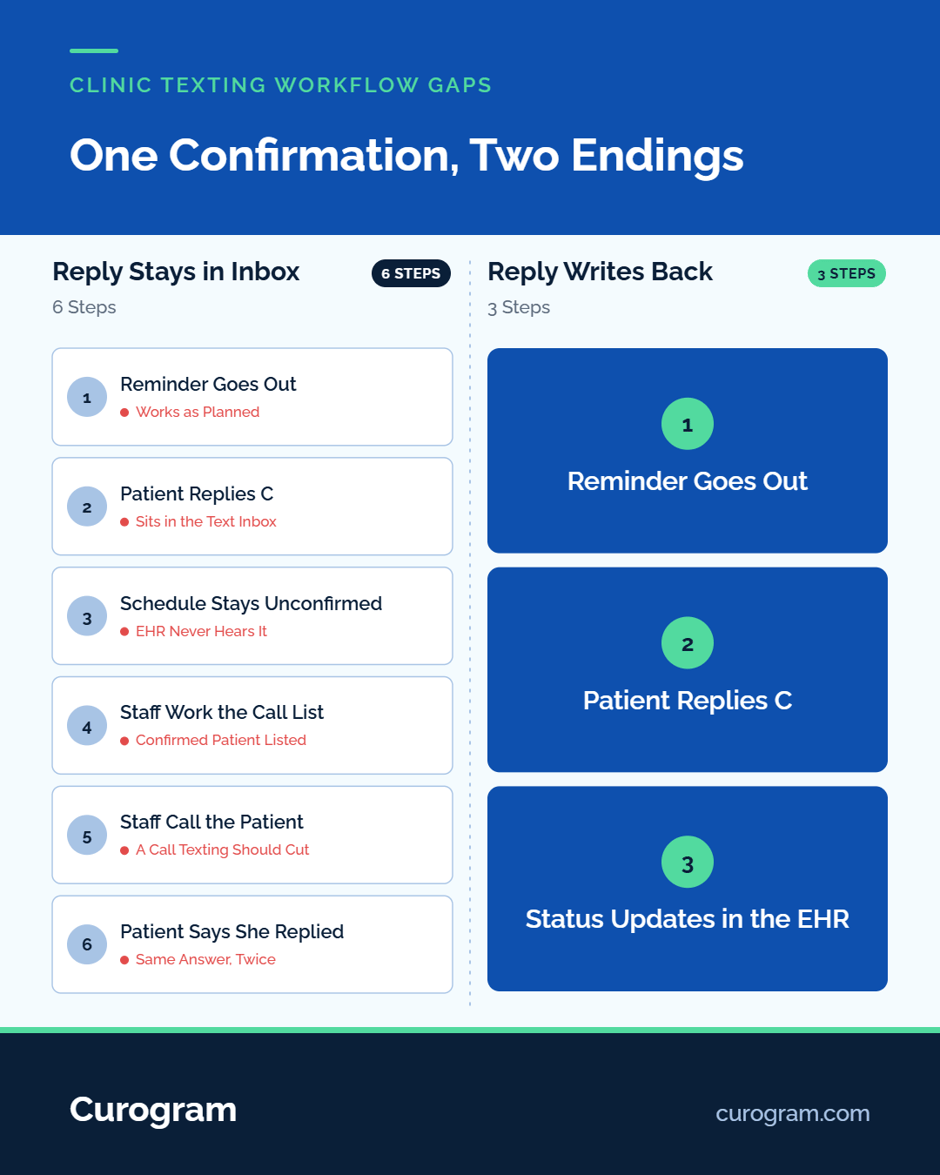
A patient replies C to confirm her Tuesday visit. On Monday afternoon, a medical assistant working the unconfirmed list calls her anyway, because the EHR still shows the slot as unconfirmed. The patient picks up at work and says she already texted back.
Nobody would file that exchange as a problem. The reminder went out, the patient answered, and the call took two minutes. Multiply it across a week of confirmations, and the desk is back to making the calls texting was bought to remove.
That call comes from one of several clinic texting workflow gaps. We think the gaps that cost the most staff time sit in handoffs between the front desk, the schedule, and the chart. They're easy to miss because each one looks like a small, sensible workaround: a quick call, a retyped time, a sticky note for the next shift. The symptom tends to show up first as phone volume that didn't drop after launch.
This guide maps five handoffs and shows how to find yours in one afternoon. It then walks through the three gaps that tend to cost the most: the schedule, the chart, and the team. Each comes with the symptom to look for, a worked example, and who at the practice owns the fix.
It ends with the order to close them and one number to watch after each fix, so you can tell whether the fix held. Order matters here, because staff who keep calling confirmed patients won't adopt new documentation habits on top of that work.
A handoff is any point where information moves from one person, screen, or system to another, and every clinic communication runs through several of them.
Five handoffs connect the front desk to the EHR, and a gap can open at any of them.
Shadow one front desk staff member for two hours and tally every retype. A retype is any time they copy information from one screen to another, or say it aloud to someone who then types it. Mark each tally under one of the five handoffs.
Scheduling deserves a close watch. In the MGMA Stat poll on phone bottlenecks in medical practices (294 responses, March 10, 2026), 31% of leaders named it their biggest staff-time drain on the phones. The tally turns vague clinic communication challenges into counts you can act on.
Gap, symptom and owner
|
Gap |
What you will see |
Who fixes it |
|---|---|---|
|
Reply does not reach the schedule |
Staff call confirmed patients anyway |
Vendor or IT |
|
Thread lives outside the chart |
Provider asks what the patient said |
Practice policy |
|
Thread has no owner |
Messages answered twice, or not at all |
Front desk lead |
|
Shift handoff loses context |
Morning staff re-read yesterday's queue |
Front desk lead |
|
No template control |
Every staff member words it differently |
Administrator |
Appointment status is the EHR field that says whether a visit is confirmed, and it's where the first gap shows up.
A confirmation never posts when a reply stays in the texting tool and nothing updates appointment status. The path runs from reminder to reply to message inbox, and stops there. Staff on the EHR's unconfirmed list see the old status and call.
Based on our internal data, Covina Arthritic Clinic confirms more than 1,100 appointments a month. At that volume, unposted confirmations would fill a call list. Ask patient texting communication platforms to show a C reply changing status through their EMR integrations. If yours can't, the limit is the tool, covered in why clinics outgrow basic patient texting tools.
A reschedule gets typed twice when the patient's new time arrives by text but has to be entered by hand. Count the touches in one version. The patient texts "Can I do Thursday at 2?" One staff member reads it, checks the EHR, and books the new slot.
A second staff member, who didn't see the first, texts the patient to confirm the time. Someone then updates the reminder so the old date doesn't go out. That's four staff touches for one change, and two chances to enter the wrong day.
A thread is the running text conversation between one patient and the practice.
A conversation lives outside the record when agreements made by text never reach the chart. At the next visit, a patient says she stopped the new medication two weeks ago, as the nurse told her by text.
The provider opens the note and finds no trace of that instruction. Now the provider has to find the nurse, and the nurse has to scroll the message inbox on another screen while the next patient waits. A decision made by text shaped the patient's care, and the chart can't show it.
Anything clinical belongs in the chart note, and logistics can stay in the thread. The test: if a covering provider read only the chart, would they miss something that changes care? Symptoms, medication changes, and nurse instructions pass. Parking, forms, and visit times don't.
The thread keeps its own audit log, and HHS guidance on the HIPAA Security Rule covers the audit controls that record activity in systems holding patient data. When content moves to the chart, add a one-line note that points back to the thread date.
The third gap is between people, and healthcare texting makes it easier to miss, since nobody hears the phone ring.
A thread has no owner when it lands in a shared inbox and nobody is assigned to it. Two things follow. Two staff answer the same patient with slightly different details, or nobody answers, because each assumed a colleague had it.
Medical messaging platforms can route threads, but the assignment rule has to come from the practice. Write it down and post it at the desk: a new thread goes to whoever works that task queue and stays with them until it closes or passes by name. More on this failure is in what makes clinic patient texting break down.
Replies pile up in two windows: the lunch hour and the last half hour before close. At lunch, the desk thins out just as patients on their own breaks text back. Near close, late-day messages draw replies after staff logs off.
The rule that covers both has two parts. Stagger lunches so one named person always owns the inbox, and set an automatic reply for closed hours that tells patients when the office will answer. Put the coverage name on the shift schedule beside each lunch slot.
Curogram is a HIPAA-compliant, SOC 2 Type II patient communication platform. Missed Call to Text Automation sends a text when a call isn't answered, so patients can reply, ask a question, or book. Lunch-hour messaging sends a set reply to anyone who texts during each location's lunch period.
Internal notes stay visible only to staff inside the patient thread, and forwarding a note assigns it as a task.

Closing clinic texting workflow gaps in the wrong order spends staff effort on fixes that don't hold.
Close the gaps in this order, and don't start the next fix until the last one holds for two weeks.
A practice that starts with templates ends up rewriting messages whose replies still land in the wrong place.
Track clinic texting workflow gaps with one number per gap, measured for two weeks before the fix and two weeks after. Two weeks covers busy Mondays and slow Fridays, so one odd day doesn't swing the result. Use the same method both times, and record who counted. Keep the counts in one shared sheet the whole team can see.
One metric per gap
|
Gap |
Metric |
Where to find it |
|---|---|---|
|
Reply does not reach the schedule |
Calls made to patients who already confirmed by text |
Unconfirmed call list checked against the message inbox |
|
Reschedules typed twice |
Staff touches per reschedule |
Two-hour shadow tally |
|
Thread lives outside the chart |
Visits where the provider asks what was said by text |
Provider tally at end of day |
|
Thread has no owner |
Threads answered twice or not at all |
Message inbox review |
|
Coverage holes |
Replies waiting past lunch or close |
Message timestamps |
|
No template control |
Different wordings of the same message |
Sample of 20 sent messages |
If calls to confirmed patients don't fall after the write-back fix, test the integration again with a live reply before moving to ownership.
A texting rollout pays off when the schedule, the chart, and the next shift all hear what the patient said. Patient engagement can look strong on a vendor report while the desk still makes the calls.
Start with one afternoon of shadowing and a tally sheet. If write-back sits at the top of the tally, fix it first, even when the chart gap feels more urgent.
Book a Curogram demo and bring your tally sheet. We'll walk through where each handoff breaks and what would close it.
Frequently Asked Questions
 Aubreigh Lee Daculug : 9/17/26, 5:59 PM
Learn why patient texting platforms stall and how to overcome compliance, workflow, and usability barriers for better adoption.

 Jo Galvez : 10/1/26, 4:00 PM
Model the return on HIPAA texting using numbers your practice already tracks: no-show recovery, staff hours, collections, and recall.
 Jo Galvez : 5/9/26, 1:00 PM
Practical strategies for texting elderly patients, how to write clear messages, overcome technology barriers, and keep your practice HIPAA-compliant.