
.jpg?width=30&height=30&name=square-formal-photo%20(1).jpg) Mira Gwehn Revilla
Mira Gwehn Revilla
The Complete Guide to HIPAA Texting ROI in 2026
 Jo Galvez : 10/1/26, 4:00 PM
Model the return on HIPAA texting using numbers your practice already tracks: no-show recovery, staff hours, collections, and recall.

Most clinics judge a new texting setup by how many messages it sends. A report showing 4,000 texts a month looks like progress. Then someone checks the phone log and finds the lines just as jammed, plus a reply inbox nobody planned to staff.
A sent count only proves the tool is switched on. The patient texting workflows that reduce front desk calls each map to one reason people phone in. They launch in a set order, and they're judged by what happens to that call type afterward.
We hold a plain view. Six workflows do most of the work, and the order you launch them matters more than any feature list.
Confirmations go first because scheduling is the biggest call bucket text can absorb. Recall goes last because it sparks booking requests before it saves any calls.
This guide is for practice administrators and IT managers at single-site and small multi-site clinics. We'll cover how to sort a week of calls and what each workflow should say to patients.
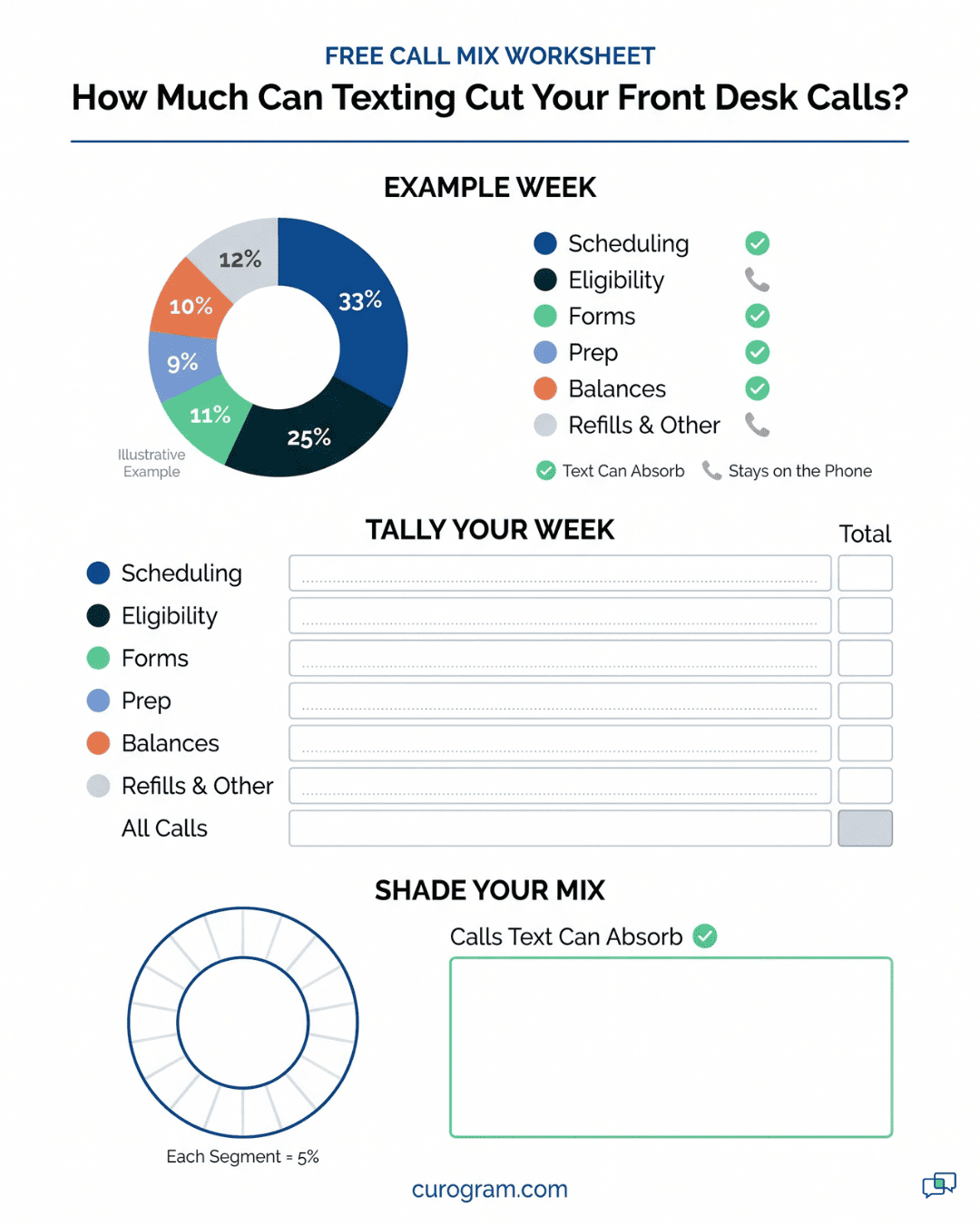
A call bucket is a group of inbound calls that share one reason, such as "move my visit" or "what do I owe." Sorting a full week of calls into buckets tells you which workflow to build first. Each bucket maps to one texting workflow, or to none.
MGMA offers a useful baseline. In its MGMA Stat poll on phone bottlenecks in medical practices, taken March 10, 2026 with 294 applicable responses, leaders named the phone task that eats the most staff time.
Eligibility or prior authorization led at 45%, then scheduling at 31%, intake at 9%, prescription refills at 6%, and other at 9%.
Text handles scheduling and intake well. Refills move partly, if your EHR sends refill requests to a task queue. Eligibility and prior authorization mostly stay put, since those calls need staff on a payer portal or on hold with a plan rep.
So nearly half the time in that poll sits where texting can't reach. You're aiming at the rest.
Keep a tally sheet by each phone for five business days. After every call, whoever answered marks one code: S for scheduling, F for forms, P for prep questions, B for balance, E for eligibility or prior auth, and O for other.
Most phone systems export call counts by hour. They can't record why the patient called, though. Only the person who picked up knows that, and a paper sheet or a shared spreadsheet tab takes about two seconds per call.
Pick a normal week. Skip the week after a holiday closure, when reschedule calls spike and skew the mix. If you run two sites, tally both, because one site's numbers won't predict the other's.
At the end of the week, total each code. That count is your baseline, and you'll compare against it after every launch.
What to Do With the "Other" PileIf O runs above 10% of the week, read the notes staff jotted beside those marks. Hidden buckets often turn up there: directions and parking, records requests, "did you get my fax," or "is the doctor running late." Some of these fit an existing workflow. Parking and directions can ride along in the confirmation text, and a running-late notice is a one-line mass text to that afternoon's patients. Anything left in O after that sort is usually too mixed to automate. Leave it on the phone and move on. |
Scheduling is the largest bucket that texting can absorb, even when eligibility work eats more staff time overall. A worked week makes the split easy to see.
Take an illustrative clinic that logs 500 inbound calls in one week. These figures are illustrative and don't come from a study.
|
Bucket |
Calls |
Share |
|
Scheduling (confirm, move, cancel) |
165 |
33% |
|
Eligibility or prior auth |
125 |
25% |
|
Forms and intake |
55 |
11% |
|
Prep questions |
45 |
9% |
|
Balances |
50 |
10% |
|
Refills and other |
60 |
12% |
Scheduling alone is a third of this clinic's week. Add forms, prep and balances, and 315 of 500 calls (63%) land in a bucket with a matching workflow.
Eligibility's 125 calls stay on the phone. That's why a clinic can text heavily and still see phone call volume barely move. When the eligibility share runs high, the ceiling on call savings drops with it.
Refills sit in the gray zone. If your EHR has a refill task queue, a text reply from the patient can drop straight into it. That moves some of those 60 calls without a new workflow, so it's worth checking before you count them as phone-only.
Each bucket you can deflect has one workflow that answers it before the patient dials. Deflection levels in this table are illustrative, based on how fully a text can answer each question.
|
Call type |
Workflow that absorbs it |
Realistic deflection |
|
Confirming or moving an appointment |
Confirmation with reschedule |
High |
|
Asking about forms |
Intake link before arrival |
High |
|
Asking what to bring or how to prepare |
Prep message with reply check |
Moderate |
|
Asking about a balance |
Text-to-pay after claim posts |
Moderate |
|
Eligibility or prior authorization |
Not a texting problem |
Low |
No-shows topped the list when MGMA asked practice leaders, "What will your organization's top patient access focus be in 2026?"
In that MGMA Stat poll on 2026 patient access priorities (December 9, 2025, 236 applicable responses), 27% chose no-shows. Online scheduling followed at 24% and phone access at 22%. Confirmations touch no-shows and phone access at once, so they launch first.
The confirm-and-reschedule loop is a confirmation text with three reply paths: confirm, reschedule or cancel. That middle option pulls calls off the phone. "Can I come Thursday instead?" is the call a plain confirmation never stops.
Sample wording, with invented names:
Hi Dana, this is Lakeside Family Medicine. You're booked with Dr. Patel on Tue, Oct 14 at 9:40 AM. Reply C to confirm, R to reschedule, or X to cancel.
Send it 48 hours ahead for most visits. For Monday and Tuesday visits, send on Friday, since a Saturday text often sits unread until the patient calls Monday morning. Keep sends inside clinic hours so a patient who replies R gets an answer while staff are there.
Patients rarely type the exact letter you asked for. Set the system to accept common variants like "yes," "ok," "Y" and a thumbs-up as a confirm. Anything it can't read should go to the staff queue as a question.
Each reply lands somewhere different. A "C" marks the visit confirmed on the schedule. An "X" frees the slot and starts the waitlist step below. An "R" drops into a staff queue with the thread attached, so the follow-up happens by text.
Based on our internal data, Covina Arthritic Clinic confirms more than 1,100 appointments a month this way. Its staff used to chase those with manual follow-up calls.
Waitlist backfill is a text sent to a matched group of waiting patients the moment a slot opens, and the first reply takes it. It gives every "X" reply a place to go within minutes.
Matching keeps it useful. Build the segment from waitlisted patients who need the same provider, visit type and length. A 15-minute med check can't fill a 40-minute new-patient slot, and offering it starts a confused text thread.
Sample blast:
An opening came up with Dr. Patel tomorrow, Oct 15, at 2:20 PM. Reply YES to take it. First reply gets the spot.
Recovered slots add up. Based on our internal data, clients see a 10% to 20% revenue increase from recovered appointment slots.
Intake before arrival means texting a secure form link so patients finish paperwork at home. Send it 72 hours before the visit. That's early enough to finish over a weekend and close enough that patients don't forget.
The link should open without an app or portal login. Inside, patients fill in demographics, snap their insurance card front and back, complete their history, and sign consents. Pre-fill whatever your EHR already holds, so a returning patient only checks and taps through.
Still ask returning patients for a fresh card photo each January, when plan changes cause the most eligibility rework. Links to online patient forms work best when they open straight to the first unanswered question.
Non-responders follow a simple rule:
On a packed Monday, that flag lets staff see the gap before the patient reaches the desk.
A reply check is a prep text that asks the patient to answer with a set word, so staff know the instructions were read. Use it for any visit where one missed step cancels the visit: fasting labs, colonoscopy prep, or an MRI with contrast.
Worked Example: A Fasting Lab DrawA patient is booked for a fasting lipid panel at 8:00 AM Thursday. Your clinic sets the fasting window. The wording below is a sample.
|
Text-to-pay is a text with a secure link for the patient's share of a bill. It cuts calls only when you send it after the payer adjudicates the claim and the balance posts as final.
Sent earlier, it backfires. Say a patient pays a $140 estimate, then the EOB shows they owe $85 (illustrative amounts). That patient calls about a refund. Another sees a bill before the insurer's EOB arrives and calls to ask why insurance didn't pay.
Trigger the text off the posted remittance in your practice management system. Include the date of service, the provider's name and the exact amount. Add "Questions? Reply here," so billing questions arrive as texts your team can answer between other tasks.
A workable cadence is a first text when the balance posts and a reminder at 7 days. Then send one more at 21 days before a paper statement goes out.
Recall is an outreach text to patients who are past due for a visit their provider recommended. It runs last in the order, and it brings back more visits than any other workflow besides confirmations.
Pull the list from your EHR using last visit date plus the recall interval. Two common segments:
Remove anyone with a future visit already booked. Check that again before every send, since patients book on their own between messages.
An illustrative starting cadence is a first text on day 1, a second on day 10 and a last on day 21. Stop the moment the patient books, replies STOP, or ignores all three. Give each text a direct booking path, either a reply or a self-scheduling link, so responses don't turn into calls.
Based on our internal data, 35% of a multi-location practice's existing patients who received an SMS recall booked an appointment within a month. Recall messages alone brought in 1,240 patient visits.
Launch one workflow, wait two weeks, check staffing, then add the next. Two weeks gives you ten business days of replies to judge, enough to spot a workflow that's adding work.
Following the order in this guide, confirmations start in week 1 and waitlist backfill in week 3. Intake forms go live in week 5 and prep reply checks in week 7. Text-to-pay arrives in week 9, and recall closes the run in week 11.
Before each new launch, answer three questions about the reply inbox:
If reschedule texts wait until tomorrow, patients call instead. That's one of the most common messaging software challenges: an inbox that belongs to everyone, so nobody answers it.
Inbound calls by category, compared with your baseline week, is the number to track. Run the same S-F-P-B-E-O tally one week per month and check the bucket each workflow targets.
After confirmations go live, the S count should drop. After intake forms, F should shrink. If a bucket holds steady after its workflow launches, look at that workflow's wording, timing or reply handling before you add another. Measured this way, inbound call reduction is something you can see per bucket.
Clinics that get calls off the phone tend to do two things. They launch in an order that matches their call mix, and they judge each step by the tally sheet.
The rest is detail you can tune. Message wording, the 48-hour confirmation window, and the 72-hour form send are all starting points. Change them when your own numbers say to.
We'd also push back on one common habit. Turning on every feature in week one is the fastest way to raise phone call volume, because an unstaffed reply inbox sends patients back to the phone. Two weeks per workflow feels slow, but it gets all six live in under three months.
Healthcare texting won't fix eligibility calls or prior authorization holds. Your 45% problem, if it matches the MGMA poll, still needs people and payer portals.
What texting does is clear the scheduling, forms, prep and balance calls around them. Picked in the right order, patient texting workflows that reduce front desk calls leave your eligibility staff with fewer scheduling calls landing on their line.
If you'd like to see how the confirm-and-reschedule loop, waitlist backfill and recall would run against your own schedule, book a demo with our team. Bring your week of tally sheets, and we'll map each bucket to the workflow that answers it.
 Jo Galvez : 10/1/26, 4:00 PM
Model the return on HIPAA texting using numbers your practice already tracks: no-show recovery, staff hours, collections, and recall.

 Aubreigh Lee Daculug : 10/2/26, 9:59 AM
A repair guide for texting that is already live and underperforming: four failure domains, a per-location audit, and the order to fix them in.
 Aubreigh Lee Daculug : 9/27/26, 6:00 PM
Two-way and one-way appointment reminders compared on call volume, confirmation rates and the software gaps that stop call reduction.