
Workflow Automation Medical Practices: Getting Started Guide
 Aubreigh Lee Daculug : 3/26/26, 4:00 PM
Implement workflow automation in your medical practice. High-impact automation opportunities, tools, implementation steps, and ROI examples.
16 min read

It is 4:47 on a Tuesday. Your front desk has nine voicemails, a fax tray nobody has touched since lunch, and a patient at the window asking why her prior authorization still has not gone through.
Your team is not lazy. They are buried.
That is the real cost of manual admin work in a medical practice. It is not one big failure. It is a hundred small delays that pile up until the front desk is running on fumes and the schedule has holes in it.
Most practices try to fix this by hiring. More hands, more phone lines, longer hours. It helps for a month or two. Then the volume grows again and you are right back where you started.
AI workflow automation tools for medical office teams take a different approach. Instead of adding people to a broken process, they remove the process. The confirmation call, the eligibility check, the refill routing, the referral follow-up — the software handles it and only pulls in a human when something needs judgment.
This guide walks you through what these tools actually do, where they save the most time, what the money looks like, and how to roll them out without throwing your team into chaos.
No hype. Just the twelve areas where automation pays off and the twelve steps that get you there.
Strip away the buzzwords and the idea is simple. These are software tools that run a series of tasks in your practice without someone clicking through every step.
The word "AI" is doing real work here, though. Older automation followed fixed rules. If A happens, do B. That breaks the moment a patient does something the rulebook did not expect.
AI workflow automation is different because it learns. It reads patterns in your data, adapts when the situation changes, and makes small decisions on its own. In a busy clinic, where almost nothing follows a script, that flexibility matters.
The range is wide. Front-office tools handle scheduling and registration. Back-office platforms handle coding and claims. Clinical tools read a chart and surface what a provider needs to see first.
Take insurance as one example. A healthcare AI automation tool can check eligibility, confirm the co-pay, flag a lapsed policy, and queue a staff message — all before anyone opens the schedule that morning.
That is the core idea behind how to improve workflow in a medical office with technology. You are not replacing your team. You are handing off the repetitive parts so your team can spend their hours on people instead of paperwork.
Two pieces of technology do most of the heavy lifting, and both are worth knowing by name.
The first is machine learning. It lets software improve from experience without anyone reprogramming it. In a medical office, machine learning can study your appointment history and spot which visit types run long, which patients tend to cancel, and where your schedule keeps jamming up.
The second is natural language processing, usually shortened to NLP. This is what lets software read and write human language.
NLP powers the chatbot that answers a patient at 11 p.m. It also pulls clean, structured data out of messy clinical notes so the information lands in the right EHR field instead of sitting in a paragraph nobody can search.
The practical applications of AI workflow automation tools for medical office environments are numerous and impactful. By targeting specific areas of your practice with the right software, you can achieve significant improvements. Understanding how to improve workflow in a medical office involves identifying the key processes that can benefit most from specialized tools.
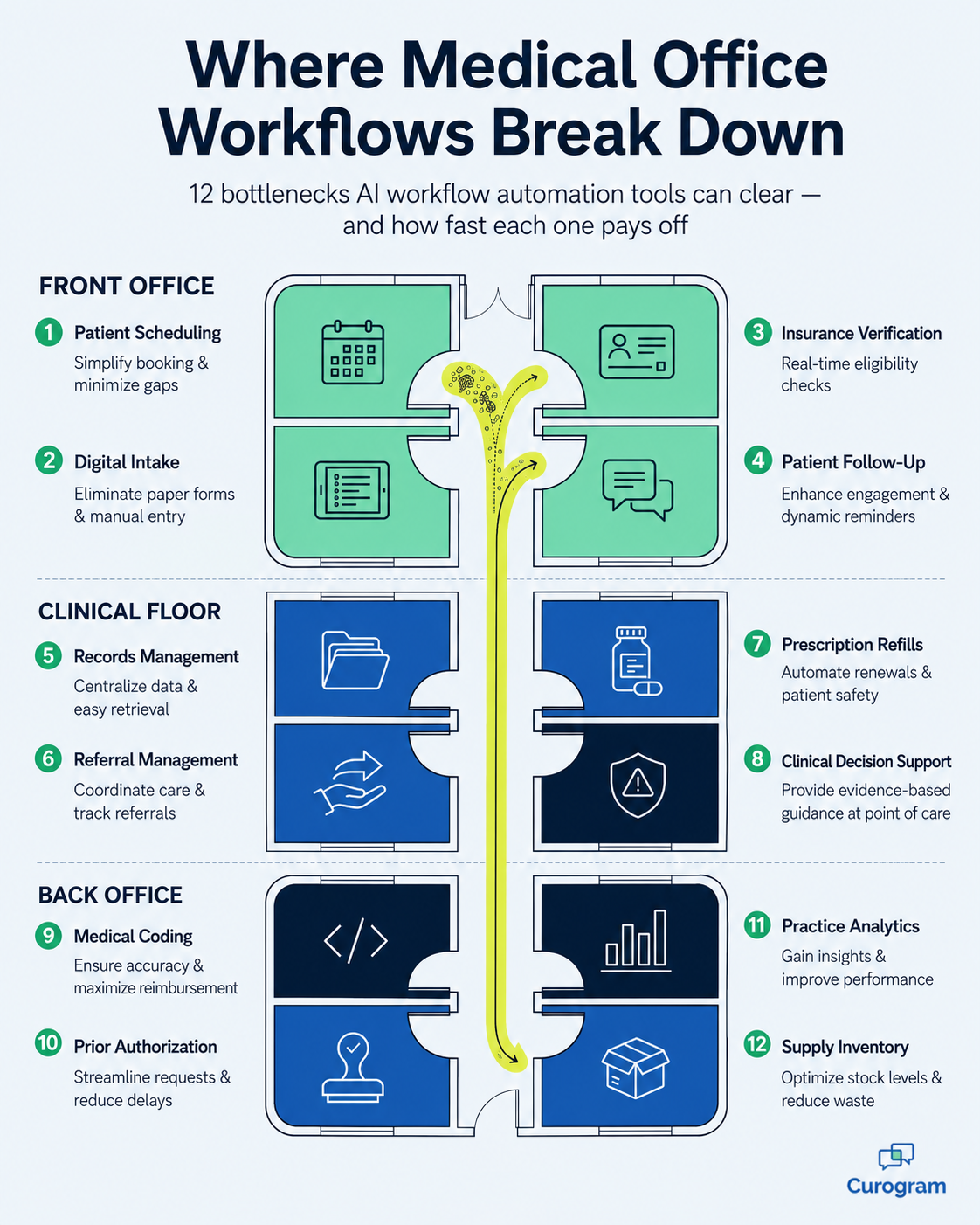
Here are twelve critical areas where these tools can make a substantial difference.
One of the most common bottlenecks is patient scheduling. AI-powered scheduling tools can automate this entire process. These platforms allow patients to interact with an AI chatbot on the practice's website or via text 24/7 to book appointments based on real-time availability and appointment type.
The traditional clipboard is inefficient and error-prone. Digital intake tools represent a core type of AI workflow automation tools for medical office staff. Patients receive a secure link to complete their forms online before their appointment. The tool's NLP engine then extracts the relevant information and automatically populates the patient's EHR.
Verifying insurance coverage can be a manual, time-consuming task. Specialized AI workflow automation tools for medical office billing departments can automate this by integrating directly with insurer databases for real-time verification. These tools instantly check coverage details, co-pays, and deductible status.
Medical coding is complex and critical for accurate billing. AI-powered coding platforms analyze clinical documentation and suggest the appropriate CPT and ICD-10 codes, reducing human error. These specific AI workflow automation tools for medical office back-office teams ensure compliance and maximize revenue.
Obtaining prior authorization is a major administrative headache. AI automation platforms can manage most of this process, electronically compiling and submitting requests with all necessary documentation extracted from the EHR. This shows how to improve workflow in a medical office by freeing up significant staff time.
EHRs have digitized information, but managing this data is still challenging. AI-powered EHR enhancement tools provide intelligent search capabilities, automatically summarizing patient data and flagging critical information. This advanced records management is a core benefit of adopting AI workflow automation tools for medical office use.
Handling refill requests is repetitive. AI workflow automation tools for medical office clinical teams can streamline this. Patients request refills via a patient portal. The tool's AI verifies eligibility based on their medical record and prescribing history, then routes the request for a one-click physician approval.
Engaging with patients between visits is crucial. AI communication platforms can send automated, personalized messages with educational content and medication reminders. This approach is a key part of how to improve workflow in a medical office by leveraging healthcare AI automation.
Managing referrals is often a manual process of faxes and phone calls. AI-powered referral management platforms can automate this workflow by electronically processing requests, ensuring all documentation is included, and tracking the referral status.
To truly understand how to improve workflow in a medical office, you need data. AI-powered analytics tools provide deep insights into your practice's performance by analyzing KPIs like wait times, provider productivity, and claim denial rates, enabling data-driven decisions.
While often administrative, many AI workflow automation tools for medical office environments also support clinical decision-making. AI-powered Clinical Decision Support (CDS) tools integrated into the EHR can analyze patient data to suggest diagnoses and flag potential drug interactions.
For larger practices, managing supplies is a complex challenge. AI inventory management tools can use scanners to track supply levels in real-time and automatically reorder items when they fall below a certain threshold, a key function of healthcare AI automation.
|
Practices often want to start with the most complex problem. That is usually a mistake. Start where the volume is. For most offices, that is the phone — and the reminder and confirmation calls that eat the front desk alive. Automated reminders and two-way texting have cut phone volume by as much as 50% for Curogram clients and lifted staff productivity by 30% or more. Covina Arthritic Clinic now confirms more than 1,100 appointments a month with no manual calling at all. For your team, that means the person answering the phone can finally finish a task without being interrupted eight times. It is the fastest win available, and it costs the least to set up. |
Operational wins are nice. But you still have to justify the spend to whoever signs the checks.
The financial case for AI workflow automation tools for medical office use rests on three things: lower costs, higher revenue capture, and less risk. Handled well, these tools are not an expense line. They are one of the few investments in a practice that pay back in months, not years.
The formula itself is simple:
ROI = ((Financial Gain − Cost of Investment) ÷ Cost of Investment) × 100
Financial gain covers two buckets: staff hours you get back, and revenue you stop losing. Cost covers software fees plus training time.
Here is an illustrative example for a small practice. These are sample figures, not client results — swap in your own to see what your picture looks like.
| Line item | Monthly | Yearly |
|---|---|---|
| Staff hours saved (2 people, 8 hrs/week each) | 64 hrs | 768 hrs |
| Value of that time at $22/hr | $1,408 | $16,896 |
| Recovered visits from fewer no-shows (12/mo at $125) | $1,500 | $18,000 |
| Total gain | $2,908 | $34,896 |
| Software and training cost | $600 | $7,200 |
| Net gain | $2,308 | $27,696 |
In this example, the practice earns back roughly $3.85 for every $1 spent — an ROI near 385%. In practice, the break-even point lands somewhere in the third or fourth month.
The intangible returns do not fit in the table, but they are real. Staff who stop working through lunch tend to stay longer, and turnover is expensive.
Manual work is the single biggest drain on a practice budget, and most of it is invisible because it is spread across everyone's day.
Reminder calls, eligibility checks, refill routing, and referral follow-ups can be cut down to near zero. That time does not disappear — it moves to work that only a person can do.
Accuracy matters just as much. Fewer keystroke errors means fewer rejected claims, fewer rework hours, and less exposure to compliance penalties.
Cost savings are only half the story. The bigger number is usually the revenue you were quietly losing.
No-shows are the clearest example. Curogram clients see no-show rates 53% below the industry average, which frees up slots that turn into 10–20% revenue increases.
Recall messaging works the same way. At one multi-location practice, 35% of patients who got an SMS recall booked within a month — 1,240 patients seen from recall texts alone.
On the billing side, AI-assisted coding captures services that were being under-billed, automated submission speeds up cash flow, and denial management catches rejections and starts the appeal without staff chasing it. Shaving even two points off your denial rate compounds into serious money over twelve months.

Successfully integrating AI workflow automation tools for medical office environments requires a strategic and well-thought-out approach. It's not simply about purchasing new software; it's about fundamentally rethinking your processes. For those wondering how to improve workflow in a medical office through technology, following a structured implementation plan is key to a smooth transition.
The first step is to understand your current workflows. Identify bottlenecks and time-consuming tasks. Involve your entire team to get a holistic view. This assessment will serve as the foundation for your strategy to select the right AI workflow automation tools for medical office use.
Once you have identified areas for improvement, define what you want to achieve. Are you aiming to reduce patient wait times by 20% or improve billing accuracy to 99%? Your goals should be specific, measurable, achievable, relevant, and time-bound (SMART).
The market for these tools is growing. Research potential partners thoroughly. Look for vendors with a proven track record in healthcare. When evaluating AI workflow automation tools for medical office use, consider ease of use, EHR integration, scalability, and customer support.
Trying to automate everything at once is a recipe for disaster. Adopt a phased implementation approach. Start with one or two of the most pressing issues. This allows you to learn and adapt without overwhelming your staff.
For each phase, develop a detailed project plan. Your plan for how to improve workflow in a medical office should include everything from software installation and data migration to staff training and go-live support.
An AI tool that doesn't seamlessly integrate with your EHR will create more problems than it solves. Before selecting from the many AI workflow automation tools for medical office options, verify that it offers robust integration.
The success of your initiative depends on your staff. Invest in comprehensive, role-based training to ensure everyone understands how the new systems work. Designate a "super-user" within each department for peer-to-peer support.
Change can be unsettling. Communicate openly with your staff about the reasons for implementing AI workflow automation tools for medical office use, the benefits, and how it will impact their roles. Emphasize that these tools are meant to empower them.
Once your new AI systems are running, continuously monitor their performance. Track the KPIs you defined in your goal-setting phase, such as patient wait times and claim denial rates. This data will help you demonstrate the return on your investment.
Your staff and patients are the end-users, so their feedback is invaluable. Regularly solicit their input on what's working well. This will help you to fine-tune your systems and ensure they are meeting the needs of everyone.
When implementing new technology, data security is a top priority. Ensure any AI workflow automation tools for medical office you choose are fully HIPAA compliant and have robust security measures to protect patient information.
The field of AI is constantly evolving. When selecting from various AI workflow automation tools for medical office use, consider scalability and the vendor's commitment to innovation. Choose a partner who can grow with your practice.

Every guide tells you what to automate. Almost none tell you where to stop.
That gap causes real damage. A practice can hit every efficiency target on the dashboard and still end up with patients who feel like they are talking to a wall.
The test is simple. Ask whether the task needs judgment, empathy, or accountability. If it needs any of the three, a person stays in the loop — the software just gets them there faster.
| Task | Who should own it |
|---|---|
| Appointment reminders and confirmations | Automate fully |
| Intake forms and record updates | Automate, staff reviews the flags |
| Eligibility and benefits checks | Automate, staff handles exceptions |
| Refill routing | Automate, provider gives final approval |
| Coding and claim submission | Software suggests, coder decides |
| Clinical decisions and drug alerts | Software flags, provider decides |
| Test results and diagnosis conversations | A person, every time |
| Upset, confused, or distressed patients | Route to a person immediately |
Notice the pattern in the middle rows. The best setups are not fully automatic or fully manual — they are handoffs, where software does the gathering and a human does the deciding.
Over-automation is quieter than under-automation. Nobody files a complaint. Patients just stop responding and start calling instead.
Watch for these signals in your first ninety days:
Here is a useful rule of thumb. If more than 1 in 10 automated conversations ends with the patient calling you anyway, the automation is generating work instead of removing it.
For your team, that means the fix is rarely more automation. It is usually a clearer escape hatch — a fast, obvious way for a patient to reach a human when the script runs out.
Here is the honest takeaway. You do not need an AI strategy. You need one bottleneck cleared, and then the next one.
Every practice in this guide started the same way: one process, one measurable goal, one small win that made the next step easier to sell internally.
The gains are not theoretical. Atlas Medical Center cut no-shows from 14.20% to 4.91% in three months. One multi-location practice earned 1,064 new five-star reviews in the same window. Covina Arthritic Clinic confirms over 1,100 appointments a month without a single manual call.
Behind each of those numbers is a front desk that stopped drowning.
Curogram brings the front-office pieces together in one HIPAA-compliant platform — two-way texting, automated reminders and confirmations, digital intake forms, text-to-pay, patient recalls, and review generation. It works alongside your existing EHR, and most teams are trained on it in about ten minutes.
That last detail matters more than it sounds. The biggest reason automation projects fail is not the software. It is staff who never got comfortable enough to use it.
So pick your bottleneck. Look at your schedule for last week and count how many hours went to calls, forms, and follow-ups that nobody needed to make by hand. That number is your starting point.
Ready to see what that looks like in your practice? Book a demo with Curogram and we'll walk through your current workflow and show you exactly where the time is going.
 Aubreigh Lee Daculug : 3/26/26, 4:00 PM
Implement workflow automation in your medical practice. High-impact automation opportunities, tools, implementation steps, and ROI examples.

Learn the 12 essential medical billing process steps, from patient check-in to final payment, to improve your revenue cycle and cash flow.

Browse 35 examples of healthcare workflow automation and learn how to choose, build, and measure the very first workflow your practice should...