11 min read

Switch from Klara to Curogram: Complete Migration Guide

Switch from Klara to Curogram: Complete Migration Guide
💡 Switching from Klara to Curogram is about more than changing a messaging tool. Most practices using Klara also rely on separate vendors for billing, reputation management, and intake. This creates sync delays, extra cost, and added staff work. A switch from Klara to Curogram migration consolidates all of these into one platform.

Curogram connects to your EHR in real time and handles two-way messaging, smart intake forms, text-to-pay, and automated Google review requests natively. The migration follows a clear sequence: audit your current tools, configure the EHR integration, activate each module, run a parallel period, then go live.

Based on our internal data, practices that complete this migration see confirmation rates above 75% and no-show rates 53% lower than the industry average. This guide walks through every phase of the migration, so your team can plan and execute with confidence.

Your messaging tool was not the problem. The ecosystem around it was.

Many practices chose Klara for a simple reason. It handled patient messaging well. Confirmations went out on time. Staff could reach patients without picking up the phone. But after a few months, most practices found that messaging alone was not enough.

They needed intake forms that sent data back to the EHR. They needed a billing option patients could use by text. They needed a way to collect Google reviews without manual follow-up. So the workarounds began.

A separate billing vendor. A third-party reputation tool. Manual data entry for every form submitted through Klara. Each new tool added costs, more training, and another system to manage.

For practices not on ModMed, Klara’s data sync could fall as much as 45 minutes behind. That kind of lag is a real operational risk. Staff work from data that does not match the chart. Errors follow.

This is where practices reach a turning point.

Based on our internal data, practices that make this move see no-show rates drop by more than 53% compared to the industry average. That is not a minor shift. It is a measurable change in how the practice operates day to day.

The answer is not more tools. It is replacing the whole stack with one platform. That is what the switch from Klara to Curogram looks like in practice. It is not a simple app swap. It is a patient communication platform switch that removes extra vendors, cuts manual work, and builds a stable base for long-term growth.

This guide is a step-by-step blueprint. It covers why practices leave Klara, how to audit your current setup, and what migration looks like from start to finish. Whether you use ModMed or another EHR, the path forward is the same: one unified platform, built to work with any system from day one.

Why Practices Leave the Walled Garden

Klara works well as a messaging tool. That is not the issue. The issue is everything messaging alone cannot do. For practices that have tried to build a complete patient workflow around it, the gaps become costly over time.

The Two Patterns Behind Every Klara Exit

Most practices do not leave Klara because it stopped working. They leave because they outgrew what it was built to do. The path to that decision usually follows one of two patterns.

Pattern One: The Non-ModMed Practice

Klara was built with ModMed as its anchor integration. Practices on other EHR systems get a surface-level connection at best. Data sync can lag up to 45 minutes between what a patient submits and what appears in the chart.

To fill that gap, practices add manual entry, which takes staff time and creates room for errors. Billing by text requires a separate vendor. Collecting Google reviews requires another tool. The workaround stack grows without the practice noticing how fragile or expensive it has become.

Pattern Two: The Practice Planning an EHR Change

Some practices run Klara because they run ModMed. The native integration feels seamless, and the workflow is smooth. But when an EHR change comes into view, that advantage becomes a liability.

Moving to a new EHR does not bring Klara along. The practice faces a ModMed dependency migration that means rebuilding its communication stack from scratch. A tool meant to simplify patient engagement becomes one more thing to re-evaluate mid-transition.

When Messaging Quality Is No Longer Enough

Klara’s messaging quality is not the problem. The problem is its inability to grow with the practice. Messaging is a starting point. But a busy clinical practice also needs intake, billing, recall, and reputation management.

When those needs are met by three or four separate tools, the system is fragile by design. One outage, one renewal dispute, or one bad update can affect the entire patient workflow.

The Vendor Stack Problem

Every extra vendor adds a contract, a monthly fee, a training commitment, and a potential point of failure. A billing vendor outage delays patient payments. A reputation tool that loses its connection means missed reviews.

Each problem is separate, with its own support call and its own resolution timeline. The more tools in the stack, the more time staff spend managing systems instead of managing patients. That overhead grows with every tool added, and it rarely shrinks on its own.

The Sync Delay Risk

A 45-minute lag in data is not a technical footnote. For a practice handling hundreds of appointments per month, it means staff are working from patient information that does not match the EHR. Reconciling those gaps becomes a daily task.

Small errors compound. The longer this continues, the more normalized the workarounds become. When a practice maps out its vendor count, its sync delays, and its manual tasks, the case for a Klara alternative becomes hard to ignore. The question stops being what to add and starts being what to replace.

Pre-Migration Assessment: Mapping the Current Tool Stack

Before anything moves, the practice needs a clear picture of where it stands today. This is not just a Klara audit. It is a full accounting of every tool, workaround, and manual step in the patient workflow.

Taking Stock of What You Currently Use

The first phase of migration is a complete inventory. Think of it as a map of your current workflow before anything changes. This step often reveals more complexity than expected.

What to Include in the Inventory

A thorough audit covers six key areas. First, the Klara plan itself: which features are active and what the contract looks like. Second, the depth of Klara’s EHR integration, whether it is ModMed-native or a limited, surface-level sync.

Third, any third-party billing or text-to-pay tool. Fourth, any reputation management platform the practice uses to gather reviews. Fifth, staff hours spent on manual data entry from intake forms. Sixth, any other point solutions fill gaps that Klara cannot cover.

What often feels like a two-tool setup turns out to be four or five vendors running side by side. The inventory makes that visible. And it creates the foundation for everything that comes next.

How to Quantify the Gap

Once the inventory is complete, assign a real cost to each item. Monthly vendor fees, staff hours for manual tasks, and time lost to error correction all count. Add them together.

This total is your baseline: the true cost of the current setup, beyond just the Klara subscription. That number is usually higher than expected. It also becomes the benchmark for measuring what a unified platform saves in comparison.

Understanding Your EHR Integration Depth

Not all Klara setups look the same. The depth of Klara’s connection to your EHR shapes how complex the migration will be. It also determines how much improvement the practice sees once the transition is done.

ModMed Practices

For practices on ModMed, Klara’s integration is at its most developed. Workflows feel more connected, and data syncs more reliably. But if an EHR change is coming, that advantage disappears with the switch.

Planning the move to Curogram alongside the EHR transition, rather than after it, prevents the practice from rebuilding its communication stack a second time. It also positions the practice on a platform that works with any EHR at the same level of quality.

Non-ModMed Practices

For practices on other EHR systems, this migration delivers an immediate upgrade. Klara’s surface-level sync is replaced by a real-time, bi-directional connection. Every intake form writes structured data directly to the correct fields in the chart.

Manual reconciliation stops being a daily task. Staff work from current, accurate records. This is the difference between a messaging tool with limited EHR reach and a true clinical platform built for universal integration from the start.


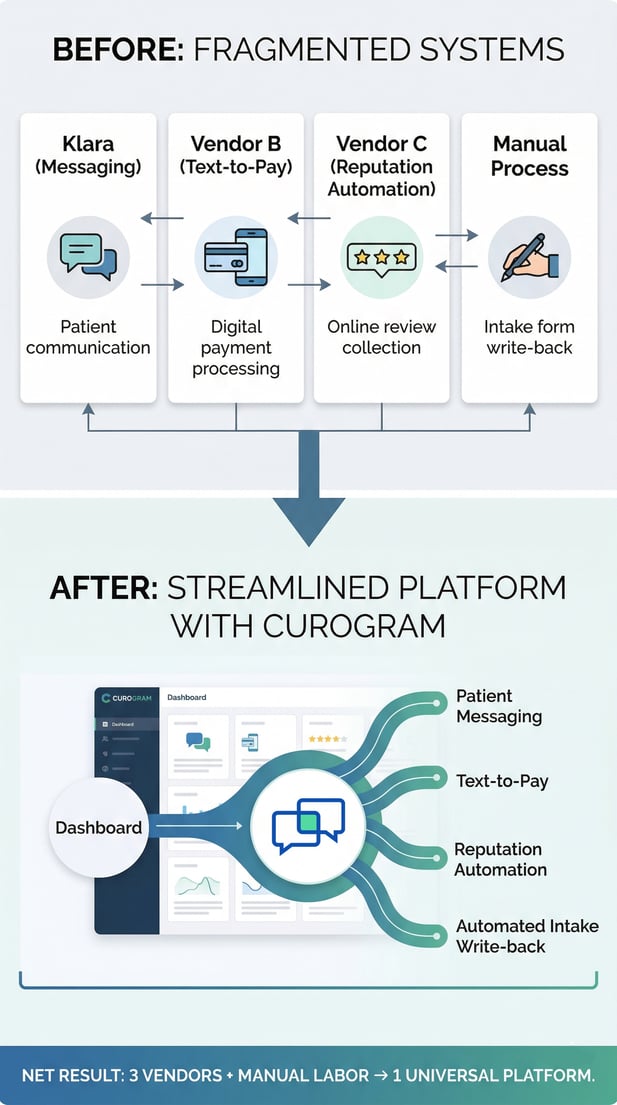
Before/after map of fragmented vs. unified medical office systems

Implementation: From Messaging App to Clinical Operating System

The migration replaces more than Klara. It replaces the whole ecosystem that grew around it. Messaging, intake, billing, reputation, and patient recall all move to one platform. Each transition happens in a defined order.

What Gets Replaced and What Gets Added

Curogram does not simply replicate Klara’s features. It replaces them with native tools and adds capabilities that were never part of the Klara package. Every workaround vendor in the current stack becomes unnecessary.

Native Messaging and Intake

Two-way messaging moves from Klara’s system to Curogram’s native platform. The key difference is what happens after the message. Curogram’s smart intake forms capture patient data in discrete fields that write directly back to the EHR.

No manual re-entry. No sync lag, waiting for data to populate the chart. Staff see accurate, complete records when they need them. This single shift removes a meaningful portion of the daily manual workload in most practices.

Text-to-Pay and Reputation Automation

Two of the largest Klara workarounds are text-based billing and review collection. Both become native Curogram features at activation. Patients receive a payment link by text and complete the transaction in minutes.

Google review requests trigger automatically after each visit, with no staff action needed. Based on our internal data, practices using these automated tools see measurable improvement in both payment speed and online review volume.

Replacing these two-point solutions alone removes vendor contracts and reduces staff tasks. The monthly tech stack becomes simpler to manage and less expensive to run.

The EHR Integration Shift

The improvement in EHR integration quality is one of the most significant outcomes of this migration. It affects almost every clinical and administrative workflow in the practice.

What Real-Time Sync Changes

For non-ModMed practices, this shift is the most immediate win. Klara’s surface-level sync, with its 45-minute lag, is replaced by a real-time, bi-directional API. Patient data entered during intake appears in the EHR as structured, field-level information.

No transcription. No end-of-day reconciliation. No clinician opening a chart that still shows outdated records. The administrative burden this removes begins on day one and compounds as the platform matures in the practice.

Confirmed Results After Deployment

The transition from a messaging tool to clinical platform integration produces results that hold across practice types and EHR systems. Based on our internal data, appointment confirmation rates exceed 75% among Curogram clients.

No-show rates run 53% lower than the industry average. In one documented case, a practice reduced its no-show rate from 14.2% to 4.91% in just three months. That is three times better than the typical industry benchmark.

These outcomes are consistent. They reflect what happens when intake, messaging, billing, and recall are all connected to the EHR and running from one platform. The workflow becomes more efficient because the system underneath it is no longer fragmented.


Migration Phase Comparison

A side-by-side view makes the scope of this migration easier to plan. The table below shows each phase of the process. It compares what the practice is moving away from with what it is moving toward.

Migration Phase

From Klara (Messaging + Workarounds)

To Curogram (Universal Clinical Platform)

Tools/Vendors to Decommission

3+ (Klara + billing vendor + reputation vendor + manual process)

0 (all capabilities are native)

EHR Integration Reconfiguration

Remove surface-level Klara sync

Single bi-directional API, universal integration quality

Sync Delay Elimination

45-minute delay for non-ModMed practices currently

Real-time sync from day one (any EHR)

Staff Retraining

Unlearn Klara + billing tool + reputation tool

Single platform to learn

Manual Data Entry Elimination

Required for non-ModMed intake to EHR

Eliminated via discrete write-back from native forms

Text-to-Pay Activation

Requires separate vendor migration

Native module, activates with platform

Reputation Automation Activation

Requires separate vendor migration

Native module, automated Google Review triggers

Parallel Run Feasibility

Manageable; Klara can run alongside

Straightforward; Curogram activates independently

Post-Migration EHR Flexibility

Future EHR change would degrade Klara further

Universal; EHR changes have no impact on platform quality


Every row in this table represents a real change in how the practice operates. Some changes, like consolidating three or more vendors at once, feel significant up front. The result, however, is a simpler and more stable system that requires less daily management.

What This Means for Your Team

The migration changes the daily experience for staff as much as it changes the technology stack. Most of the fragmented complexity they have been managing quietly disappears when everything moves to one platform.

Reducing the Retraining Burden

A multi-vendor setup means staff must be competent across multiple systems at once. Klara handles messaging. A separate billing tool handles text-to-pay. Another platform manages reputation. Each has its own interface, its own login, and its own support team.

When one tool updates, staff adapt. When another has an outage, staff troubleshoot. This cycle of fragmented tool management is a hidden cost that grows over time. It rarely shrinks on its own.

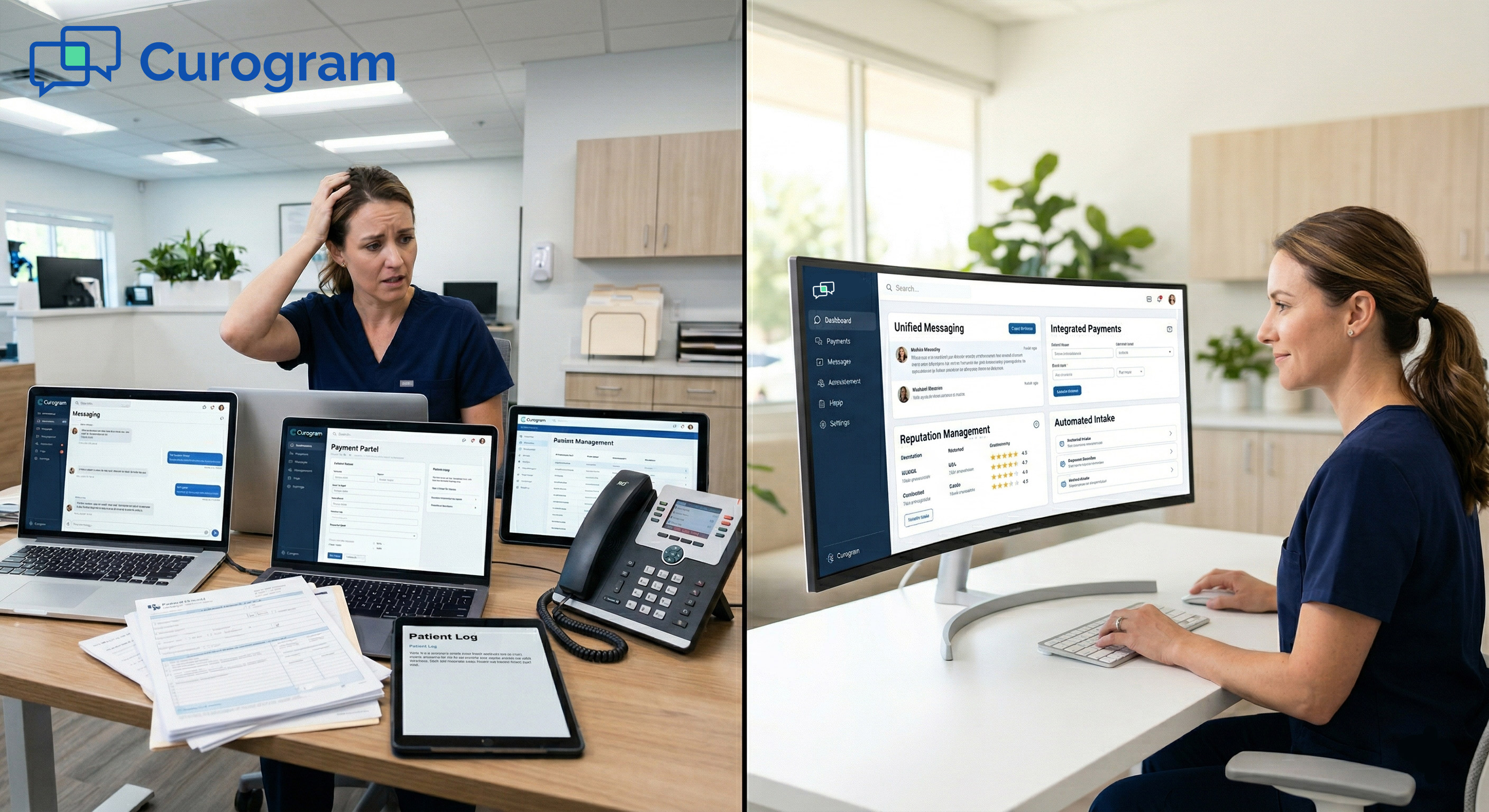
With Curogram, there is one platform to learn and one interface for the full workflow. Staff training is faster, onboarding is simpler, and daily management is more predictable. Errors that come from switching between systems with different logic also decrease.

Parallel Run Feasibility

The migration does not require a hard cutover from Klara to Curogram. Both systems can operate during a parallel run phase. Curogram activates independently, so the practice can test messaging, reminders, intake, billing, and reputation workflows in real conditions before the legacy system is turned off.

Staff can confirm that everything works as expected without disrupting patient communication. Because Curogram’s modules are self-contained, there are no complex dependencies to manage during this period.

Most practices complete the parallel run within a few weeks. Once every workflow is confirmed and the team is ready, the Klara subscription is deactivated. Patient communication continues without any gaps throughout the transition.

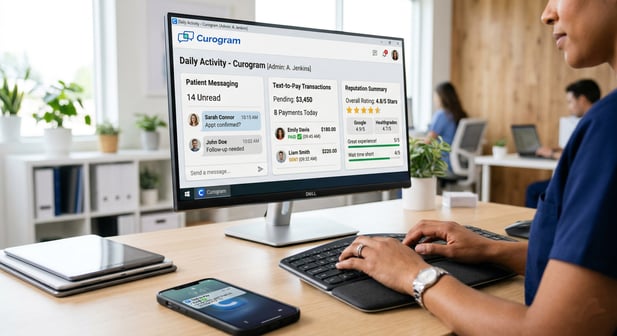
Close-up of medical office software showing Curogram patient messagingMigration as Freedom from Ecosystem Lock-In

Moving off Klara is not just a tech change. It is a choice about the kind of platform the practice wants to build on for the next several years. And it is a decision that becomes more valuable the earlier it is made.

The Strategic Case for Moving Now

Waiting does not simplify the migration. The longer a multi-vendor stack runs, the more embedded each tool becomes in daily operations. Replacing everything at once is more disruptive in the short term.

But it is far better than replacing tools one at a time while trying to keep the practice running at full capacity. A phased, single-platform migration is cleaner, faster, and easier to manage than a rolling series of smaller swaps.

Vendor Consolidation

Moving from three or more vendors to one platform changes how the practice manages its entire technology setup. There is one contract instead of three. One support relationship instead of several. One billing cycle, one renewal date, and one team to call.

This is a structural improvement, not just a cost saving. It reduces the overhead of managing multiple vendor relationships. It also removes the risk of one vendor’s problem creating a gap in another part of the workflow.

Long-Term EHR Flexibility

This is perhaps the most important benefit of the migration. With Curogram, an EHR change does not disrupt the patient communication platform. Integration quality stays the same regardless of which EHR the practice moves to.

For practices that have already been through a ModMed dependency migration, or are planning one, this matters. EHR decisions and communication platform decisions become fully independent. The practice can choose the best EHR for clinical reasons without worrying about what it will do to the rest of the workflow.

Migrating from Klara to Curogram closes more than a feature gap. It replaces a fragile, multi-vendor stack with a single, universally integrated platform. Sync delays disappear. Manual intake entry stops. Billing and reputation tools run natively without extra contracts. Everything is HIPAA-compliant and secure.

The practice gains a foundation that holds up through EHR changes, volume growth, and expansion to new locations. The first step is simple: audit your current tools, map the gaps, and see how many of them a single migration can resolve.

Ready to map your migration path? Talk to an expert today.


Frequently Asked Questions

How does Curogram’s EHR integration during migration compare to Klara’s sync?

For non-ModMed practices, the migration replaces Klara’s surface-level sync, which can lag up to 45 minutes, with Curogram’s real-time, bi-directional API. Patient data from intake forms writes directly to discrete EHR fields without manual entry.

For practices planning an EHR change, Curogram’s universal integration means the platform performs consistently regardless of which EHR is chosen. The sync delay risk and manual reconciliation burden both disappear from day one.

What happens to patient communication during the transition?

A parallel run phase is recommended, during which Curogram runs alongside Klara. The practice can validate messaging, reminders, intake, and billing workflows before deactivating the legacy tool.

Because Curogram’s modules activate independently, the parallel period is straightforward to manage. Patient communication continues without gaps throughout the process.

How long does a typical migration from Klara to Curogram take?

Migration timelines vary based on how many vendors are being consolidated. Curogram’s native modules activate out of the box, which compresses overall deployment time.

Based on our internal data, practices reach full automation, including confirmation rates above 75% and no-show rates 53% lower than the industry average, within months of deployment. The parallel run phase typically takes a few weeks before the practice goes fully live.

Why should practices consider this migration before planning an EHR change?

If a practice is using Klara on ModMed and an EHR change is coming, the Klara integration does not transfer to the new system. Planning the migration to Curogram before or alongside the EHR switch prevents having to rebuild the communication stack twice.

Curogram’s universal integration means the platform performs consistently regardless of which EHR comes next. Starting the migration early removes one major variable from an already complex transition.

How does switching to Curogram affect the staff training workload?

Switching to Curogram replaces multiple tools with a single platform. Staff no longer need to be trained on separate systems for messaging, billing, and reputation management.

A single interface, single login, and single support team reduces the daily management burden significantly. The learning curve is shorter than managing multiple disconnected tools with different workflows and different logic.