
 Joshua Inciso
Why You Need a Google Business Listing and How To Optimize It
 Joshua Inciso : 5/19/22, 8:14 AM
Google My Business can help boost your practice's visibility in the local community. Here's how to optimize yours.

Your next new patient has probably already met your practice. They just haven't walked through your door yet. That first meeting happened on a phone screen, in a list of search results, next to three other offices down the street.
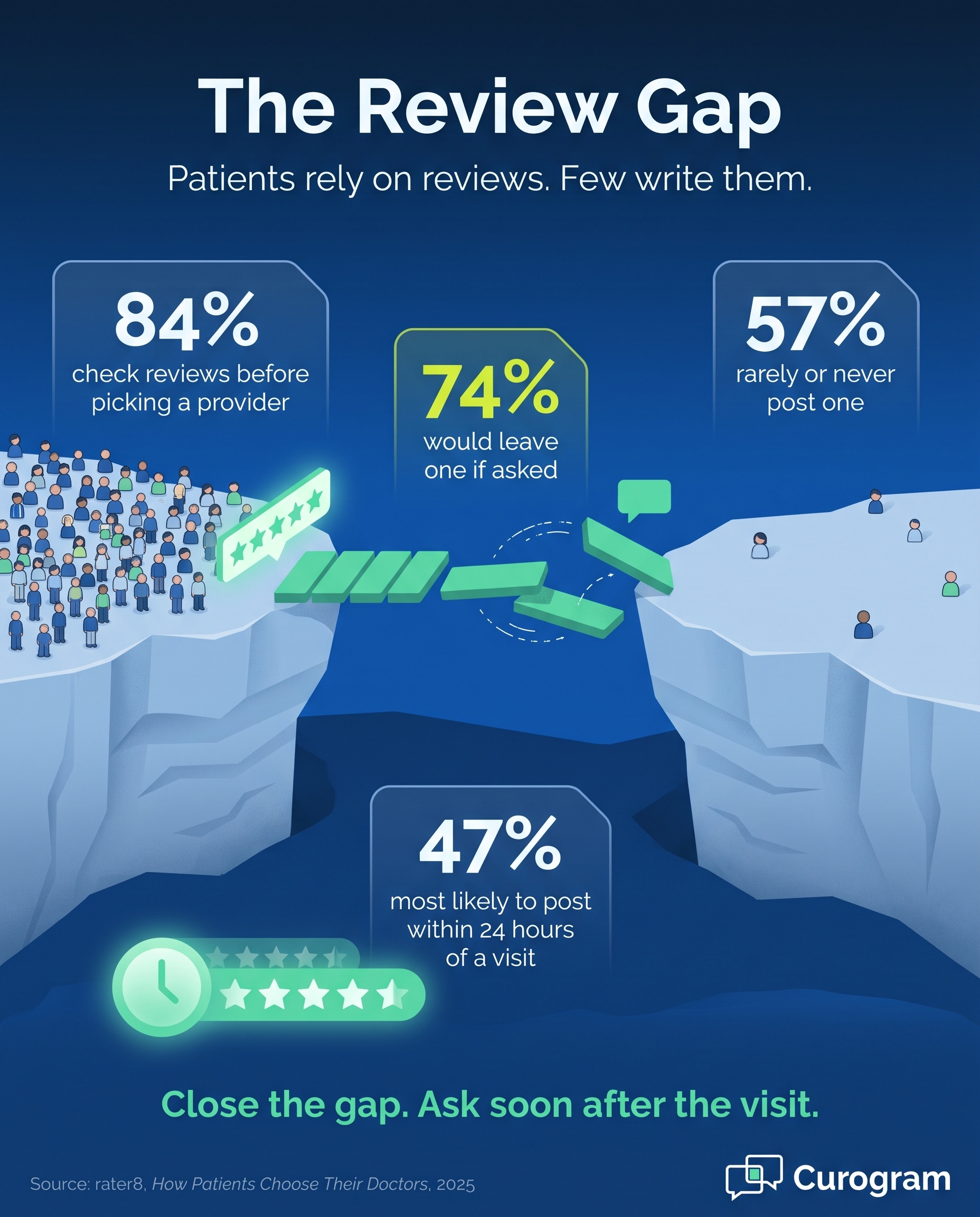
These first impressions form quickly, and they carry real weight. A 2025 rater8 survey found that 84% of patients check online reviews before they choose a new provider, and more than half read six or more reviews before making a decision. In other words, patients are judging your practice long before they call.
For years, a basic website was enough to cover this stage. That is simply no longer true. A website helps current patients find your phone number or log in to their portal, but it does little for someone who has never heard of you and is comparing options late at night.
To reach that person, your practice needs a more active approach. You have to show up in the places where patients already look, including social media, Google Search and Maps, and sometimes paid ads. Each channel gives a prospective patient one more chance to find you, learn about your services, and decide to trust you.
The good news is that you don't need a large marketing department to do this well. Most of the work comes down to a few steady habits: keeping your details accurate, posting useful content regularly, and making it easy for satisfied patients to share their experience.
This guide covers three practical ways to enhance your practice's online presence. You'll learn how to build trust on social media, get more from your Google Business Profile, and decide when paid search advertising makes sense. You'll also find tips for staying HIPAA-compliant along the way, because one careless reply can undo months of effort.
Social media is one of the easiest ways to show patients who you are. It can promote your services, boost patient engagement, and help your audience grow over time. Best of all, it costs little more than your team's time.
Start with the platforms your patients already use. According to Pew Research Center's 2025 survey, 84% of U.S. adults use YouTube and 71% use Facebook. For most practices, a Facebook page is the best place to begin, since many patients use it to look up local providers.
Set up your page with your full details:
Location, website, phone number, hours, and a few real photos of your staff and office. Then keep it active. A page that hasn't been updated in a year can make patients wonder if you're still open.

You can share different content to keep your page fresh and useful, such as:
One rule matters more than any posting schedule: protect patient privacy. Never confirm that someone is your patient when replying to a comment, even if they mention it first. Before you post any patient photo or testimonial, get their written permission.
Because most patients search for care close to home, a Google Business Profile is one of the most important tools your practice can use. Google renamed this tool from Google My Business in late 2021, but its purpose remains unchanged. It helps your practice show up in local search results and on Google Maps.
Here's how it works.
When a patient types your town or city plus "physician" or your specialty, a well-built profile helps your name and location appear. Patients who search "doctor near me" on Google Maps can find you the same way.
Google's goal is to connect searchers with the best local match, using detailed and trusted information. The more complete your profile is, the better your chances.
Follow these steps to make yours stand out:
When you reply to reviews, keep it general. Thank the reviewer and invite them to call your office, but never mention their visit, treatment, or condition. Even a friendly reply can break HIPAA rules if it confirms someone was seen at your practice.
|
Reviews are the fuel behind a strong Google Business Profile, yet the same 2025 rater8 survey found that 57% of patients rarely or never review their own providers. The solution is surprisingly simple: ask them. In that survey, 74% of patients said they would be more likely to leave a review if their provider requested one. Timing matters as well. Nearly half of patients (47%) said they are most likely to post a review within 24 hours of an appointment, so a short, friendly request sent soon after the visit often makes the difference. |
Building an organic presence takes time, often several months. If you need results sooner, paid search advertising can place your practice at the top of search results almost immediately. Ads can also appear on social media feeds and partner websites, which helps you reach patients in more places.
Paid ads work best alongside SEO, not instead of it. Here's how the two compare:
| SEO (Organic Search) | Paid Search Ads | |
|---|---|---|
| Speed | Builds slowly over months | Can appear the same day |
| Cost | Mostly staff time or agency fees | You pay for each click |
| Targeting | Based on the keywords and topics you rank for | Keywords plus location, device, time of day, and more |
| Lasting value | Rankings can last after the work is done | Visibility stops when the budget stops |
| Best for | Long-term trust and steady traffic | New services, new locations, or quick growth |
The biggest advantage of paid search is control. You can show ads only to people within a few miles of your office, or only during hours when your staff can take calls. That helps you reach the right patients and grow new patient bookings without wasting budget.
Before you launch, check with your compliance team about tracking tools. Many ad platforms use pixels that collect visitor data. In 2024, a federal court struck down part of HHS guidance on tracking tools for public web pages. However, HIPAA still applies to tracking on pages behind a login, such as your patient portal.
A strong online presence is no longer a nice extra for healthcare practices. It's how most new patients decide which provider to trust. Social media shows them your team's personality, your Google Business Profile helps them find you nearby, and paid search puts you in front of them when timing matters most.
None of these channels has to be complicated. Start with the basics, then build from there as you go. Keep your details accurate everywhere, post helpful content on a steady schedule, and reply to every review with care while protecting patient privacy.
Still, getting found is only half the job. Once new patients start booking, the experience you deliver shapes what they say about you online. Easy scheduling, timely reminders, and clear communication all lead to happier patients, and happy patients are your best source of new reviews.
That's where Curogram, a HIPAA-compliant two-way texting platform built for busy front desk teams, can help. It sends automated appointment reminders, digital intake forms, and post-visit surveys by text. When a patient leaves positive feedback, Curogram can invite them to share it as a Google review. Because messages go out automatically, your front desk spends less time on the phone and more time with patients in the office.
The results can add up quickly. In Curogram client data from clinical settings, one multi-location practice earned 1,064 new 5-star reviews in just three months. Across current clients, Curogram's automated reminders and two-way texting have helped keep no-show rates 53% lower than the industry average.
You've already done the hard part by giving patients thoughtful, consistent care. Now it's time to make sure that care shows up where new patients are looking. If you're ready to turn more happy visits into 5-star reviews, see how Curogram can grow your practice's online reputation.
 Joshua Inciso : 5/19/22, 8:14 AM
Google My Business can help boost your practice's visibility in the local community. Here's how to optimize yours.
 Joshua Inciso : 6/1/22, 8:45 AM
This article discusses the 3 major strategies for keeping your practice prepared to maintain a positive connection with patients.
 Joshua Inciso : 5/13/22, 7:36 AM
Social media marketing can help you expand your audience reach and acquire new patients. Here's how to successfully use social media to grow your...