
 Aubreigh Lee Daculug

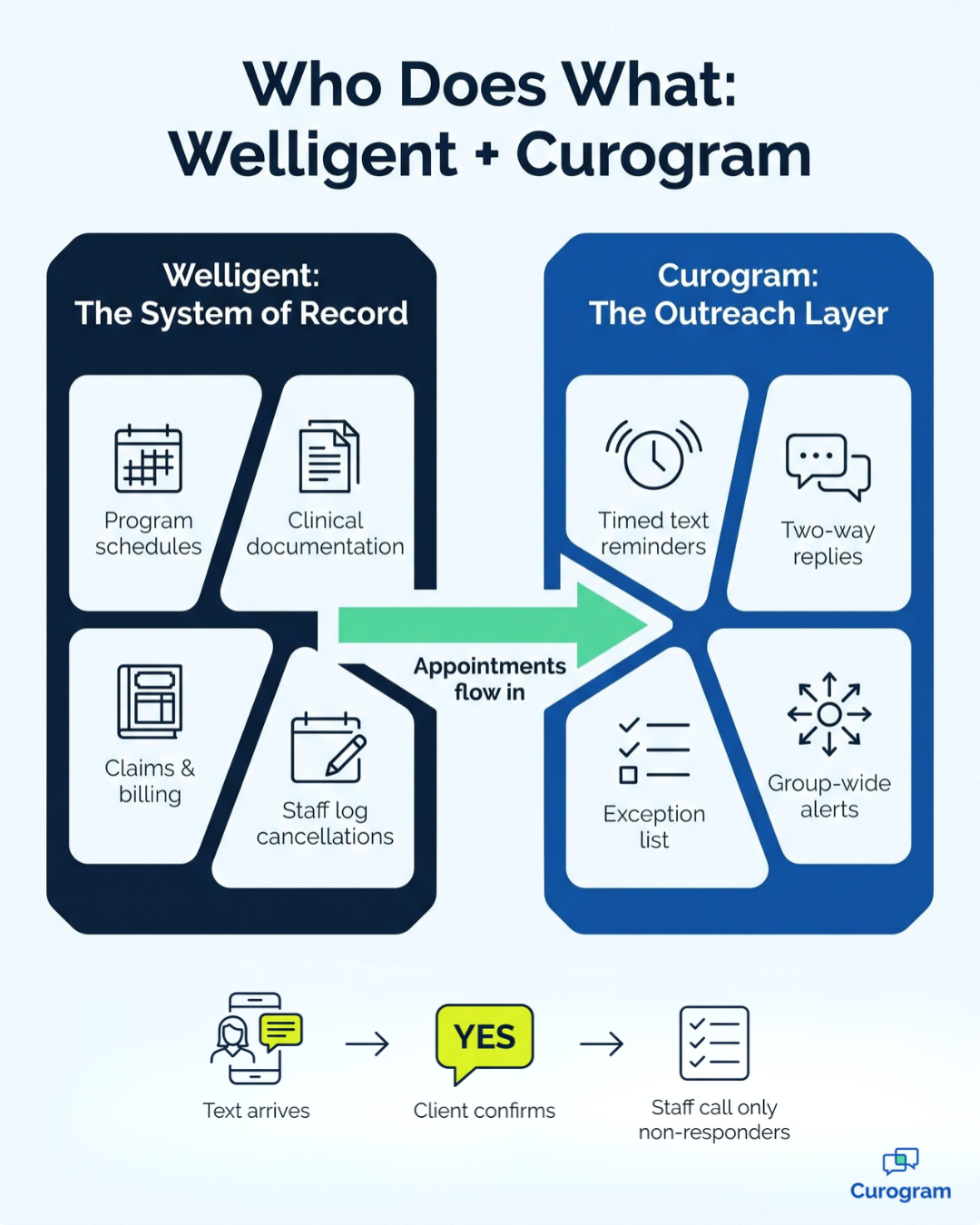
Curogram pulls appointments from Welligent and sends two-way texts straight to each client's phone. Clients reply to confirm or cancel, and staff only call the people who don't answer.
Across specialties, Curogram clients average a confirmation rate above 75%, fully automated, with no-show rates 53% below the industry average.
Your Tuesday IOP group has twelve chairs, and on paper, all twelve clients received a reminder. In practice, those reminders went to a portal most of them never opened.
So the chairs sit empty. The facilitator reworks the session plan for seven people, while the program director watches census slip without being able to point to anyone who dropped the ball.
That's the hidden cost of the morning confirmation routine in behavioral health. Your team spends the first hours of every day on access center confirmation calls, dialing, leaving voicemails, and dialing again across IOP, outpatient, and day program schedules. Most mornings, the list wins.
The problem isn't effort, because your staff work hard. The problem is the route the reminder takes.
Welligent does a strong job of organizing multi-program schedules in one place. But its native reminders depend on clients logging into the Welligent Connect portal, and many IOP clients, especially those in early recovery, never activate an account. Their reminders sit unread behind what we call "The Portal Wall."
Reducing IOP no-shows with Welligent appointment reminders means moving that message to the place clients already look: their text inbox. A short text lands on the phone, and the client replies YES or lets you know they can't make it. Your staff see who answered before the first group begins.
This guide is for program coordinators, access center managers, and program directors who are tired of chasing the same list every day.
You'll see what the morning confirmation marathon really costs, how one texting cadence can serve every program, and what changes when staff work a short exception list. We'll also be transparent about how Curogram connects to Welligent, including what it does and doesn't send back.
Let's begin with the morning itself, where most of the trouble starts.
The Morning Call Marathon Your Access Center Can't Win
Welligent earns its place in multi-program agencies. A single system holds the IOP track, the outpatient panel, and the I/DD day program roster, and centralizing every schedule genuinely matters.
The gap appears after the schedule is built. Confirmation still depends on a phone line and a portal most clients never activated, so staff end up manually verifying what the system was supposed to communicate in the first place.
At a busy agency, a typical morning might unfold like this:
- Staff walk in to 80 or more confirmation calls spread across programs.
- About half the numbers roll to voicemail, so the list barely shrinks.
- The IOP coordinator pulls yesterday's attendance to guess who might skip today.
- The I/DD day program can't lock its transport roster because caregivers haven't called back.
- By the time the calls wrap up, the first group has already started. It's short.
The numbers behind those empty seats are hard to ignore. A study in The American Journal of Managed Care notes that about 25% to 40% of people seeking care in community mental health settings miss their first appointment. A quality improvement project at an Oregon community mental health agency found its Medicaid clients had the highest non-attendance rate, at 24%.
Now look at group therapy no-show costs in dollars.
Here's an illustrative example, not Curogram client data.
Say your agency runs 60 IOP sessions a day with a 25% no-show rate.
That's 15 empty slots, and at $150 to $300 per session, you lose $2,250 to $4,500 a day, or about $45,000 to $90,000 over a 20-day month.
The damage goes past revenue. Missed sessions break the steady attendance IOP treatment depends on, and they can make it harder to meet the weekly service hours many payers expect. And every hour spent dialing is an hour not spent on intake, crisis triage, or filling a canceled slot.
Behind those numbers are real people.
There's the access center coordinator who has never once finished the morning call list, and the IOP facilitator adjusting group plans for whoever walks in. There's also the program director defending a census miss to the executive team, when the real culprit is a reminder that never left the portal.
That's what makes SUD program census management so frustrating. The monthly report looks like an attendance problem, but underneath, it's a communication delivery problem.
One Reminder Rhythm That Works Across Every Program
Curogram works like a virtual access center assistant. It adds confirmation capacity across your programs and locations without adding staff. And it's built for clients who will never log into a portal.
The core feature is automated SMS reminders with two-way replies. You set reminder timing and message templates by appointment type and location.
Clients answer by text:
A YES confirms the visit, and a cancellation shows up right away, so staff can offer the slot to someone on the waitlist. Anyone who doesn't reply lands on a short call list your team can finish before the first group.
The goal is an automated reminder cadence behavioral health teams can set once and trust. Here's what that could look like across programs.
These timings are examples, not fixed settings.
| Program | Example reminder timing | Who usually replies | What staff handle |
|---|---|---|---|
| SUD intensive outpatient (IOP) | 3 days before, 1 day before, morning of | The client | Non-responders before group |
| I/DD day program | Evening before | Whoever's number is on file, often a caregiver | Transport roster changes |
| Outpatient or CCBHC panel | 1 to 2 days before | The client | Cancellations to backfill |
| School-based program | Day before, timed around class | The client or a parent | Reschedule requests |
This turns your IOP attendance confirmation workflow from a call list into a reply list. In an SUD group, one no-show can shift the whole session, so the morning-of text matters most.
For I/DD day program attendance confirmations, the evening-before text gives transport time to adjust. A school-based program can time messages around the class day instead of during it.

How Curogram Connects to Welligent
Welligent doesn't publish an open API, so Curogram connects through its integration engine over a private connection. Setup uses a Welligent user ID and password that your team provides. Appointments flow one way, from Welligent into Curogram, and Welligent stays your system of record.
It's worth being clear about the limits. Text replies are not written back into Welligent. Staff update the schedule for cancellations and changes as they work the exception list.
Even so, your access center manages one queue instead of three separate call sheets. For more on the basics, see our guide to Welligent automated appointment reminders, the Welligent mass messaging article, and the main Welligent integration page.
Our Welligent automated SMS reminders pillar page covers the full system. If a whole group session cancels, Mass Messaging can alert every client on that panel at once.
What Changes When Staff Work Exceptions, Not Lists
Here's what automation looks like at scale.
Across specialties, Curogram clients average a confirmation rate above 75%, and the process is 100% automated. Their no-show rates run 53% below the industry average.
Volume isn't a problem either. Covina Arthritic Clinic averages more than 1,100 confirmed appointments per month through Curogram. That's a medical practice, not a behavioral health agency. Still, it shows the kind of daily confirmation volume a community mental health center needs to handle.
The real shift is from call sheet to exception queue. Replies come in before staff arrive, so the morning starts with a short list of non-responders instead of the full schedule. Cancellations arrive early enough to fill the chair from the waitlist.
Here's what the after picture can look like:
- IOP groups start on time, with the clients you planned for.
- Day program transport rosters lock the night before.
- Attendance stays steadier, which supports both treatment progress and billing.
- Staff mornings open up for warm handoffs, crisis calls, and new client intakes.
That last point matters most.
The National Council for Mental Wellbeing's workforce survey found that 38% of behavioral health workers said less time on admin tasks would help them better serve clients. Clearing the call sheet gives that time back. If you're looking for other ways to remove paper and phone work, Text-to-Pay uses the same text channel to collect copays.
For clients who skip the portal entirely, read Text Confirmations for Clients Who Will Never Use a Portal.
Trade Tomorrow's Call Sheet for a Five-Second YES
Empty group chairs rarely come from clients who don't care. More often, they come from reminders that never reached them, because a message sitting in an unopened portal never gave the client a real chance to confirm.
That's why the fastest census gain available to a Welligent organization often isn't a new program or another hire. It's moving appointment confirmation off the phone and out of the portal, and into automated two-way text. The schedule you already built in Welligent finally reaches the people on it.
Think of the division of labor this way.
Welligent manages your schedule, your documentation, and your claims. Curogram handles your clients' five-second YES, the small reply that keeps chairs filled and staff off the phone.
The cost of a missing YES accumulates quietly. It appears in empty IOP seats, in day program vans that can't be routed, and in coordinators who never reach the bottom of the list. It also appears in the work your team never gets to, like intake calls, crisis support, and warm handoffs for new clients.
Try a simple exercise this week. Count the confirmation calls your access center makes tomorrow morning, then count the empty IOP chairs by Friday. Multiply those chairs by your session rate, and you'll have an accurate picture of what the current process costs across your programs.
With those numbers in hand, bring them to us. Share your no-show rates by program and your daily schedule volume, and we'll map an automated reminder cadence against your scheduling volume. We'll also demonstrate how Curogram reads appointments from Welligent and what your team would handle each morning.
You don't need to replace your EMR or retrain staff on a new scheduling system. Book a Consultation and discover what your mornings look like when the schedule confirms itself.