
 Jo Galvez
MyRXNT works well for patients who sign up, but every feature sits behind an account and a password. Curogram sends reminders, questions, and form links as plain texts, and patients just reply.
Private details go by a secure link the patient opens after a quick ID check, with no account. Atlas Medical Center cut no-shows from 14.20% to 4.91% in three months with Curogram's text reminders.
Two patients get news from the same RXNT practice on the same afternoon. Their Thursday visits have moved from 2:00 to 3:30.
The first gets an email saying she has a new message and should log in to view it. She doesn't remember making an account. She closes the email, plans to call tomorrow, forgets, and shows up at 2:00 for a slot that no longer exists.
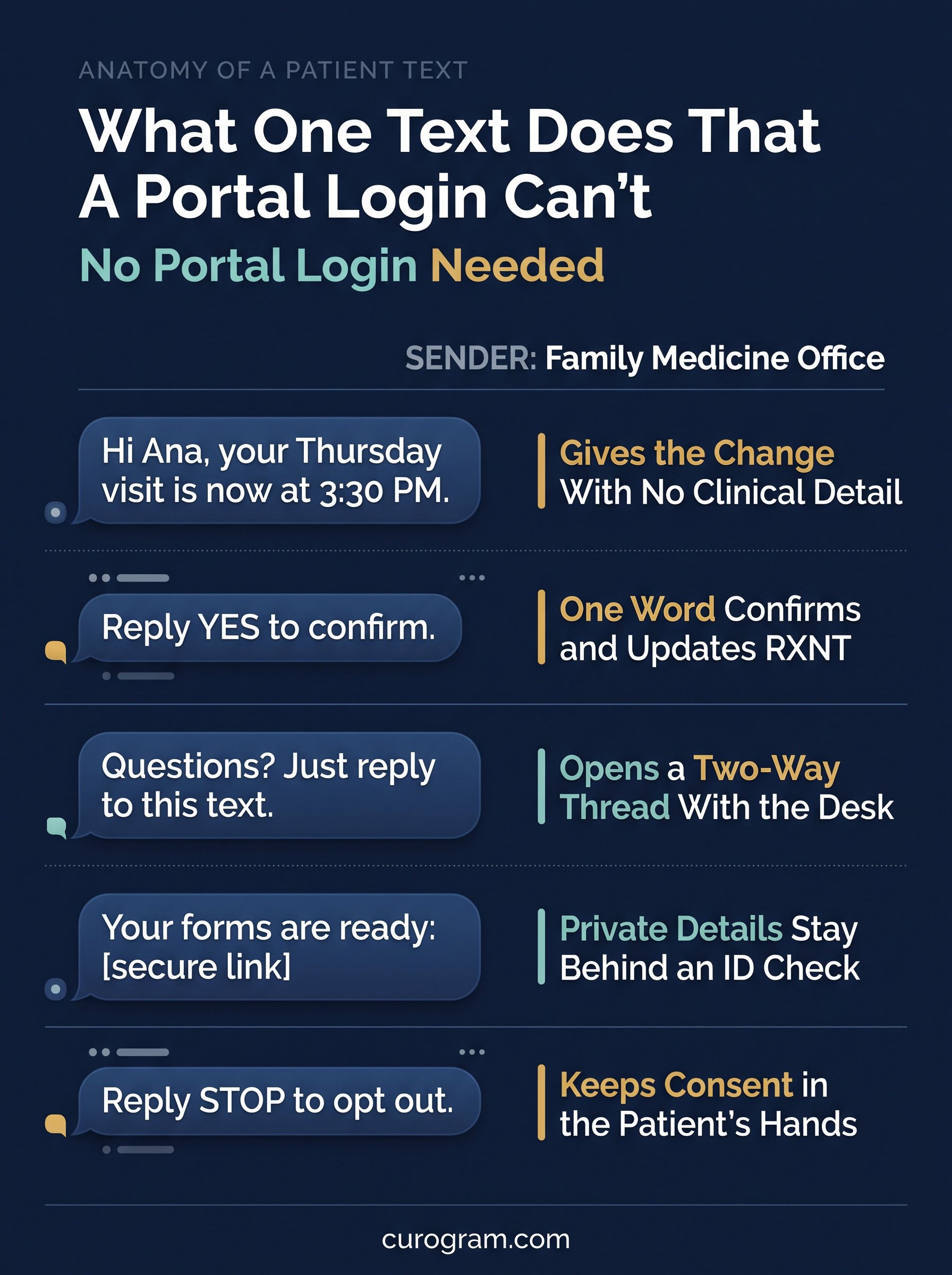
The second gets a text from the office: "Hi Ana, your Thursday visit is now at 3:30 PM. Reply YES to confirm." She types YES from the school pickup line and gets on with her day. Her visit stays on the books, and nobody at the front desk has to chase her.
Both messages said the same thing. One of them needed a password to read. In the practice's records, both show up the same way: message sent.
Our position is that patient contact should ask nothing of the patient beyond reading a text. The portal still has a place, for patients who want records, forms, and lab results. Everyday contact belongs on the channel every patient already checks, many times a day, without thinking about it.
We'll walk the login path the way patients see it, step by step. Then we cover how a no-login text channel stays secure, and what happens when every patient on the schedule can actually be reached.
It's written for the providers and managers who speak up for their patients' time. We'll also mark where texting has limits, and what should stay out of a plain text.
The Login Detour From the Patient's Side
MyRXNT gives engaged patients real value: records, forms, visit requests, and secure messages. For everyone else, "check your portal" is homework.
What "Check Your Portal" Asks a Patient to Do
The MyRXNT registration barrier is a chain of small tasks. The app only works for patients who already have an RXNT Patient Portal account set up with the practice. To read one message, a new user has to:
- Open the email or text notice.
- Create a portal account.
- Verify their identity.
- Choose and remember a password.
- Download the app, which needs a smartphone.
- Find the Messages tab.
Each step is a place to quit, and the practice can't see where anyone stopped.
Messages Sent, Never Read
National numbers show how many patients fall off. In 2024, 65% of U.S. adults were offered and used an online portal. That leaves about a third outside it.
Scheduling tells a similar story. An MGMA poll found 71% of practices have fewer than 1 in 4 patients self-scheduling online. MGMA's 2025 no-show report also lists portals that lock people out among the frictions that raise no-show risk.
Three Patients the Portal Misses
Patient communication preferences aren't random. The same three people show up in almost every practice:
|
Patient |
Where the portal stops them |
What a text does instead |
|---|---|---|
|
Retiree with a flip phone |
No app, and no habit of passwords |
Arrives like any other text |
|
Anxious patient with one question |
Account setup feels like too much |
Asks it in one reply |
|
Working parent |
No time to log in at work |
Answers at lunch |
None of them is avoiding the practice. Each would answer a text from the office, and each is likely to miss a portal message. For the anxious patient, the cost goes past a missed slot. A small question goes unasked until it turns into a bigger one at the next visit.
Communication Without Homework
The fix is to send messages where patients already look, and to let the platform handle security on their behalf.
One Thread on the Phone They Already Check
Nearly everyone can get a text. About 98% of U.S. adults own a cellphone, and 91% own a smartphone. A plain SMS reaches both groups. The MyRXNT app only reaches the second.
Texts also skip app downloads, updates, and storage limits, which matters on older phones.
That's the case for no-app patient communication. Patients see texts from the office in the same thread every time, so a reminder, a question, and a form link all sit in one place.
Security the Patient Doesn't Have to Manage
Standard texts aren't encrypted, so they carry logistics only: a time, a date, a reply option. Anything clinical goes by a secure link, and the patient confirms who they are to open it. They never create an account, and consent is tracked by the platform, so there are no portal settings to manage.
That split matches clinical guidance. A 2023 risk note in Psychiatric News advised that texting be limited to confirming and canceling appointments, with a BAA from the vendor.
Curogram Highlight: 2-Way HIPAA-Compliant Texting
2-Way HIPAA-Compliant Texting lets patients reply to your office the way they reply to anyone. They don't install anything or make an account. Curogram is HIPAA compliant and SOC 2 Type II certified, signs a BAA with your practice, and tracks consent and opt-outs.
RXNT stays your clinical record. Curogram carries the conversation and writes Confirm or Cancelled back to the RXNT schedule.
Among patient portal alternatives for small practices, this fits behavioral health well, since a text is private and low-pressure. Physical therapy offices use quick check-ins to keep home exercise plans on track. See the RXNT details on our two-way texting for RXNT users page.

Every Patient, Actually Reached
When messages land where patients look, the results show up on the schedule.
Atlas Medical Center: 14.20% to 4.91%
Atlas Medical Center cut its no-show rate from 14.20% to 4.91% in three months with Curogram's text reminders. The change came from patients seeing the reminder and answering it, often in one word. For a small practice, each confirmed visit is a slot nobody has to scramble to fill that morning.
Across Curogram client data from clinical settings, confirmation rates run above 75%. Each of those confirmations is a patient the practice heard back from, in writing, on the schedule.
From Notification to Conversation
SMS vs patient portal comes down to what the patient can do next. A portal notice says "log in." A text says "reply YES," and the reply updates the RXNT schedule.
Outreach stops being a one-way announcement. Patients answer back, ask follow-up questions, and say when a time won't work. Staff stop guessing, too, since a thread shows whether the patient answered. You can see how the sync is set up on Curogram's RXNT integration page.
What Patients Do Instead of Logging In
Patients confirm from the pickup line. A follow-up question arrives by text after a visit, and staff answer it from the shared inbox. Intake happens through secure online forms sent as a link, and video visits open through easy telemedicine links in the same thread. Every reply lands in the shared inbox your staff already work from.
That's how practices reach patients without patient portal sign-ups. For the full channel strategy, see our guide to two-way HIPAA texting for RXNT practices. For staff setup, read the RXNT front desk texting workflow.
Conclusion: Meet Patients Where They Already Are
The portal serves the patients who choose it. A text line reaches everyone else, and in most practices that is the larger group.
MyRXNT is built for records access. Texting is built for the patient's convenience: a message that asks nothing but a glance at their phone. Each has a job, and only one of them reaches the retiree, the anxious patient, and the parent at lunch.
Stop measuring engagement by portal signups. Count answered messages instead, because a reply is the only proof a patient actually heard from you.
Schedule a demo to see the patient side end-to-end, from the first text to a confirmed visit on your RXNT schedule.
Frequently Asked Questions