
 Jo Galvez

When visits route through outside video tools, the front desk ends up resending links and talking patients through app installs.
Curogram puts the visit link in the same text thread as the reminder, and it opens with one tap in the patient's browser. Staff run the day from one shared inbox. The schedule itself stays in RXNT.
Telehealth days should be the easiest days at the front desk. No rooms to clean, no waiting area to manage, no clipboards to hand out. In a lot of RXNT practices, they're the hardest.
The reason is a job nobody hired for. When video visits run through an outside tool, the front desk becomes its help line. Staff resend links, read out meeting IDs, and explain why the phone wants an app.
The provider waits in an empty video room while it happens, and the in-person patient at the counter waits too.
None of that shows on the RXNT schedule. A 9:00 visit that starts at 9:12 looks like any other kept appointment, and the 10:00 runs late behind it. By lunch, the provider is 20 minutes behind, and nobody can point to a single cause on the screen.
Better scripts and a laminated how-to-join sheet help a little. They still leave staff as the help line.
Our view is that the best telehealth workflow is the one with nothing for staff to support. When the visit opens from a text link with one tap, the help-line work mostly goes away, and staff handle the rare exception by text.
This guide maps the virtual day for office managers and front desk leads. It covers the day-of sequence, the no-answer step, who owns what, and the tasks that come off the list for good.
It also names the patients who still need a phone call, because a workflow that pretends they don't exist breaks on the first one.
The Tech-Support Visit at the RXNT Front Desk
Teams learned to run virtual care fast. Along the way, many practices ended up staffing an IT desk without meaning to.
A Virtual Morning, Call by Call
Most front desk leads can recite this one:
- The 9:00 patient calls. They can't find the email with the link.
- Staff resend it, then wait on the line.
- "It wants me to download something."
- Staff talk them through the app store, step by step.
- The provider sits in an empty video room.
- The visit starts at 9:12, and the 10:00 runs late.
That's staff telehealth troubleshooting, and it happens while two patients wait at the in-person counter.
What It Costs in Staff Time
Take an illustrative morning with three struggling patients at eight minutes each. That's 24 minutes of desk time, plus the provider's idle minutes on every one.
It isn't rare, either. In one health system's data, about 12% of video visits with connection data failed, meaning no shared connection or a switch to phone. And phones were already full: practice leaders say scheduling makes up 31% of their most time-heavy phone work. Tech-help calls land at the top of the hour, right when in-person patients are checking in.
Who Feels It Most
The front desk lead who dreads telehealth days more than a double-booked clinic day. The provider whose four-session afternoon delivered three. She knows the 9:00 will need a walkthrough before it even starts.
Front desk virtual visits shouldn't feel like that. The tech help is what makes them heavy, and the tech help comes from the doorway the patient has to get through.
The Zero-Support Doorway
Remove the app, the account, and the meeting ID, and most of the support work goes with them.
The Day-Of Sequence
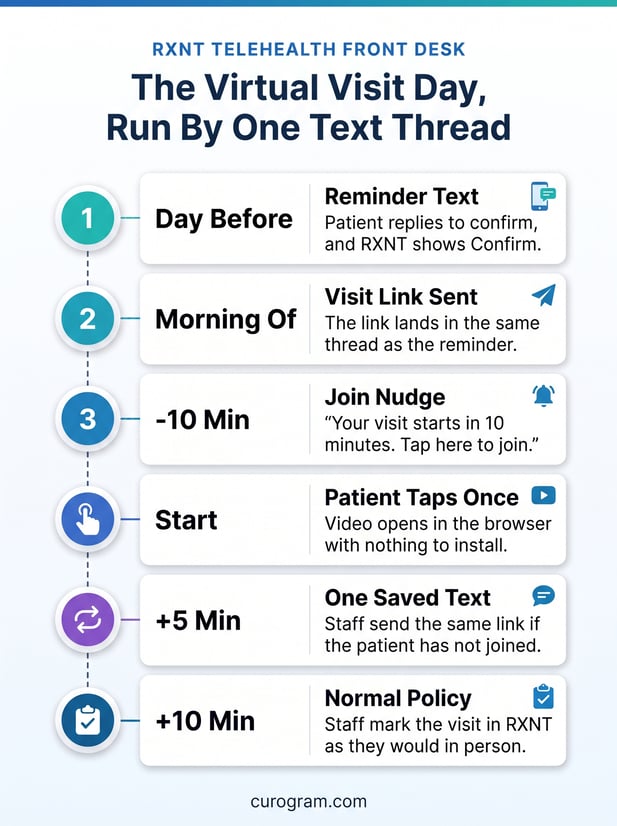
Curogram connects with RXNT through a private API and reads the appointment schedule. Telehealth day-of coordination then runs as a short sequence in one text thread:
- Day before: a reminder that asks the patient to confirm.
- Morning of: the visit link, in the same thread.
- Ten minutes before: "Your visit starts in 10 minutes. Tap here to join."
- At start: the patient taps once, and video opens in the browser.
Confirm and cancel replies write back to RXNT as Confirm or Cancelled, so the schedule stays current. Patients who confirmed the day before have already used the thread once, so the visit link isn't a surprise.
The No-Answer Step
A clear virtual visit no-show workflow needs one rule. Five minutes after start, if the patient hasn't joined, a staff member sends one saved text: "Ready when you are. Tap here to join: [link]."
Because the link is the same, there's nothing to re-explain. If ten minutes pass with no reply, staff mark the visit in RXNT under your normal no-show policy. No phone chase is needed.
Curogram Highlight: Text-Launched TelemedicineText-Launched Telemedicine puts the visit link in the reminder thread and opens secure video in the patient's browser with one tap. Staff never create meetings, manage host accounts, or read out IDs. Running-late notes and reschedule requests land in one shared inbox. Curogram is HIPAA-compliant and SOC 2 Type II certified, and it signs a BAA with your practice. Behavioral health and internal medicine practices with virtual-heavy days get the most back. See easy telemedicine for RXNT users. |

The Virtual Schedule That Runs Itself
Good telehealth session management shows up as a shorter task list.
What Drops Off the Front Desk's List
|
Old task |
What replaces it |
|---|---|
|
Resending email links |
Link sits in the reminder thread |
|
Walking patients through app installs |
Nothing to install |
|
Reading out meeting IDs |
No IDs exist |
|
Phone chase for late patients |
One saved text at five minutes |
|
Watching several video tools |
One shared inbox |
The virtual schedule stays in RXNT. Curogram handles the connection, so staff watch one inbox in place of several platforms. Setup details are on Curogram's RXNT integration page.
The Attendance Baseline
Curogram psychiatry clients average an 11.03% no-show rate across their appointments, based on our internal data. That baseline comes from the reminder and confirmation thread, and the video link now rides that same thread.
Practices that already use automated SMS reminders keep the same sequence and add the link to it. MGMA's 2025 no-show report gives similar advice for any visit type, recommending two-way texting so patients can confirm or ask a question.
A Small Desk Can Run It
This telehealth workflow small practice teams can run scales down to one or two people. Exceptions are rare, easy to spot in the inbox, and handled by text in seconds between check-ins.
A patient texts "my camera won't turn on," and staff reply with the same link or offer to switch the visit to a phone call.
Staff who already know the RXNT patient texting workflow for front desk staff will recognize the inbox. For the full picture, see one-tap telemedicine for RXNT, and for the patient side, read how video visits RXNT patients join from a text link work.
Conclusion: Close the Help Desk
RXNT holds your schedule and your notes. The connection moment decides if your front desk spends the morning on care or on tech help.
Ask your front desk one question this week: how many minutes went to telehealth troubleshooting last week? Write the number down. That's the help desk you opened without meaning to.
Most of it goes away when the patient's way in is one tap. What's left is a handful of texts your team can answer between check-ins.
Book a demo. We'll walk through your current virtual-day workflow with your RXNT schedule and cross out the steps that disappear.
Frequently Asked Questions