
 Jo Galvez

RXNT's own option, VideoBridge, links your schedule to an outside video tool such as Zoom or doxy.me. It works, but patients must find the right link, and some tools ask for an app first.
Curogram puts the link in the same text thread as the visit reminder, so there's one place to look and nothing to install.
A video visit can be ready on the provider's side and still not happen. The therapist has the session open, notes pulled up, camera on.
Your patient is somewhere else. Maybe in an email inbox, hunting for the right link. Maybe in an app store, being asked for a password set up two phones ago. Either way, the session clock is running and the provider can't help from the other side of the screen.
RXNT made a sensible choice when it built telehealth into an affordable suite. Its VideoBridge feature lets providers connect a video tool they already use, like Zoom or doxy.me, to the RXNT schedule.
What that asks of the patient is the catch: leave the practice's messages, go to another company's link, and sometimes install that company's app first.
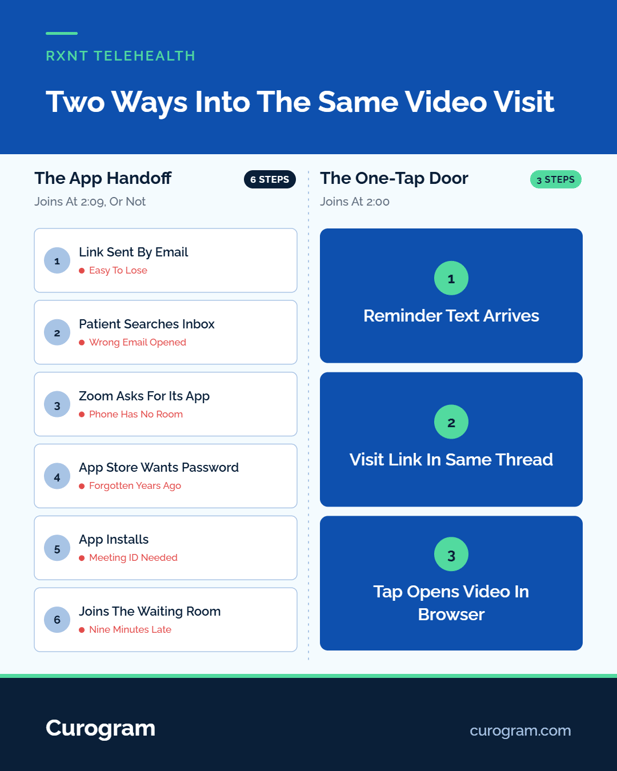
We call this the App Handoff. Each step is small. Together they turn part of every virtual schedule into "couldn't connect" no-shows, and the patients who drop off are often the ones telehealth was meant to help most.
Our position is that the doorway to a video visit should be the same text thread that reminded the patient about it. One tap, in the browser, with nothing to download. RXNT keeps the schedule and the chart.
None of this is a knock on RXNT. It's a question of where the patient's first tap lands.
Below, we walk through where the App Handoff breaks, how a text-launched visit fits beside RXNT, and what changes in a behavioral health practice when virtual sessions start on time.
The App Handoff: Where Virtual Visits Stall
RXNT's telehealth works. The friction sits in the gap between the patient's phone and the video room.
How VideoBridge Hands the Patient Off
VideoBridge connects RXNT to the provider's chosen HIPAA-compliant video tool, with that tool's own waiting room. Charting and billing for the visit stay in RXNT, which is a real strength.
For the patient, the visit now lives on someone else's platform. Links come by email or through the portal. On a phone, Zoom usually asks for its app before the call opens. RXNT telehealth options are solid for the practice, and the extra steps land on the patient.
The Join, Step by Step
This is how a 2:00 video visit slips:
- The visit is booked in RXNT, and a link goes out by email.
- Two minutes before, the patient can't find the email.
- The link opens and asks them to install an app.
- The app store wants a password they don't remember.
- They join at 2:09, flustered and apologizing.
That's nine minutes off a 45-minute therapy session, or a visit that never starts.
Who Drops Off
The patients most likely to stall are the ones who need home visits most. A 2025 study of video visit data found patients older than 65 were 102% more likely to have a failed video visit. Failures meant no shared connection, or a switch to a phone call.
Inside the practice, it looks like this. A therapist watches an empty waiting room for ten minutes. An older patient gives up without a word and stops booking virtual visits at all.
The One-Tap Exam Room Next to RXNT
Our fix moves the doorway into the text thread the patient already uses with your office.
How a Text-Launched Visit Works
Curogram connects with RXNT through a private API and reads your appointment schedule. Patients get reminders by text, then a visit link in the same thread. One tap opens the video in the phone's browser. Their phone asks for camera access once, and the patient is in.
That's no app telehealth in practice: no store, no account, no meeting ID. If the patient is running late, they reply in the same thread and someone at the desk sees it. The work splits this way:
|
Task |
RXNT |
Curogram |
|---|---|---|
|
Booking the visit |
The schedule of record |
Reads the appointment |
|
Visit notes and billing |
Stays in RXNT |
Nothing |
|
Reminder and confirmation |
None needed |
Text; writes back Confirm or Cancelled |
|
Video link |
Outside tool via VideoBridge |
One tap from the same thread |
|
Running-late messages |
Phone call |
Reply in the same thread |
Security Without an App
HHS guidance says providers must use video vendors that comply with HIPAA and sign business associate agreements. Curogram is HIPAA compliant and SOC 2 Type II certified, and it signs a BAA with your practice.
HIPAA compliant video visits don't depend on the patient installing anything. Protection sits in the platform. Setup details are on Curogram's RXNT integration page.
Curogram Highlight: Text-Launched TelemedicineText-Launched Telemedicine opens a secure video visit straight from a text link, in the patient's browser. There's nothing to install, no account to create, and no meeting ID to type. Pre-visit questions and running-late notes stay in the same thread as the reminder. As a VideoBridge alternative, it fits psychiatry and therapy well. Sessions keep their full length, and patients don't need an account with another video company. For anxious patients, one tap is a lower bar than an app setup. See easy telemedicine for RXNT users. |

The On-Time Session
When the doorway is one tap, the virtual schedule starts acting like the in-person one.
What the Attendance Numbers Show
Curogram psychiatry clients average an 11.03% no-show rate across their appointments, based on our internal data. Reminders and confirmations by text drive that number, and the visit link now rides the same thread. That figure covers in-person and virtual visits together, so treat it as the baseline the text thread already delivers.
That's the basis for telehealth no-show reduction: the patient who confirmed by text also joins by text. MGMA's 2025 no-show report likewise recommends two-way texting so patients can confirm or ask a question. Most practices pair the visit link with automated SMS reminders sent the day before.
From Handoff to Doorway
The virtual visit patient experience gets shorter by every step that's gone. Patients stop treating a 2:00 visit like an IT project at 1:45. They open the thread they already know, tap once, and see their provider.
Staff stop talking people through installs. Questions before the visit run through 2-way HIPAA texting in the same inbox, where any staff member can answer. A patient who texts "can we push to 2:15?" gets an answer before the provider ever opens the room.
What Changes for the Provider
A therapist with four afternoon sessions gets four full sessions. Psychiatrists doing 15-minute med checks start on time, with no opening minutes lost to audio settings.
For the staff side of the day, read about running telehealth alongside RXNT scheduling. For the patient side, see how video visits RXNT patients join from a text link work in practice.
Conclusion: Open the One-Tap Door
RXNT documents the visit. Whether the visit happens at all is decided earlier, at the moment the patient tries to get in.
Try one count this week. Pull last month's virtual visits that ended as "couldn't connect" or switched to a phone call, and ask staff how many minutes they spent on tech help. That total is the App Handoff's bill.
A text link the patient taps once is the simplest way we know to bring it down. It also keeps every pre-visit question in one thread your team can see.
Schedule a demo. Join a test visit from your own phone, count the taps, and see how it runs next to your RXNT schedule.
Frequently Asked Questions