
 Aubreigh Lee Daculug
Open Dental's eServices lineup doesn't include a review-request tool. So in most offices, the job falls to a busy front desk, and it rarely gets done. Curogram calls this gap "The Empty Review Column."
In Curogram client data from clinical settings, one multi-location practice saw 90% of patients leave 5-star reviews. That added 1,064 new 5-star reviews in three months.
Your hygiene chairs produce two things every day: healthier smiles and happy patients. The smiles leave with the patient, and unfortunately, so does the goodwill, which almost never makes it onto your Google profile.
That isn't because your patients dislike your practice. Most of them leave feeling cared for, chat about weekend plans at the front counter, and book their next cleaning without a second thought.
They mean well, but life gets busy. Then they get into the car, check their messages, and forget the appointment ever happened.
Meanwhile, someone across town is searching for a new dentist, scanning star ratings on a map and making a decision in less than a minute. A Dentaly survey reported by DentistryIQ found that 83% of Americans use online reviews as the first step in choosing a new dentist. If your profile looks quiet, that phone call may never come.
Most office managers already understand this, and reviews come up regularly in the morning huddle. Everyone agrees the team should ask more often, yet nothing changes, because requesting reviews isn't anyone's job on paper.
That's the real issue: your practice doesn't have a review problem so much as a workflow problem. The request has no owner, no scheduled moment, and no reliable way to track it, so it disappears from the list on every busy day.
This guide explains why the manual approach keeps failing and what a simple, hands-off fix looks like. You'll see how an Open Dental review request workflow after dental appointments can operate with Curogram handling the asking automatically.
You'll also find real results from a multi-location practice, along with clear answers about HIPAA, timing, and front desk workload.
By the end, you'll know how to turn finished visits into steady reviews without adding a single task at checkout.
The Review Job That Sits on No One's List
Open Dental does a lot of things right for a busy practice. Your schedule, ledger, and recall list all live in one affordable system that your team already knows well.
Reputation, however, has no real home there:
There's no review module, no review report, and nobody assigned to make the request.
That's how "The Empty Review Column" takes hold, since everyone intends to ask for reviews but nobody actually has a process for it. Open Dental's own fee schedule lists eConfirmations at $25 to $40 a month per location and texting at $0.04 per outgoing message. However, it doesn't list a review-request tool anywhere.
Here's how the manual version typically plays out in a real office:
- The morning huddle agrees, once again, that the team should be asking for more reviews.
- The front desk fully intends to mention it during checkout.
- Three patients are waiting at the counter, and the phone keeps ringing.
- The review card next to the computer stays untouched all day.
- On Friday afternoon, someone emails a Google review link to five patients.
- Two of those emails bounce, and none of the others turn into reviews.
By Monday morning, the DSO-backed office down the street has collected another week of fresh 5-star reviews.
Manual asking also consumes staff time at the busiest moment of the day. As an illustrative example, suppose asking takes two minutes per patient and your office checks out 40 patients daily.
That adds up to 80 minutes of front desk time every day, and only a small portion of those conversations will ever become actual reviews.
The approach doesn't scale either, because more patients require more asking, and more asking eventually requires more staff. Even a perfect dental front desk review request script can't solve that problem, since someone still has to deliver it at exactly the right moment.
Meanwhile, a weak rating quietly reduces every new-patient opportunity. In the same Dentaly survey, 95% of respondents said negative reviews made them reconsider contacting a practice.
Consider an office sitting at 2.9 stars:
If it loses just two new patients a month, and each one is worth about $850 in the first year, roughly $20,400 a year walks out the door (an illustrative example, so substitute your own numbers).
The person who feels this most is usually the office manager. You track confirmation rates, recall rates, and production down to the decimal point, yet you have no lever to pull on the one number every prospective patient sees first.

Meet the Review Ask That Runs on Its Own
The Visit Ends, the Survey Starts
Curogram's automated post-appointment surveys work as your "Review Engine." Curogram reads appointments from your Open Dental schedule, and after the visit, it texts the patient a short survey while the positive experience is still fresh.
Your front desk's task list gains nothing at all.
That's the foundation of automated review requests for office managers:
The system owns the request, so your team doesn't have to remember it.
One Survey, Two Paths
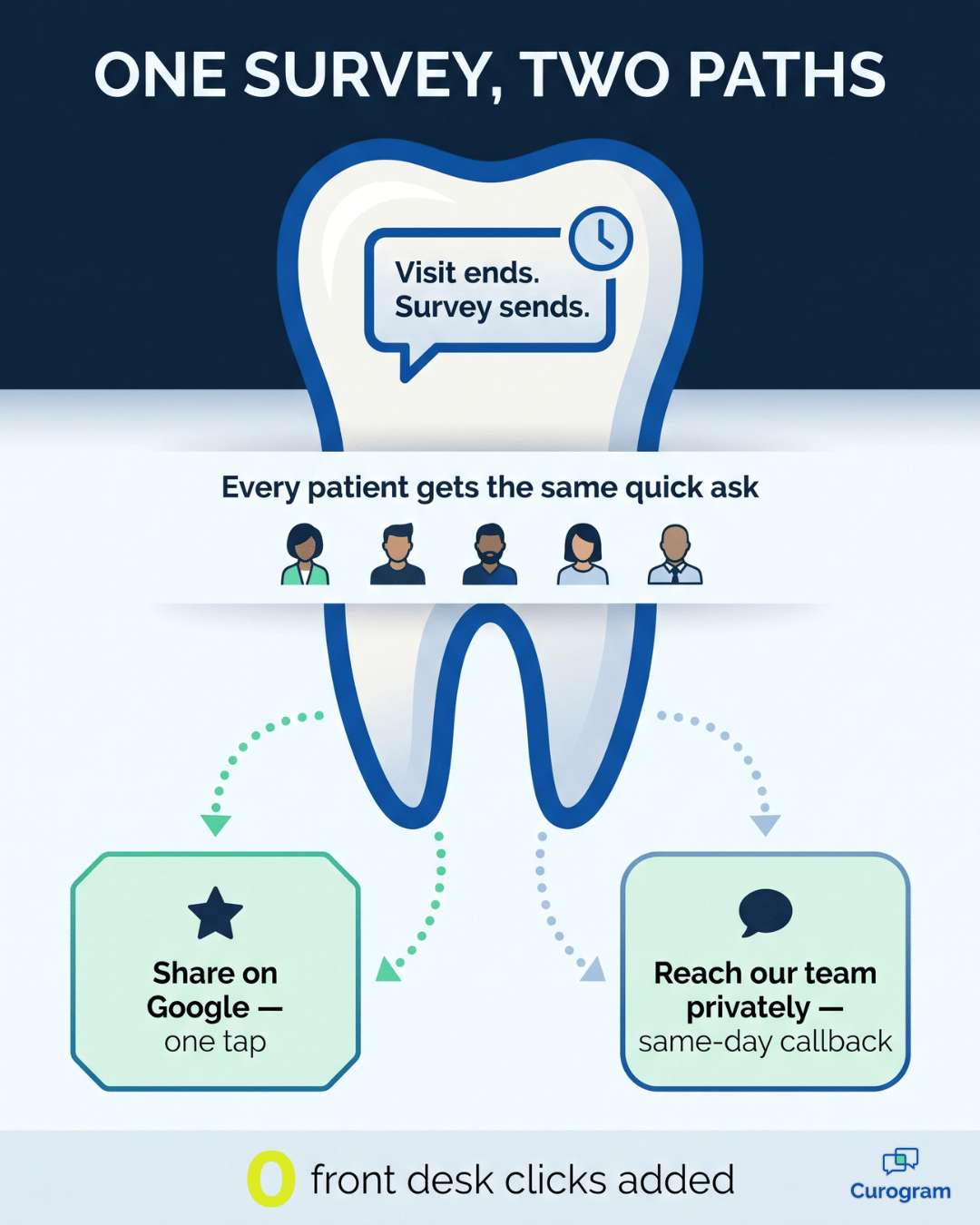
Every patient gets the same short survey, and their reply decides the next step. Happy patients get a one-tap path to your Google review page, while anyone with a concern gets a quick, private way to reach your office.
So you hear about a rough visit from a survey reply instead of a public one-star review, and you can call the patient that same afternoon.
How It Fits With Open Dental
Curogram connects through an integration agent that needs access to your Open Dental server. It pulls in your appointments, while Open Dental stays your system of record for the schedule and the ledger. You can keep any eServices you already use, and setup usually takes two to five days.
Group practices gain the most from this setup. With multi-location dental review management, every office follows the same dental office reputation workflow, so no location depends on one employee's memory.
The Hygiene-Book Connection
Your hygiene schedule is likely your best source of reviews. Every prophy that wraps up is both a patient you keep and a chance at a 5-star review. Recall keeps those chairs full, and the survey turns full chairs into reviews. Orthodontic offices, where patients return every few weeks, can build review volume even faster.
Review request timing after hygiene appointments matters as well. A text that arrives shortly after the cleaning reaches the patient while the visit still feels good, and a text sent a week later is easy to ignore.
The Review Number Your Monday Huddle Will Want to Share
Here's what the same "visit ends, survey sends" workflow produced in Curogram client data from clinical settings. The results came from a multi-location healthcare practice rather than a dental office, but the workflow is the same as the one described above.
| Result | What happened |
|---|---|
| Patients who left 5-star reviews | 90% |
| New 5-star reviews in three months | 1,064 |
| Total Google reviews, August 2023 to December 2024 | 993 to 8,159 |
Consider what that kind of growth means for visibility. A profile that once looked thin became one of the most reviewed in its area.
That's the shift from counter card to compounding asset. Reviews stop being a checkout favor your team forgets and start running on their own after every completed visit.
This is the post-visit follow-up dental practice teams have wanted for years: consistent, quiet, and handled the same way every time.
Now imagine the difference in your weekly routine. The office manager adds a review line to the Monday report, right beside confirmations and production. Negative feedback arrives as a private survey reply with a phone number attached, and checkout returns to what it should be: a warm goodbye instead of a sales pitch.
What to Have Ready Before Reviews Start Rolling In
Getting started comes down to a few simple checks, and most take less than a day.
Here's what your office should line up before the first survey goes out:
- Server access: Curogram's integration agent needs access to the server where Open Dental runs, so bring in your IT person early.
- Setup time: The connection typically takes two to five days, so you can plan around a normal week.
- Cost by location: The monthly integration fee is $35 per treating location, and Open Dental may charge its own integration fee, so confirm the full total with your Curogram rep.
- Your Google review link: Each location needs a verified Google Business Profile, since that's where the one-tap link sends happy patients.
- A reply plan: Decide who will answer new reviews and who will call back patients who share a concern.
Replying matters more than most practices expect. Google's guide to managing customer reviews shows how to reply from your Business Profile and handle bad feedback calmly. A short, friendly reply shows future patients that a real person is paying attention.
Finally, keep the ask fair. Send the same survey to every patient, not just the ones you think loved their visit. Google's review policy doesn't allow practices to pick only happy patients to ask, and a steady mix of honest reviews builds more trust anyway.
Let Every Finished Visit Do the Asking
The best review system is the one your team never has to think about. The visit ends, the survey goes out, the satisfied patient taps, and your profile grows, without cards on the counter, Friday email batches, or awkward requests at checkout.
That's what separates this approach from what most practices do today.
Many offices treat reviews as a task, and tasks get pushed aside on busy days, which dental offices have plenty of. When the request runs automatically, it happens after every visit, whether the front desk is calm or completely overwhelmed.
Think of it as a clear division of responsibilities.
Open Dental manages your schedule, recall list, and ledger, while Curogram captures the moment of goodwill in the parking lot. A well-built Open Dental review request workflow after dental appointments catches that moment every single time.
So try a quick test this week; it only takes five minutes. Count last week's completed appointments in Open Dental, and then count last week's new Google reviews. The gap between those two numbers is your growth engine, sitting idle.
For most practices, that gap is surprisingly large. Every happy patient who left without sharing the experience represents a review you earned but never received, and over a month, those missed opportunities add up quickly in local search.
Closing the gap doesn't require a new hire or a new script; it requires a workflow that runs without anyone remembering it. Once it's in place, your reviews grow at the same pace as your schedule.
Ready to see what your own numbers could look like? Book a Consultation with Curogram, and in 20 minutes we'll review your schedule and completed-visit volume. Then we'll walk you through a projection of how those visits could turn into steady new reviews.