
 Jo Galvez
It costs $25 a month per location, or $40 with landline texting, plus a fee per text sent. Curogram works alongside Open Dental instead. It is HIPAA-compliant and SOC 2 Type II certified.
It reads appointments from Open Dental and sends two-way SMS reminders from the cloud. Patients confirm, cancel, or ask for a new time by reply.
Every reply lands in one shared team inbox, so staff know who's coming before the huddle starts. Curogram client data from clinical settings shows confirmation rates above 75%.
At Atlas Medical Center, a medical practice, no-shows fell from 14.20% to 4.91% in three months.
Open Dental gets a lot right. The pricing is honest, the schedule module is quick, and most front desks like working in it. Reminders are where the monthly bill starts to grow.
eConfirmations is a paid add-on for each location. Texting adds its own access fee, and every outgoing message carries a charge.
A long message counts as two. And every send depends on one Windows service, running on a server in your back office.
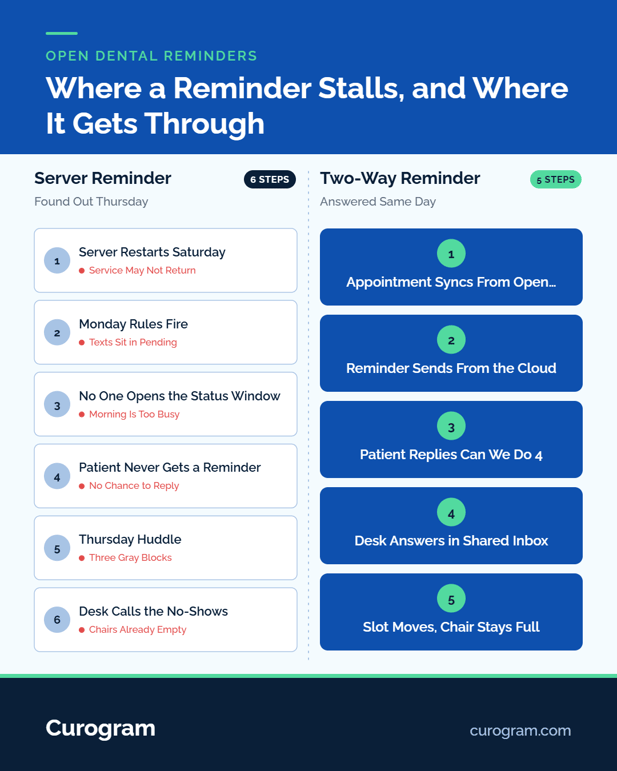
When that service stops, the texts stop too. Most offices don't find out from a warning. They find out from Thursday's hygiene column: three gray blocks and a hygienist waiting in an empty operatory.
We think reminders should run off-site and invite a reply. Below, we walk through how the native setup works and where it breaks.
Then we show how a two-way reminder layer fits beside Open Dental, with nothing else in your software changing.
How eConfirmations Works in Open Dental, and Where It Stops
Native Open Dental appointment confirmations run through eServices. They do their job on a good day. Trouble shows up in three places: the invoice, the reply, and the server.
What Each Reminder Costs
Open Dental publishes its eServices fees on its own site. For one location, the reminder pieces stack up like this, as listed in November 2026:
|
Line item |
What Open Dental lists |
|---|---|
|
eConfirmations |
$25 a month per location, or $40 with landline texting |
|
Texting access |
A monthly access fee per location |
|
Each outgoing text |
A per-message fee, charged again past 160 characters |
|
Incoming replies |
No charge |
So the meter runs on every send. A three-touch cadence for 800 monthly visits is 2,400 billed messages before anyone replies.
What Happens When a Patient Replies
eConfirmations handles the reply it expects, the confirm keyword. Anything else lands as an incoming text in Open Dental's texting window. "Can we do 3 instead of 2?" waits there until someone opens it.
At 8:10 a.m., with three patients at the window and two lines ringing, nobody opens it. Your patient assumes the office saw the message. Nobody did, and the chair sits empty at 2.
Why the eConnector Matters for Every Send
Open Dental's own eServices troubleshooting page says the server hosting the eConnector must stay on for eServices to work. If that machine sleeps, restarts, or loses its connection, reminders can sit in Pending.
Open Dental does show the status in the eConnector window. But nobody checks that window during a full morning. Most office managers learn the eConnector texting outage fix the hard way. Check the server, restart the service, then reinstall if needed.
What a Stalled Week Costs
Take an office that books 40 visits a day. Say a stalled eConnector leaves two extra chairs empty each day for three days. That's six lost visits. At an illustrative $200 per hygiene visit, one weekend restart costs $1,200 in production.
How Curogram Runs Two-Way Reminders Alongside Open Dental
Open Dental keeps the charts, the schedule, and the ledger. Curogram handles the reminder conversation. If you're weighing an Open Dental eConfirmations alternative, that split is the whole design.
Curogram Highlight: Automated Two-Way SMS RemindersAutomated Two-Way SMS Reminders send on a cadence you set by appointment type. Hygiene recall can start two weeks out with a soft nudge. Doctor production can run a tighter sequence. Ortho adjustments get short, frequent touches. Patients confirm, cancel, or ask for a new time by reply. Confirms and cancels are processed on their own. Every other reply goes to one shared team inbox, where anyone at the desk can answer by text. That inbox also runs HIPAA-compliant two-way texting. A reminder reply and a billing question sit in one thread. Curogram is HIPAA-compliant and SOC 2 Type II certified and signs a BAA. See how automated SMS reminders for Open Dental users are set up. |
How the Open Dental Connection Works
Curogram's Integration Agent reads appointments from your Open Dental database. Setup usually takes two to five days and needs access to the office server. Nothing changes for patients, and there's no app for them to download.
Once an appointment syncs, its reminders send from Curogram's cloud. A server reboot at 7 a.m. doesn't hold texts already scheduled, and new bookings sync once it's back.
Reply statuses show in Curogram's dashboard and don't write back to the Open Dental appointment. More on Curogram's Open Dental integration.
|
eConfirmations |
Curogram |
|
|---|---|---|
|
Where sends start |
eConnector on your server |
Curogram's cloud |
|
Free-text replies |
Texting window in Open Dental |
Shared team inbox |
|
Cadence |
Rules per appointment |
Set by appointment type |
|
Confirm status |
In Open Dental |
In Curogram's dashboard |
Why Hygiene-Heavy Practices Feel It First
Hygiene recall is booked six months out, which is a long time to forget. And hygienists are hard to replace. The ADA Health Policy Institute reports that only 60% of dentists have enough hygienists on staff.
An empty hygiene chair wastes an hour you already paid for. Pediatric offices add another layer, since the reminder really goes to a parent. With two-way reminder texts for dental offices, that parent can ask to move Emma to 4. A person answers.
What a Full Hygiene Book Looks Like
Good dental appointment reminder software should show up in the morning huddle. This is what changes when replies get answered.
The Proof
Curogram client data from clinical settings shows confirmation rates above 75%. Atlas Medical Center, a medical practice, cut no-shows from 14.20% to 4.91% in three months.
Outside research agrees on the basics. A 2023 review of 61 studies found strong evidence that reminders improve attendance.
A 2026 meta-analysis found that text and phone reminders both raised attendance. Texts do it without a staff member dialing. That's the plain case to reduce dental no-shows with SMS.
The 7:55 Huddle
The team opens the dashboard and reads replies, not gray blocks. Thursday's cancellation came in Tuesday by text, so the slot already went to the ASAP list. The hygienist's column holds through the afternoon.
For the front desk side, see our playbook on reducing broken appointments in Open Dental hygiene schedules. For the patient side, read about two-way text confirmations for Open Dental patients. To refill the book from your dormant list, look at mass messaging for Open Dental practices.
Conclusion: Take Reminders Off the Server in the Closet
Open Dental runs your practice well. The weak spot is a reminder that depends on one office machine and listens for one keyword.
Automated text appointment reminders for Open Dental scheduling work better as a conversation. They should send from the cloud and accept any reply a patient types. Charts, schedule, and ledger stay right where they are.
Your eServices invoice says what reminders cost each month. Your broken-appointment report says what they missed. Put the two reports side by side before you talk to anyone.
Bring both reports and book a demo. In 20 minutes, we'll run the reminder workflow on your own schedule. Then we'll show you where last month's empty chairs came from.
Frequently Asked Questions