5 min read

From Paper to PDF: Automating Data Entry for eKyros

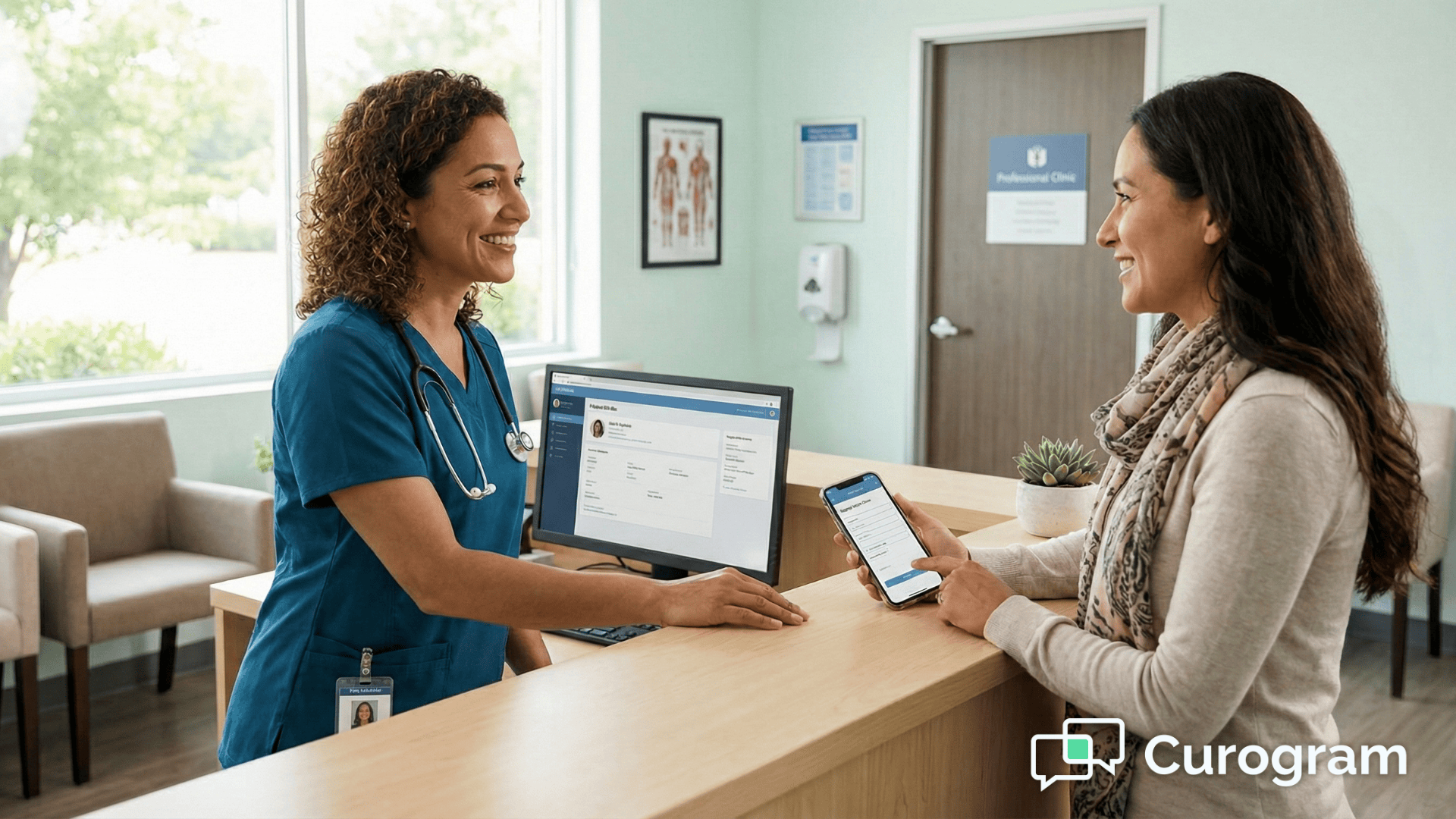
Clinic volunteer greeting patient using digital intake on smartphone
💡 Automating data entry for eKyros clinics starts with letting patients type their own answers. With Curogram's digital intake workflow, patients fill out forms on their phones before they arrive.

Staff review the typed, signed form in Curogram and download it as a clean PDF for the eKyros chart. No one has to squint at handwriting or retype five pages.

Volunteers get that time back for patients, and your records start out legible and complete.

A patient walks in, hands back a clipboard, and five pages of handwritten forms land on the front desk. Now a volunteer has to sit down, decode the handwriting, and type every answer into eKyros.

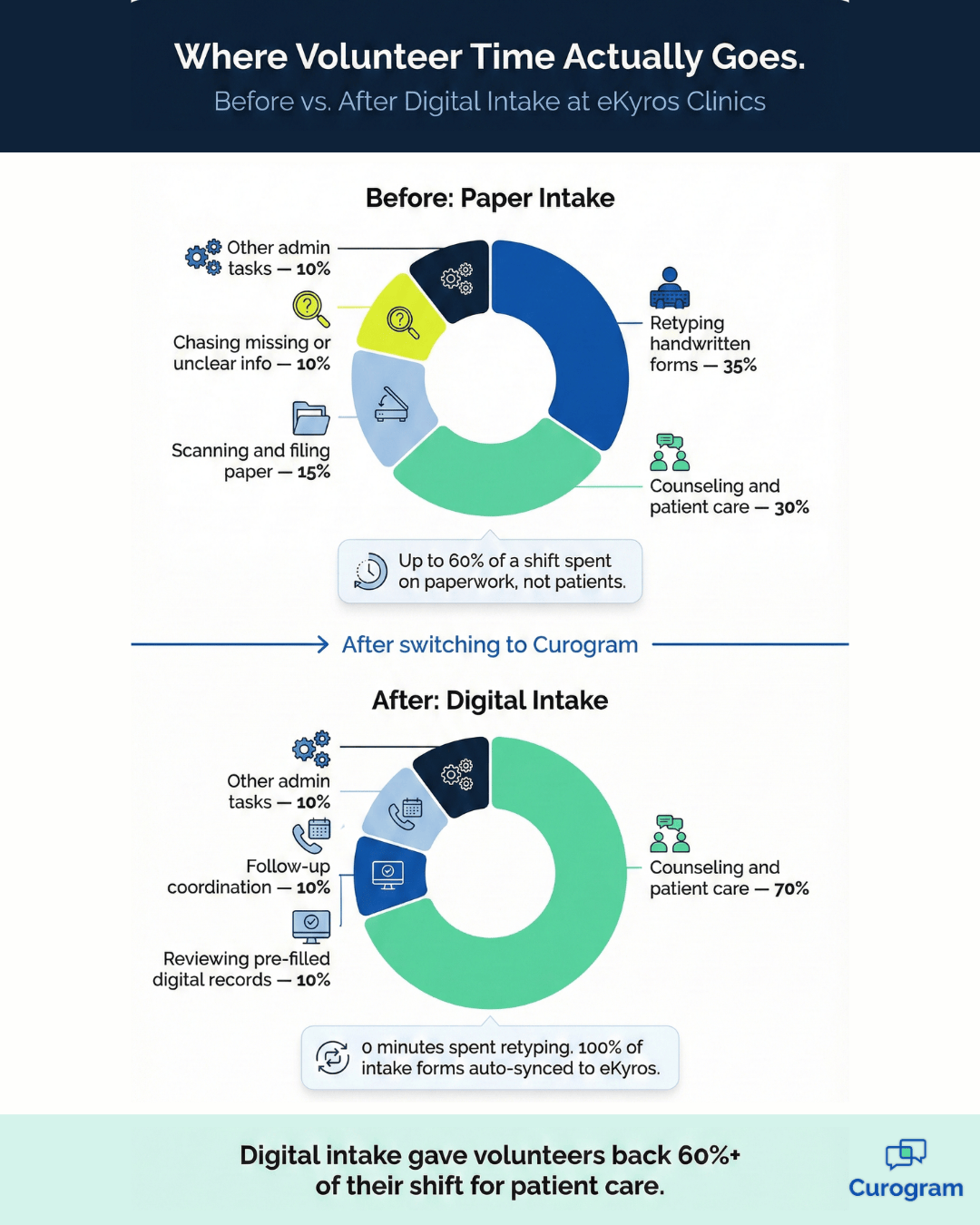
Do that for every new patient, and the typing eats a real share of each shift. Volunteers came to counsel women in need. Instead, the first part of their day goes to a keyboard.

Misreads are the bigger risk. A date gets entered wrong. An allergy gets missed. A phone number is off by one digit, and the follow-up text never arrives.

Our view: the person who knows the answers should be the one typing them. When patients fill out intake forms on their phones, the data arrives typed and complete. This article walks through how that works with Curogram and eKyros, and how to roll it out without disrupting your center.

Why Retyping Handwritten Forms Costs More Than You Think

The Hours No Budget Shows

Most centers don't think of data entry as a cost. There's no line item for it. But every hour a volunteer spends typing forms into eKyros is an hour she isn't sitting with a patient.

For centers that run on limited volunteer shifts, that tradeoff hurts. A backlog at the desk pushes back the next appointment, and the patient after that waits longer too.

What Goes Wrong on a Clipboard

Paper forms carry risks that show up later in the chart:

  • Handwriting that's hard to read
  • Skipped or half-finished fields
  • Misspelled names or wrong contact details
  • Health details entered incorrectly

A "7" can look like a "1." The date of the last menstrual period gets recorded a week off. These errors lead to confusion in the chart, missed follow-ups, or decisions based on the wrong information.

Over time, records get harder to audit and reports get less reliable. Staff spend extra time double-checking instead of moving forward. Your volunteers signed up to serve, and retyping forms takes them away from that.

How Curogram Turns Patient Phones Into a Digital Scribe

Curogram lets the patient do the data entry. Instead of a clipboard, she gets a secure link by text before her visit. She fills out the form at home, in the car, or in the waiting area. No app or login is needed.

Three Steps From Phone to eKyros Chart

The process works in three steps:

  • The patient fills out and signs the form through a secure link on her phone.
  • Staff review the typed answers in Curogram before the visit.
  • Staff download the completed form as a PDF and add it to the patient's eKyros chart.

When the nurse opens the record, the history is typed, organized, and ready to read. Nothing needs decoding.

One Upload Instead of Five Pages of Typing

Curogram's eKyros connection handles appointments and reminders. Completed forms stay in Curogram, where staff review them and download the PDF. Adding that file to the chart takes a few clicks.

Compare that to reading five handwritten pages and typing each answer into eKyros. The upload is a short step, and the content is already legible. Centers can set up their intake forms to match the paper versions they use today.

Why Clear, Typed Records Keep Patients Safer

A handwritten form can always be misread. A volunteer might type "penicillin" when the patient wrote "phenytoin." A misread allergy or medication name can have serious results. Legible records are a quality and safety requirement in any clinical setting.

Standard Forms That Remove Guesswork

Answers on a Curogram form are typed, so there's nothing to interpret. Required fields stop patients from skipping key questions. Conditional logic shows follow-up questions only when they apply, so a patient who answers "no" to a medication question doesn't see the dosage fields.

Every form comes in the same layout, which makes review faster for nurses.

Photo uploads help too. Instead of photocopying an ID or insurance card, the patient snaps a picture on her phone. The image comes in with her form, clear and readable, and your center saves on toner and paper.

A Stronger Audit Trail

Patients sign forms electronically, and Curogram keeps an audit trail of each submission. When a chart is reviewed months later, you can see when the form was completed and signed.

Curogram is HIPAA-compliant and SOC 2 Type II certified, so patient answers and signatures stay protected from the phone to your team.

Comparison of a handwritten clipboard intake form and a typed digital intake form on a phone

What Happens When Errors Slip Into Patient Records

How Small Errors Grow

A wrong birth date can cause trouble with referrals. A misspelled medication name can confuse a provider at a follow-up visit. A missed allergy note could put a patient at real physical risk.

Each retyped form is another chance for one of these errors. The more forms your center handles, the more chances add up.

Why Non-Profits Face Higher Risk

Large hospital systems have dedicated data teams. Pregnancy resource centers often rely on rotating volunteers.

Each new volunteer brings a different comfort level with medical terms, handwriting, and eKyros itself. That variety raises the chance that something gets entered wrong.

A digital intake workflow takes the retyping step out. The patient types her own answers, and staff see them exactly as she entered them.

Patient completing digital intake form on phone in clinic waiting area

Getting Your Center Started Without the Growing Pains

Switching from paper can feel like a big leap for a center with long-standing habits. You don't need to change every form at once.

A Practical Rollout Plan

Start with your highest-volume intake form so the team sees results quickly.

A typical rollout looks like this:

  • Pick one or two forms to go digital first, such as patient history or consent.
  • Set up those forms in Curogram with the same fields as the paper version.
  • Send the link to a few patients and fix anything confusing.
  • Roll out to all patients and retire the paper version.

Connecting Curogram to eKyros usually takes about a day, using an eKyros login. Your forms can go live once they're set up and tested.

Built for Centers That Run on Volunteer Power

Training takes about 10 minutes. Volunteers send links, check completed forms, and download PDFs. If they can open an eKyros chart, they can handle the rest.

That matters when your team changes week to week. New volunteers spend their first shift with patients instead of learning to decode handwriting.

Frequently Asked Questions

How does automating data entry for eKyros clinics work with Curogram?

Patients get a secure link by text and fill out intake forms on their phones. Staff review the typed answers in Curogram and download a PDF for the eKyros chart, so no one retypes handwriting.

How much training do our volunteers need?

About 10 minutes. Staff send form links and review answers in Curogram, which works much like regular texting. Volunteers who already know how to open an eKyros chart can handle the rest of the process.

How do patients without a smartphone complete their forms?

The forms open in any web browser, so they work on a tablet or laptop too. Many centers keep a tablet in the waiting area for patients who arrive without a phone.

Why are typed forms safer than handwritten ones?

Typed answers can't be misread. Required fields stop skipped questions, and conditional logic shows follow-up questions only when they apply, so staff review a complete, legible history before the visit starts.

How does Curogram keep intake forms secure?

Curogram is HIPAA-compliant and SOC 2 Type II certified. Forms travel through secure, encrypted links, and each submission is logged in an audit trail, which gives your center a cleaner record than paper.

Recover Your Hours and Refocus on What Matters Most

Paper forms take time from every center that still uses them. Hours go into keyboards and data fields instead of conversations and care.

Automating data entry for eKyros clinics gives that time back. Patients type their own answers, staff review a clean form in Curogram, and a legible PDF goes into the eKyros chart.

Check-ins move faster, and records start out complete. Volunteers walk into each appointment prepared instead of catching up on paperwork.

Schedule a demo to see how Curogram's digital intake works with eKyros and gives your team more time for the work they came to do.