
 Aubreigh Lee Daculug
That ends "The Pre-Visit Tech Support Shift," the minutes staff lose walking patients through app downloads and portal logins before each video visit.
The workflow runs in three steps: the reminder goes out, the patient confirms by text, and the join link arrives. Covina Arthritic Clinic averages more than 1,100 confirmed appointments a month on Curogram's automated text thread.
Nobody takes a front desk job hoping to troubleshoot webcams, yet in plenty of CureMD practices, that is exactly what the stretch before a video visit has become. The phone rings, a patient can't access the appointment, and someone at the desk becomes the practice's help line.
Telehealth was supposed to simplify everyday life, and for providers and patients it often does. For the front office, though, it quietly added a new category of work that never appears on the schedule.
Consider what one video visit asks of your team. Someone schedules it in CureMD and someone confirms it, and then, too often, someone talks the patient through an app download, a new account, or a portal password that disappeared months ago.
That last step is the real problem, and we call it "The Pre-Visit Tech Support Shift." It's the run of calls, password resets, and "can you see me now?" moments that land on your staff before each virtual appointment.
The shift hits hardest in practices serving many older patients. Rheumatology, primary care, and cardiology panels are full of patients who want a video visit but freeze when they encounter an app store screen.
When they can't connect, the appointment goes empty and the provider sits waiting.
A better virtual visit workflow for CureMD front office staff removes the join step from the patient's plate, and from your team's. The link arrives by text, the patient taps it, and the visit opens in the phone's browser without an app or login.
This guide walks through the entire workflow, from booking in CureMD to the moment the patient appears on screen.
You'll see where the tech support hours hide, how one text conversation replaces them, what the setup requires, and what a calmer telehealth day looks like in real numbers.
The Hidden Shift Behind Every CureMD Video Visit
CureMD handles the clinical side of telehealth well, keeping scheduling, documentation, and billing together in one system. The company has earned Best in KLAS honors in the past, and its AI Contact Center answers calls around the clock and can book or reschedule visits by phone.
The gap sits on the patient's side of the connection, where joining a CureMD televisit can mean finding an app, creating an account, or signing in through a patient portal.
Think of it as "The Walled Garden":
Every path in has a gate, and your front desk usually ends up standing at it.
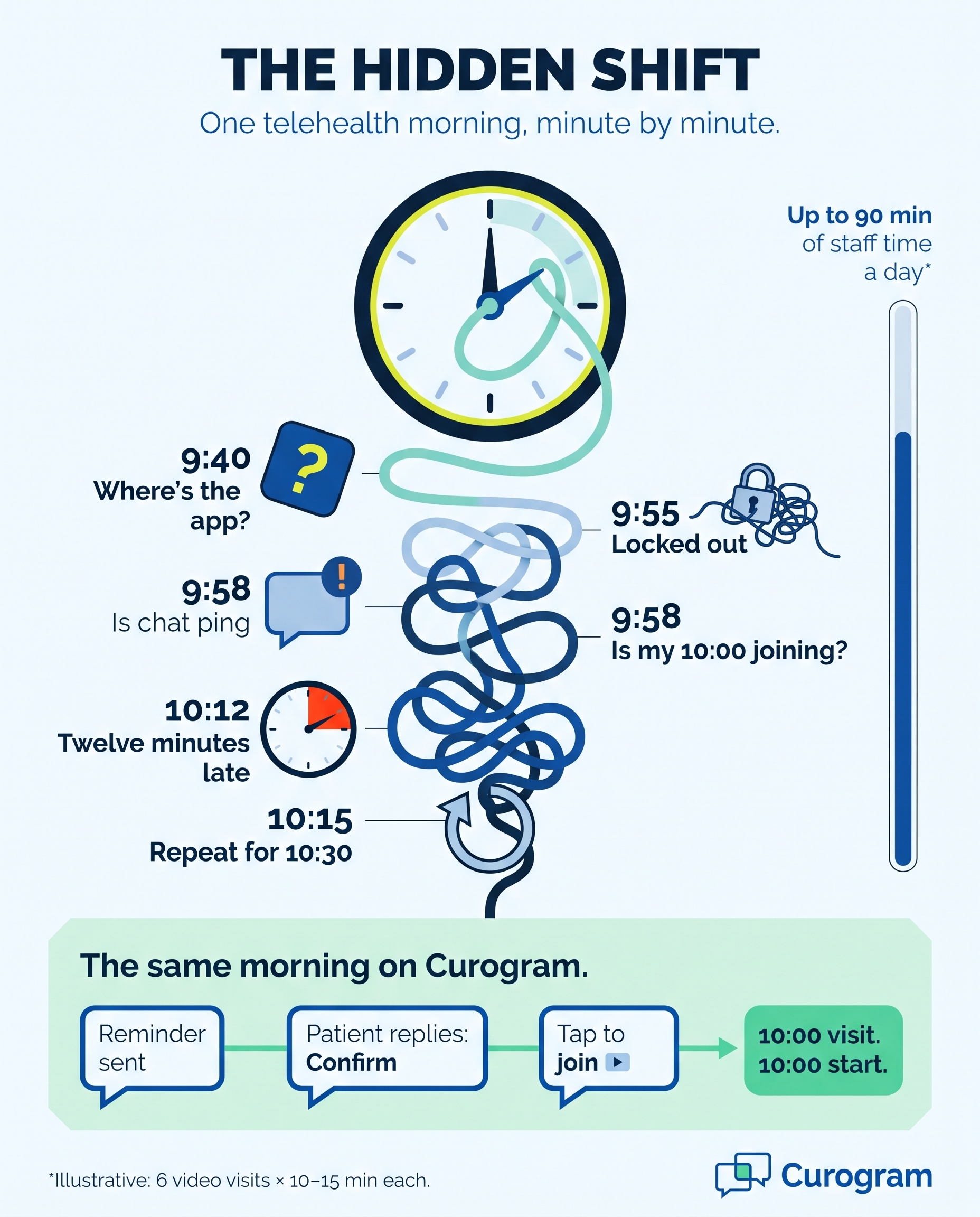
Here's how a difficult telehealth morning tends to unfold:
- 9:40. A patient calls because the reminder instructed them to download an application, and they can't find it anywhere.
- 9:55. Another patient is locked out, so you walk them through a password reset over the phone, one screen at a time.
- 9:58. The provider sends a message asking, "Is my 10:00 joining?"
- 10:12. The visit finally starts twelve minutes late, or it doesn't start at all.
- 10:15. The same cycle begins again for the 10:30 appointment.
These are the telehealth tech support calls front desk teams never see on the schedule, but they're real work all the same. In a recent MGMA Stat poll, practice leaders named patient questions about portal access among the most time-consuming phone tasks their staff handle.
Now attach some rough numbers to the problem: as an illustrative example, say each rescued join takes 10 to 15 minutes of staff time. With six video visits on the day's schedule, that adds up to as much as 90 minutes spent on technical help.
That's what medical office telehealth prep time really looks like: less preparation, more rescue.
When a patient gives up entirely, the financial cost grows, because the slot is lost and a billable visit becomes a no-show, and meanwhile the software bill keeps arriving. Capterra lists CureMD pricing from about $195 to $395 per provider each month, depending on the package, and much of that value leaks away at the exact moment a patient tries to join.
Ask a front office lead how they feel about a video-heavy day, and many will say they'd rather face a double-booked morning in person.
At least a patient standing at the desk can see exactly what you're indicating. Every telehealth slot hides a second appointment: a tech support session that nobody scheduled.
One Text Thread, From Reminder to Video Room
Curogram works as a "One-Tap Visit," a workflow where your team's telehealth job ends once the appointment is booked in CureMD. The reminder, the confirmation, and the join link all travel together in one automated text thread.
Patients actually read those messages, too, since Curogram sees a 98% open rate on SMS.
A Link Instead of a Lesson
Curogram pairs HIPAA-compliant video visits by text link with two-way smart reminders. The patient confirms by replying to a text, and your staff can see confirmation status at a glance. Before the visit begins, the join link arrives in that same conversation.
The link opens directly in the phone's web browser, so there's no app to coach and no password to reset. That's pre-visit tech check elimination in practical terms.
There's nothing to test ahead of time, because there's nothing for the patient to install or configure.
How It Fits Beside CureMD
Curogram runs next to your CureMD schedule as a communication layer, while CureMD remains the system of record for the encounter. Appointments sync from CureMD into Curogram every 15 minutes for the next three days, then every 30 minutes for the following four days.
When a patient confirms or cancels by text, that status writes back to CureMD automatically.
Telehealth join link automation is what really changes the daily rhythm. Front desk virtual visit scheduling tasks shrink to a single step, which is booking the appointment, and the text thread handles everything after that. Setup does require a few items from your side, including your CureMD practice URL, login credentials, and an API key and secret.
Why It Matters for Older Patients
Think about panels with many older patients,
Such as rheumatology, primary care, or cardiology follow-ups. In these practices, the join step quietly decides who gets telehealth at all.
Without an easy path in, staff tend to reserve video visits for the patients who are already comfortable with technology.
A text link opens the door to anyone who can read a text message. The minutes your staff recover go straight to the patients standing at the desk. In that sense, automation makes the office feel more personal, not less.
What a Smooth Telehealth Day Looks Like
The proof starts with confirmations, since the join link travels in the same thread. Covina Arthritic Clinic moved its confirmation work onto Curogram's automated text thread, and confirmed appointments grew from 369 a month to more than 1,300 within five months.
Over that period, the clinic averaged more than 1,100 confirmed visits every month.
Call this change "From Tech Support to Front Office." Staff stop rescuing joins and start managing the schedule, with the same discipline that helped Atlas Medical Center cut its no-show rate from 14.20% to 4.91% in three months. Now that discipline extends to the virtual column as well.
Here's how a single video visit changes:
| Step | The old way | With Curogram |
|---|---|---|
| Reminder | Staff call or send a generic note | Automated text goes out |
| Confirmation | Phone tag until someone answers | Patient replies to the text |
| Getting ready | App, account, or portal setup | Nothing to install |
| Joining | Staff coach the patient by phone | Patient taps one link |
| Visit start | Often late, sometimes missed | On time, from the browser |
Here's the after:
The 10:00 video visit starts at 10:00, nobody at the front desk picked up a phone about it, and every confirmation status was visible before the day began.
Over time, this becomes a virtual visit no-show reduction workflow that runs without anyone pushing it. Appointments that actually happen are where the revenue lives, and Curogram client data from clinical settings shows a 10–20% revenue increase as recovered appointments fill the schedule.
Rolling Out the One-Tap Workflow in Your Office
Switching your telehealth routine doesn't require a major overhaul or a complicated set of new habits for your team, because most of the effort happens once, during the initial setup, and the daily routine becomes noticeably simpler afterward.
The following practical sequence gives your office manager a clear path to follow:
- Gather your CureMD access details. The connection needs your CureMD practice URL, username, password, API key, and API secret, so have someone with administrator access collect them ahead of time.
- Connect your appointment schedule. Once connected, Curogram pulls appointments from CureMD every 15 minutes for the next three days and every 30 minutes for the following four days.
- Review the patient messaging. Keep every text focused on logistics, like the date, time, and join link, and leave health details out of the message itself.
- Add intake forms to the thread. Patients can complete secure online forms by text before the visit, and completed intake forms can be sent back to CureMD.
- Prepare your team and your patients. Staff learn to watch confirmation statuses instead of chasing calls, and patients only need one simple instruction: watch for the text, then tap the link.
- Measure the improvement. For the first few weeks, track how many pre-visit tech calls come in and how many video visits start on time, then compare those numbers with your old routine.
That last step matters more than it seems, because when your team can see the calls disappearing, the new workflow stops feeling like another application and starts feeling like valuable time returned to their workday.
Give Your Front Desk Its Mornings Back
The fastest telehealth improvement for a busy CureMD front office isn't a new camera or another training session. It's removing the join step your front desk staff currently fix by hand, one phone call at a time, and once the link handles that work, the hidden shift disappears.
Keep the responsibilities clear: CureMD is built for your schedule and the visit record, while Curogram is built for the patient's way in, and for the staff hours that doorway costs you today. The two systems work together, so nothing about your current documentation process needs to change.
That division matters for everyone involved, because your team keeps operating in the system they already know, and patients get a path that feels as simple as answering a message from a friend. Nobody has to choose between offering telehealth to every patient and protecting the front desk's sanity.
Try a simple experiment this week. Count the minutes your team spends coaching patients into video visits, including every app question, every password reset, and every "is my patient joining?" message from a provider. Then add up the appointments that started late or never started.
Now imagine an automated text link handling all of that independently. The reminder goes out, the patient replies to confirm, and the link appears at the scheduled time. The visit opens with one tap, and your staff can welcome the next patient at the desk instead.
Ready to see how this works on your own calendar? Schedule a Demo with Curogram, bring your virtual visit volume, and we'll map the automated workflow against your actual CureMD schedule in 15 minutes.