
.jpg?width=30&height=30&name=square-formal-photo%20(1).jpg) Mira Gwehn Revilla
Mira Gwehn Revilla
What Makes Clinic Patient Texting Break Down
 Aubreigh Lee Daculug : 10/1/26, 6:00 PM
Four failures behind broken clinic texting: personal phones, no BAA, no audit trail and no opt-out record. What each exposes and how to close it.

A patient replies "C" to confirm a Thursday follow-up. In a clinic texting tool, that reply flips the visit to Confirmed in the EHR and stops the reminder sequence.
In a general business texting app, the reply waits in a shared inbox until someone at the front desk opens the chart, finds the visit, and clicks Confirm by hand.
That hand step is one of eight patient texting platform limitations we see again and again in practices that started on a general tool.
In our view, the gaps that matter most in healthcare messaging come from how a general tool is built: how it stores, logs, and routes data. Staff training can't fill them.
Most of these tools were chosen for good reasons. They were cheap, quick to set up, and the marketing team already used one. They also do the basics well, like sending a text and getting a reply.
Trouble starts when the texts carry clinic work. A reminder names a patient and a visit, which makes it PHI. Refill questions need to reach the right provider's team. A new-patient form needs to land in the allergy list, where an alert can fire.
Retail texting apps were built to send coupons and shipping alerts. Nothing in that design expects a BAA, a legal medical record, or a provider panel. So the clinic communication challenges pile up in places a manager rarely looks: the audit log, the Documents tab, the STOP list.
We've sorted the eight gaps by where they bite. Four sit with compliance and the chart, where an auditor or a coder will find them. The other four show up at the front desk and on the patient's phone.
Three of the eight gaps are compliance gaps, and an auditor finds them first. None can be fixed by changing how staff use the tool. Each one depends on what the vendor has signed and built.
A general business tool and a clinic tool can look the same on a phone screen. Behind the screen, they split on six capabilities a practice relies on every day.
|
Capability |
General business tool |
What healthcare needs |
|
Vendor agreement |
Standard terms of service |
Executed BAA |
|
Logging |
Account-level activity |
Per-user, per-message, exportable |
|
Schedule |
No connection |
Appointment status write-back |
|
Forms |
A link to a web form |
Discrete fields into the chart |
|
Routing |
Team or channel |
Rendering provider |
|
Consent |
Marketing opt-out list |
Consent record tied to the patient |
Row one decides the rest. Without a BAA, you can't put PHI in the tool at all, so the other five rows never get a fair test.
A business associate agreement is a contract in which a vendor promises to protect the PHI it handles for a covered entity.
HIPAA requires one before a vendor can create, receive, keep, or send PHI on your behalf. Most general texting vendors won't sign, because their terms are written for retailers, gyms, and sales teams that never touch health data.
Signing would bind the vendor to real duties. It would have to report breaches to you, pass the same terms down to its own subcontractors, and return or destroy PHI when the contract ends. Few tools built for every industry are set up to meet those duties for one of them.
For your practice, the result is blunt. A text that names a patient and a visit is PHI. Sending it through a vendor with no BAA is a disclosure HIPAA doesn't allow, and careful staff can't fix that, since the gap sits in the contract.
A BAA has to spell out what the vendor may do with PHI and what it must do to protect it. HHS lays this out in its sample business associate agreement provisions, first released on January 25, 2013. HHS calls the sample model language only. Using it word for word doesn't make a contract compliant on its own.
When a texting vendor sends you a BAA, read it against the core duties in the sample:
A one-page addendum that only promises "industry-standard security" leaves most of that list unstated.
An audit log is a record of who did what to which data, and when. HIPAA's Security Rule asks covered entities to have audit controls that record and examine activity in systems holding electronic PHI.
The HHS guidance on the HIPAA Security Rule groups these with the other technical safeguards under 45 CFR Parts 160 and 164.
Business texting tools usually log at the account level. A typical report shows that the shared "Front Desk" login sent 212 messages on Monday. It has no line showing that Dana, a part-time scheduler, opened a patient's biopsy thread from her own phone at 6:50 p.m.
A clinic needs each message tied to a named user and each view logged. The log should export cleanly when a patient asks who saw their record, or when a breach review starts. With one shared login, the log can only ever name the login.
Medical record rules decide how long a patient text must be kept, and those rules come mostly from state law.
Many states require adult records to be kept for years, with longer periods for minors' records. Check your state's medical board or health department for the exact rule, since it changes by state and sometimes by record type.
HIPAA adds its own six-year rule for required paperwork, such as policies and risk assessments, under 45 CFR 164.316. The chart itself falls under your state's rule.
Business tools set message history for storage cost. Check two settings in your current plan: how long threads are kept, and who can delete them.
If a text about a dose change was part of a patient's care, it may belong in the legal record, and a 12-month purge erases it on schedule.

Covina Arthritic Clinic confirms more than 1,100 appointments a month by text, based on our internal data. Every one of those replies has to end up in the EHR. On the record side, general tools fall furthest behind, because they have no link to the chart at all.
Write-back is the step where a texting tool updates the EHR on its own after a patient replies. It's the biggest operational gap in general business tools, since they can't see your schedule or change it. Every reply becomes a retype.
Without write-back, one "C" reply takes a scheduler five steps:
Confirmations get the attention, but every reply type changes something in the chart. A tool with write-back handles each one where the schedule lives.
|
Patient reply |
What should change in the EHR |
|
"C" or "YES" |
Visit status set to Confirmed |
|
"Cancel" |
Visit cancelled and the slot opened |
|
"Can I move it?" |
A reschedule task for the front desk |
|
"Running 10 min late" |
A note on the visit for the check-in team |
Cancellations hurt most when they don't write back. A slot freed by a 7 a.m. text can be filled the same day only if the schedule shows it open. When the cancel sits in a texting inbox until lunch, the slot usually goes empty.
Discrete-field capture means each answer on a patient form lands in its own field in the chart. A drug allergy goes into the allergy list.
Pharmacy choice goes into the pharmacy field. A general texting tool can only send a link to a web form, and the answers come back as a PDF or an email attached to the thread.
That PDF costs time and carries risk. Someone has to open it, read it, and retype the answers into the EHR. Until they do, a penicillin allergy written on page 2 is invisible to the EHR's drug-allergy check.
The PDF also tends to end up in the Documents tab. From there, no report can find it. Ask the EHR for every patient on warfarin, and the ones who listed it only on a scanned form won't appear.
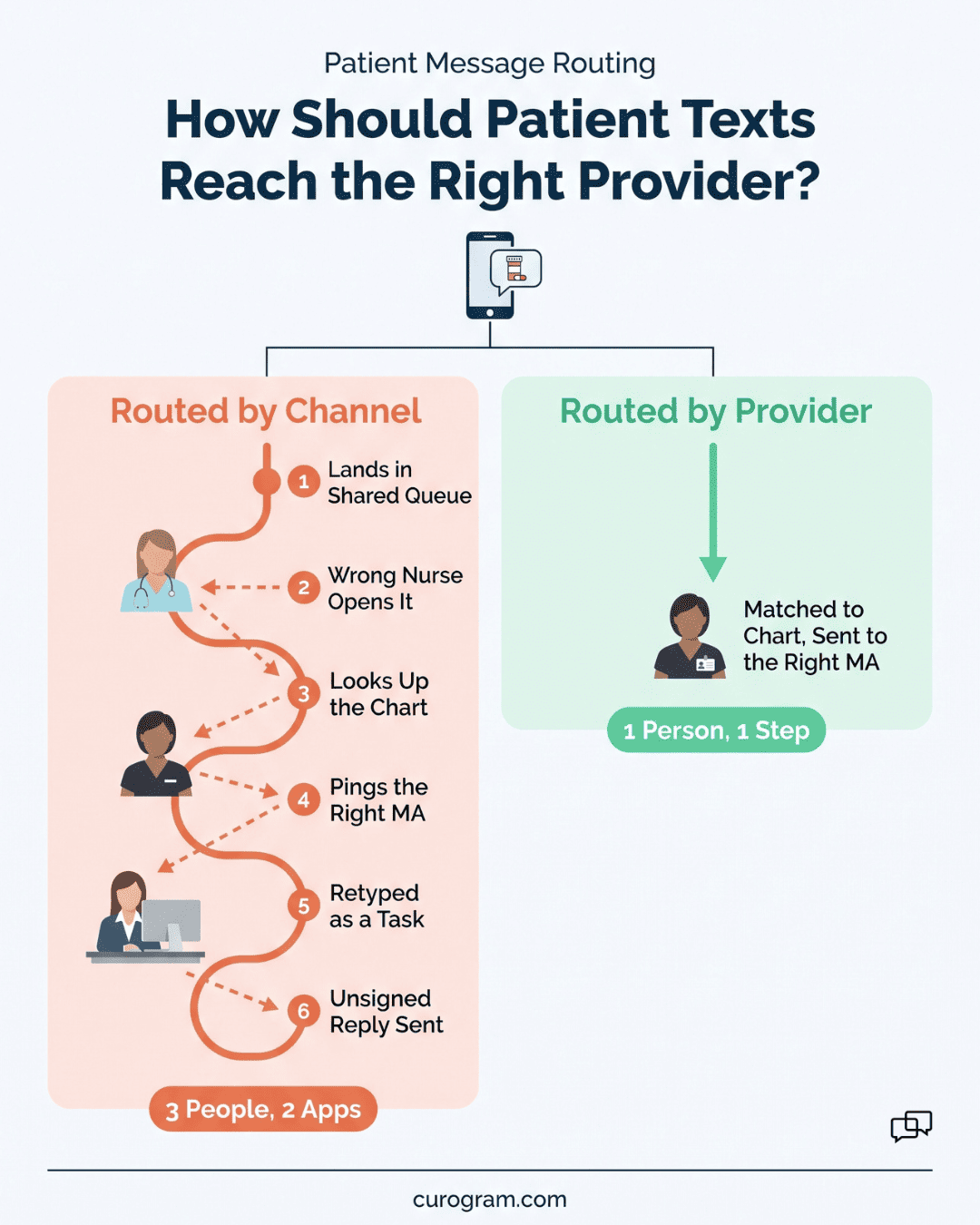
Clinical communication in a practice runs on panels. Each patient belongs to a rendering provider, and that provider's nurse or MA handles their refills, results calls, and care questions. A general tool doesn't know any of this.
Provider-level routing sends each patient message to the team that works with that patient's provider. General tools route by channel or team instead, such as "Front Desk," "Billing," or "Clinical," because they don't know which provider a patient sees.
Take a three-provider family practice. Dr. Patel's MA handles her refills, and Dr. Kim's nurse handles his. A single "Clinical" channel drops both panels into one queue, and whoever grabs a message first may never have met the patient.
Shared queues also hide ownership. When three people can see a thread, each can assume another has it. A refill request can sit for a day with three readers and no owner, and the patient calls the office to ask again.
How Does One Refill Question Move Through Each Tool?Take one text from a patient we'll call Mr. Alvarez: "Can you refill my lisinopril? I run out Friday." In a general business tool, it goes like this:
A clinic tool matches the phone number to the chart first. Because Mr. Alvarez is on Dr. Patel's panel, the text goes straight to her MA's queue. She creates the refill task from the thread, and her reply is logged under her name. One person handles it, with a record of who did what. |
Minimum necessary is the HIPAA standard that limits each use or sharing of PHI to the least information needed for the job. General template libraries push the other way. Retail templates reward detail, with fields like {service}, {staff}, and {notes}, because detail sells.
In a clinic, {service} becomes "colonoscopy" or "cardiology consult." A merge field that felt helpful now puts a diagnosis on a lock screen, where a spouse or coworker can read it. Staff copy the template because it's already in the library, and nothing in the tool warns them.
The habit spreads through reuse. A scheduler answers one patient with "Your MRI of the left knee is moved to Friday," and that reply becomes the model for the next ten. General tools have no default templates written for HIPAA, so each office writes its own and learns the rules by mistake.
Patient engagement by text depends on trust. Patients keep replying when their opt-outs are honored and their questions reach someone who knows their history. General tools struggle with both.
A clinical consent record is a note tied to the patient's chart that shows what they agreed to receive, by which channel, and when. A marketing unsubscribe list is a list of phone numbers that texted STOP, with no link to any chart.
That gap causes real problems in a clinic. A mother shares one cell number with her two kids' records.
She texts STOP to a flu-shot promo, and the tool blocks the number for every send, including her son's reminder for his asthma follow-up. He no-shows, and nobody at the front desk knows why.
The reverse happens too. A patient who opted out last spring shows up for check-in, and the front desk has no way to see it in the chart. They update the cell number and enroll her in reminders again, against her stated wishes.
How Do Texting Consent Rules Differ by Message Type?Consent rules for texts depend on what the message is for. Under the TCPA, informational texts such as appointment reminders need prior express consent. A consent record has to show which tier each patient agreed to and when. A marketing list holds one bit per number: subscribed or not. It can't tell a patient who said yes to reminders and no to promos from one who said no to both. That's why consent belongs with the patient, where staff can check it at intake. |
General tools file messages by campaign. The recall blast is one thread, the reminder is another, and the text-to-pay link is a third, sometimes from a different number. For the patient, each message starts a new chat with no memory of the last one.
The result shows up in replies. A patient books her eye exam for the 14th, then gets "Time for your annual eye exam!" two days later. She replies "I already booked." The reply lands in a campaign report that no one reads, and the recall keeps firing.
Recall replies are worth catching. At one multi-location practice, 35% of patients who got an SMS recall booked within a month, and 1,240 visits came from recall alone, based on our internal data.
You don't need a replacement plan to start. A few checks will show which gaps your current tool has, and many teams find them while chasing patient texting workflow failures in medical practices.
If the list below fails on more than one count, the reasons why clinics outgrow basic patient texting tools will sound familiar.
Check the BAA, the audit log, and write-back first. Each takes under an hour, and each one is a hard stop if it fails.
Plan an overlap of two to four weeks. Let the old tool answer patients already in a thread while the new tool sends all new reminders. A reminder cycle that runs fully on the new tool tells you the new setup works.
Some data should move and some shouldn't.
|
Port to the new tool |
Leave behind |
|
Patient cell numbers |
Shared logins |
|
Every STOP and opt-out |
Marketing lists built on promo sign-ups |
|
Open threads with pending questions |
Templates with merge fields like {service} |
|
Templates rewritten to minimum necessary |
Closed campaign threads |
Opt-outs are the item teams forget. A patient who texted STOP to the old number must stay opted out on the new one.
Before you close the old account, export the full message history. Store it under your state's retention rule, since the old vendor will purge it on its own schedule. Then send patients one last text from the old number saying office texts will come from a new one.
Each of the eight gaps traces back to one design choice. General texting tools were built for businesses that never sign a BAA, never keep a legal record, and never route a message to a provider panel.
Practices pay for that choice in retyped confirmations, PDFs in the wrong tab, and STOP lists that silence the wrong child.
We think the BAA, the audit log, and write-back are the three that decide whether a tool belongs in a clinic. The first two keep you inside HIPAA. Write-back keeps your staff out of copy-and-paste work that adds up to hours a month.
None of this calls for a rushed switch. Run the three checks this week. If your current tool passes, you've lost an hour. If it fails, you'll know exactly which gap to close first, and which questions to ask any of the patient texting communication platforms you look at next.
Patient texting platform limitations are easiest to spot side by side with a tool built for clinic work. Request a demo now and and and bring your EHR name and your monthly reminder volume.
 Aubreigh Lee Daculug : 10/1/26, 6:00 PM
Four failures behind broken clinic texting: personal phones, no BAA, no audit trail and no opt-out record. What each exposes and how to close it.

 Jo Galvez : 7/24/26, 4:00 PM
What a Business Associate Agreement is, why HIPAA requires one, what it must contain, and the questions to ask any vendor before signing.
 Jo Galvez : 4/25/26, 3:00 PM
Mental health and SUD treatment involve highly sensitive data. Learn what behavioral health clinics need in a HIPAA-compliant texting platform.