
 Aubreigh Lee Daculug
11 Top Benefits of Online Digital Patient Check-in for Practices
Review the benefits of online digital patient check-in and find out which questions to ask a vendor before you sign a contract for your medical...

In a 2022 MGMA Stat poll on patient check-in methods, 83% of medical practices said patients still checked in at the front desk, while only 7% used online check-in. The poll ran on May 3, 2022, and drew 652 responses.
Some of that has changed. Still, if you walk into most small offices today, you will find a clipboard, a pen on a string, and a stack of forms waiting to be typed in by hand.
You already know paper is inefficient, so we will skip that argument. If you want the basics, our guide to patient intake software and front desk workflow explains what these tools do and what paper costs your practice.
This guide continues where that one ends. You have decided to move to digital intake forms, and now you face two harder questions: which tool should you choose, and how will you prove the switch was worth the money?
That is where most practices stall.
Every vendor demo looks polished, and every sales deck promises hours of saved time. Few vendors show you how to test those claims before you sign, and even fewer help you measure the results after launch.
A poor decision rarely fails in an obvious way. You discover the problem months later, when your staff are still re-typing answers that were supposed to flow into the chart automatically.
This guide gives you a better process. You will get four tests for scoring any vendor, a simple return model based on your own schedule, and practical advice on building forms, timing reminders, and reviewing results after 60 days.
The scoring takes one afternoon, and the calculations take about as long as a typical lunch break. Together, they give you a decision you can defend to your physicians, partners, or whoever approves the budget.
Any vendor that stores or sends your patients' answers must sign a business associate agreement before go-live. A business associate agreement is a contract in which a vendor promises to protect the health data it handles for you under HIPAA.
Two clauses deserve a careful read before you sign.
The first covers subcontractors:
Who else touches the data, and where it is hosted. The second covers what happens when the contract ends, including how your data is returned or destroyed.
HHS offers sample business associate agreement provisions published by HHS on January 25, 2013. Use them as a checklist. They are sample language only, so they do not make a contract compliant on their own.
A discrete field is a single piece of data, like a birth date or an allergy, saved in its own labeled spot in the EHR. An attached file is a PDF of the finished form, dropped into the patient's document tab.
The difference shows up at the front desk. With discrete fields, staff review the answers and accept them into the chart. With a PDF, someone has to open the file, read it, and type each answer into the right box.
Consider a new patient who lists eight different medications on their history form. Discrete capture puts all eight in the med list in seconds. A PDF means eight manual entries, and eight chances for a typo.
Patients should be able to open a link, complete the form on their phone, and return later if they get interrupted. That means no app, no password, and a form that saves progress.
Each of these barriers costs you finished forms, because an app download sends patients to a store page, and many never return. A password adds a reset loop for anyone who forgot it, which is most people.
A form that cannot save progress is equally costly. Imagine a patient who stops halfway to find their insurance card. If the form resets, many will not start over. Good online forms open from a text link and pick up right where the patient left off.
A vendor should report three numbers for every form: completion rate, time to complete, and pre-arrival completion. Completion rate is the share of patients who finish a form after opening it.
Time to complete tells you if a form is too long. Pre-arrival completion is the share of patients who finish before they walk in, and it is the number that frees up your front desk.
Ask for all three numbers during the demo, using data from a practice similar to your size. If a vendor can only show you how many links were sent, you will have no way to prove the tool worked. Once you have a scored shortlist, our roundup of the best online patient forms for small practices can help you compare options.
Scoring the four criteria
| Criterion | Fails if | Passes if |
|---|---|---|
| Compliance | No BAA, or hosting is not disclosed | BAA signed before go-live |
| Integration | Answers arrive as a PDF | Discrete fields flow into the chart |
| Patient experience | App download or account needed | Link opens and resumes on a phone |
| Measurability | No completion reporting | Completion and timing reported per form |
A tool that fails any single row is not ready for your practice, no matter how impressive the demo looks.
Your return model needs three inputs: monthly visits, desk minutes per intake, and your rework rate. All three come from your own office, so the result reflects your reality rather than a vendor's average.
Write these numbers down before you switch, because they become the baseline for every comparison you make later.
Multiply the minutes you save per patient by your monthly visits, then by what a minute of staff time costs. That gives you a monthly figure you can put in front of a decision-maker.
Here is one worked example using typical numbers. Every figure below is illustrative, so swap in your own.
In practice, not every patient will complete their forms early. Multiply the result by the completion rate you expect to get a safer number.
The biggest gains often show up after the desk work is done. When insurance details arrive a day or two early, staff can run an eligibility check before the visit instead of during it.
That early check catches problems while there is still time to fix them. A wrong member ID or a lapsed plan gets sorted out by phone, not at the window with a line forming behind the patient.
Cleaner data also means fewer claim rejections. A single typo in a policy number can send a claim back. Patients spend less time in the lobby, too, which makes your schedule easier to hold.
Most independent practices need three or four core forms, not ten. A short set gets finished. A long one gets abandoned on the third screen.
A solid core set looks like this:
Retire the rest. That includes duplicate history forms, a separate new-patient letter, and any page that asks returning patients for details you already have. You can build and send this set with Curogram's online patient forms.
Conditional logic shows or hides questions based on earlier answers. Two or three simple branches pay for themselves fast.
The first splits new patients from returning ones. Returning patients see what you have on file and confirm it, instead of filling it out again. The second splits insured patients from self-pay, so self-pay patients skip the insurance pages.
A third branch can open a medication list only when a patient says they take something. Stop there. Each extra branch is one more thing to test. Complex logic can also break without warning when you edit a form.
Send intake forms two to three days before the visit, alongside the appointment confirmation. That window gives patients an evening at home to finish, with their insurance card and medication bottles close by.
The send that creates a lobby queue is the same-day morning text. Patients see it on the drive in, start it in the parking lot, and finish it at your window. You end up with the delays of paper plus the cost of a new tool.
New patients usually need additional lead time, since their paperwork is longer. For them, consider sending the link as soon as the visit is booked.
One reminder, sent 24 hours before the visit to patients who have not finished, is usually enough. Sending more than one starts to feel like spam, and patients quickly learn to ignore the messages.
Keep the message brief and specific. Name the practice, say what is left, give a time estimate, and include the link.
Here is a sample:
"Hi Maria, this is Lakeside Family Medicine. Your check-in forms for tomorrow's 10:30 visit are almost done. It takes about 4 minutes to finish: [link]. Reply STOP to opt out."
A HIPAA-compliant texting platform like Curogram can send the form link and this reminder in the same thread patients already use to confirm visits. Keeping everything in one conversation makes the link much easier for patients to find.
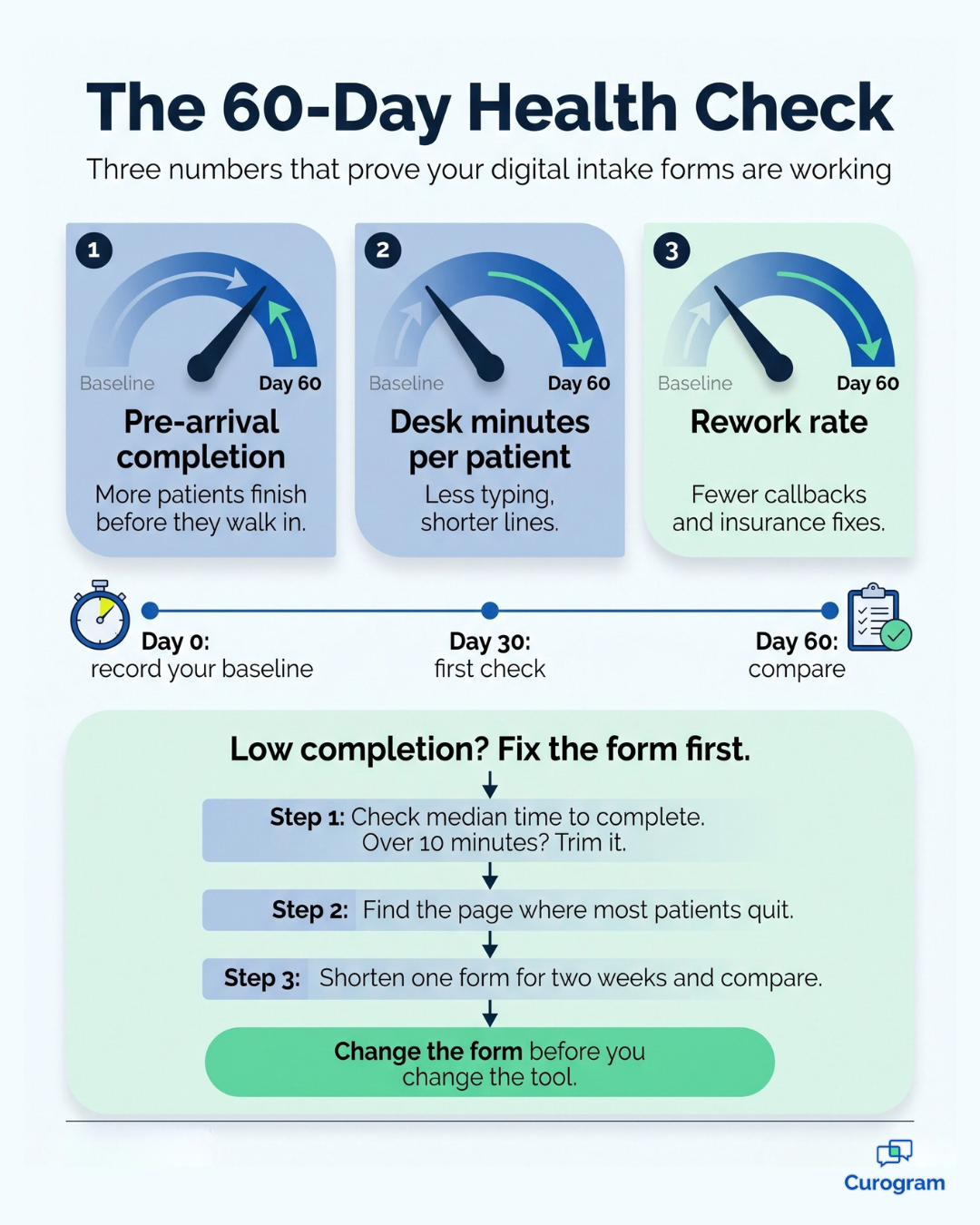
At 60 days, check pre-arrival completion, desk minutes per patient, and rework rate. Compare each one against the baseline you recorded before the switch.
| Metric | What to compare | Shape of a good result |
|---|---|---|
| Pre-arrival completion | Share of patients done before arrival | Rising month over month, with most patients done early |
| Desk minutes per patient | Stopwatch time vs. your baseline | Clearly lower than your paper baseline |
| Rework rate | Callbacks and fixes vs. your baseline | Lower, with fewer insurance errors |
A good result trends in the right direction on all three. One strong number and two flat ones usually point to a setup issue you can fix.
Low completion is usually a form-length problem, not a software problem. Before you blame the vendor, investigate how long patients take and where they abandon the form.
Start by reviewing the median time to complete. If the median runs past 10 minutes, the form is likely too long. Next, review the drop-off rate on each individual page. If most patients quit at the same screen, that screen is your problem.
To test this theory, shorten one form for two weeks and compare completion rates before and after the change. Most patient intake solutions and medical practice software let you clone a form, so you can trim the copy without losing the original.
Paper intake conceals its true cost effectively. It shows up as a few extra minutes per patient, an occasional callback, or a rejected claim, and those losses add up to real hours and real dollars every month.
Choosing a digital tool no longer requires a leap of faith. You now have a repeatable process for selecting a vendor and proving that the investment works.
Begin with the four evaluation tests. Ask every vendor for a signed BAA, discrete-field capture, a phone-friendly form with no app, and real completion data. Any tool that fails one does not deserve a second meeting.
Then build your return model. Time 20 check-ins, pull your monthly visits, and count your rework for two weeks. Those three numbers turn a vague vendor promise into a figure you can present to your partners.
Keep the form set focused, send it two to three days before the visit, and remind patients only once if they have not finished. After 60 days, review your three numbers and adjust the form before you second-guess the tool.
The plan works whether you see 400 patients a month or 4,000.
Curogram helps independent practices put this plan into action. Patients receive intake links by text, in the same HIPAA-compliant thread they use to confirm appointments. Their answers reach your team before they arrive, so your staff spend less time typing and more time helping the people in front of them.
Based on our internal data, Atlas Medical Center reduced its no-show rate from 14.20% to 4.91% within three months of moving patient communication to Curogram. Better communication before the visit pays off in more than one place.
Ready to see how this would work in your office? Book a Demo and our team will walk you through it using your own schedule.

Review the benefits of online digital patient check-in and find out which questions to ask a vendor before you sign a contract for your medical...

Automated reminders, advanced call routing, 2-way texting, and online patient forms improve efficiency for healthcare call centers.

.jpg?width=30&name=square-formal-photo%20(1).jpg) Mira Gwehn Revilla : 4/17/26, 3:00 PM
Mira Gwehn Revilla : 4/17/26, 3:00 PM
Still using paper forms? Patient intake solutions cut check-in time and free your front desk. See how to go digital without disrupting your workflow.