
 Aubreigh Lee Daculug

Patient friction is what you ask patients to install or log into. Support is who fixes a failed send, and how fast.
Curogram, an Azalea Health integration partner, runs reminders, two-way texting, forms, payments, and review requests in one HIPAA-compliant platform. Curogram client data from clinical settings shows phone call volume dropping by as much as 50%.
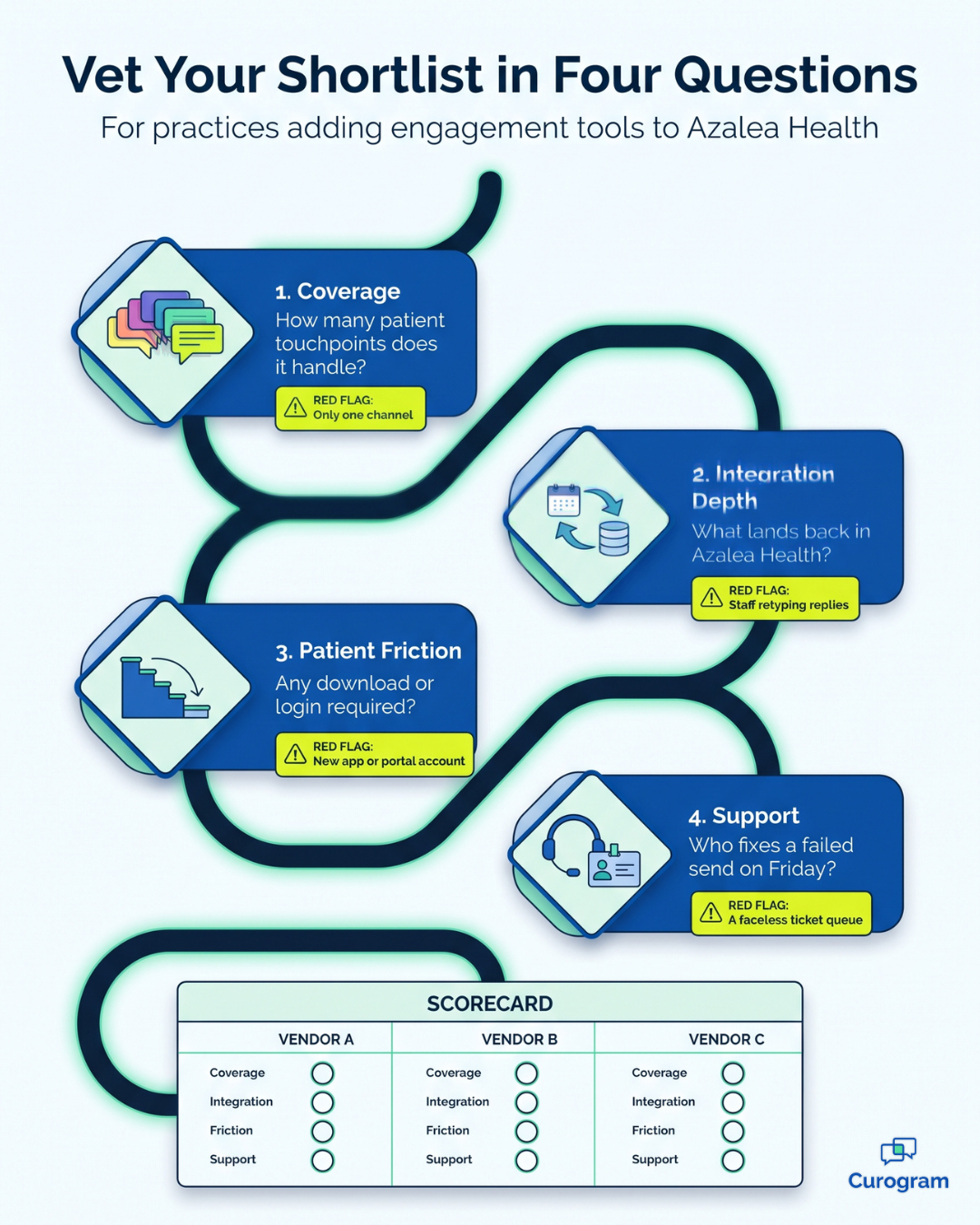
The renewal invoice is where most software decisions get judged. Someone at the leadership table asks what the practice received for the money, and the answer is either clear or uncomfortable. If you're adding patient engagement to Azalea Health, you can make that answer clear today. Evaluate every option on four criteria: coverage, integration depth, patient friction, and support.
Coverage measures how much of your patient communication a single tool handles. Integration depth measures what data flows back into Azalea Health. Patient friction measures what patients must install, create, or remember, while support measures who responds when something breaks and how quickly.
Those questions sound simple, but vendor demos are built to show off features, not to answer them. A polished reminder screen won't tell you whether a patient's reply updates your schedule or sits in a separate inbox that someone has to check by hand. Yet that difference shapes your front desk's workload every single day.
A quick note first. Curogram is an Azalea Health integration partner, so we sell one of the tools you may be considering. We'll answer our own four questions near the end, and until then, this is a buyer's guide you can apply to any vendor, including us.
This guide is written for the person who has to defend the decision. Maybe you're a practice administrator with three demos on the calendar, or a CFO who needs a frame that holds up in a budget meeting. Or maybe you inherited a shortlist and need a fair, consistent way to compare it.
Either way, the goal is the same. You want a tool your staff still relies on a year from now, not one that quietly becomes shelfware while the phones keep ringing. The four criteria below help you recognize the difference before you sign.
The Four Questions Worth Asking Every Vendor
Why these four and not a feature checklist
Feature checklists reward the vendor with the longest list. That's a problem, because the length of a list says very little about whether your staff will still use the tool next spring. Most Azalea Health add-on apps can claim reminders, texting, and forms on paper, so a checklist rarely separates them.
What predicts staying power is different. It's whether the tool covers enough of the job, connects deeply enough to eliminate retyping, asks little of patients, and comes with dependable help. When choosing engagement tools, Azalea Health practices get further with these four questions, because they're much harder to fake during a scripted demo.
They're also easier to defend. A board or partner group may not care which vendor offers the most templates. They will understand fewer tools, less manual entry, more patients reached, and a named person accountable for results.
Use the table below as a scorecard, and bring it to every call on your shortlist.
| Criterion | The question to ask | What a weak answer looks like |
|---|---|---|
| Coverage | How much of our patient messaging does this handle? | One channel, with the rest still on other tools |
| Integration depth | What writes back into Azalea Health, and what doesn't? | Read-only, or staff retyping results |
| Patient friction | What are we asking a patient to install or create? | An app download or a portal account |
| Support | Who answers when a send fails on a Friday? | A ticket queue with no named owner |
Coverage: How Much of Your Patient Messaging One Tool Handles
Counting your communication surface
Before you evaluate any product, list every way your practice currently communicates with patients.
For most outpatient practices, the inventory has seven lines:
- Appointment reminders
- Two-way messages
- Intake forms
- Payments
- Review requests
- Mass sends, like weather closures or flu clinic notices
- Video visits
Now check each line against each vendor on your shortlist. A tool that covers two lines leaves the other five scattered across separate systems. That means separate logins, separate training, and separate invoices.
What partial coverage costs
Partial coverage costs more than its price tag suggests. Two tools mean two dashboards to monitor, two support relationships to manage, and two places to record which patients agreed to receive texts. When a patient insists they never received a message, someone has to search both systems to find out what happened.
Broad tools also tend to get used broadly. In Curogram client data from clinical settings, one multi-location practice used automated post-visit surveys to generate 1,064 new five-star reviews in three months. That kind of volume is far easier to reach when review requests run on the same platform staff already open every day.
Integration Depth: What Flows Back Into Azalea Health
Read-only versus write-back
This is the distinction most buyers overlook. A tool that reads your Azalea Health schedule and a tool that updates it are fundamentally different products. The first one sends reminders, while the second also returns the patient's answer to the place your front desk actually works.
Consider a patient who texts back to confirm tomorrow's appointment. With a read-only tool, a staff member notices that reply and retypes it into the schedule. With write-back, the confirmation reaches the schedule without that extra step, and across a full day of visits, the difference adds up quickly.
Write-back is also what makes One-Dashboard Coverage valuable. A single screen only saves time if the work completed there appears in your EHR.
Questions to ask about the Azalea Health connection
The Azalea Apps Marketplace patient engagement category is a reasonable place to begin your search. Azalea Health built its marketplace as a library of approved third-party applications. From the outside, many Azalea Health API marketplace integrations look nearly identical, so these four questions help you tell them apart:
- Which data flows into your tool from Azalea Health, and which flows back out?
- Which appointment statuses write back: confirmed, canceled, no-show, or only some?
- Do recalls and intake forms connect, or do those stay manual?
- Does the connection use a public API, a private API, or something else, and what access does it need from us?
Request the answers in writing. A vendor with a well-documented connection can list exactly what writes back in one short email.

Patient Friction: How Many Steps Stand Between You and Your Patients
The install, the account, the login
Every additional step you ask of a patient removes part of your panel. An app download loses some people, a portal account loses more, and a forgotten password loses still more.
For a rural or older panel, this criterion often decides everything. The patients most likely to give up at step two are frequently the ones you most need to reach: older adults, people with unreliable internet, and patients managing ongoing conditions. A tool that only works for your most tech-comfortable patients isn't really covering your panel.
That's why many teams consider adding SMS alongside the patient portal instead of relying on the portal alone. If your organization handles panel outreach for community health centers, the stakes are even higher, since a missed message can mean a missed preventive visit.
Testing friction before you buy
Here's a practical test that takes about 15 minutes:
| Ask a staff member's parent to try the tool once, alone, with no assistance. Send them a reminder, a form, and a payment request, then watch carefully where they hesitate or stop. |
If they finish without calling anyone, you've learned more than any demo can reveal. If they get stuck, a meaningful share of your patients will too.
Support and What Getting Live Really Takes
Implementation is where promising tools most often go wrong. The software works, but nobody owns the rollout. Staff gradually drift back to the phone, and six months later the subscription renews for a tool almost nobody uses.
What to ask about onboarding
Ask each vendor these questions before you sign anything:
- Who is our named owner during setup, and who owns the account after launch?
- How many days pass from signed contract to the first live message?
- What does our team actually have to do, and how many hours will it take?
- Who answers when a send fails late on a Friday?
Compliance belongs on this list as well. Use federal guidance to shape the compliance questions to ask any vendor, starting with whether they'll sign a business associate agreement. Strong vendors answer in specifics, and our own guide to what setup actually involves shows the level of detail you should expect from anyone.
How Curogram Answers the Same Four Questions
Here are our answers, held to the same standard. You can check the details on the Azalea Health integration page.
Coverage. Curogram runs appointment reminders, two-way texting, mass texting, online forms, text-to-pay, review requests, and telehealth in one HIPAA-compliant platform. That covers all seven lines of the inventory above.
Integration depth. Our Public API connection with Azalea Health is marked ready. Curogram pulls appointments in and can write appointments and patient records back, along with confirmed and canceled statuses. Recalls don't sync in, and completed intake forms don't write back through this connection, so plan those steps with us.
Patient friction. Reminders, forms, and payment requests reach patients by text, on the phone they already carry.
Support. Staff training can take as little as 10 minutes. Azalea Health charges no integration fee for the connection.
Conclusion
A sound buying decision is one you can explain in two minutes. Coverage tells you how many tools you'll still be juggling next year. Integration depth tells you how much retyping your staff will still do. Patient friction and support tell you whether the tool will reach people and remain in daily use.
Most patient engagement apps for Azalea Health marketplace shoppers look similar during a demo. The four criteria help you see past the polish. They turn a stack of feature lists into a short set of answers you can compare side by side and defend to leadership.
So write the four questions down and send them to every vendor on your shortlist before the next round of calls. Pay close attention to who answers clearly and who changes the subject. Vague answers before a contract rarely become clearer after one. A vendor that welcomes these questions is usually a vendor that expects to be measured.
Watch the integration answers most carefully. "We integrate with Azalea Health" is a starting point, not an answer. You need to know what flows in, what writes back, which statuses update, and what remains manual.
Then test the patient experience yourself. One unassisted attempt by a real person reveals more than any slide deck. Finally, ask who owns your rollout by name, because a tool nobody owns is a tool nobody uses.
We'd rather earn your decision than assume it. Run these four criteria against us. We will answer all four on a call, plainly, including what our Azalea Health connection doesn't support yet.
Bring your shortlist and your toughest questions. We'll walk through coverage, write-back, patient steps, and onboarding using your actual daily workflows instead of a generic sales script. Book a Demo and see how Curogram holds up against your scorecard.
Frequently Asked Questions